Author Archives: Robins

BUILD FAILED error when installing ruby ​​2.4.3

BUILD FAILED error when installing ruby ​​2.4.3

Error occurred when installing ruby ​​2.4.3 on MacOS Big Sur 11.2.2

% rbenv install 2.4.3
Downloading openssl-1.1.1k.tar.gz...
-> https://dqw8nmjcqpjn7.cloudfront.net/892a0875b9872acd04a9fde79b1f943075d5ea162415de3047c327df33fbaee5
Installing openssl-1.1.1k...
Installed openssl-1.1.1k to /Users/satou/.rbenv/versions/2.4.3

Downloading ruby-2.4.3.tar.bz2...
-> https://cache.ruby-lang.org/pub/ruby/2.4/ruby-2.4.3.tar.bz2
Installing ruby-2.4.3...

WARNING: ruby-2.4.3 is past its end of life and is now unsupported.
It no longer receives bug fixes or critical security updates.

ruby-build: using readline from homebrew

BUILD FAILED (macOS 11.2.2 using ruby-build 20210423)

Inspect or clean up the working tree at /var/folders/h3/4830l_xd6hj1msdhp0v_s3j40000gn/T/ruby-build.20210429133129.9166.uvvuHD
Results logged to /var/folders/h3/4830l_xd6hj1msdhp0v_s3j40000gn/T/ruby-build.20210429133129.9166.log

Last 10 log lines:
compiling fiber.c
linking shared-object fiber.bundle
compiling closure.c
closure.c:263:14: error: implicit declaration of function 'ffi_prep_closure' is invalid in C99 [-Werror,-Wimplicit-function-declaration]
    result = ffi_prep_closure(pcl, cif, callback, (void *)self);
             ^
1 error generated.
make[2]: *** [closure.o] Error 1
make[1]: *** [ext/fiddle/all] Error 2
make: *** [build-ext] Error 2

solve

Solved by the following command

% RUBY_CFLAGS=-DUSE_FFI_CLOSURE_ALLOC rbenv install 2.4.3  
[Solved] The Ruby zlib extension was not compiled

If rbenv cannot install a particular version

% rbenv uninstall 2.7.1

BUILD FAILED (macOS 11.2.3 using ruby-build 20200520-14-g1642176)
...
The Ruby zlib extension was not compiled.
ERROR: Ruby install aborted due to missing extensions
Configure options used:
  --prefix=/Users/XXXX/.rbenv/versions/2.7.1
  --with-openssl-dir=/Users/cano/.rbenv/versions/2.7.1/openssl
  --enable-shared
  --with-readline-dir=/usr/local/opt/readline
  CC=clang
  LDFLAGS=-L/Users/cano/.rbenv/versions/2.7.1/lib 
  CPPFLAGS=-I/Users/cano/.rbenv/versions/2.7.1/include 

Install with options

% RUBY_CONFIGURE_OPTS="--with-zlib-dir=$(brew --prefix zlib)" rbenv install 2.7.1

If not

% RUBY_CONFIGURE_OPTS="--with-openssl-dir=/usr/local/opt/openssl" rbenv install 2.7.1

C language: Implementation of dynamic array initialization, insertion, traversal, deletion and destruction

Initialization of dynamic array

#include <iostream>
using namespace std;
struct dynamicArray{ 
      void **pAddr;
      int m_capacity;
      int m_size;
      }
struct dynamicArray *initdynamicArray(int capacity){ 
         if(capacity<=0) {      
           return 0;
           }  
   struct dynamicArray *array=malloc(sizeof(struct dynamicArray)) 
   if(array=NULL){   
      return 0;
    }   
     array->pAddr=malloc(sizeof(void*)*capacity); 
     array->m_capacity=capacity;   
     array->size=0;    
     return array;
     }

Function series

```void *insert(struct dynamicArray *array,int pos,void *data){
if(array==NULL||data==NULL){
    return 0;
}
if(pos<=0||pos>array->m_size){
     pos=array->m_size;
}
if(array->m_size==array->capacity){
     int newCapacity=array->capacity;
     void **newSpace=malloc(sizeof(void*)*newCapacity);
     memcpy(newSpace,array->pAddr,sizeof(void *)*array->capacity);
     free(array->pAddr);
     array->pAddr=newSpace;
}

for(int i=array->m_size;i<=pos;i--){
     array->pAddr[i+1]=array->pAddr[i];
}

array->pAddr[pos]=data;

void foreach_Dynamicarray(struct dynamicArray *array,void(myPrint)(void*)){
     for(int i=0;i<array->m_size;i++){
     myPrint(array->pAddr[i]);
     }
 }
 void myPrintPerson(void *data){
     struct person *p=data;
     cout<<p->blabla<p->blabuble<endl;
 }

 void remove(struct dynamicArray *array,int pos){
     if(array==NULL||pos<=0||pos>=array->){
      return 0;
   }
   for(int i=array->m_size;i>=pos;i--){
       array->pAddr[i]=array->pAddr[i+1];
   }
 }

 void destroy(struct dynamicArray *array){
    if(array=NULL){
        return 0;
    }
    if(array->pAddr!=NULL){
        free(array->pAddr);
        array->pAddr=NULL;
    }
    free(array);
    array=NULL;
 }

Flash back problem when Android studio plays music in sdcard through intent

Code

Add a button in the layout file, set listening events for button in the main class, and play music through intent

1. Write activity_ main.xml

<?xml version="1.0" encoding="utf-8"?>
<LinearLayout xmlns:android="http://schemas.android.com/apk/res/android"
    android:layout_width="match_parent"
    android:layout_height="match_parent"
    android:orientation="vertical" >
    
    <Button
        android:id="@+id/btn_click"
        android:layout_width="match_parent"
        android:layout_height="wrap_content"
        android:layout_margin="10dp"
        android:gravity="center"
        android:padding="8dp"
        android:text="@string/click4" />

</LinearLayout>

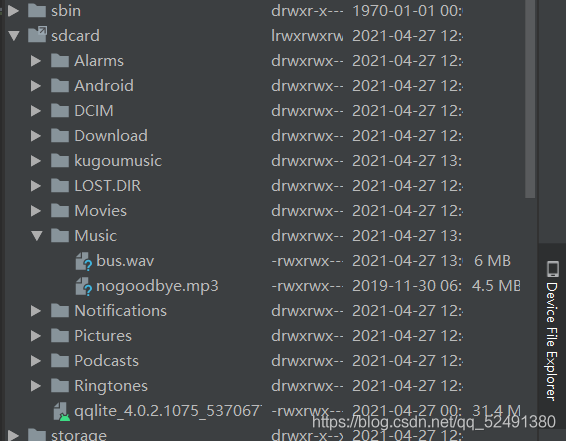
2. Import music into virtual machine

There is a device file explorer in the lower right corner of Android studio. After opening, you can see the file directory of the virtual machine. Find/MNT/sdcard/music, right-click upload and select the music to be imported. The file name should not appear in Chinese

3. Write mainactivity.class

package com.ch5_2;
import android.app.Activity;
import android.content.Intent;
import android.net.Uri;
import android.os.Bundle;
import android.view.View;

import java.io.File;

public class MainActivity extends Activity {

    @Override
    protected void onCreate(Bundle savedInstanceState) {
        super.onCreate(savedInstanceState);
        setContentView(R.layout.activity_main);
        
        findViewById(R.id.btn_click4).setOnClickListener(new View.OnClickListener() {
            @Override
            public void onClick(View v) {
                Intent intent = new Intent();
                intent.setAction(Intent.ACTION_VIEW);
                //Get the file path, the path is the virtual machine memory card path
                Uri data = Uri.fromFile(new File("/mnt/sdcard/Music/nogoodbye.mp3"));
                intent.setDataAndType(data,"audio/*");
                startActivity(intent);
            }
        });
    }
}

Questions

1. Flashback

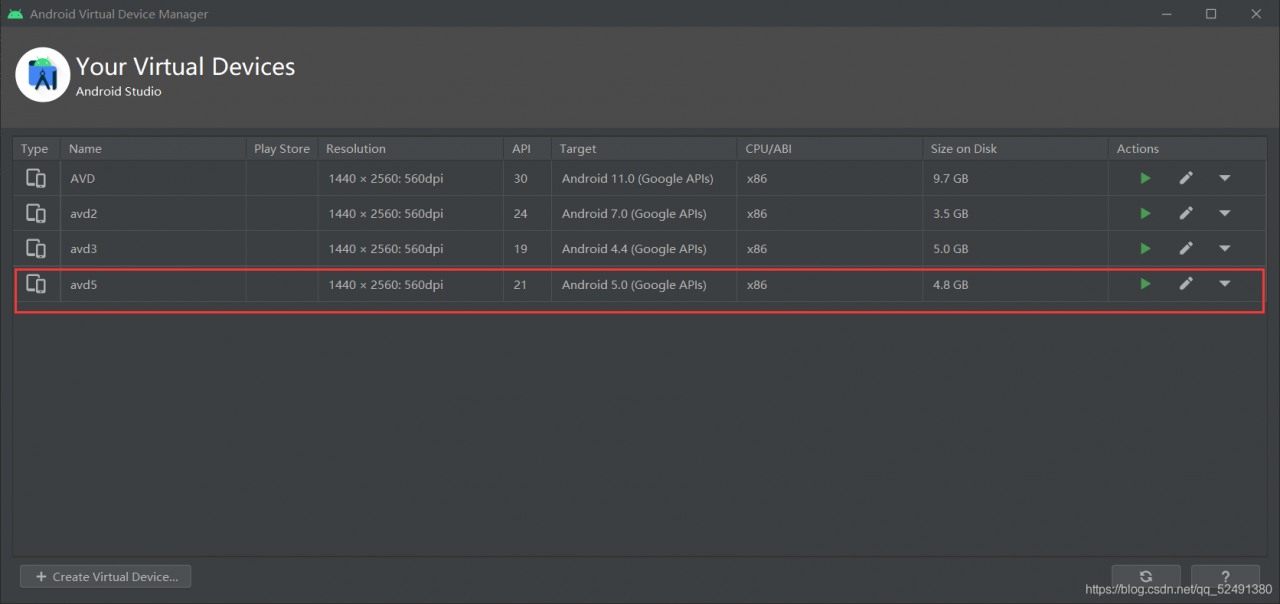
Here, the version of the virtual machine will affect the operation. If the version is too high, it will flash back. I used to use Android 11.0, but as soon as I click button, it will flash back. The reason should be the compatibility problem. Change to a lower version

here is Android 5.0

2. This file type problem is not supported

When changing to a lower version of the virtual machine, you may encounter the problem that Android music playing software does not support this type of file. I used MP3 file at the beginning, and the result shows that it does not support it. It’s OK to change to WAV format.

[How to Solve] Easyclick read text garbled

Easyclick read text garbled solution

This problem is caused by the forced reading of text encoded as UTF-8 after the upgrade of easyclick
for example,

terms of settlement

    1. write and read Java plug-ins in your own way. After modifying the encoding of the text to UTF-8, it can be read normally</ ol>

Java plug-in code


package com.plugin.gudcgukOhj;

import android.content.Context;
import android.os.Environment;
import android.util.Log;

import java.io.*;
import java.nio.charset.Charset;

public class PluginClz {
    Context context;

    public PluginClz(Context context) {
        System.out.println("--- " + context);
    }  
        /**
	     * Read the local text content to the specified encoding type
	     * @param strFilePath Full name of the text path
	     * @param encode encoding type
	     * @return
	     */
    public static String ReadTxtFile(String strFilePath ,String encode) {
        String path = strFilePath;
        String content = ""; 
        //open
        File file = new File(path);
        if (!file.isDirectory()) {
            try {
                InputStream instream = new FileInputStream(file);
                InputStreamReader inputStreamReader = null;
                try {
                    inputStreamReader = new InputStreamReader(instream, encode);
                } catch (UnsupportedEncodingException e1) {
                    e1.printStackTrace();
                }
                BufferedReader reader = new BufferedReader(inputStreamReader);
                StringBuffer sb = new StringBuffer("");
                String line;
                try {
                    while ((line = reader.readLine()) != null) {
                        sb.append(line);
                        sb.append("\n");
                    }
                } catch (IOException e) {
                    e.printStackTrace();
                }
                content = sb.toString();
            } catch (java.io.FileNotFoundException e) {
               System.ou.println("TestFile", "The File doesn't not exist.");
            }
        }
        return content;
    }
}    

Calling method main.js

//The call here is made by loading the apk file first and then instantiating the object
// the js file package will not enter the plug-in, for testing purposes only
function main() {
  //this is where the plugin is loaded
  var r = loadDex("mokuai.apk");
  if (!r) {
      loge("failed to load the plugin");
      return;
  } else {
      logd("Loading the plugin was successful");
  }


  //Here the object is instantiated, and then the relevant method is called
  var obj = new com.plugin.gudcgukOhj.PluginClz(context);
  let file = "/sdcard/1.txt"
  let encode = "GB18030"; // Specify your original encoding
  var s = obj.ReadTxtFile(file,encode);
  logd("java return data: "+s);

}

main();

Mxnet Export onnx Symbol and params files provided are invalid

Invalid parameter file name.

import mxnet as mx
import numpy as np
import sys
import os
import argparse
import onnx
 
print('mxnet version:', mx.__version__)
print('onnx version:', onnx.__version__)
 
from mxnet.contrib import onnx as onnx_mxnet
 
from onnx import checker
 
 
syms   = './mnist-symbol.json'
params = './mnist-0000.params'
 
input_shape = (1,3,112,112)
 
onnx_file = './mnist.onnx'
 
# Invoke export model API. It returns path of the converted onnx model
converted_model_path = onnx_mxnet.export_model(syms, params, [input_shape], np.float32, onnx_file)

Finally, it is found that the parameter file name is wrongly written, “-” and “” I don’t know.

C#: Analysis of the difference between write() and writeline()

Both write() and writeline() are methods provided by system.console, which are mainly used to display the output stream from the specified output device (screen by default).
the differences between the two methods are as follows:

The console. Writeline() method outputs the string to be output together with the newline control character. When the next statement is executed, the cursor will move to the next line of the current output string.
as for the console. Write() method, the cursor will stop after the last character of the output string in C # tutorial, and will not move to the next line.

The difference between write() and writeline()

All the methods provided by system.console
are displayed on the screen
write() does not wrap after it is displayed, and writeline() wraps
code examples

using System;
using System.Collections.Generic;
using System.Linq;
using System.Text;
using System.Threading.Tasks;
 
namespace The difference between WriteLine and Write
WriteLine
class Program
{
static void Main(string[] args)
{
//WriteLine output with mouse at the beginning of the next line
//Write output does not start a new line
System.Console.WriteLine("First WriteLine Line");
System.Console.WriteLine("Second WriteLine Line");
 
System.Console.Write("First Write Line");//Instead of starting a new line after the First Write Line, the output is directly followed by the Second Write Line
System.Console.Write("Second Write Line");
 
//passing parameters
System.Console.WriteLine("\nWriteLine:Parameter={0}", 123);
System.Console.Write("Write:Parameter={0}", 456);
System.Console.ReadKey();
}
}
}
output

First WriteLine Line
Second WriteLine Line
First Write LineSecond Write Line
WriteLine:Parameter=123
Write:Parameter=456

Here is the article about the difference between write() and writeline() in C #. For more information about CSharp write and writeline, please search the previous articles of script home or continue to browse the following related articles. I hope you can support them in the future

Java will convert Excel to list set or JSON, export excel file to local, excel import and export, easyexcel tool class

Introducing Maven coordinates

        <!--fastjson-->
        <dependency>
            <groupId>com.alibaba</groupId>
            <artifactId>fastjson</artifactId>
            <version>1.2.76</version>
        </dependency>        
        <!--easyexcel-->
        <dependency>
            <groupId>com.alibaba</groupId>
            <artifactId>easyexcel</artifactId>
            <version>2.2.8</version>
        </dependency>

According to the file path, the excel file is parsed into a list

    /**
     * Parsing Excel files into Lists
     *
     * @param pathName file path (e.g. D:\test\xzh.xlsx)
     * @param head Table header
     * @param <T> generic
     * @return
     */
    public static <T> List<T> upload(String pathName, Class<T> head) {
        List<T> list = new ArrayList<>();
        AnalysisEventListener<T> analysisEventListener = new AnalysisEventListener<T>() {
            // This will be called for every data parsing
            @Override
            public void invoke(T data, AnalysisContext context) {
                log.info("Parsing a piece of data:{}", JSON.toJSONString(data));
                list.add(data);
                // TODO Here you can also manipulate the data
            }

            // All the data parsing is done and will be called
            @Override
            public void doAfterAllAnalysed(AnalysisContext context) {
                log.info("All data parsing is complete!") ;
                // TODO Here you can also manipulate the data
            }
        };
        EasyExcel.read(pathName, head, analysisEventListener).sheet().doRead();
        return list;
    }

According to the file stream, the excel file is parsed into a list

    /**
     * Parsing Excel files into Lists
     *
     * @param file File
     * @param head table header
     * @param <T> generic
     * @return
     */
    public static <T> List<T> upload(MultipartFile file, Class<T> head) {
        List<T> list = new ArrayList<>();
        AnalysisEventListener<T> analysisEventListener = new AnalysisEventListener<T>() {
            // This will be called every time the data is parsed
            @Override
            public void invoke(T data, AnalysisContext context) {
                log.info("Parsed a piece of data: {}", JSON.toJSONString(data));
                list.add(data);
                // TODO You can also manipulate the data here
            }

            // All the data parsing is done and it will call
            @Override
            public void doAfterAllAnalysed(AnalysisContext context) {
                log.info("All data parsing is complete!") ;
                // TODO Here you can also manipulate the data
            }
        };
        InputStream inputStream;
        try {
            inputStream = file.getInputStream();
        } catch (IOException e) {
            log.error("upload-InputStream-Exception:", e);
            return null;
        }
        EasyExcel.read(inputStream, head, analysisEventListener).sheet().doRead();
        return list;
    }

Download excel file to file path

    /**
     * Excel file download
     *
     * @param pathName File path
     * @param sheetName Worksheet name
     * @param data data
     * @param head Table header
     * @param <T> generic
     */
    public static <T> void download(String pathName, String sheetName, List<T> data, Class<T> head) {
        EasyExcel.write(pathName, head).sheet(sheetName).doWrite(data);
    }

Excel file download to file path response body response

    /**
     * Excel file download
     *
     * @param response response body
     * @param excelName File name
     * @param sheetName Worksheet name
     * @param data data
     * @param head table header
     * @param <T> generic
     */
    public static <T> void download(HttpServletResponse response, String excelName, String sheetName, List<T> data, Class<T> head) {
        response.setContentType("application/vnd.ms-excel");
        response.setCharacterEncoding("UTF-8");
        try {
            String fileName = URLEncoder.encode(excelName, "UTF-8");
            response.setHeader("Content-disposition", "attachment;filename=" + fileName + ".xlsx");
            EasyExcel.write(response.getOutputStream(), head).sheet(sheetName).doWrite(data);
        } catch (IOException e) {
            log.error("download-Exception:", e);
        }
    }

GitHub: https://github.com/xxiangzh/xzh-excel/tree/easyexcel

How to distinguish the source channel of router.push jump fast application

Phenomenon description:

Jump from a fast app a to the B1 page of B fast app. A may be a fast app or a card with a negative screen. How can you tell which one comes from?

Solution:
fast application and card jump to other fast applications through router.push interface, which is realized by using the HAP link in deeplink. At the same time, parameters can be carried in the HAP link, and a flag parameter can be added when skipping. Parameters can be obtained from B1 page of B fast application. According to the parameter value, whether the source is a negative screen card or fast application a can be judged, Then do the corresponding logic processing according to the needs. Fast application uses this.xx to get parameters carried by jump.

Example code:
a fast application code:

<template>
    <div>
        <text class="button" onclick="router">test</text>
    </div>
</template>
<style>
    .button{
        width: 100%;
        height: 200px;
        color: #000000;
        font-size: 80px;
    }
</style>
<script>
    import router from '@system.router';
    module.exports = {
        data: {
            
        },
        onInit() {
            this.$page.setTitleBar({ text: '' })
        },
        router(){
            console.log("router");
            router.push({
                uri: 'hap://app/com.huawei.ceshi/Test?body=quickapp',
            })
        }
    }
</script>

Card related codes:

<template>
    <div>
        <text class="button" onclick="router">测试</text>
    </div>
</template>
<style>
    .button{
        width: 100%;
        height: 200px;
        color: #000000;
        font-size: 80px;
    }
</style>
<script>
    import router from '@system.router';
    module.exports = {
        data: {
            
        },
        onInit() {
            this.$page.setTitleBar({ text: '' })
        },
        router(){
            console.log("router");
            router.push({
                uri: 'hap://app/com.huawei.ceshi/Test?body=card',
            })
        }
    }
</script>

B fast application code:

In the oninit() life cycle method, the parameter value is obtained. In the following code, the accept variable is defined to receive the parameter value. For example, in the onbackpress() method, different business logic is implemented according to the source.

<template>
    <div style="flex-direction: column;">
        <text class="text">datas</text>
        <text class="text" style="background-color: black">{{accept}}</text>
    </div>
</template>
<style>
    .text {
        height: 80px;
        font-size: 50px;
        color: red;
        width: 500px;
    }
</style>
<script>
    import router from '@system.router';
    module.exports = {
        data: {
            accept: ""
        },
        onInit() {
            this.$page.setTitleBar({ text: '' })
            this.accept = this.body;
        },
        onBackPress() {
            if (this.accept === "quickapp") {
                console.log("this is quickapp");
            } else if (this.accept === "quickapp") {
                console.log("this is crad");
            }else{
                router.back()
            }
            return true;
        }
    }
</script>

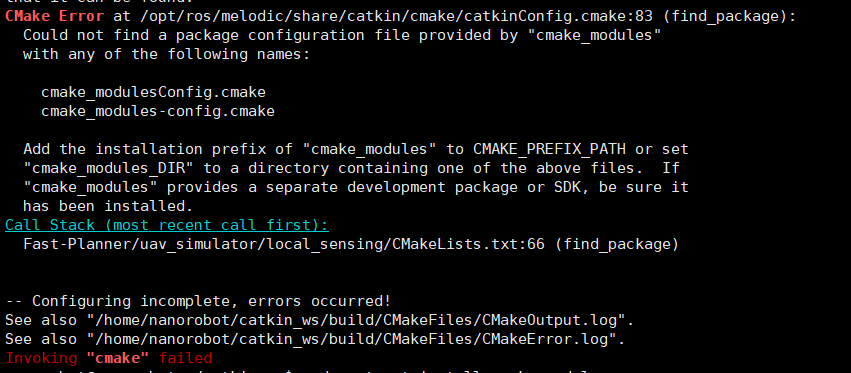
Fastplanner compilation error: Could not find a package configuration file provided by “cmake_modules”

Tips for the Less module cmake_modules:
CMake Error at /opt/ros/melodic/share/catkin/cmake/catkinConfig.cmake:83 (find_package):
Could not find a package configuration file provided by “cmake_modules”
with any of the following names:

cmake_modulesConfig.cmake
cmake_modules-config.cmake

Add the installation prefix of “cmake_modules” to CMAKE_PREFIX_PATH or set
“cmake_modules_DIR” to a directory containing one of the above files. If
“cmake_modules” provides a separate development package or SDK, be sure it
has been installed.
Call Stack (most recent call first):
Fast-Planner/uav_simulator/local_sensing/CMakeLists.txt:66 (find_package)
– Configuring incomplete, errors occurred!
See also “/home/nanorobot/catkin_ws/build/CMakeFiles/CMakeOutput.log”.
See also “/home/nanorobot/catkin_ws/build/CMakeFiles/CMakeError.log”.
Invoking “cmake” failed

Two Methods:

        1. sudo apt-get install ros-melodic-cmake-modules(here melodic replace with your ros version)

      cmake_modules https://github.com/ros/cmake_modules


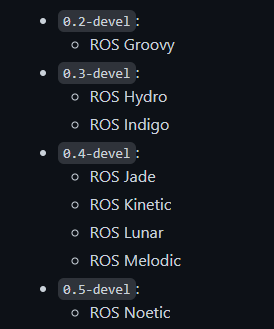
      1. Different ros corresponding versions.

  1. My version of ros is melodic, download the 0.4-devel version.


    Then it is

mkdir build 
cd build 
cmake ..
make .
sudo make install

JAVA: Controller exception handling

With the @controlleradvice annotation, @exceptionhandler can specify the subdivision type of the exception on the specified controller

@ControllerAdvice
public class BaseController {

    private static final Logger logger = LoggerFactory.getLogger(BaseController.class);

    /**
     * Parameter type conversion error
     *
     * @param exception error
     * @return error message
     */
   @ExceptionHandler(HttpMessageConversionException.class)
   public String parameterTypeException(HttpMessageConversionException exception){       
        logger.error(exception.getCause().getLocalizedMessage());
        return ResultErr("Type conversion error");
   }

	/**
	 * Uniform exception handling
	 */
	@ExceptionHandler(value = Exception.class)
	@ResponseBody
	public String handlerException(Exception e) {
	    logger.error("Data check failure : errorMessage{"+e.getMessage()+"}");
		return ResultErr(e.getCode(), e.getMessage());
	}
	
}