Author Archives: Robins

[Solved] The method getContextPath() from the type HttpServletRequest refers to the missing type String

Error: “The method getContextPath() from the type HttpServletRequest refers to the missing type String”

Solution: See if the project’s jre is different from your local name (the jre version or the name is different will cause this problem).

Specific operation:

    1. Right-click the project-Build Path-Configure Build Path, under the Libraries option, you will find an error jre Libraries, remove it.

    2. Then right-click the project-Build Path-Add Library, select JRE System Library, select Workspace defaulr JRE (jdk1.6) (the JDK has been successfully installed and configured before), and then Finish.

Note: For your own experience, you must also check whether the environment variable configuration is correct, and then restart Eclipse and recompile the program clear.

1. Open My Computer-Properties-Advanced-Environment Variables 

2. New system variables JAVA_HOME and CLASSPATH 
Variable name: JAVA_HOME 
Variable value: C:\Program Files\Java\jdk1.7.0
Variable name: CLASSPATH 
Variable value: .;%JAVA_HOME%\lib\dt.jar;%JAVA_HOME%\lib\tools.jar;

3. Select the environment variable named "Path" in "System Variables", double-click the variable, add the absolute path of the bin directory in the JDK installation path to the value of the Path variable, and use half-width semicolons and existing The path is separated. 
Variable name: Path 
Variable value: ;%JAVA_HOME%\bin;%JAVA_HOME%\jre\bin;
This is the java environment configuration. After the configuration is completed, start eclipse directly, it will automatically complete the java environment configuration

Tomcat startup error: java.lang.NoClassDefFoundError

When tomcat starts to load the spring configuration file, an error is reported and the class GetHelloRequest cannot be found. After investigation, the class actually already exists. Later, I found that there was another sentence in the log: This is very likely to create a memory leak. I suspected that there was insufficient memory. I looked at the environment and started a lot of tomcat processes. Kill a few and restart the tomcat. This time it was pulled up.

The specific error log in catalina.out is as follows:

09-May-2017 10:47:38.380 SEVERE [localhost-startStop-1] org.springframework.web.context.ContextLoader.initWebApplicationContext Context initialization failed
 java.lang.NoClassDefFoundError: GetHelloRequest
    at java.lang.Class.getDeclaredMethods0(Native Method)
    at java.lang.Class.privateGetDeclaredMethods(Class.java:2701)
    at java.lang.Class.getDeclaredMethods(Class.java:1975)
    at org.springframework.util.ReflectionUtils.getDeclaredMethods(ReflectionUtils.java:613)
    at org.springframework.util.ReflectionUtils.doWithMethods(ReflectionUtils.java:524)
    at org.springframework.util.ReflectionUtils.doWithMethods(ReflectionUtils.java:510)
    at org.springframework.beans.factory.annotation.AutowiredAnnotationBeanPostProcessor.determineCandidateConstructors(AutowiredAnnotationBeanPostProcessor.java:241)
    at org.springframework.beans.factory.support.AbstractAutowireCapableBeanFactory.determineConstructorsFromBeanPostProcessors(AbstractAutowireCapableBeanFactory.java:1073)
    at org.springframework.beans.factory.support.AbstractAutowireCapableBeanFactory.createBeanInstance(AbstractAutowireCapableBeanFactory.java:1046)
    at org.springframework.beans.factory.support.AbstractAutowireCapableBeanFactory.doCreateBean(AbstractAutowireCapableBeanFactory.java:512)
    at org.springframework.beans.factory.support.AbstractAutowireCapableBeanFactory.createBean(AbstractAutowireCapableBeanFactory.java:482)
    at org.springframework.beans.factory.support.AbstractBeanFactory$1.getObject(AbstractBeanFactory.java:306)
    at org.springframework.beans.factory.support.DefaultSingletonBeanRegistry.getSingleton(DefaultSingletonBeanRegistry.java:230)
    at org.springframework.beans.factory.support.AbstractBeanFactory.doGetBean(AbstractBeanFactory.java:302)
    at org.springframework.beans.factory.support.AbstractBeanFactory.getBean(AbstractBeanFactory.java:197)
    at org.springframework.beans.factory.support.DefaultListableBeanFactory.preInstantiateSingletons(DefaultListableBeanFactory.java:778)
    at org.springframework.context.support.AbstractApplicationContext.finishBeanFactoryInitialization(AbstractApplicationContext.java:843)
    at org.springframework.context.support.AbstractApplicationContext.refresh(AbstractApplicationContext.java:541)
    at org.springframework.web.context.ContextLoader.configureAndRefreshWebApplicationContext(ContextLoader.java:444)
    at org.springframework.web.context.ContextLoader.initWebApplicationContext(ContextLoader.java:326)
    at org.springframework.web.context.ContextLoaderListener.contextInitialized(ContextLoaderListener.java:107)
    at org.apache.catalina.core.StandardContext.listenerStart(StandardContext.java:4745)
    at org.apache.catalina.core.StandardContext.startInternal(StandardContext.java:5207)
    at org.apache.catalina.util.LifecycleBase.start(LifecycleBase.java:150)
    at org.apache.catalina.core.ContainerBase$StartChild.call(ContainerBase.java:1419)
    at org.apache.catalina.core.ContainerBase$StartChild.call(ContainerBase.java:1409)
    at java.util.concurrent.FutureTask.run(FutureTask.java:266)
    at java.util.concurrent.ThreadPoolExecutor.runWorker(ThreadPoolExecutor.java:1142)
    at java.util.concurrent.ThreadPoolExecutor$Worker.run(ThreadPoolExecutor.java:617)
    at java.lang.Thread.run(Thread.java:745)
Caused by: java.lang.ClassNotFoundException: GetHelloRequest
    at org.apache.catalina.loader.WebappClassLoaderBase.loadClass(WebappClassLoaderBase.java:1285)
    at org.apache.catalina.loader.WebappClassLoaderBase.loadClass(WebappClassLoaderBase.java:1119)
    ... 30 more

09-May-2017 10:47:38.383 SEVERE [localhost-startStop-1] org.apache.catalina.core.StandardContext.startInternal One or more listeners failed to start. Full details will be found in the appropriate container log file
09-May-2017 10:47:39.410 INFO [localhost-startStop-1] org.apache.catalina.util.SessionIdGeneratorBase.createSecureRandom Creation of SecureRandom instance for session ID generation using [SHA1PRNG] took [1,026] milliseconds.
09-May-2017 10:47:39.410 SEVERE [localhost-startStop-1] org.apache.catalina.core.StandardContext.startInternal Context [] startup failed due to previous errors
09-May-2017 10:47:39.417 INFO [localhost-startStop-1] org.springframework.web.context.support.XmlWebApplicationContext.doClose Closing Root WebApplicationContext: startup date [Tue May 09 10:47:36 CST 2017]; root of context hierarchy
09-May-2017 10:47:39.430 WARNING [localhost-startStop-1] org.springframework.web.context.support.XmlWebApplicationContext.doClose Exception thrown from LifecycleProcessor on context close
 java.lang.IllegalStateException: LifecycleProcessor not initialized - call 'refresh' before invoking lifecycle methods via the context: Root WebApplicationContext: startup date [Tue May 09 10:47:36 CST 2017]; root of context hierarchy
    at org.springframework.context.support.AbstractApplicationContext.getLifecycleProcessor(AbstractApplicationContext.java:416)
    at org.springframework.context.support.AbstractApplicationContext.doClose(AbstractApplicationContext.java:979)
    at org.springframework.context.support.AbstractApplicationContext.close(AbstractApplicationContext.java:938)
    at org.springframework.web.context.ContextLoader.closeWebApplicationContext(ContextLoader.java:581)
    at org.springframework.web.context.ContextLoaderListener.contextDestroyed(ContextLoaderListener.java:116)
    at org.apache.catalina.core.StandardContext.listenerStop(StandardContext.java:4792)
    at org.apache.catalina.core.StandardContext.stopInternal (StandardContext.java: 5429 )
    at org.apache.catalina.util.LifecycleBase.stop(LifecycleBase.java:226)
    at org.apache.catalina.util.LifecycleBase.start(LifecycleBase.java:154)
    at org.apache.catalina.core.ContainerBase$StartChild.call(ContainerBase.java:1419)
    at org.apache.catalina.core.ContainerBase$StartChild.call(ContainerBase.java:1409)
    at java.util.concurrent.FutureTask.run(FutureTask.java:266)
    at java.util.concurrent.ThreadPoolExecutor.runWorker(ThreadPoolExecutor.java:1142)
    at java.util.concurrent.ThreadPoolExecutor$Worker.run(ThreadPoolExecutor.java:617)
    at java.lang.Thread.run(Thread.java:745)

09-May-2017 10:47:39.443 WARNING [localhost-startStop-1] org.apache.catalina.loader.WebappClassLoaderBase.clearReferencesThreads 
The web application [ROOT] appears to have started a thread named [pool-2-thread-1] but has failed to stop it. 
This is very likely to create a memory leak. Stack trace of thread:
 sun.misc.Unsafe.park(Native Method)
 java.util.concurrent.locks.LockSupport.park(LockSupport.java:175)
 java.util.concurrent.locks.AbstractQueuedSynchronizer$ConditionObject.await(AbstractQueuedSynchronizer.java:2039)
 java.util.concurrent.ScheduledThreadPoolExecutor$DelayedWorkQueue.take(ScheduledThreadPoolExecutor.java:1088)
 java.util.concurrent.ScheduledThreadPoolExecutor$DelayedWorkQueue.take(ScheduledThreadPoolExecutor.java:809)
 java.util.concurrent.ThreadPoolExecutor.getTask(ThreadPoolExecutor.java:1067)
 java.util.concurrent.ThreadPoolExecutor.runWorker(ThreadPoolExecutor.java:1127)
 java.util.concurrent.ThreadPoolExecutor$Worker.run(ThreadPoolExecutor.java:617)
 java.lang.Thread.run(Thread.java:745)
09-May-2017 10:47:39.444 WARNING [localhost-startStop-1] org.apache.catalina.loader.WebappClassLoaderBase.clearReferencesThreads 
The web application [ROOT] appears to have started a thread named [pool-2-thread-2] but has failed to stop it. 
This is very likely to create a memory leak. Stack trace of thread:
 sun.misc.Unsafe.park(Native Method)
 java.util.concurrent.locks.LockSupport.parkNanos(LockSupport.java:215)
 java.util.concurrent.locks.AbstractQueuedSynchronizer$ConditionObject.awaitNanos(AbstractQueuedSynchronizer.java:2078)
 java.util.concurrent.ScheduledThreadPoolExecutor$DelayedWorkQueue.take(ScheduledThreadPoolExecutor.java:1093)
 java.util.concurrent.ScheduledThreadPoolExecutor$DelayedWorkQueue.take(ScheduledThreadPoolExecutor.java:809)
 java.util.concurrent.ThreadPoolExecutor.getTask(ThreadPoolExecutor.java:1067)
 java.util.concurrent.ThreadPoolExecutor.runWorker(ThreadPoolExecutor.java:1127)
 java.util.concurrent.ThreadPoolExecutor$Worker.run(ThreadPoolExecutor.java:617)
 java.lang.Thread.run(Thread.java:745)
09-May-2017 10:47:39.444 WARNING [localhost-startStop-1] org.apache.catalina.loader.WebappClassLoaderBase.clearReferencesThreads 
The web application [ROOT] appears to have started a thread named [nioEventLoopGroup-2-1] but has failed to stop it. This is very likely to create a memory leak. Stack trace of thread:
 sun.nio.ch.EPollArrayWrapper.epollWait(Native Method)
 sun.nio.ch.EPollArrayWrapper.poll(EPollArrayWrapper.java:269)
 sun.nio.ch.EPollSelectorImpl.doSelect (EPollSelectorImpl.java: 93 )
 sun.nio.ch.SelectorImpl.lockAndDoSelect (SelectorImpl.java: 86 )
 sun.nio.ch.SelectorImpl.select(SelectorImpl.java:97)
 io.netty.channel.nio.SelectedSelectionKeySetSelector.select(SelectedSelectionKeySetSelector.java:62)
 io.netty.channel.nio.NioEventLoop. select (NioEventLoop.java: 732 )
 io.netty.channel.nio.NioEventLoop.run (NioEventLoop.java: 388 )
 io.netty.util.concurrent.SingleThreadEventExecutor$5.run(SingleThreadEventExecutor.java:858)
 io.netty.util.concurrent.DefaultThreadFactory$DefaultRunnableDecorator.run(DefaultThreadFactory.java:144)
 java.lang.Thread.run(Thread.java:745)

As yellow mark at the beginning of the class is not found abnormal, went on to say tomcat pulled the pool- 2-the Thread- 1 and pool- 2-the Thread-2, but after it failed its own did not turn off, prompted us There is a risk of memory overflow. Because there are indeed multiple tomcat processes in the background, it is suspected that the class loading failure is caused by insufficient memory.

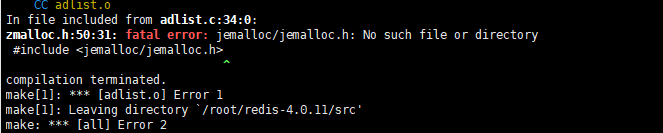
Redis installation error: jemalloc/jemalloc.h: No such file or directory.

jemalloc/jemalloc.h: No such file or directory.
image

Documentation

For this error, we can see the explanation in the README.md file.

---------

Selecting a non-default memory allocator when building Redis is done by setting
the `MALLOC` environment variable. Redis is compiled and linked against libc
malloc by default, with the exception of jemalloc being the default on Linux
systems. This default was picked because jemalloc has proven to have fewer
fragmentation problems than libc malloc.

To force compiling against libc malloc, use:

    % make MALLOC=libc

To compile against jemalloc on Mac OS X systems, use:

    % make MALLOC=jemalloc

Verbose build
-------------

Correct solution

Correct solution (for version 2.2 and above)
clean up the residual files from the last compilation and recompile

make distclean  && make

Initial installation of hive-2.1.0 startup error problem solution

Install hive-2.1.0 for the first time, log in to the hive shell command line through bin/hive, and report the following error:

[hadoop@db03 hive-2.1.0]$ bin/hive

which: no hbase in (/opt/service/jdk1.7.0_67/bin:/opt/service/jdk1.7.0_67/jre/bin:/opt/mysql-5.6.24/bin:/opt/service/jdk1.7.0_67/bin:/opt/service/jdk1.7.0_67/jre/bin:/usr/lib64/qt-3.3/bin:/usr/local/bin:/bin:/usr/bin:/usr/local/sbin:/usr/sbin:/sbin:/home/hadoop/bin)

SLF4J: Class path contains multiple SLF4J bindings.

SLF4J: Found binding in [jar:file:/opt/apache/hive-2.1.0/lib/log4j-slf4j-impl-2.4.1.jar!/org/slf4j/impl/StaticLoggerBinder.class]

SLF4J: Found binding in [jar:file:/opt/apache/hadoop-2.7.3/share/hadoop/common/lib/slf4j-log4j12-1.7.10.jar!/org/slf4j/impl/StaticLoggerBinder.class]

SLF4J: See http://www.slf4j.org/codes.html#multiple_bindings for an explanation.

SLF4J: Actual binding is of type [org.apache.logging.slf4j.Log4jLoggerFactory]

Logging initialized using configuration in file:/opt/apache/hive-2.1.0/conf/hive-log4j2.properties Async: true

Exception in thread "main" java.lang.RuntimeException: org.apache.hadoop.hive.ql.metadata.HiveException: org.apache.hadoop.hive.ql.metadata.HiveException: MetaException(message:Hive metastore database is not initialized. Please use schematool (e.g. ./schematool -initSchema -dbType ...) to create the schema. If needed, don't forget to include the option to auto-create the underlying database in your JDBC connection string (e.g. ?createDatabaseIfNotExist=true for mysql))

at org.apache.hadoop.hive.ql.session.SessionState.start(SessionState.java:578)

at org.apache.hadoop.hive.ql.session.SessionState.beginStart(SessionState.java:518)

at org.apache.hadoop.hive.cli.CliDriver.run(CliDriver.java:705)

at org.apache.hadoop.hive.cli.CliDriver.main(CliDriver.java:641)

at sun.reflect.NativeMethodAccessorImpl.invoke0(Native Method)

at sun.reflect.NativeMethodAccessorImpl.invoke(NativeMethodAccessorImpl.java:57)

at sun.reflect.DelegatingMethodAccessorImpl.invoke(DelegatingMethodAccessorImpl.java:43)

at java.lang.reflect.Method.invoke(Method.java:606)

at org.apache.hadoop.util.RunJar.run (RunJar.java:221)

at org.apache.hadoop.util.RunJar.main (RunJar.java:136)

Caused by: org.apache.hadoop.hive.ql.metadata.HiveException: org.apache.hadoop.hive.ql.metadata.HiveException: MetaException(message:Hive metastore database is not initialized. Please use schematool (e.g. ./schematool -initSchema -dbType ...) to create the schema. If needed, don't forget to include the option to auto-create the underlying database in your JDBC connection string (e.g. ?createDatabaseIfNotExist=true for mysql))

at org.apache.hadoop.hive.ql.metadata.Hive.registerAllFunctionsOnce(Hive.java:226)

at org.apache.hadoop.hive.ql.metadata.Hive.<init>(Hive.java:366)

at org.apache.hadoop.hive.ql.metadata.Hive.create(Hive.java:310)

at org.apache.hadoop.hive.ql.metadata.Hive.getInternal(Hive.java:290)

at org.apache.hadoop.hive.ql.metadata.Hive.get(Hive.java:266)

at org.apache.hadoop.hive.ql.session.SessionState.start(SessionState.java:545)

... 9 more

Caused by: org.apache.hadoop.hive.ql.metadata.HiveException: MetaException(message:Hive metastore database is not initialized. Please use schematool (e.g. ./schematool -initSchema -dbType ...) to create the schema. If needed, don't forget to include the option to auto-create the underlying database in your JDBC connection string (e.g. ?createDatabaseIfNotExist=true for mysql))

at org.apache.hadoop.hive.ql.metadata.Hive.getAllFunctions(Hive.java:3593)

at org.apache.hadoop.hive.ql.metadata.Hive.reloadFunctions(Hive.java:236)

at org.apache.hadoop.hive.ql.metadata.Hive.registerAllFunctionsOnce(Hive.java:221)

... 14 more

Caused by: MetaException(message:Hive metastore database is not initialized. Please use schematool (e.g. ./schematool -initSchema -dbType ...) to create the schema. If needed, don't forget to include the option to auto-create the underlying database in your JDBC connection string (e.g. ?createDatabaseIfNotExist=true for mysql))

at org.apache.hadoop.hive.ql.metadata.Hive.getMSC(Hive.java:3364)

at org.apache.hadoop.hive.ql.metadata.Hive.getMSC(Hive.java:3336)

at org.apache.hadoop.hive.ql.metadata.Hive.getAllFunctions(Hive.java:3590)

... 16 more

According to the log prompt, the metadata has not been initialized. You can initialize the source database through the ./schematool -initSchema -dbType command, because I am a mysql database here, and I know that I execute the following commands:

[hadoop@db03 hive-2.1.0]$ bin/schematool -initSchema -dbType mysql

which: no hbase in (/opt/service/jdk1.7.0_67/bin:/opt/service/jdk1.7.0_67/jre/bin:/opt/mysql-5.6.24/bin:/opt/service/jdk1.7.0_67/bin:/opt/service/jdk1.7.0_67/jre/bin:/usr/lib64/qt-3.3/bin:/usr/local/bin:/bin:/usr/bin:/usr/local/sbin:/usr/sbin:/sbin:/home/hadoop/bin)

SLF4J: Class path contains multiple SLF4J bindings.

SLF4J: Found binding in [jar:file:/opt/apache/hive-2.1.0/lib/log4j-slf4j-impl-2.4.1.jar!/org/slf4j/impl/StaticLoggerBinder.class]

SLF4J: Found binding in [jar:file:/opt/apache/hadoop-2.7.3/share/hadoop/common/lib/slf4j-log4j12-1.7.10.jar!/org/slf4j/impl/StaticLoggerBinder.class]

SLF4J: See http://www.slf4j.org/codes.html#multiple_bindings for an explanation.

SLF4J: Actual binding is of type [org.apache.logging.slf4j.Log4jLoggerFactory]

Metastore connection URL:  jdbc:mysql://db03:3306/hive?createDatabaseIfNotExist=true

Metastore Connection Driver :  com.mysql.jdbc.Driver

Metastore connection User:  root

Starting metastore schema initialization to 2.1.0

Initialization script hive-schema-2.1.0.mysql.sql

Initialization script completed

schemaTool completed

Log in to the hive shell through the bin/hive command again, and successfully log in, and the problem is solved. I have been using hive-0.13.1 before. You can log in directly without initializing the database when using hive for the first time.

[Solved] Executing npm install error: npm ERR! code EINTEGRITY

The following error is reported when executing npm install on the command line:

D:\frontend\viewsdev>npm install
npm ERR! code EINTEGRITY
npm ERR! sha512-8qtu6VYSXUExVPx6H8s8+OhQo0UQP7ogAoOa2bOPCvnhlpaGVYf3yh45WNa7PhhdWSOGQW3DdblqMX8UJ7Cu6g== integrity checksum failed when using sha512: wanted sha512-8qtu6VYSXUExVPx6H8s8+OhQo0UQP7ogAoOa2bOPCvnhlpaGVYf3yh45WNa7PhhdWSOGQW3DdblqMX8UJ7Cu6g== but got sha512-OvgW+e/pBS2QuX5CTDaaE+DM62t8mMk+IJfcpE3Zv1DC03DwoOKcyqRHlA+lkXWahSOPmvYZJSEDUKX0nOeLDw==. (4954746 bytes)

Later, it was found that it was a problem with the npm version and needed to be updated to the latest version:

D: \ frontend \ viewsdev> npm install - g npm
C:\Users\wulf\AppData\Roaming\npm\npx -> C:\Users\wulf\AppData\Roaming\npm\node_modules\npm\bin\npx-cli.js
C:\Users\wulf\AppData\Roaming\npm\npm -> C:\Users\wulf\AppData\Roaming\npm\node_modules\npm\bin\npm-cli.js
+ [email protected]
added 396 packages in 45.85s

Re-install successfully:

D:\frontend\viewsdev>npm install

> [email protected] preinstall D:\frontend\viewsdev
> npm install ./local_modules/my-htmlone ./local_modules/my-url-loader

npm WARN deprecated [email protected]: gulp-util is deprecated - replace it, following the guidelines at https://medium.com/gulpjs/gulp-util-ca3b1f9f9ac5
npm WARN deprecated [email protected]: the module is now available as 'css-select'
npm WARN deprecated [email protected]: the module is now available as 'css-what'
npm WARN [email protected] requires a peer of file-loader@* but none is installed. You must install peer dependencies yourself.
npm WARN [email protected] No repository field.

+ [email protected]
+ [email protected]
updated 2 packages and audited 131 packages in 12.198s
found 3 vulnerabilities (2 low, 1 moderate)
  run `npm audit fix` to fix them, or `npm audit` for details
npm WARN deprecated [email protected]: 🙌  Thanks for using Babel: we recommend using babel-preset-env now: please read babeljs.io/env to update!
npm WARN deprecated [email protected]: Has been renamed to https://www.npmjs.com/package/webpack-stream
npm WARN deprecated [email protected]: gulp-util is deprecated - replace it, following the guidelines at https://medium.com/gulpjs/gulp-util-ca3b1f9f9ac5
npm WARN deprecated [email protected]: please upgrade to graceful-fs 4 for compatibility with current and future versions of Node.js
npm WARN deprecated [email protected]: react-tools is deprecated. For more information, visit https://fb.me/react-tools-deprecated
npm WARN deprecated [email protected]: please upgrade to graceful-fs 4 for compatibility with current and future versions of Node.js
npm WARN deprecated [email protected]: Please update to minimatch 3.0.2 or higher to avoid a RegExp DoS issue
npm WARN deprecated [email protected]: Browserslist 2 could fail on reading Browserslist >3.0 config used in other tools.
npm WARN deprecated [email protected]: Please update to minimatch 3.0.2 or higher to avoid a RegExp DoS issue
npm WARN deprecated [email protected]: please upgrade to graceful-fs 4 for compatibility with current and future versions of Node.js

> [email protected] install D:\frontend\viewsdev\node_modules\node-sass
> node scripts/install.js

Downloading binary from https://github.com/sass/node-sass/releases/download/v4.9.2/win32-x64-57_binding.node
Download complete  ] - :
Binary saved to D:\frontend\viewsdev\node_modules\node-sass\vendor\win32-x64-57\binding.node
Caching binary to C:\Users\wulf\AppData\Roaming\npm-cache\node-sass\4.9.2\win32-x64-57_binding.node

> [email protected] postinstall D:\frontend\viewsdev\node_modules\node-sass
> node scripts/build.js

Binary found at D:\frontend\viewsdev\node_modules\node-sass\vendor\win32-x64-57\binding.node
Testing binary
Binary is fine
npm WARN [email protected] requires a peer of jquery@>=1.8.0 but none is installed. You must install peer dependencies yourself.
npm WARN [email protected] requires a peer of node-sass@^3.4.2 but none is installed. You must install peer dependencies yourself.
npm WARN [email protected] No repository field.
npm WARN optional SKIPPING OPTIONAL DEPENDENCY: [email protected] (node_modules\fsevents):
npm WARN notsup SKIPPING OPTIONAL DEPENDENCY: Unsupported platform for [email protected]: wanted {"os":"darwin","arch":"any"} (current: {"os":"win32","arch":"x64"})

added 1243 packages from 760 contributors and audited 9576 packages in 186.808s
found 22 vulnerabilities (8 low, 10 moderate, 4 high)
  run `npm audit fix` to fix them, or `npm audit` for details

[Solved] The error message of the persistent file is not configured

09:15:56,111 INFO [org.jboss.modules] (main) JBoss Modules version 1.5.2.Final
09:15:56,393 INFO [org.jboss.msc] (main) JBoss MSC version 1.2.6.Final
09:15:56,471 INFO [org.jboss.as] (MSC service thread 1-8) WFLYSRV0049: WildFly Full 10.1.0.Final (WildFly Core 2.2.0.Final) starting
09:15:58,155 INFO [org.jboss.as.server.deployment.scanner] (DeploymentScanner-threads – 1) WFLYDS0004: Found zhuyrCoreJpaRest.war in deployment directory. To trigger deployment create a file called zhuyrCoreJpaRest.war.dodeploy
09:15:58,245 INFO [org.jboss.as.server] (Controller Boot Thread) WFLYSRV0039: Creating http management service using socket-binding (management-http)
09:15:58,270 INFO [org.xnio] (MSC service thread 1-1) XNIO version 3.4.0.Final
09:15:58,288 INFO [org.xnio.nio] (MSC service thread 1-1) XNIO NIO Implementation Version 3.4.0.Final
09:15:58,347 INFO [org.jboss.as.clustering.infinispan] (ServerService Thread Pool — 38) WFLYCLINF0001: Activating Infinispan subsystem.
09:15:58,373 INFO [org.jboss.as.jsf] (ServerService Thread Pool — 44) WFLYJSF0007: Activated the following JSF Implementations: [main]
09:15:58,382 INFO [org.jboss.as.naming] (ServerService Thread Pool — 46) WFLYNAM0001: Activating Naming Subsystem
09:15:58,410 WARN [org.jboss.as.txn] (ServerService Thread Pool — 54) WFLYTX0013: Node identifier property is set to the default value. Please make sure it is unique.
09:15:58,431 INFO [org.wildfly.extension.undertow] (MSC service thread 1-3) WFLYUT0003: Undertow 1.4.0.Final starting
09:15:58,433 INFO [org.jboss.as.webservices] (ServerService Thread Pool — 56) WFLYWS0002: Activating WebServices Extension
09:15:58,441 INFO [org.jboss.as.connector] (MSC service thread 1-6) WFLYJCA0009: Starting JCA Subsystem (WildFly/IronJacamar 1.3.4.Final)
09:15:58,478 INFO [org.wildfly.extension.io] (ServerService Thread Pool — 37) WFLYIO001: Worker ‘default’ has auto-configured to 8 core threads with 64 task threads based on your 4 available processors
09:15:58,650 INFO [org.jboss.as.security] (ServerService Thread Pool — 53) WFLYSEC0002: Activating Security Subsystem
09:15:58,695 INFO [org.jboss.as.connector.subsystems.datasources] (ServerService Thread Pool — 33) WFLYJCA0004: Deploying JDBC-compliant driver class org.h2.Driver (version 1.3)
09:15:58,708 INFO [org.jboss.as.security] (MSC service thread 1-3) WFLYSEC0001: Current PicketBox version=4.9.6.Final
09:15:58,776 INFO [org.jboss.as.connector.deployers.jdbc] (MSC service thread 1-7) WFLYJCA0018: Started Driver service with driver-name = h2
09:15:58,782 INFO [org.jboss.as.connector.subsystems.datasources] (ServerService Thread Pool — 33) WFLYJCA0005: Deploying non-JDBC-compliant driver class com.mysql.jdbc.Driver (version 5.1)
09:15:58,784 INFO [org.jboss.as.connector.deployers.jdbc] (MSC service thread 1-7) WFLYJCA0018: Started Driver service with driver-name = mysql
09:15:58,832 INFO [org.jboss.as.naming] (MSC service thread 1-5) WFLYNAM0003: Starting Naming Service
09:15:58,833 INFO [org.jboss.as.mail.extension] (MSC service thread 1-5) WFLYMAIL0001: Bound mail session [java:jboss/mail/Default]
09:15:58,898 INFO [org.jboss.remoting] (MSC service thread 1-6) JBoss Remoting version 4.0.21.Final
09:15:59,032 INFO [org.wildfly.extension.undertow] (ServerService Thread Pool — 55) WFLYUT0014: Creating file handler for path ‘D:\work\tools\wildfly-10.1.0.FinalForTest/welcome-content’ with options [directory-listing: ‘false’, follow-symlink: ‘false’, case-sensitive: ‘true’, safe-symlink-paths: ‘[]’]
09:15:59,041 INFO [org.wildfly.extension.undertow] (MSC service thread 1-1) WFLYUT0012: Started server default-server.
09:15:59,043 INFO [org.wildfly.extension.undertow] (MSC service thread 1-3) WFLYUT0018: Host default-host starting
09:15:59,106 INFO [org.jboss.as.ejb3] (MSC service thread 1-5) WFLYEJB0482: Strict pool mdb-strict-max-pool is using a max instance size of 16 (per class), which is derived from the number of CPUs on this host.
09:15:59,110 INFO [org.jboss.as.ejb3] (MSC service thread 1-6) WFLYEJB0481: Strict pool slsb-strict-max-pool is using a max instance size of 64 (per class), which is derived from thread worker pool sizing.
09:15:59,542 INFO [org.wildfly.extension.undertow] (MSC service thread 1-1) WFLYUT0006: Undertow HTTP listener default listening on 127.0.0.1:8080
09:15:59,703 WARN [org.jboss.as.domain.management.security] (MSC service thread 1-6) WFLYDM0111: Keystore D:\work\tools\wildfly-10.1.0.FinalForTest\standalone\configuration\application.keystore not found, it will be auto generated on first use with a self signed certificate for host localhost
09:15:59,718 INFO [org.jboss.as.server.deployment.scanner] (MSC service thread 1-1) WFLYDS0013: Started FileSystemDeploymentService for directory D:\work\tools\wildfly-10.1.0.FinalForTest\standalone\deployments
09:15:59,759 INFO [org.jboss.as.server.deployment] (MSC service thread 1-2) WFLYSRV0027: Starting deployment of “zhuyrCoreJpaRest.war” (runtime-name: “zhuyrCoreJpaRest.war”)
09:15:59,993 INFO [org.wildfly.extension.undertow] (MSC service thread 1-6) WFLYUT0006: Undertow HTTPS listener https listening on 127.0.0.1:8443
09:16:00,173 INFO [org.infinispan.factories.GlobalComponentRegistry] (MSC service thread 1-5) ISPN000128: Infinispan version: Infinispan ‘Chakra’ 8.2.4.Final
09:16:00,239 INFO [org.infinispan.configuration.cache.EvictionConfigurationBuilder] (ServerService Thread Pool — 63) ISPN000152: Passivation configured without an eviction policy being selected. Only manually evicted entities will be passivated.
09:16:00,242 INFO [org.infinispan.configuration.cache.EvictionConfigurationBuilder] (ServerService Thread Pool — 63) ISPN000152: Passivation configured without an eviction policy being selected. Only manually evicted entities will be passivated.
09:16:00,245 INFO [org.infinispan.configuration.cache.EvictionConfigurationBuilder] (ServerService Thread Pool — 59) ISPN000152: Passivation configured without an eviction policy being selected. Only manually evicted entities will be passivated.
09:16:00,246 INFO [org.infinispan.configuration.cache.EvictionConfigurationBuilder] (ServerService Thread Pool — 59) ISPN000152: Passivation configured without an eviction policy being selected. Only manually evicted entities will be passivated.
09:16:00,266 INFO [org.infinispan.configuration.cache.EvictionConfigurationBuilder] (ServerService Thread Pool — 60) ISPN000152: Passivation configured without an eviction policy being selected. Only manually evicted entities will be passivated.
09:16:00,267 INFO [org.infinispan.configuration.cache.EvictionConfigurationBuilder] (ServerService Thread Pool — 60) ISPN000152: Passivation configured without an eviction policy being selected. Only manually evicted entities will be passivated.
09:16:00,372 INFO [org.jboss.ws.common.management] (MSC service thread 1-6) JBWS022052: Starting JBossWS 5.1.5.Final (Apache CXF 3.1.6)
09:16:00,405 INFO [org.jboss.as.connector.subsystems.datasources] (MSC service thread 1-2) WFLYJCA0001: Bound data source [java:jboss/datasources/ZhuyrDS]
09:16:00,551 INFO [org.jboss.as.connector.subsystems.datasources] (MSC service thread 1-3) WFLYJCA0001: Bound data source [java:jboss/datasources/ExampleDS]
09:16:01,575 INFO [org.jboss.weld.deployer] (MSC service thread 1-6) WFLYWELD0003: Processing weld deployment zhuyrCoreJpaRest.war
09:16:01,653 INFO [org.hibernate.validator.internal.util.Version] (MSC service thread 1-6) HV000001: Hibernate Validator 5.2.4.Final
09:16:01,748 INFO [org.jboss.as.ejb3.deployment] (MSC service thread 1-6) WFLYEJB0473: JNDI bindings for session bean named ‘StudentJpaRepo’ in deployment unit ‘deployment “zhuyrCoreJpaRest.war”‘ are as follows:

java:global/zhuyrCoreJpaRest/StudentJpaRepo!com.zhuyrCore.StudentRepo
java:app/zhuyrCoreJpaRest/StudentJpaRepo!com.zhuyrCore.StudentRepo
java:module/StudentJpaRepo!com.zhuyrCore.StudentRepo
java:global/zhuyrCoreJpaRest/StudentJpaRepo
java:app/zhuyrCoreJpaRest/StudentJpaRepo
java:module/StudentJpaRepo

09:16:01,919 ERROR [org.jboss.msc.service.fail] (MSC service thread 1-2) MSC000001: Failed to start service jboss.deployment.unit.”zhuyrCoreJpaRest.war”.INSTALL: org.jboss.msc.service.StartException in service jboss.deployment.unit.”zhuyrCoreJpaRest.war”.INSTALL: WFLYSRV0153: Failed to process phase INSTALL of deployment “zhuyrCoreJpaRest.war”
at org.jboss.as.server.deployment.DeploymentUnitPhaseService.start(DeploymentUnitPhaseService.java:154)
at org.jboss.msc.service.ServiceControllerImpl$StartTask.startService(ServiceControllerImpl.java:1948)
at org.jboss.msc.service.ServiceControllerImpl$StartTask.run(ServiceControllerImpl.java:1881)
at java.util.concurrent.ThreadPoolExecutor.runWorker(ThreadPoolExecutor.java:1142)
at java.util.concurrent.ThreadPoolExecutor$Worker.run(ThreadPoolExecutor.java:617)
at java.lang.Thread.run(Thread.java:745)
Caused by: org.jboss.as.server.deployment.DeploymentUnitProcessingException: WFLYEE0041: Component class com.zhuyrJpa.StudentJpaRepo for component StudentJpaRepo has errors:
WFLYJPA0033: Can’t find a persistence unit named jpa-1 in deployment “zhuyrCoreJpaRest.war”
at org.jboss.as.ee.component.deployers.ModuleJndiBindingProcessor$1.handle(ModuleJndiBindingProcessor.java:157)
at org.jboss.as.ee.component.ClassDescriptionTraversal.run(ClassDescriptionTraversal.java:54)
at org.jboss.as.ee.component.deployers.ModuleJndiBindingProcessor.processClassConfigurations(ModuleJndiBindingProcessor.java:186)
at org.jboss.as.ee.component.deployers.ModuleJndiBindingProcessor.deploy(ModuleJndiBindingProcessor.java:143)
at org.jboss.as.server.deployment.DeploymentUnitPhaseService.start(DeploymentUnitPhaseService.java:147)
… 5 more

09:16:01,927 ERROR [org.jboss.as.controller.management-operation] (Controller Boot Thread) WFLYCTL0013: Operation (“deploy”) failed – address: ([(“deployment” => “zhuyrCoreJpaRest.war”)]) – failure description: {
“WFLYCTL0080: Failed services” => {“jboss.deployment.unit.\”zhuyrCoreJpaRest.war\”.INSTALL” => “org.jboss.msc.service.StartException in service jboss.deployment.unit.\”zhuyrCoreJpaRest.war\”.INSTALL: WFLYSRV0153: Failed to process phase INSTALL of deployment \”zhuyrCoreJpaRest.war\”
Caused by: org.jboss.as.server.deployment.DeploymentUnitProcessingException: WFLYEE0041: Component class com.zhuyrJpa.StudentJpaRepo for component StudentJpaRepo has errors:
WFLYJPA0033: Can’t find a persistence unit named jpa-1 in deployment \”zhuyrCoreJpaRest.war\””},
“WFLYCTL0412: Required services that are not installed:” => [
“jboss.deployment.unit.\”zhuyrCoreJpaRest.war\”.INSTALL”,
“jboss.deployment.unit.\”zhuyrCoreJpaRest.war\”.beanmanager”
],
“WFLYCTL0180: Services with missing/unavailable dependencies” => [
“jboss.deployment.unit.\”zhuyrCoreJpaRest.war\”.weld.weldClassIntrospector is missing [jboss.deployment.unit.\”zhuyrCoreJpaRest.war\”.beanmanager]”,
“jboss.deployment.unit.\”zhuyrCoreJpaRest.war\”.batch.environment is missing [jboss.deployment.unit.\”zhuyrCoreJpaRest.war\”.beanmanager]”
]
}
09:16:01,996 INFO [org.jboss.as.server] (ServerService Thread Pool — 34) WFLYSRV0010: Deployed “zhuyrCoreJpaRest.war” (runtime-name : “zhuyrCoreJpaRest.war”)
09:16:02,003 INFO [org.jboss.as.controller] (Controller Boot Thread) WFLYCTL0183: Service status report
WFLYCTL0184: New missing/unsatisfied dependencies:
service jboss.deployment.unit.”zhuyrCoreJpaRest.war”.beanmanager (missing) dependents: [service jboss.deployment.unit.”zhuyrCoreJpaRest.war”.batch.environment, service jboss.deployment.unit.”zhuyrCoreJpaRest.war”.weld.weldClassIntrospector]
WFLYCTL0186: Services which failed to start: service jboss.deployment.unit.”zhuyrCoreJpaRest.war”.INSTALL: org.jboss.msc.service.StartException in service jboss.deployment.unit.”zhuyrCoreJpaRest.war”.INSTALL: WFLYSRV0153: Failed to process phase INSTALL of deployment “zhuyrCoreJpaRest.war”

09:16:02,141 INFO [org.jboss.as] (Controller Boot Thread) WFLYSRV0060: Http management interface listening on http://127.0.0.1:9990/management
09:16:02,141 INFO [org.jboss.as] (Controller Boot Thread) WFLYSRV0051: Admin console listening on http://127.0.0.1:9990
09:16:02,142 ERROR [org.jboss.as] (Controller Boot Thread) WFLYSRV0026: WildFly Full 10.1.0.Final (WildFly Core 2.2.0.Final) started (with errors) in 6408ms – Started 368 of 616 services (3 services failed or missing dependencies, 396 services are lazy, passive or on-demand)
09:16:02,190 INFO [org.jboss.as.server.deployment] (MSC service thread 1-3) WFLYSRV0028: Stopped deployment zhuyrCoreJpaRest.war (runtime-name: zhuyrCoreJpaRest.war) in 13ms
09:16:02,254 WARN [org.jboss.as.controller] (DeploymentScanner-threads – 1) WFLYCTL0357: Notification of type deployment-undeployed is not described for the resource at the address []
09:16:02,255 INFO [org.jboss.as.server] (DeploymentScanner-threads – 1) WFLYSRV0009: Undeployed “zhuyrCoreJpaRest.war” (runtime-name: “zhuyrCoreJpaRest.war”)
09:16:02,256 INFO [org.jboss.as.controller] (DeploymentScanner-threads – 1) WFLYCTL0183: Service status report
WFLYCTL0186: Services which failed to start: service jboss.deployment.unit.”zhuyrCoreJpaRest.war”.INSTALL

09:16:07,066 INFO [org.jboss.as.server.deployment.scanner] (DeploymentScanner-threads – 1) WFLYDS0004: Found zhuyrCoreJpaRest.war in deployment directory. To trigger deployment create a file called zhuyrCoreJpaRest.war.dodeploy


Solution:

The location of the persistence.xml file may be misplaced;

It may be that the entity class <class>com.zhuyrCore.Student</class> is not added in the persistence.xml file
[Solved] Maven Error: The packaging for this project did not assign a file to the build artifact

Problem Description
	When using the maven function provided by idea to install a project, the console reports an error
	The packaging for this project did not assign a file to the build artifact
Problem Analysis
	This is to say that the package for the plugin could not be found, in fact, it is not that the package for the plugin could not be found, but that the project did not load the package from the maven repository into the project
Problem solving
	The use of their own is the install under plugins caused by
	should use the Lifecycle install normal operation

[Solved] ERROR: for jms_koko Cannot start service koko: driver failed programming

ERROR: for jms_koko Cannot start service koko: driver failed programming
error:

jms_mysql is up-to-date
jms_redis is up-to-date
Creating jms_core ... done
Creating jms_guacamole ... 
Creating jms_celery    ... 
Creating jms_koko      ... 
Creating jms_koko      ... error
Creating jms_luna      ... 
WARNING: Host is already in use by another container

ERROR: for jms_koko  Cannot start service koko: driver failed programming externCreating jms_guacamole ... done
Creating jms_celery    ... done
tcp -d 0/0 --dport 2222 -j DNAT --to-destination 192.168.250.5:2222 ! -i br-c11eCreating jms_lina      ... done
Creating jms_luna      ... done

ERROR: for koko  Cannot start service koko: driver failed programming external connectivity on endpoint jms_koko (741a5fd6b1e317171d1ed6ac21bbf5b97d7035ca33b1bc9bc721e4e864843942):  (iptables failed: iptables --wait -t nat -A DOCKER -p tcp -d 0/0 --dport 2222 -j DNAT --to-destination 192.168.250.5:2222 ! -i br-c11e31f24830: iptables: No chain/target/match by that name.
 (exit status 1))
ERROR: Encountered errors while bringing up the project.

The custom chain docker defined when docker service is started is cleared due to centos7 firewall
solution

#systemctl restart docker// restart docker server

Then run jump server

ERROR: for nginx Container “xxx” is unhealthy.

Error information

ERROR: for nginx Container "5b4004998a86" is unhealthy. 

resolvent

#docker logs -f jms_core --tail 200 

[Solved] java.sql.SQLException: Unknown system variable cache query size

Recently, when I was learning springboot + MySQL + mybatis and doing a project with CSDN boss, I encountered an error when connecting to MySQL:

java.sql.SQLException: Unknown system variable 'query_cache_size'

Error reason:
the version of MySQL connector Java is too low, and the database driver version does not match the local MySQL version. Query cache has been out of date since MySQL 5.7.20, but it has been removed since MySQL 8.0
solution:
first, modify the driver name in the application. YML or application. Properties file

driver-class-name: com.mysql.cj.jdbc.Driver  #Linked Drivers for MySQL 8.0 onwards
com.mysql.jdbc.Driver #Older linked drivers

Then modify the driver version in the POM. XML file

<dependency>
			<groupId>mysql</groupId>
			<artifactId>mysql-connector-java</artifactId>
			<version>8.0.25</version>
			<scope>runtime</scope>
		</dependency>

The previous version here is 5. X. just change it to the actual MySQL version number. Mine is 8.0.25
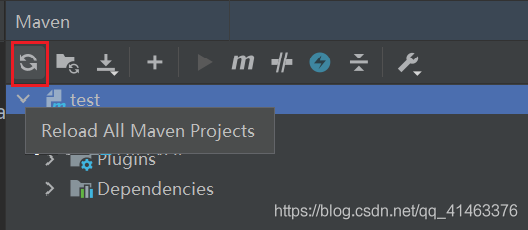
remember to reload Maven’s dependencies after changing. Otherwise, it will still report an error:

Cannot load driver class:com.mysql.cj.jdbc.Driver

Click this icon to reload the dependency

perfect solution!