Author Archives: Robins

[Solved] ln: failed to create symbolic link ‘/usr/bin/java’: File exists

Install Java environment in CentOS, add soft link times: ln: failed to create symbolic link ‘/ usr/bin/Java’: file exists

[root@iZbp12f9404um3f6avsm29Z /]# ln -s /usr/local/java/jdk1.8.0_291/bin/java /usr/bin/java
ln: failed to create symbolic link ‘/usr/bin/java’: File exists

Failed to create symbolic link, file exists.

-s   The meaning of the command is to add symbolic links to play the role of a link

resolvent

[root@iZbp12f9404um3f6avsm29Z /]# ln -sf /usr/local/java/jdk1.8.0_291/bin/java /usr/bin/java
[root@iZbp12f9404um3f6avsm29Z /]# java -version
java version "1.8.0_291"
Java(TM) SE Runtime Environment (build 1.8.0_291-b10)
Java HotSpot(TM) 64-Bit Server VM (build 25.291-b10, mixed mode)

Modify the – s command to – SF command- The f command means to enforce, which means to create if it does not exist and to override if it does exist

So far, the creation of soft connection is completed

[Solved] Description: Failed to configure a DataSource: ‘url‘ attribute is not specified and no embedded

Description:
Failed to configure a DataSource: ‘url’ attribute is not specified and no embedded datasource could be configured.
Reason: Failed to determine a suitable driver class
Action:
Consider the following:
If you want an embedded database (H2, HSQL or Derby), please put it on the classpath.
If you have database settings to be loaded from a particular profile you may need to activate it (no profiles are currently active).
My database configuration file is application.properties. after reading it seems to be unreadable, I recreate the application.yml file again, just copy the configuration file to this side yml. restart it and it’s fine.

server:
  port: 8080
spring:
  datasource:
    driver-class-name: com.mysql.cj.jdbc.Driver
    url: jdbc:mysql://localhost:3306/springcloud?useUnicode=true&characterEncoding=utf-8&allowMultiQueries=true&useSSL=false&serverTimezone=UTC
    username: root
    password: 123456

I don’t know why.

[Solved] NVIDIA-SMI has failed because it couldn’t communicate with the NVIDIA drive

NVIDIA-SMI has failed because it couldn’t communicate with the NVIDIA driver. Make sure that the latest NVIDIA driver is installed and running

The main reason is that the system kernel has been upgraded, which leads to the mismatch between the new version kernel and the original graphics driver. Just execute two commands

sudo apt-get install dkms
sudo dkms install -m nvidia -v 440.44(440.44 indicates the driver version number)

Use the command ll/usr/SRC/to see that there is a nvidia-440.44/folder below

[Solved] Git Error: OpenSSL SSL_read: Connection was reset, errno 10054和Failed to connect to github.com port 443

Question 1: OpenSSL_ read: Connection was reset, errno 10054

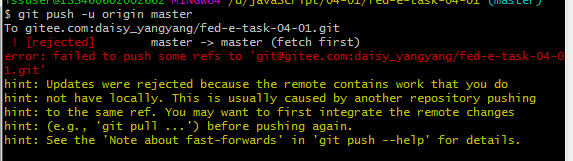
When using git to upload your own project, an error will be reported:

Cause of the problem

openssl ssl_ Read: connection reset, errno 10054

This is the SSL certificate of the server that has not been signed by a third party, so an error is reported.

This error is most likely caused by network instability and connection timeout. If you try again, you will still report an error.

Problem solving methods

Method 1

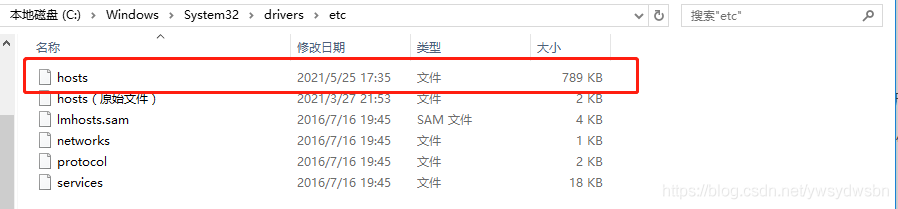
First, check whether the IP corresponding to the domain name of GitHub in the host file of Disk C is correct. If not, query the correct IP https://www.ipaddress.com/

If there is no problem with the IP address, upload it several times.

Method 2

If method one doesn’t work, modify the settings and remove SSL verification
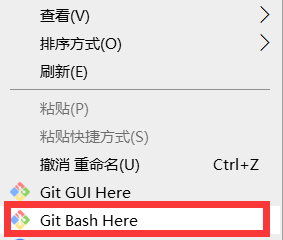
Enter git bash here

Input

git config --global http.sslVerify "false"

At this point, the GIT operation can be executed again

if prompted:

fatal: not in a git directory

Then do it first

git init

Re input:

git config http.sslVerify "false"

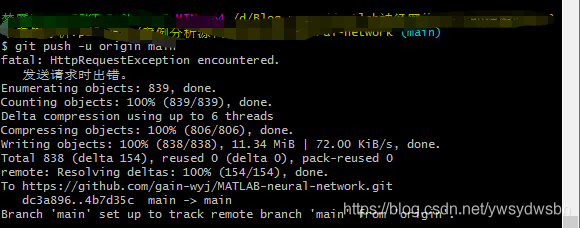
Q2: failed to connect to github.com port 443: timed out

When using git push - U origin main to upload an item, another injury occurred:

Cause of the problem

Network problems or agency problems

Problem solving methods

It is found that there is no problem with the network, and the GitHub can be accessed normally,

reference material: https://blog.csdn.net/hustsselbj/article/details/46842191?utm_ medium=distribute.pc_ relevant_ t0.none-task-blog-BlogCommendFromMachineLearnPai2-1.nonecase& depth_ 1-utm_ source=distribute.pc_ relevant_ t0.none-task-blog-BlogCommendFromMachineLearnPai2-1.nonecase

It is the problem of agency

Uncheck proxy server and use automatic detection settings

And then git push - U origin main , it’s successful.

[Solved] Imx6qdl Android 5.0 kernel 3.10 can’t mount system file system

2016.09.19
Freeing unused kernel memory: 412K (80e7c000 – 80ee3000)
type=1403 audit(42.730:2): policy loaded auid=4294967295 ses=4294967295
type=1404 audit(42.750:3): enforcing=1 old_enforcing=0 auid=4294967295 ses=4294967295
init: /dev/hw_random not found
Console: switching to colour dummy device 80×30
init: /dev/hw_random not found
fs_mgr: __mount(source=/dev/block/mmcblk1p5,target=/system,type=ext4)=-1
fs_mgr: Failed to mount an un-encryptable or wiped partition on/dev/block/mmcblk1p5 at /system options: barrier=1 error: No such file or directory
fs_mgr: __mount(source=/dev/block/mmcblk1p4,target=/data,type=ext4)=-1
fs_mgr: fs_mgr_mount_all(): possibly an encryptable blkdev /dev/block/mmcblk1p4 for mount /data type ext4 )
fs_mgr: __mount(source=/dev/block/mmcblk1p6,target=/cache,type=ext4)=-1
fs_mgr: Failed to mount an un-encryptable or wiped partition on/dev/block/mmcblk1p6 at /cache options: nomblk_io_submit error: No such file or directory
fs_mgr: __mount(source=/dev/block/mmcblk1p7,target=/device,type=ext4)=-1
fs_mgr: Failed to mount an un-encryptable or wiped partition on/dev/block/mmcblk1p7 at /device options: (null) error: No such file or directory
init: fs_mgr_mount_all returned an error
init: fs_mgr_mount_all returned unexpected error 255
SELinux: Could not set context for /cache:  Read-only file system
rfkill: BT RF going to : off
init: cannot find ‘/system/bin/logd’, disabling ‘logd’
init: cannot find ‘/system/bin/lmkd’, disabling ‘lmkd’
binder: 119:119 transaction failed 29189, size 0-0
init: cannot find ‘/system/bin/servicemanager’, disabling ‘servicemanager’
init: cannot find ‘/system/bin/vold’, disabling ‘vold’
init: cannot find ‘/system/bin/surfaceflinger’, disabling ‘surfaceflinger’
init: using deprecated syntax for specifying property ‘ro.serialno’, use ${name} instead
init: using deprecated syntax for specifying property ‘ro.product.manufacturer’, use ${name} instead
init: property ‘ro.product.manufacturer’ doesn’t exist while expanding ‘$ro.product.manufacturer’
init: cannot expand ‘$ro.product.manufacturer’ while writing to ‘/sys/class/android_usb/android0/iManufacturer’
init: using deprecated syntax for specifying property ‘ro.product.model’, use ${name} instead
init: property ‘ro.product.model’ doesn’t exist while expanding ‘$ro.product.model’
init: cannot expand ‘$ro.product.model’ while writing to ‘/sys/class/android_usb/android0/iProduct’
android_usb: already disabled
read descriptors
read strings

Solution:
.burn.sh
BUILD_TARGET_DEVICE=sd (for sd boot) should be commented out and replaced by emmc boot. Depends on the boot method of the development board.

Yum source error: [errno 14] HTTP Error 404 – not found

Trying other mirrors.
To address this issue please refer to the below knowledge base article 

https://access.redhat.com/articles/1320623

If above article doesn't help to resolve this issue please create a bug on https://bugs.centos.org/


 One of the configured repositories failed (onlyoffice repo),
 and yum doesn't have enough cached data to continue. At this point the only
 safe thing yum can do is fail. There are a few ways to work "fix" this:

     1. Contact the upstream for the repository and get them to fix the problem.

     2. Reconfigure the baseurl/etc. for the repository, to point to a working
        upstream. This is most often useful if you are using a newer
        distribution release than is supported by the repository (and the
        packages for the previous distribution release still work).

     3. Run the command with the repository temporarily disabled
            yum --disablerepo=onlyoffice ...

     4. Disable the repository permanently, so yum won't use it by default. Yum
        will then just ignore the repository until you permanently enable it
        again or use --enablerepo for temporary usage:

            yum-config-manager --disable onlyoffice
        or
            subscription-manager repos --disable=onlyoffice

     5. Configure the failing repository to be skipped, if it is unavailable.
        Note that yum will try to contact the repo. when it runs most commands,
        so will have to try and fail each time (and thus. yum will be be much
        slower). If it is a very temporary problem though, this is often a nice
        compromise:

            yum-config-manager --save --setopt=onlyoffice.skip_if_unavailable=true

failure: repodata/repomd.xml from onlyoffice: [Errno 256] No more mirrors to try.
http://download.onlyoffice.com/repo/centos/noarch/repodata/repomd.xml: [Errno 14] HTTP Error 404 - Not Found

Reason: there is a problem with the yum source address. Either check the yum source or replace it with a new one.

The following is Baidu’s search result (error): Yum source file has a problem, not index cache. Clear cache is useless; So the way down here is a little bit big. Either view the yum source file, or change it to the yum source file on a normal machine</ mark>

This error is caused by a problem with the yum repository and can be solved by using the following two commands.
`yum clean all` # Clear the index cache of all yum commands
`rpm --rebuilddb` # The command to rebuild the RPM database

Solution 1: find the error report: http://download.onlyoffice.com/repo/centos/noarch/ Repair or delete the yum source file
solution 2: copy a Yum source from another normal Yum machine
verification method: Yum makecache verify whether the yum index cache can be generated normally, and remember to clear all the index caches first Yum clean all to verify

How to Solve Errors encountered by maven

Could not transfer artifact
org.apache.maven.surefire:surefire-junit-platform:pom:2.22.2 from/to
alimaven (http://maven.aliyun.com/nexus/content/groups/public/):
java.lang.RuntimeException: Unexpected error:
java.security.InvalidAlgorithmParameterException: the trustAnchors
parameter must be non-empty

Solution:

Just load this dependency

            <plugin>
                <groupId>org.apache.maven.plugins</groupId>
                <artifactId>maven-surefire-plugin</artifactId>
                <configuration>
                    <skipTests>true</skipTests>
                </configuration>
            </plugin>

Collection and solution of error reporting on various platforms of pyspider

Collection and solution of error reporting in pyspider

Command “python setup.py egg_ info” failed with error code 10

This means that pycurl installation reported an error

Download address of WHL file of pycurl in win10 solution

# Follow the link above to download the pycurl whl file, pay attention to your own python version, I'm using python 3.7 here
# locate the path to change the file
pip3 install pycurl-7.43.0.4-cp37-cp37m-win_amd64.whl

CentOS solution

yum install python-devel curl-devel
pip3 install pycurl

Ubuntu solution

sudo apt-get install libcurl4-gnutls-dev
pip install pyspider

SyntaxError: invalid syntax

Async cannot be used as a keyword and needs to be changed as a variable

Run pyspider to find the error file and replace async to know that the error was not reported

ImportError: cannot import name ‘Disp

Realization of breakpoint download based on DIO in flutter

As there are not many articles downloaded from the shutter breakpoint, and there are few cases, I found them on the DIO case after searching for them for a long time, and it took me some time to be wronged
based on DIO: ^ 4.0.0 and Path_ Provider: ^ 2.0.2 implements the function of downloading a large file

Core code

import 'dart:async';
import 'dart:io';
import 'dart:typed_data';
import 'package:dio/dio.dart';
import 'package:path_provider/path_provider.dart';

class DownloadFile {
  /// Used to record the url being downloaded to avoid duplicate downloads
  static var downloadingUrls = Map<String, CancelToken>();

  /// Breakpoint downloading of large files
  static Future<void> download({
    required String url,
    required String savePath,
    ProgressCallback?onReceiveProgress,
    void Function()?done,
    void Function(DioError)?failed,
  }) async {
    int downloadStart = 0;
    bool fileExists = false;
    File f = File(savePath);
    if (await f.exists()) {
      downloadStart = f.lengthSync();
      fileExists = true;
    }
    print("start: $downloadStart");
    if (fileExists && downloadingUrls.containsKey(url)) {
      return;
    }
    var dio = Dio();
    CancelToken cancelToken = CancelToken();
    downloadingUrls[url] = cancelToken;
    try {
      var response = await dio.get<ResponseBody>(
        url,
        options: Options(
          /// Receive response data as a stream
          responseType: ResponseType.stream,
          followRedirects: false,
          headers: {
            /// Downloading key locations in segments
            "range": "bytes=$downloadStart-",
          },
        ),
      );
      File file = File(savePath);
      RandomAccessFile raf = file.openSync(mode: FileMode.append);
      int received = downloadStart;
      int total = await _getContentLength(response);
      Stream<Uint8List> stream = response.data!.stream;
      StreamSubscription<Uint8List>?subscription;
      subscription = stream.listen(
        (data) {
          /// Write files must be synchronized
          raf.writeFromSync(data);
          received += data.length;
          onReceiveProgress?.call(received, total);
        },
        onDone: () async {
          downloadingUrls.remove(url);
          await raf.close();
          done?.call();
        },
        onError: (e) async {
          await raf.close();
          downloadingUrls.remove(url);
          failed?.call(e as DioError);
        },
        cancelOnError: true,
      );
      cancelToken.whenCancel.then((_) async {
        await subscription?.cancel();
        await raf.close();
      });
    } on DioError catch (error) {
      /// The request has been sent and the server responds with a status code that it is not in the range of 200
      if (CancelToken.isCancel(error)) {
        print("Download cancelled");
      } else {
        failed?.call(error);
      }
      downloadingUrls.remove(url);
    }
  }

  /// Get the size of the downloaded file
  static Future<int> _getContentLength(Response<ResponseBody> response) async {
    try {
      var headerContent =
          response.headers.value(HttpHeaders.contentRangeHeader);
      print("download files: $headerContent");
      if (headerContent != null) {
        return int.parse(headerContent.split('/').last);
      } else {
        return 0;
      }
    } catch (e) {
      return 0;
    }
  }

  /// Cancel Mission
  static void cancelDownload(String url) {
    downloadingUrls[url]?.cancel();
    downloadingUrls.remove(url);
  }
}

Call case

void main() {
  runApp(TestMyApp());
}

class TestMyApp extends StatefulWidget {
  @override
  State<StatefulWidget> createState() {
    return _TestMyAppState();
  }
}

class _TestMyAppState extends State<TestMyApp> {
  void download() async {
    var url = "mp4";
    Directory dir = await getApplicationDocumentsDirectory();
    var sDCardDir = dir.path;
    var savePath = sDCardDir + "/video/1.mp4";
    File f = File(sDCardDir + "/video");
    if (!await f.exists()) {
      new Directory(sDCardDir + "/video").createSync();
    }

    await DownLoadManage().download(
      url: url,
      savePath: savePath,
      onReceiveProgress: (received, total) {
        if (total != -1) {
          print("Download1Received:" +
              received.toString() +
              "Total:" +
              total.toString() +
              "Progress.+${(received/total * 100).floor()}%");
        }
      },
      done: () {
        print("Download 1 completed");
      },
      failed: (e) {
        print("Download 1 failed:" + e.toString());
      },
    );
  }

  @override
  Widget build(BuildContext context) {
    return Container(
      color: Colors.white,
      child: Center(
        child: GestureDetector(
          onTap: () {
            download();
          },
          child: Container(
            width: 150,
            height: 150,
            color: Colors.red,
          ),
        ),
      ),
    );
  }
}