CUDA error: device-side assert triggered
Solution
Check whether the label starts from 0. If not, modify it to start from 0.
CUDA error: device-side assert triggered
Solution
Check whether the label starts from 0. If not, modify it to start from 0.
When doing the project, due to the need to do DLL to speed up, but often burst out error
File "C:\Users\32373\AppData\Local\Programs\Python\Python37\lib\ctypes\__init__.py", line 434, in LoadLibrary
    return self._dlltype(name)
  File "C:\Users\32373\AppData\Local\Programs\Python\Python37\lib\ctypes\__init__.py", line 356, in __init__
    self._handle = _dlopen(self._name, mode)
OSError: [WinError 126] The specified module could not be found
The example code is as follows
from ctypes import cdll
class Demo():
	def __init__(self):
		self.__path = "ZeissControl2.dll"
		self.__Library = cdll.LoadLibrary(self.__path)
It’s also a bug that has been bothering me for a long time.
for this problem, I summarize two reasons:
However, in general, in addition to the specified DLL files, user-defined DLL files may also rely on the DLL files of the system environment
in the latter case, we generally do not know which DLL files we rely on
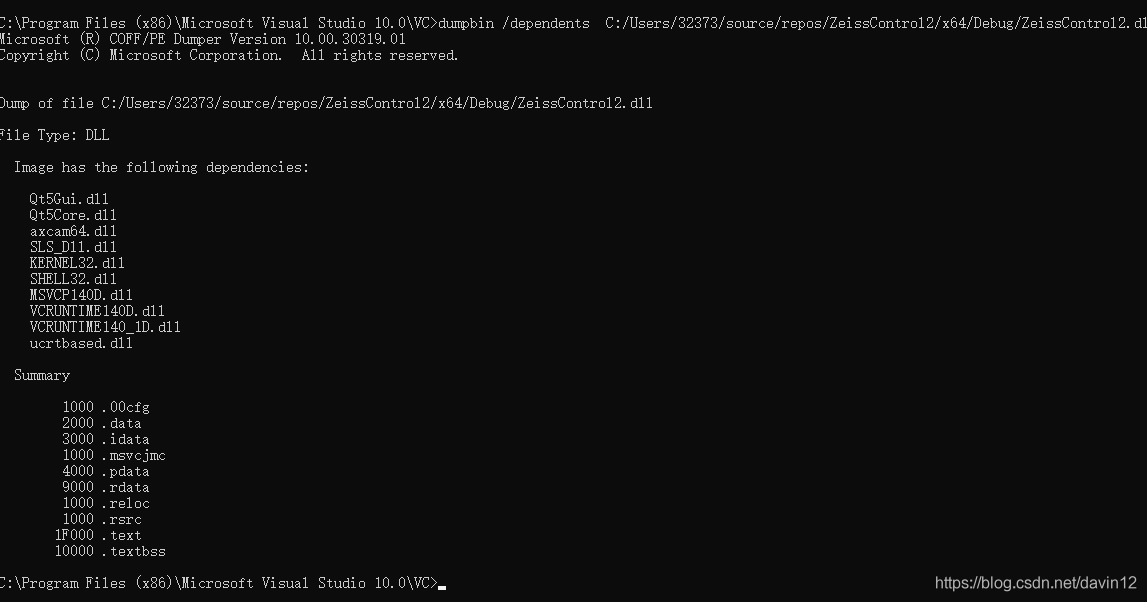
Fortunately, Visual Studio provides dumpbin/dependencies tool to get the list of DLL files that the specified DLL depends on
specific operation
Start Menu = & gt& gt; visual studio 2017 or 2019 ===>& gt; Developer Command Prompt for VS 2017 or 2019
After opening the terminal and entering the dumpbin command, you can see that
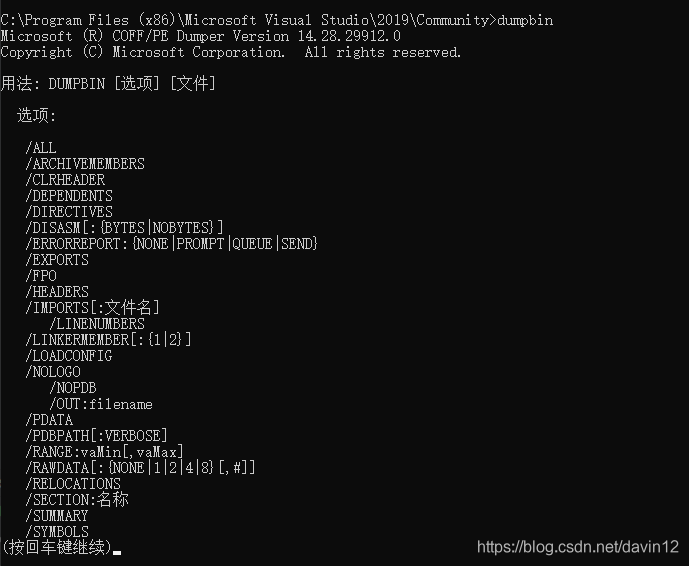
we want to view the list of other DLL files that the specified DLL file depends on. The command is as follows
dumpbin /dependents your_ dll_ path
For example,
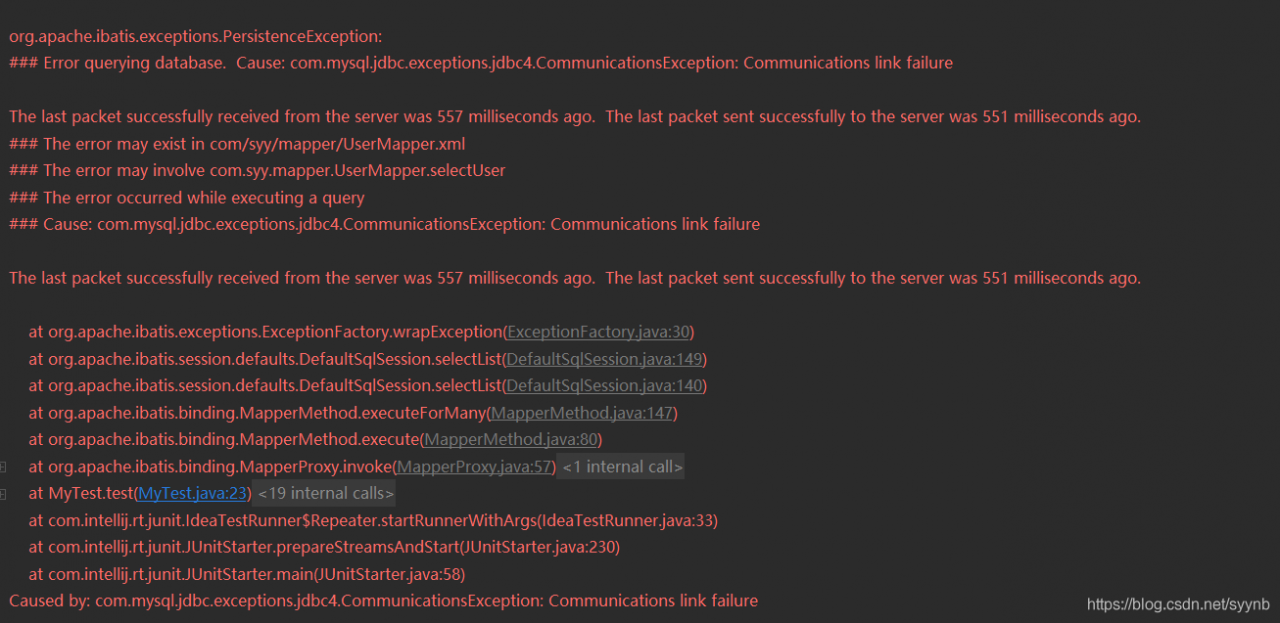
Solution: when connecting to the database, change usessl = true to usessl = false. Of course, if usessl = true is not written, it is true by default.
Note: however, I don’t know why I did it. What’s more, the tutorial I read only uses true, and why I report an error. If a boss sees it, he hopes to answer it.
It’s no use opening Android studio for a day. Error: unknown host ‘Maven. Aliyun. Com’. You may need to adjust the proxy settings in gradle
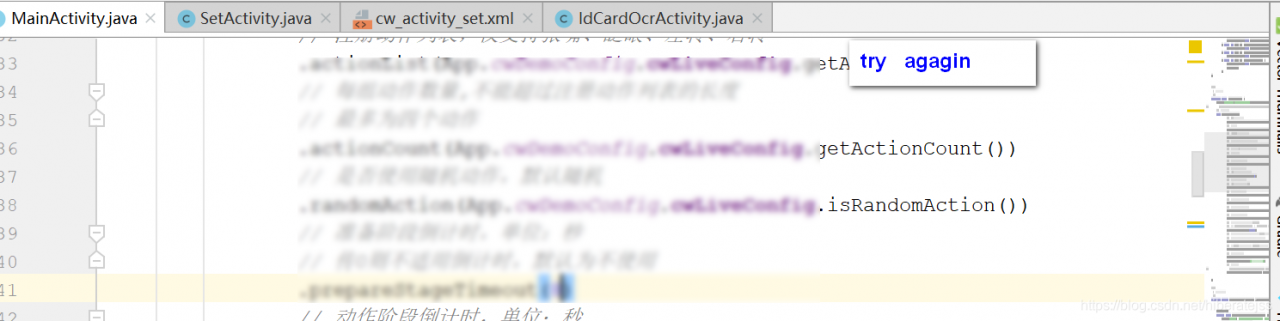
But it was always good before, so restart Android studio, open any class and click “try again”,
After try again, try packing, and the packing is successful
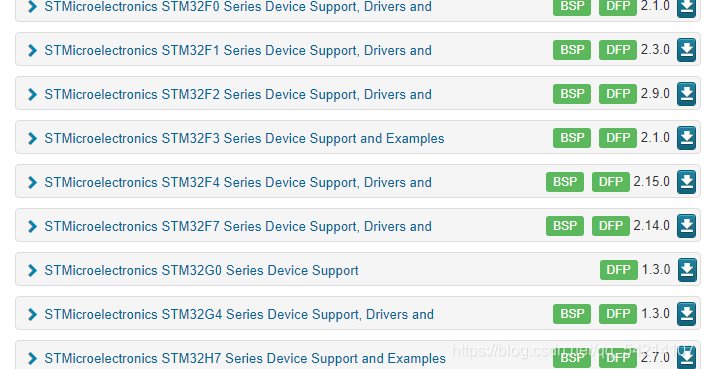
Picture address: https://www.keil.com/dd2/pack/# # eula-container
Jflash download address: https://www.segger.com/products/production/flasher/tools/j-flash-spi/
Solution to bug:
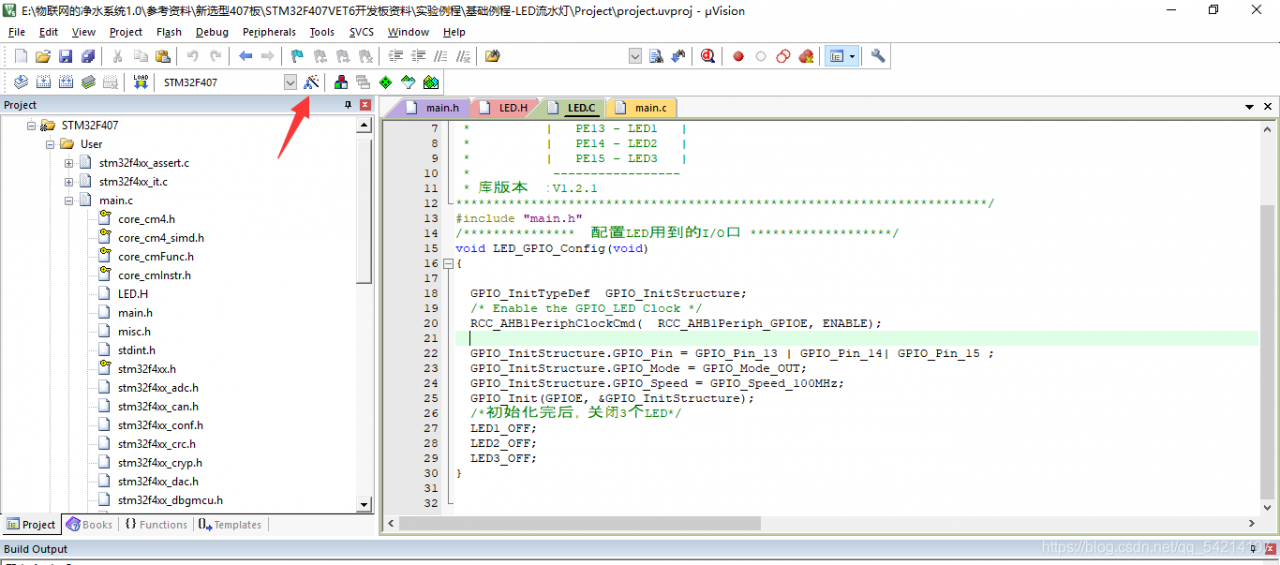
1. Click the magic wand
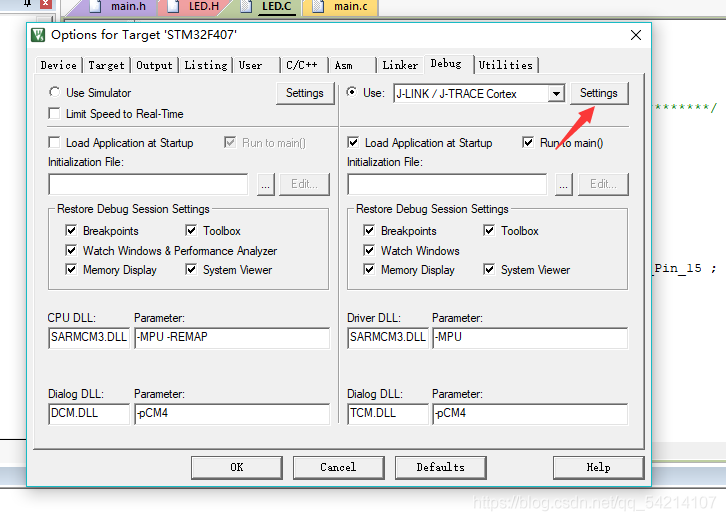
2. Click settings in debug
3. Click flash download to add stmf4xxflash
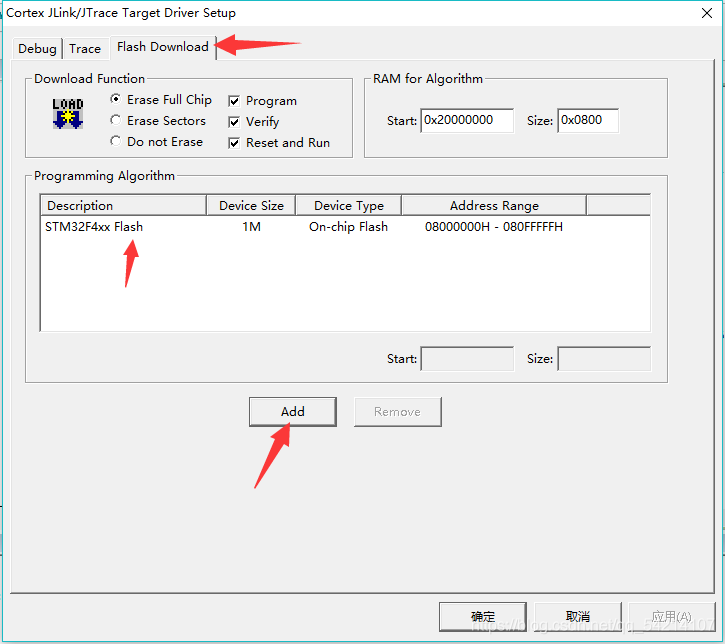
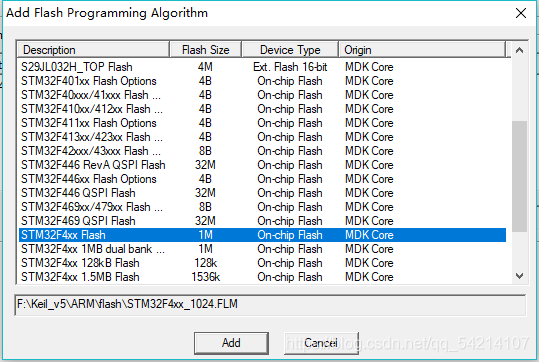
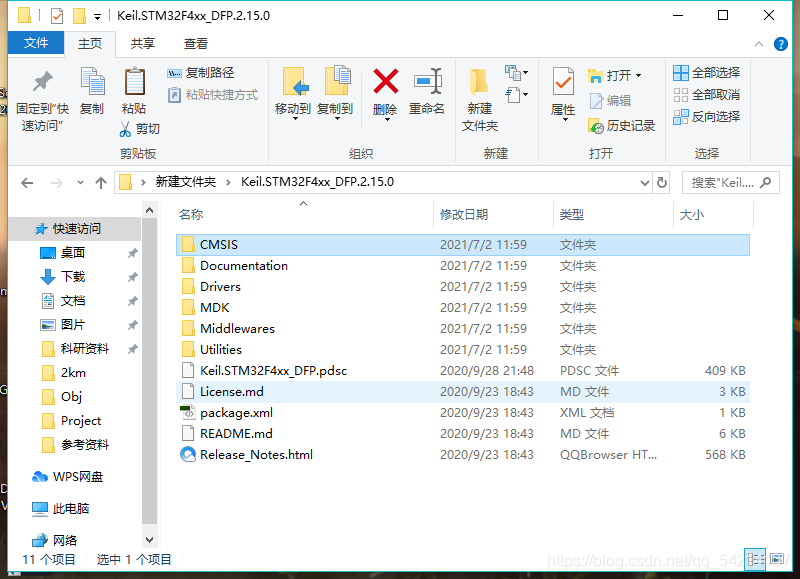
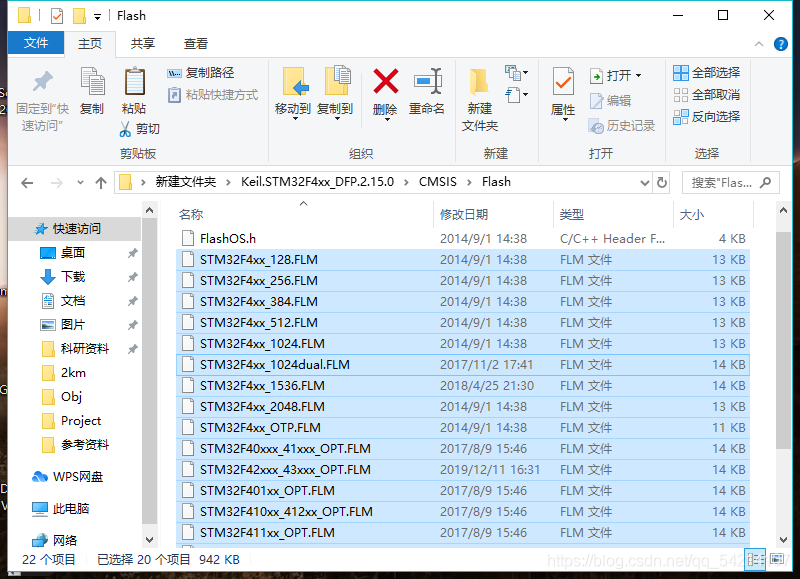
Flash download has been explained at the beginning. After downloading the firmware library, find the flash folder in your keil5 folder and put the corresponding flash file in it
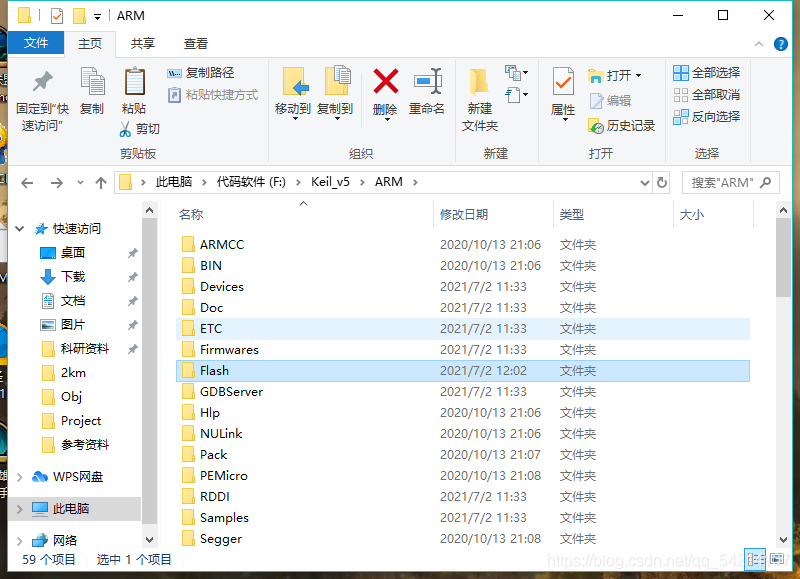
Put the file below in the folder corresponding to the picture above
How to Solve Error: socket.gaierror: [Errno 8] nodename nor servname provided, or not known
Situation 1:
Error content:
socket.gaierror: [Errno 8] nodename nor servname provided, or not known
Reason:
hostname is not written in /etc/hosts. For example, the MAC-20150101 in the abnormal information above is actually the host name of our Mac system. Some codes may need to find the corresponding IP address in the local DNS according to the host name, because the local DNS configuration is not specified What is the IP address of the host name, this error will also be prompted.
Solution:
Implement in python interpreter:
python
Call the gethostname() method provided by the Socket library to obtain the host name
>>>import socket
>>>socket.gethostname()
>>>>exit()
Get the host name, modify the hosts file, enter the command
vim /etc/hosts
Add the host name 127.0.0.1 hostname
Error resolution
Situation 2:
The solution to prompt nodename nor servname provided when the Java Web project is started on the Mac system
java.net.UnknownHostException: MAC-20150101: MAC-20150101: nodename nor servname provided, or not known
at java.net.InetAddress.getLocalHost(InetAddress.java:1473)
at org.eclipse.rse.core.RSECorePlugin.getLocalMachineName(RSECorePlugin.java:265)
at org.eclipse.rse.core.RSEPreferencesManager.getDefaultPrivateSystemProfileName(RSEPreferencesManager.java:358)
at org.eclipse.rse.core.RSEPreferencesManager.initDefaults(RSEPreferencesManager.java:337)
at org.eclipse.rse.internal.core.RSEPreferenceInitializer.initializeDefaultPreferences(RSEPreferenceInitializer.java:23)
at org.eclipse.core.internal.preferences.PreferenceServiceRegistryHelper$1.run(PreferenceServiceRegistryHelper.java:300)
at org.eclipse.core.runtime.SafeRunner.run(SafeRunner.java:42)
....
....
....
Caused by: java.net.UnknownHostException: MAC-20150101: nodename nor servname provided, or not known
at java.net.Inet6AddressImpl.lookupAllHostAddr(Native Method)
at java.net.InetAddress$1.lookupAllHostAddr(InetAddress.java:901)
at java.net.InetAddress.getAddressesFromNameService(InetAddress.java:1293)
at java.net.InetAddress.getLocalHost(InetAddress.java:1469)
... 28 more
Regarding the MAC-20150101 in the exception information, it is actually the host name of our Mac system. Some codes may need to find the corresponding IP address in the local DNS according to the host name, because the local DNS configuration does not specify the host What is the name of this IP address, this error will also be prompted.
The solution is very simple:
1) Open the terminal on the Mac system, check the current host DNS configuration, enter the command cat /private/etc/hosts, as shown in the figure:
2) Then edit the host configuration, add the mapping of the host name, enter the command sudo vi /private/etc/hosts, enter the VI editor, and add the following mapping
127.0.0.1 MAC-20150101
Just exit and save.
3) Finally, enter the refresh command dscacheutil -flushcache in the terminal
After three steps, when starting the Java Web project, the following error message will not appear.
The reason for this error is that the Internet says that there is a place in the project that calls the following code:
InetAddress.getLocalHost().getCanonicalHostName();
It is said that this method will return FQDN (Fully Qualified Domain Name), if the host name is not configured, then calling this code will throw an exception message, and this method depends on the underlying operating system, the configuration of the Mac system is somewhat different from that of Windows !
Situation 3:
Socket.gaierror: [Errno -2] Name or service not known error solution when configuring the remote server Jupyter notebook
Modify the jupyter_notebook_config.py configuration file and enter the command:
vim ~/.jupyter/jupyter_notebook_config.py
In the configuration file, search for c.NotebookApp.ip, find this sentence and modify it to c.NotebookApp.ip=’0.0.0.0′ (general tutorial will write and modify it to’*’), save and restart the notebook.
## The IP address the notebook server will listen on.
c.NotebookApp.ip = '*'
c.NotebookApp.allow_remote_access=True
Just as the error says, the CREATE VIEW statement needs to be the only statement in the query batch.
You have two option in this scenario, depending on the functionality you want to achieve:
CREATE VIEW query at the beginning
CREATE VIEW showing
as
select tradename, unitprice, GenericFlag
from Medicine;

with ExpAndCheapMedicine(MostMoney, MinMoney) as
(
    select max(unitprice), min(unitprice)
    from Medicine
)
,
findmostexpensive(nameOfExpensive) as
(
    select tradename
    from Medicine, ExpAndCheapMedicine
    where UnitPrice = MostMoney
)
,
findCheapest(nameOfCheapest) as
(
    select tradename
    from Medicine, ExpAndCheapMedicine
        where UnitPrice = MinMoney
    )
GO after the CTE and before the CREATE VIEW query
— Option #2
with ExpAndCheapMedicine(MostMoney, MinMoney) as
(
    select max(unitprice), min(unitprice)
    from Medicine
)
,
findmostexpensive(nameOfExpensive) as
(
    select tradename
    from Medicine, ExpAndCheapMedicine
    where UnitPrice = MostMoney
)
,
findCheapest(nameOfCheapest) as
(
    select tradename
    from Medicine, ExpAndCheapMedicine
    where UnitPrice = MinMoney
)

GO

CREATE VIEW showing
as
select tradename, unitprice, GenericFlag
from Medicine;
Create View needs to add Go up and down, if there are other SQL up and down
What I just want to share with you today is the activation code of VMware Workstation Pro 10-15 version. The activation codes provided this time are all real and effective.
VMware Workstation Pro 15 activation license
UY758-0RXEQ-M81WP-8ZM7Z-Y3HDA
VF750-4MX5Q-488DQ-9WZE9-ZY2D6
UU54R-FVD91-488PP-7NNGC-ZFAX6
YC74H-FGF92-081VZ-R5QNG-P6RY4
YC34H-6WWDK-085MQ-JYPNX-NZRA2
VMware Workstation Pro 14 activation license
FF31K-AHZD1-H8ETZ-8WWEZ-WUUVA
CV7T2-6WY5Q-48EWP-ZXY7X-QGUWD
VMware Workstation Pro 12 activation license
5A02H-AU243-TZJ49-GTC7K-3C61N
VF5XA-FNDDJ-085GZ-4NXZ9-N20E6
UC5MR-8NE16-H81WY-R7QGV-QG2D8
ZG1WH-ATY96-H80QP-X7PEX-Y30V4
AA3E0-0VDE1-0893Z-KGZ59-QGAVF
VMware Workstation Pro 10 activation license
1Z0G9-67285-FZG78-ZL3Q2-234JG
4C4EK-89KDL-5ZFP9-1LA5P-2A0J0
HY086-4T01N-CZ3U0-CV0QM-13DNU
Note: If it is WinXP or 32-bit system, please use 10.x version; after 11.x version, Win7 or higher 64-bit system is supported.
TypeError: __init__() missing 1 required positional argument:’on_delete’ solution
When executing python manage.py makemigrations, an error occurs: TypeError: init() missing 1 required positional argument:’on_delete’
solution:
When defining a foreign key, you need to add on_delete=;
that is: contract = models.ForeignKey(Contract, on_delete=models.CASCADE)
The reasons are as follows:
After django is upgraded to 2.0, when the table is associated with the table, the on_delete parameter must be written, otherwise an exception will be reported:
TypeError: init() missing 1 required positional argument:’on_delete’
on_delete=None, # When deleting data in the associated table, the behavior of the current table and its associated field
on_delete=models.CASCADE, # Delete associated data, and delete associated with it
on_delete=models.DO_NOTHING, # Delete associated data, nothing Don’t do
on_delete=models.PROTECT, # Delete associated data and raise an error ProtectedError
# models.ForeignKey(‘Associated table’, on_delete=models.SET_NULL, blank=True, null=True)
on_delete=models.SET_NULL, # Delete associated data , The value associated with it is set to null (provided that the FK field needs to be set to be nullable, and one pair is
treated together ) # models.ForeignKey(‘associated table’, on_delete=models.SET_DEFAULT, default=’default value’)
on_delete=models .SET_DEFAULT, # Delete the associated data, and set the associated value to the default value (provided that the FK field needs to set the default value, one pair is the same)
on_delete=models.SET, # Delete associated data,
a. Set the associated value To specify the value, set: models.SET (value)
b. Set the associated value to the return value of the executable object, set: models.SET (executable object)
Since many-to-many (ManyToManyField) has no on_delete parameter, the above is only for foreign keys (ForeignKey) and one-to-one (OneToOneField)
Error Message:
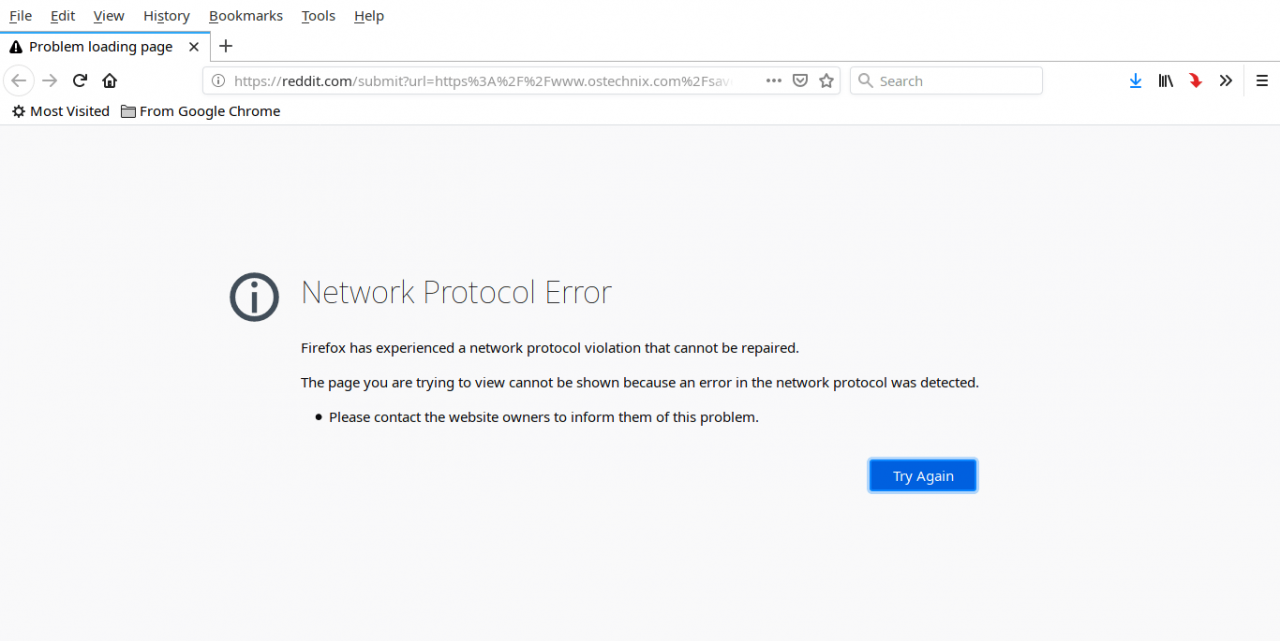
Network Protocol Error
Firefox has experienced a network protocol violation that cannot be repaired.
The page you are trying to view cannot be shown because an error in the network protocol was detected.
Please contact the website owners to inform them of this problem.
Solution:
Method 1:
To fix “Network Protocol Error” or “Corrupted Content Error”, you need to bypass the cache when reloading the webpage. To do this, press the Ctrl + F5 or Ctrl + Shift + R shortcut key, and it will reload the page from the server instead of loading it from the Firefox cache. Then the web page should work normally.
Method 2:
If method 1 does not work, try the following methods.
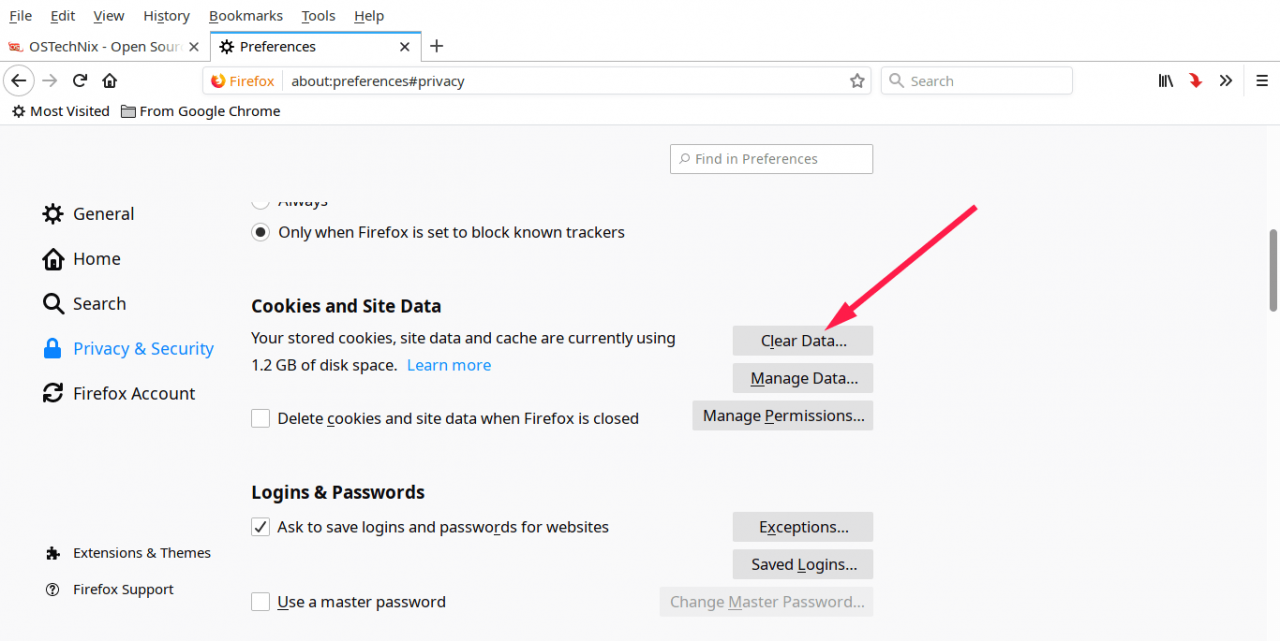
Open “Edit -> Preferences”, in the “Preferences” window, open the “Privacy & Security” tab in the left pane, and click the “Clear Data” option to clear the Firefox cache.
Make sure you check the “Cookies and Site Data” and “Cached Web Content” options, and then click “Clear”.
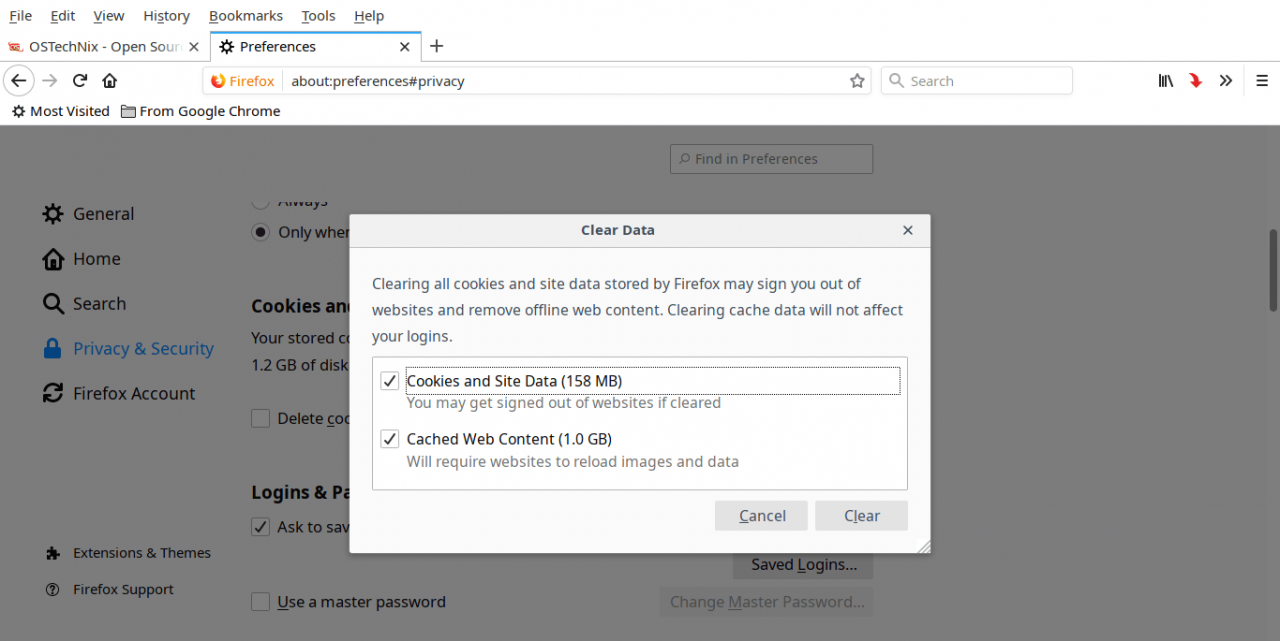
carry out! Now cookies and offline content will be deleted. Note that Firefox may log you out of the sites you are logged in to, and you can log in to these sites again later. Finally, close the Firefox browser and restart the system. Now the page loads without any problems.
Error using multiprocessing module:
from multiprocessing import Process

def hello():
    print('hello')

p = Process(target=hello)
p.start()
Change the code to:
from multiprocessing import Process, freeze_support, set_start_method

def hello():
    print('hello')

if __name__ == '__main__':
    p = Process(target=hello)
    p.start()
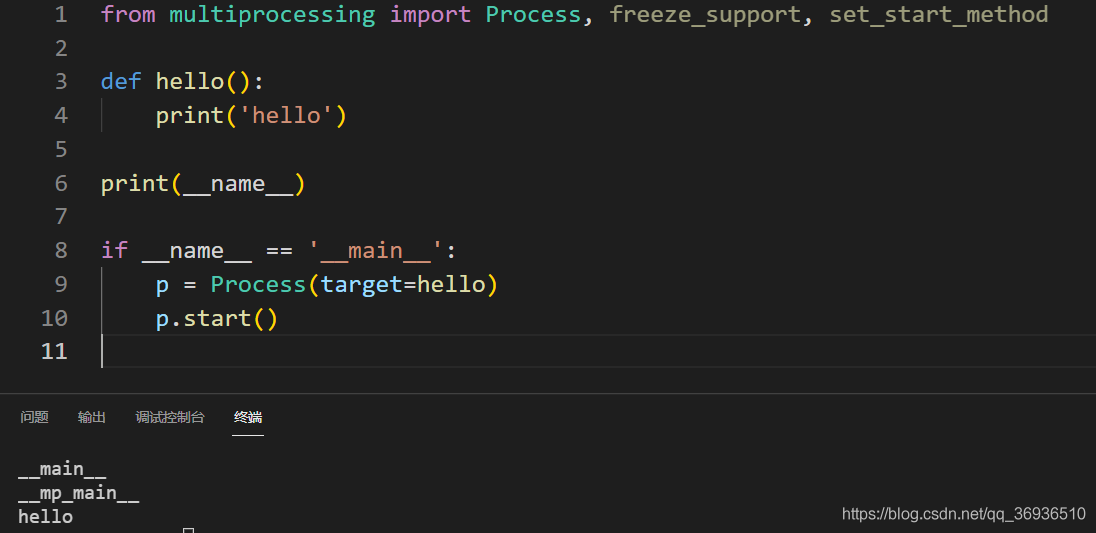
Which if __name__ == '__main__':role is to protect the program entry point , when a sub-process using open Process, Python interpreter into the current module, and invoke the hello method, using a simple intuitive test:
from multiprocessing import Process, freeze_support, set_start_method

def hello():
    print('hello')

print("!!!")

if __name__ == '__main__':
    p = Process(target=hello)
    p.start()
In this code, Print ("!!" is not a hello method. Let’s see the running result:
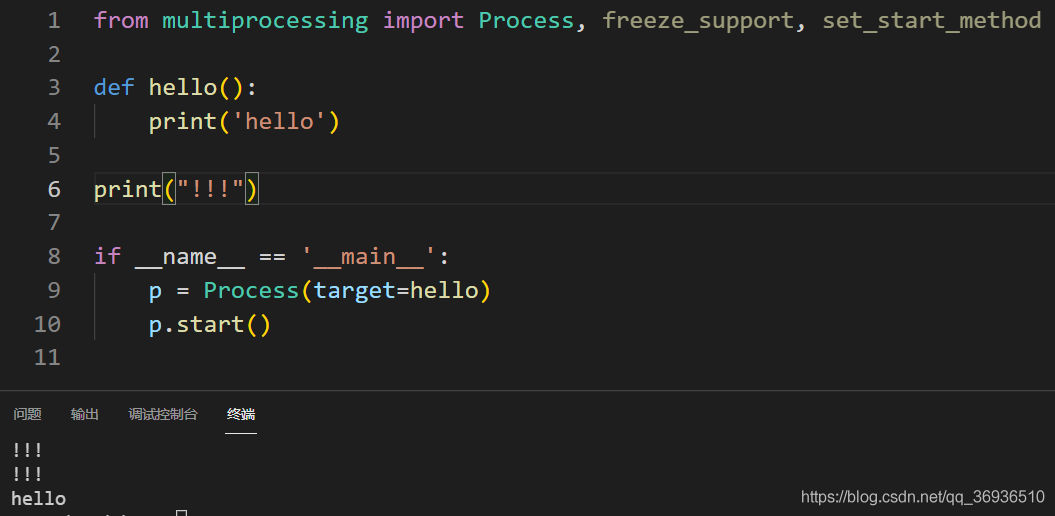
print("!!!") was called twice!!! So before generating a new process, be sure to add if__ name__ == '__ main__':!
Further, if you change print("!!!")to print(__name__), you will get the following results:
E/AndroidRuntime(7698): Cause by: java.lang.RuntimeException: stop failed.
if (mediarecorder != null) {
        mediarecorder.stop();
        mediarecorder.release();
        mediarecorder = null;
        if (mCamera != null) {
            mCamera.release();
            mCamera = null;
        }
    }
Now, in mediarecord. Stop(); This sentence is wrong, now in mediarecord. Stop(); If you add a few sentences before this sentence, you won’t make a mistake
mediarecorder.setOnErrorListener(null);
mediarecorder.setOnInfoListener(null);
mediarecorder.setPreviewDisplay(null);
After modification:
if (mediarecorder != null) {
            //added by ouyang start
            try {
                //The following three parameters must be added, if not, it will crash, in mediarecorder.stop();
                // error is reported as: RuntimeException:stop failed
                mediarecorder.setOnErrorListener(null);
                mediarecorder.setOnInfoListener(null);
                mediarecorder.setPreviewDisplay(null);
                mediarecorder.stop();
            } catch (IllegalStateException e) {
                // TODO: handle exception
                Log.i("Exception", Log.getStackTraceString(e));
            }catch (RuntimeException e) {
                // TODO: handle exception
                Log.i("Exception", Log.getStackTraceString(e));
            }catch (Exception e) {
                // TODO: handle exception
                Log.i("Exception", Log.getStackTraceString(e));
            }
            //added by ouyang end

            mediarecorder.release();
            mediarecorder = null;
            if (mCamera != null) {
                mCamera.release();
                mCamera = null;
            }
        }