Author Archives: Robins

[Solved] Qt UpdateLayeredWindowIndirect failed for ptDst Error

Error encountered when setting QT window transparent shaded border:

The widget used in the code implementation is embedded with a frame, and the white background and fillet style settings are set for the frame

Then directly call the setgraphicseffect method on the widget to add the shadow effect, and the above error occurs.

Solution:

Remove the shadow setting of the widget and directly set the shadow on the frame, UI -> frame-> Setgraphicseffect calls shadow.

After testing, the above error printing will not appear again.

[Solved] Maven Error: parent.relativePath points at wrong local POM

Maven Project Error Messages:

Project build error: Non-resolvable parent POM for com.sap.cloud.sample:connectivity:[unknown-version]: Failure to find com.sap.cloud.sample:sdk-samples-parent:pom:1.0.0 in https://repo.maven.apache.org/maven2 was cached in the local repository, resolution will not be reattempted until the update interval of central has elapsed or updates are forced and ‘parent.relativePath’ points at wrong local POM


Analyze
A parent dependency is defined in the pom.xml of my Maven project named connectivity:

But there is no local pom.xml in the upper-level folder dis of connectivity, so Maven will report the above error message.


Solution
Create a new pom.xml in the upper-level folder dis of the current project, and define the content of sdk-samples-parent.

After the problem is solved.

Clickhouse error: XXXX.XXXX_local20211009 (8fdb18e9-bb4c-42d8-8fdb-18e9bb4c02d8): auto…

Code: 49, e.displayText() = DB::Exception: Part 20211009_67706_67706_0 is covered by 20211009_67118_67714_12 but should be merged into 20211009_67706_67715_1. This shouldn’t happen often., Stack trace (when copying this message, always include the lines below):
Error Messages:
XXXX.XXXX_local20211009 (8fdb18e9-bb4c-42d8-8fdb-18e9bb4c02d8): auto DB::StorageReplicatedMergeTree::processQueueEntry(ReplicatedMergeTreeQueue::SelectedEntryPtr)::(anonymous class)::operator()(DB::StorageReplicatedMergeTree::LogEntryPtr &) const: Code: 49, e.displayText() = DB::Exception: Part 20211009_67706_67706_0 is covered by 20211009_67118_67714_12 but should be merged into 20211009_67706_67715_1. This shouldn’t happen often., Stack trace (when copying this message, always include the lines below):
Solution 1.
1. Try to delete the local table and the distributed table XXXX.XXXX_local20211009

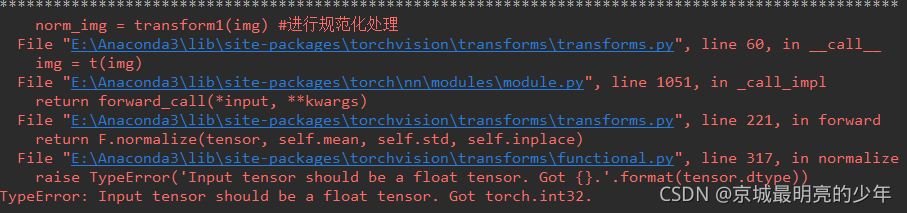
Normalize error: TypeError: Input tensor should be a float tensor…

The following error is reported when using tensor ` normalization

from torchvision import transforms
import numpy as np
import torchvision
import torch

data = np.random.randint(0, 255, size=12)
img = data.reshape(2,2,3)


print(img)
print("*"*100)
transform1 = transforms.Compose([
    transforms.ToTensor(), # range [0, 255] -> [0.0,1.0]
    transforms.Normalize(mean = (10,10,10), std = (1,1,1)),
    ]
)
# img = img.astype('float')
norm_img = transform1(img) 
print(norm_img)

You can add this sentence. In fact, it is to set the element type. See the tips above

Fastjson Error: Error: Cannot create inner bean ‘org.springframework.http.converter.json.MappingJackson2HttpMessageConverter

Error: Cannot create inner bean ‘org.springframework.http.converter.json.MappingJackson2HttpMessageConverter#0

The spring-mvc.xml configuration file is written like this

 <bean class="org.springframework.http.converter.json.MappingJackson2HttpMessageConverter">
                 <property name="objectMapper">
                     <bean class="org.springframework.http.converter.json.Jackson2ObjectMapperFactoryBean">
                         <property name="failOnEmptyBeans" value="false"/>
                     </bean>
                 </property>
             </bean>

reason:

Only the fastjosn dependency is imported, and the following dependency is not imported

 <dependency>
             <groupId>com.fasterxml.jackson.core</groupId>
             <artifactId>jackson-databind</artifactId>
             <version>2.12.4</version>
         </dependency>

These three jar packages are missing from the generated package

jackson-annotations-2.12.4.jar jackson-databind-2.12.4.jar jackson-core-2.12.4.jar

The problem is solved after importing dependencies.

Tez Execute MR Task Error [How to Solve]

Question

I’m executing the DWS Layer command DWS_load_member_When start.sh 2020-07-21 , an error is reported. This is all the error information

which: no hbase in (:/opt/install/jdk1.8.0_231/bin:/usr/local/sbin:/usr/local/bin:/usr/sbin:/usr/bin:/opt/install/hadoop-2.9.2/bin:/opt/install/hadoop-2.9.2/sbin:/opt/install/flume-1.9.0/bin:/opt/install/hive-2.3.7/bin:/opt/install/datax/bin:/opt/install/spark-2.4.5/bin:/opt/install/spark-2.4.5/sbin:/root/bin)
SLF4J: Class path contains multiple SLF4J bindings.
SLF4J: Found binding in [jar:file:/opt/install/hive-2.3.7/lib/log4j-slf4j-impl-2.6.2.jar!/org/slf4j/impl/StaticLoggerBinder.class]
SLF4J: Found binding in [jar:file:/opt/install/tez-0.9.2/lib/slf4j-log4j12-1.7.10.jar!/org/slf4j/impl/StaticLoggerBinder.class]
SLF4J: Found binding in [jar:file:/opt/install/hadoop-2.9.2/share/hadoop/common/lib/slf4j-log4j12-1.7.25.jar!/org/slf4j/impl/StaticLoggerBinder.class]
SLF4J: See http://www.slf4j.org/codes.html#multiple_bindings for an explanation.
SLF4J: Actual binding is of type [org.apache.logging.slf4j.Log4jLoggerFactory]

Logging initialized using configuration in jar:file:/opt/install/hive-2.3.7/lib/hive-common-2.3.7.jar!/hive-log4j2.properties Async: true
Query ID = root_20211014210413_76de217f-e97b-4435-adca-7e662260ab0b
Total jobs = 1
Launching Job 1 out of 1
Status: Running (Executing on YARN cluster with App id application_1634216554071_0002)

----------------------------------------------------------------------------------------------
        VERTICES      MODE        STATUS  TOTAL  COMPLETED  RUNNING  PENDING  FAILED  KILLED  
----------------------------------------------------------------------------------------------

----------------------------------------------------------------------------------------------
VERTICES: 00/00  [>>--------------------------] 0%    ELAPSED TIME: 8.05 s     
----------------------------------------------------------------------------------------------
Status: Failed--------------------------------------------------------------------------------
Application application_1634216554071_0002 failed 2 times due to AM Container for appattempt_1634216554071_0002_000002 exited with  exitCode: -103
Failing this attempt.Diagnostics: [2021-10-14 21:04:29.444]Container [pid=20544,containerID=container_1634216554071_0002_02_000001] is running beyond virtual memory limits. Current usage: 277.4 MB of 1 GB physical memory used; 2.7 GB of 2.1 GB virtual memory used. Killing container.
Dump of the process-tree for container_1634216554071_0002_02_000001 :
	|- PID PPID PGRPID SESSID CMD_NAME USER_MODE_TIME(MILLIS) SYSTEM_TIME(MILLIS) VMEM_USAGE(BYTES) RSSMEM_USAGE(PAGES) FULL_CMD_LINE
	|- 20544 20543 20544 20544 (bash) 0 0 115900416 304 /bin/bash -c /opt/install/jdk1.8.0_231/bin/java  -Xmx819m -Djava.io.tmpdir=/opt/install/hadoop-2.9.2/data/tmp/nm-local-dir/usercache/root/appcache/application_1634216554071_0002/container_1634216554071_0002_02_000001/tmp -server -Djava.net.preferIPv4Stack=true -Dhadoop.metrics.log.level=WARN -XX:+PrintGCDetails -verbose:gc -XX:+PrintGCTimeStamps -XX:+UseNUMA -XX:+UseParallelGC -Dlog4j.configuratorClass=org.apache.tez.common.TezLog4jConfigurator -Dlog4j.configuration=tez-container-log4j.properties -Dyarn.app.container.log.dir=/opt/install/hadoop-2.9.2/logs/userlogs/application_1634216554071_0002/container_1634216554071_0002_02_000001 -Dtez.root.logger=INFO,CLA -Dsun.nio.ch.bugLevel='' org.apache.tez.dag.app.DAGAppMaster --session 1>/opt/install/hadoop-2.9.2/logs/userlogs/application_1634216554071_0002/container_1634216554071_0002_02_000001/stdout 2>/opt/install/hadoop-2.9.2/logs/userlogs/application_1634216554071_0002/container_1634216554071_0002_02_000001/stderr  
	|- 20551 20544 20544 20544 (java) 367 99 2771484672 70721 /opt/install/jdk1.8.0_231/bin/java -Xmx819m -Djava.io.tmpdir=/opt/install/hadoop-2.9.2/data/tmp/nm-local-dir/usercache/root/appcache/application_1634216554071_0002/container_1634216554071_0002_02_000001/tmp -server -Djava.net.preferIPv4Stack=true -Dhadoop.metrics.log.level=WARN -XX:+PrintGCDetails -verbose:gc -XX:+PrintGCTimeStamps -XX:+UseNUMA -XX:+UseParallelGC -Dlog4j.configuratorClass=org.apache.tez.common.TezLog4jConfigurator -Dlog4j.configuration=tez-container-log4j.properties -Dyarn.app.container.log.dir=/opt/install/hadoop-2.9.2/logs/userlogs/application_1634216554071_0002/container_1634216554071_0002_02_000001 -Dtez.root.logger=INFO,CLA -Dsun.nio.ch.bugLevel= org.apache.tez.dag.app.DAGAppMaster --session 

[2021-10-14 21:04:29.458]Container killed on request. Exit code is 143
[2021-10-14 21:04:29.481]Container exited with a non-zero exit code 143. 
For more detailed output, check the application tracking page: http://hadoop1:8088/cluster/app/application_1634216554071_0002 Then click on links to logs of each attempt.
. Failing the application.
FAILED: Execution Error, return code 2 from org.apache.hadoop.hive.ql.exec.tez.TezTask. Application application_1634216554071_0002 failed 2 times due to AM Container for appattempt_1634216554071_0002_000002 exited with  exitCode: -103
Failing this attempt.Diagnostics: [2021-10-14 21:04:29.444]Container [pid=20544,containerID=container_1634216554071_0002_02_000001] is running beyond virtual memory limits. Current usage: 277.4 MB of 1 GB physical memory used; 2.7 GB of 2.1 GB virtual memory used. Killing container.
Dump of the process-tree for container_1634216554071_0002_02_000001 :
	|- PID PPID PGRPID SESSID CMD_NAME USER_MODE_TIME(MILLIS) SYSTEM_TIME(MILLIS) VMEM_USAGE(BYTES) RSSMEM_USAGE(PAGES) FULL_CMD_LINE
	|- 20544 20543 20544 20544 (bash) 0 0 115900416 304 /bin/bash -c /opt/install/jdk1.8.0_231/bin/java  -Xmx819m -Djava.io.tmpdir=/opt/install/hadoop-2.9.2/data/tmp/nm-local-dir/usercache/root/appcache/application_1634216554071_0002/container_1634216554071_0002_02_000001/tmp -server -Djava.net.preferIPv4Stack=true -Dhadoop.metrics.log.level=WARN -XX:+PrintGCDetails -verbose:gc -XX:+PrintGCTimeStamps -XX:+UseNUMA -XX:+UseParallelGC -Dlog4j.configuratorClass=org.apache.tez.common.TezLog4jConfigurator -Dlog4j.configuration=tez-container-log4j.properties -Dyarn.app.container.log.dir=/opt/install/hadoop-2.9.2/logs/userlogs/application_1634216554071_0002/container_1634216554071_0002_02_000001 -Dtez.root.logger=INFO,CLA -Dsun.nio.ch.bugLevel='' org.apache.tez.dag.app.DAGAppMaster --session 1>/opt/install/hadoop-2.9.2/logs/userlogs/application_1634216554071_0002/container_1634216554071_0002_02_000001/stdout 2>/opt/install/hadoop-2.9.2/logs/userlogs/application_1634216554071_0002/container_1634216554071_0002_02_000001/stderr  
	|- 20551 20544 20544 20544 (java) 367 99 2771484672 70721 /opt/install/jdk1.8.0_231/bin/java -Xmx819m -Djava.io.tmpdir=/opt/install/hadoop-2.9.2/data/tmp/nm-local-dir/usercache/root/appcache/application_1634216554071_0002/container_1634216554071_0002_02_000001/tmp -server -Djava.net.preferIPv4Stack=true -Dhadoop.metrics.log.level=WARN -XX:+PrintGCDetails -verbose:gc -XX:+PrintGCTimeStamps -XX:+UseNUMA -XX:+UseParallelGC -Dlog4j.configuratorClass=org.apache.tez.common.TezLog4jConfigurator -Dlog4j.configuration=tez-container-log4j.properties -Dyarn.app.container.log.dir=/opt/install/hadoop-2.9.2/logs/userlogs/application_1634216554071_0002/container_1634216554071_0002_02_000001 -Dtez.root.logger=INFO,CLA -Dsun.nio.ch.bugLevel= org.apache.tez.dag.app.DAGAppMaster --session 

[2021-10-14 21:04:29.458]Container killed on request. Exit code is 143
[2021-10-14 21:04:29.481]Container exited with a non-zero exit code 143. 
For more detailed output, check the application tracking page: http://hadoop1:8088/cluster/app/application_1634216554071_0002 Then click on links to logs of each attempt.
. Failing the application.

It’s taken off to interpret this error message.

The logs at the beginning of slf4j before line 9 do not need to be concerned, but only indicate that some unimpeded packages are missing;

Then is the implementation of the task I submitted this time

Logging initialized using configuration in jar:file:/opt/install/hive-2.3.7/lib/hive-common-2.3.7.jar!/hive-log4j2.properties Async: true
Query ID = root_20211014210413_76de217f-e97b-4435-adca-7e662260ab0b
Total jobs = 1
Launching Job 1 out of 1
Status: Running (Executing on YARN cluster with App id application_1634216554071_0002)

----------------------------------------------------------------------------------------------
        VERTICES      MODE        STATUS  TOTAL  COMPLETED  RUNNING  PENDING  FAILED  KILLED  
----------------------------------------------------------------------------------------------

----------------------------------------------------------------------------------------------
VERTICES: 00/00  [>>--------------------------] 0%    ELAPSED TIME: 8.05 s     
----------------------------------------------------------------------------------------------

Tell me again that the task execution failed, and the program exit number is - 103

Status: Failed--------------------------------------------------------------------------------
Application application_1634216554071_0002 failed 2 times due to AM Container for appattempt_1634216554071_0002_000002 exited with  exitCode: -103
Failing this attempt.Diagnostics: [2021-10-14 21:04:29.444]Container [pid=20544,containerID=container_1634216554071_0002_02_000001] is running beyond virtual memory limits. Current usage: 277.4 MB of 1 GB physical memory used; 2.7 GB of 2.1 GB virtual memory used. Killing container.

Followed by a list of reasons: container [attribute describing container] is running beyond virtual memory limits. Current usage: 277.4 MB of 1 GB physical memory used; 2.7 GB of 2.1 GB virtual memory used. Killing container ② means that my running task (actually container, which is easy to understand here) exceeds the limit of virtual memory. The usage is 1g of physical memory. My task uses 277.4m, which is OK. It’s not too much, but I use 2.7g of virtual memory, which is obviously unreasonable, So nodemanager killed it.

The last part of the log, which is also the most informative part, will tell us where the problem will be recorded

Dump of the process-tree for container_1634216554071_0002_02_000001 :
	|- PID PPID PGRPID SESSID CMD_NAME USER_MODE_TIME(MILLIS) SYSTEM_TIME(MILLIS) VMEM_USAGE(BYTES) RSSMEM_USAGE(PAGES) FULL_CMD_LINE
	|- ...
	|- ...

[2021-10-14 21:04:29.458]Container killed on request. Exit code is 143
[2021-10-14 21:04:29.481]Container exited with a non-zero exit code 143. 
For more detailed output, check the application tracking page: http://hadoop1:8088/cluster/app/application_1634216554071_0002 Then click on links to logs of each attempt.
. Failing the application.

Focus on the penultimate sentence: for more detailed output, check the application tracking page: http://hadoop1:8088/cluster/app/application_1634216554071_0002 then click on links to logs of each attempt. http://hadoop1:8088/cluster/app/application_1634216554071_0002 find it. ③

Solution:

The old idea is that there are problems in resources, and there are only two directions: 1. Too heavy tasks and 2. Too few resources. In this case, the task is not heavy. It can also be seen from the occupied physical memory that the memory I allocate is more than enough to complete the task. The problem lies in the virtual memory. Then I have two ideas about the “virtual memory”. First, what configuration can intervene? Which configuration is it?

Next time you encounter this kind of problem, you can think about these points:

Cancel the check of virtual memory

yarn-site.xmlSet in or program yarn.nodemanager.vmem-check-enabledasfalse

<property>
 	<name>yarn.nodemanager.vmem-check-enabled</name>
	 <value>false</value>
 	<description>Whether virtual memory limits will be enforced for containers.</description>
</property>

In addition to virtual memory super, there may be a super-physical memory, also can be set to check physical memory yarn.nodemanager.pmem-check-enabledis false, personally think that this approach is not very good, if a program has a memory leak and other issues, cancel the check, it could lead to cluster collapse.

Increase mapreduce.map.memory.mbormapreduce.reduce.memory.mb

This method should be given priority. This method can not only solve the virtual memory, perhaps most of the time the physical memory is not enough, this method is just suitable.

<property>    
    <name>mapreduce.map.memory.mb</name>    
    <value>2048</value>    
    <description>maps</description>
</property>
<property>    
    <name>mapreduce.reduce.memory.mb</name>    
    <value>2048</value>    
    <description>reduces</description>
</property>


Properly increase yarn.nodemanager.vmem-pmem-ratiothe size, one physical memory increases multiple virtual memory, but this parameter should not be too outrageous, the essence is to deal with mapreduce.reduce.memory.db* yarn.nodemanager.vmem-pmem-ratio.

If the memory occupied by the task is too ridiculous, more consideration should be whether the program has a memory leak, whether there is data skew, etc., and the program should be given priority to solve such problems.

[Ubuntu] How to Solve dpkg Error: dpkg: error: failed to open package info file ‘/usr/local/var/lib/dpkg/status’ for reading: No such file or directory

Error Message:
dpkg: error: failed to open package info file ‘/usr/local/var/lib/dpkg/status’ for reading: No such file or directory
dpkg: error: failed to open package info file ‘/usr/local/var/lib/dpkg/available’ for reading: No such file or directory

Solution:
cp -a /var/lib/dpkg/status-old /usr/local/var/lib/dpkg/status
cp -a /var/lib/dpkg/available /usr/local/var/lib/dpkg/available
dpkg --configure -a

Error report after installing Oracle GoldenGate monitor agent oggmon-20603

Problem phenomenon: after the Oracle Golden Gate monitor agent is installed normally, check that the jagent process already exists in info all, and the process can also be started normally, but the Ogg component can not be found in the automatic search of the OEM’s Ogg plug-in;

Troubleshooting: how to run jagentdebug.jar debug script to help with golden gate monitoring issues (OEM/Ogg monitor server)?Jagentdebug.jar debug in (DOC ID 2410209.1), the installation of the entire Ogg monitor client is also normal; After troubleshooting, the logs of Ogg Monitor reported errors such as oggmon-20603 and oggmon-20609. After further analysis and troubleshooting, patch 29684138 needs to be installed (when Ogg monitor monitors Ogg versions above 18C, Ogg 19.1.0.0.210720 is used this time)   Version), after installing this patch, you can search Ogg from oem13.2 and add monitoring;

Log information of Ogg monitor client:

[2021-10-15T10:29:53.650+08:00] [JAGENT] [ERROR] [OGGMON-20603] [com.goldengate.monitor.jagent.comm.ws.ManagerService] [tid: MessageCollector] [ecid: 0000Nm1gtXy0rm^_xTs1yW1XQE8n000002,0] RESTful Web Service with name messages/last has become unresponsive
[2021-10-15T10:29:58.607+08:00] [JAGENT] [ERROR] [OGGMON-20494] [com.goldengate.monitor.jagent.comm.ws.NotificationsCollector] [tid: StatusCollector] [ecid: 0000Nm1gtXx0rm^_xTs1yW1XQE8n000001,0] Error occurred while registering the OGG process. Exception: [[
 source parameter must not be null 
]]
[2021-10-15T10:29:58.651+08:00] [JAGENT] [ERROR] [OGGMON-20609] [com.goldengate.monitor.jagent.comm.ws.ManagerService] [tid: MessageCollector] [ecid: 0000Nm1gtXy0rm^_xTs1yW1XQE8n000002,0] Unsuccessful connection response from Message Web Service. Query String: messages/last ; Response Code: 404 ; Response Message: Not Found
[2021-10-15T10:29:58.652+08:00] [JAGENT] [ERROR] [OGGMON-20603] [com.goldengate.monitor.jagent.comm.ws.ManagerService] [tid: MessageCollector] [ecid: 0000Nm1gtXy0rm^_xTs1yW1XQE8n000002,0] RESTful Web Service with name messages/last has become unresponsive
[2021-10-15T10:29:58.652+08:00] [JAGENT] [ERROR] [OGGMON-20609] [com.goldengate.monitor.jagent.comm.ws.ManagerService] [tid: MessageCollector] [ecid: 0000Nm1gtXy0rm^_xTs1yW1XQE8n000002,0] Unsuccessful connection response from Message Web Service. Query String: messages/last ; Response Code: 404 ; Response Message: Not Found

Patching process:

GGSCI (oracle12c) 4> info all

Program     Status      Group       Lag at Chkpt  Time Since Chkpt

MANAGER     RUNNING                                           
JAGENT      STOPPED                                           
PMSRVR      STOPPED                                           
EXTRACT     RUNNING     EXT1        00:00:00      00:00:00    
EXTRACT     RUNNING     PUMP1       00:00:00      00:00:04    


Close the JAGNET process first, so that there is no active process in the OGG MONITOR directory, you can ps -ef to confirm, and then you can patch it, the same reason as ORACLE database software patching.
$export ORACLE_HOME=/oracle/wls ===>> To set the OGG installation path

[oracle@oracle12c:/home/oracle/29684138]$/oracle/wls/OPatch/opatch lsinv
Oracle Interim Patch Installer version 13.9.1.0.0
Copyright (c) 2021, Oracle Corporation.  All rights reserved.


Oracle Home       : /oracle/wls
Central Inventory : /oracle/oraInventoryogg
   from           : /oracle/wls/oraInst.loc
OPatch version    : 13.9.1.0.0
OUI version       : 13.9.1.0.0
Log file location : /oracle/wls/cfgtoollogs/opatch/opatch2021-10-15_13-37-51PM_1.log


OPatch detects the Middleware Home as "/oracle/wls"

Lsinventory Output file location : /oracle/wls/cfgtoollogs/opatch/lsinv/lsinventory2021-10-15_13-37-51PM.txt

--------------------------------------------------------------------------------
Local Machine Information::
Hostname: oracle12c
ARU platform id: 226
ARU platform description:: Linux x86-64


Interim patches (6) :

Patch  22754279     : applied on Thu Oct 14 21:09:29 CST 2021
Unique Patch ID:  20383951
Patch description:  "One-off"
   Created on 9 Jul 2016, 00:36:58 hrs UTC
   Bugs fixed:
     22754279

Patch  21663638     : applied on Thu Oct 14 21:09:02 CST 2021
Unique Patch ID:  20477024
Patch description:  "One-off"
   Created on 31 Aug 2016, 21:01:13 hrs UTC
   Bugs fixed:
     21663638

Patch  19795066     : applied on Thu Oct 14 21:08:34 CST 2021
Unique Patch ID:  19149348
Patch description:  "One-off"
   Created on 16 Jul 2015, 15:51:43 hrs UTC
   Bugs fixed:
     19795066

Patch  19632480     : applied on Thu Oct 14 21:08:08 CST 2021
Unique Patch ID:  19278519
Patch description:  "One-off"
   Created on 25 Aug 2015, 07:19:43 hrs UTC
   Bugs fixed:
     19632480

Patch  19154304     : applied on Thu Oct 14 21:07:41 CST 2021
Unique Patch ID:  19278518
Patch description:  "One-off"
   Created on 25 Aug 2015, 07:10:13 hrs UTC
   Bugs fixed:
     19154304

Patch  19030178     : applied on Thu Oct 14 21:07:14 CST 2021
Unique Patch ID:  19234068
Patch description:  "One-off"
   Created on 4 Aug 2015, 05:40:22 hrs UTC
   Bugs fixed:
     19030178


--------------------------------------------------------------------------------

OPatch succeeded.


[oracle@oracle12c:/home/oracle/29684138]$/oracle/wls/OPatch/opatch apply
Oracle Interim Patch Installer version 13.9.1.0.0
Copyright (c) 2021, Oracle Corporation.  All rights reserved.


Oracle Home       : /oracle/wls
Central Inventory : /oracle/oraInventoryogg
   from           : /oracle/wls/oraInst.loc
OPatch version    : 13.9.1.0.0
OUI version       : 13.9.1.0.0
Log file location : /oracle/wls/cfgtoollogs/opatch/opatch2021-10-15_13-38-00PM_1.log


OPatch detects the Middleware Home as "/oracle/wls"

Verifying environment and performing prerequisite checks...
OPatch continues with these patches:   29684138  

Do you want to proceed?[y|n]
y
User Responded with: Y
All checks passed.

Please shutdown Oracle instances running out of this ORACLE_HOME on the local system.
(Oracle Home = '/oracle/wls')


Is the local system ready for patching?[y|n]
y
User Responded with: Y
Backing up files...
Applying interim patch '29684138' to OH '/oracle/wls'

Patching component oracle.ogg.monitor.agent, 12.2.1.2.0...

Patching component oracle.ogg.monitor.agent, 12.2.1.2.0...
Patch 29684138 successfully applied.
Log file location: /oracle/wls/cfgtoollogs/opatch/opatch2021-10-15_13-38-00PM_1.log

OPatch succeeded.

Android: How to Solve libuv Compile Error

Libuv compiler error resolution libuv compiler Android version error resolution

Error reporting reference articles

report errors

error adding symbols: Archive has no index; run ranlib to add one

libuvcopy 1.42.0
Andro10 64 degrees
kali2021
cmake
ndk21

cmake -DCMAKE_TOOLCHAIN_FILE=/usr/lib/android-ndk/build/cmake/android.toolchain.cmake -DANDROID_ABI=armeabi-v7a .. -DCMAKE_SYSTEM_NAME=Android -DANDROID_NATIVE_API_LEVEL=21

Add-DANDROID_NATIVE_API_LEVEL=21will done, the current version of libuv版do not support thearmeabi-v7a

How to Solve Error: No suitable driver found for

No suitable driver found for jdbc:mysql:localhost:mysql when using JDBC to connect to MySQL database
MySQL version: 8.0.26
Change the driver to:
“jdbc:mysql://localhost:3306/mysql?useUnicode=true&characterEncoding=utf-8&serverTimezone=Asia/Shanghai”

import java.sql.*;

public class JDBCTest {
    public static void main(String[] args) {
        try {
            Class.forName("com.mysql.cj.jdbc.Driver");
        } catch (ClassNotFoundException e) {
            e.printStackTrace();
        }

        Connection conn = null;
        try {
            conn = DriverManager.getConnection("jdbc:mysql://localhost:3306/mysql?useUnicode=true&characterEncoding=utf-8&serverTimezone=Asia/Shanghai","root","dcc12345");
            System.out.println("数据库连接成功");

        } catch (SQLException throwables) {
            throwables.printStackTrace();
        }finally {
            if(conn != null){
                try {
                    conn.close();
                } catch (SQLException throwables) {
                    throwables.printStackTrace();
                }
            }
        }
    }
}

The writing method of the new version of MySQL driver is different from that of the previous version. Jar package 8.0. * everything is common