solution: for example, the server side is
on Linux
- modify the SSH configuration file, enter the command :sudo vim /etc/ssh/sshd_config, modify as follows:
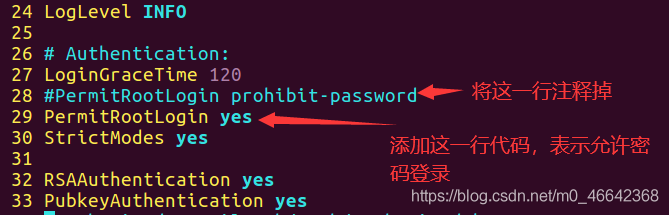
- save exit, restart SSH service :sudo service SSH restart
solution: for example, the server side is
on Linux
gradle cannot compile org. Gradle. API. The tasks. TaskExecutionException: Execution failed for task ‘: app: compileJava’
if you have the same problem, hopefully in less than a minute, read on:
as shown in figure:
error graph
error graph details
or you can click on the details
org.gradle.api.tasks.TaskExecutionException: Execution failed for task ':front-core:compileJava'.
at org.gradle.api.internal.tasks.execution.ExecuteActionsTaskExecuter.executeActions(ExecuteActionsTaskExecuter.java:100)
at org.gradle.api.internal.tasks.execution.ExecuteActionsTaskExecuter.execute(ExecuteActionsTaskExecuter.java:70)
at org.gradle.api.internal.tasks.execution.OutputDirectoryCreatingTaskExecuter.execute(OutputDirectoryCreatingTaskExecuter.java:51)
at org.gradle.api.internal.tasks.execution.SkipUpToDateTaskExecuter.execute(SkipUpToDateTaskExecuter.java:62)
at org.gradle.api.internal.tasks.execution.ResolveTaskOutputCachingStateExecuter.execute(ResolveTaskOutputCachingStateExecuter.java:54)
at org.gradle.api.internal.tasks.execution.ValidatingTaskExecuter.execute(ValidatingTaskExecuter.java:60)
at org.gradle.api.internal.tasks.execution.SkipEmptySourceFilesTaskExecuter.execute(SkipEmptySourceFilesTaskExecuter.java:97)
at org.gradle.api.internal.tasks.execution.CleanupStaleOutputsExecuter.execute(CleanupStaleOutputsExecuter.java:87)
at org.gradle.api.internal.tasks.execution.ResolveTaskArtifactStateTaskExecuter.execute(ResolveTaskArtifactStateTaskExecuter.java:52)
at org.gradle.api.internal.tasks.execution.SkipTaskWithNoActionsExecuter.execute(SkipTaskWithNoActionsExecuter.java:52)
at org.gradle.api.internal.tasks.execution.SkipOnlyIfTaskExecuter.execute(SkipOnlyIfTaskExecuter.java:54)
at org.gradle.api.internal.tasks.execution.ExecuteAtMostOnceTaskExecuter.execute(ExecuteAtMostOnceTaskExecuter.java:43)
at org.gradle.api.internal.tasks.execution.CatchExceptionTaskExecuter.execute(CatchExceptionTaskExecuter.java:34)
at org.gradle.execution.taskgraph.DefaultTaskGraphExecuter$EventFiringTaskWorker$1.run(DefaultTaskGraphExecuter.java:248)
at org.gradle.internal.progress.DefaultBuildOperationExecutor$RunnableBuildOperationWorker.execute(DefaultBuildOperationExecutor.java:336)
at org.gradle.internal.progress.DefaultBuildOperationExecutor$RunnableBuildOperationWorker.execute(DefaultBuildOperationExecutor.java:328)
at org.gradle.internal.progress.DefaultBuildOperationExecutor.execute(DefaultBuildOperationExecutor.java:199)
at org.gradle.internal.progress.DefaultBuildOperationExecutor.run(DefaultBuildOperationExecutor.java:110)
at org.gradle.execution.taskgraph.DefaultTaskGraphExecuter$EventFiringTaskWorker.execute(DefaultTaskGraphExecuter.java:241)
at org.gradle.execution.taskgraph.DefaultTaskGraphExecuter$EventFiringTaskWorker.execute(DefaultTaskGraphExecuter.java:230)
at org.gradle.execution.taskgraph.DefaultTaskPlanExecutor$TaskExecutorWorker.processTask(DefaultTaskPlanExecutor.java:123)
at org.gradle.execution.taskgraph.DefaultTaskPlanExecutor$TaskExecutorWorker.access$200(DefaultTaskPlanExecutor.java:79)
at org.gradle.execution.taskgraph.DefaultTaskPlanExecutor$TaskExecutorWorker$1.execute(DefaultTaskPlanExecutor.java:104)
at org.gradle.execution.taskgraph.DefaultTaskPlanExecutor$TaskExecutorWorker$1.execute(DefaultTaskPlanExecutor.java:98)
at org.gradle.execution.taskgraph.DefaultTaskExecutionPlan.execute(DefaultTaskExecutionPlan.java:626)
at org.gradle.execution.taskgraph.DefaultTaskExecutionPlan.executeWithTask(DefaultTaskExecutionPlan.java:581)
at org.gradle.execution.taskgraph.DefaultTaskPlanExecutor$TaskExecutorWorker.run(DefaultTaskPlanExecutor.java:98)
at org.gradle.internal.concurrent.ExecutorPolicy$CatchAndRecordFailures.onExecute(ExecutorPolicy.java:63)
at org.gradle.internal.concurrent.ManagedExecutorImpl$1.run(ManagedExecutorImpl.java:46)
at java.util.concurrent.ThreadPoolExecutor.runWorker(ThreadPoolExecutor.java:1142)
at java.util.concurrent.ThreadPoolExecutor$Worker.run(ThreadPoolExecutor.java:617)
at org.gradle.internal.concurrent.ThreadFactoryImpl$ManagedThreadRunnable.run(ThreadFactoryImpl.java:55)
at java.lang.Thread.run(Thread.java:745)
Caused by: org.gradle.api.internal.tasks.compile.CompilationFailedException: Compilation failed; see the compiler error output for details.
at org.gradle.api.internal.tasks.compile.JdkJavaCompiler.execute(JdkJavaCompiler.java:50)
at org.gradle.api.internal.tasks.compile.JdkJavaCompiler.execute(JdkJavaCompiler.java:35)
at org.gradle.api.internal.tasks.compile.NormalizingJavaCompiler.delegateAndHandleErrors(NormalizingJavaCompiler.java:98)
at org.gradle.api.internal.tasks.compile.NormalizingJavaCompiler.execute(NormalizingJavaCompiler.java:51)
at org.gradle.api.internal.tasks.compile.NormalizingJavaCompiler.execute(NormalizingJavaCompiler.java:37)
at org.gradle.api.internal.tasks.compile.CleaningJavaCompilerSupport.execute(CleaningJavaCompilerSupport.java:35)
at org.gradle.api.internal.tasks.compile.CleaningJavaCompilerSupport.execute(CleaningJavaCompilerSupport.java:25)
at org.gradle.api.tasks.compile.JavaCompile.performCompilation(JavaCompile.java:207)
at org.gradle.api.tasks.compile.JavaCompile.compile(JavaCompile.java:192)
at org.gradle.api.tasks.compile.JavaCompile.compile(JavaCompile.java:124)
at sun.reflect.GeneratedMethodAccessor780.invoke(Unknown Source)
at sun.reflect.DelegatingMethodAccessorImpl.invoke(DelegatingMethodAccessorImpl.java:43)
at java.lang.reflect.Method.invoke(Method.java:498)
at org.gradle.internal.reflect.JavaMethod.invoke(JavaMethod.java:73)
at org.gradle.api.internal.project.taskfactory.IncrementalTaskAction.doExecute(IncrementalTaskAction.java:46)
at org.gradle.api.internal.project.taskfactory.StandardTaskAction.execute(StandardTaskAction.java:39)
at org.gradle.api.internal.project.taskfactory.StandardTaskAction.execute(StandardTaskAction.java:26)
at org.gradle.api.internal.tasks.execution.ExecuteActionsTaskExecuter$1.run(ExecuteActionsTaskExecuter.java:121)
at org.gradle.internal.progress.DefaultBuildOperationExecutor$RunnableBuildOperationWorker.execute(DefaultBuildOperationExecutor.java:336)
at org.gradle.internal.progress.DefaultBuildOperationExecutor$RunnableBuildOperationWorker.execute(DefaultBuildOperationExecutor.java:328)
at org.gradle.internal.progress.DefaultBuildOperationExecutor.execute(DefaultBuildOperationExecutor.java:199)
at org.gradle.internal.progress.DefaultBuildOperationExecutor.run(DefaultBuildOperationExecutor.java:110)
at org.gradle.api.internal.tasks.execution.ExecuteActionsTaskExecuter.executeAction(ExecuteActionsTaskExecuter.java:110)
at org.gradle.api.internal.tasks.execution.ExecuteActionsTaskExecuter.executeActions(ExecuteActionsTaskExecuter.java:92)
... 32 more
gradlew compileDebugSource — stacktrac-info
tip: If according to the command not found then the next AndroidStudio generated gradlew under which path in the root directory, and then CD to the project root directory and then in the above command prefix./(slash in front of a point) can
the above command in the terminal of AndroidStudio input, recompile view gradle specific error message
run after the above command:
Task :front-core:compileJava FAILED
Putting task artifact state for task ':front-core:compileJava' into context took 0.0 secs.
Up-to-date check for task ':front-core:compileJava' took 0.001 secs. It is not up-to-date because:
  Task has failed previously.
All input files are considered out-of-date for incremental task ':front-core:compileJava'.
Compiling with JDK Java compiler API.
警告: [options] 未与 -source 1.7 一起设置引导类路径
/Users/mrq/AndroidStudioProjects/SenseInsight/common/front-core/src/main/java/com/sensetime/insight/front/Visitor.java:25: 警告: @Builder will ignore the initializing expression entirely. If you want the initializing expression to ser as default, add @Builder.Default. If it is not supposed to be settable during building, make the field final.
private int age = -1;
            ^
/Users/mrq/AndroidStudioProjects/SenseInsight/common/front-core/src/main/java/com/sensetime/insight/front/Visitor.java:30: 警告: @Builder will ignore the initializing expression entirely. If you want the initializing expression to serve as default, add @Builder.Default. If it is not supposed to be settable during building, make the field final.
private String gender = "";
               ^
/Users/mrq/AndroidStudioProjects/SenseInsight/common/front-core/src/main/java/com/sensetime/insight/front/FaceImage.java:36: 警告: @Builder will ignore the initializing expression entirely. If you want the initializing expression to sve as default, add @Builder.Default. If it is not supposed to be settable during building, make the field final.
private int sended = 0;
            ^
/Users/mrq/AndroidStudioProjects/SenseInsight/common/front-core/src/main/java/com/sensetime/insight/front/detect/FaceHandler.java:8: 错误: 程序包com.sun.tools.internal.jxc.ap不存在
import com.sun.tools.internal.jxc.ap.Const;
                                ^
1 个错误
3 个警告

:front-core:compileJava (Thread[Task worker for ':',5,main]) completed. Took 1.239 secs.

FAILURE: Build failed with an exception.

* What went wrong:
Execution failed for task ':front-core:compileJava'.
> Compilation failed; see the compiler error output for details.
the above error is very detailed, one error, three warnings can be ignored, direct to the error
/Users/mrq/AndroidStudioProjects/SenseInsight/common/front-core/src/main/java/com/sensetime/insight/front/detect/FaceHandler.java:8: 错误: 程序包com.sun.tools.internal.jxc.ap不存在
import com.sun.tools.internal.jxc.ap.Const;
                            ^
, you can see what’s going on, what’s going on in which path, which class, what’s going on and my problem is I can’t find this package, and I can just fix it and I’m sure as long as I get to the problem, it’s not that hard for the programmer monkey to fix it, right?
actually, my problem was that I made a mistake when I was running Constant, and the Const package was automatically imported. However, my AndroidStudio did not set the automatic deletion of useless packages, so this problem occurred when I was packing. Here, I would also like to show the Settings of AndroidStudio’s automatic guide package and automatic delete package
automatic guide set
there was a problem with the transfer project today:
Failed to load resource: net::ERR_SSL_PROTOCOL_ERROR
looked for a long time, do not know what is wrong, thought it was cross-domain, looked at me there is no cross-domain
Is
a question of permissions?But I have all the permissions
I used the background of laravel-admin, and it occurred to me that it might be because of the request protocol, because my current request is HTTPS protocol, and my project HTTPS protocol can also be accessed. So I changed the request protocol from HTTPS to HTTP
and then it’s normal
occurs
error: Command ‘C:\Program Files (x86)\Microsoft Visual Studio\2019\Community\ Tools\MSVC\14.24.28314\bin\HostX86\x64\cl.exe’ failed with exit status 2
such an error, in addition to possible VS installation problems, could also be a problem with the running Program. For example: Python setup.py build_ext –inplace is required to install an algorithm framework, but it runs incorrectly, as shown in the figure below. 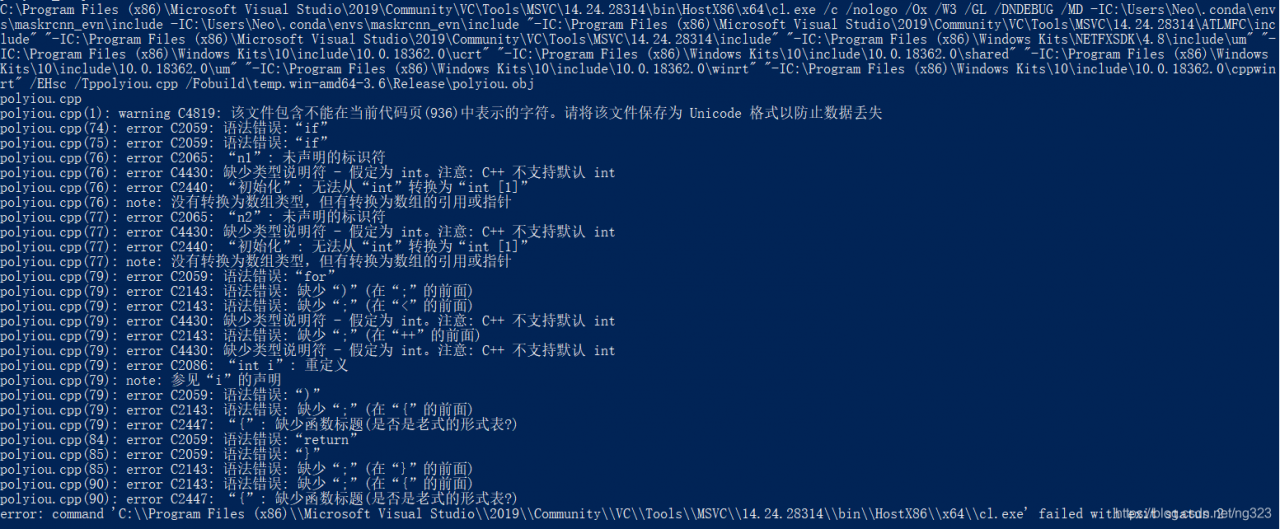
on disk d
right click – property – security
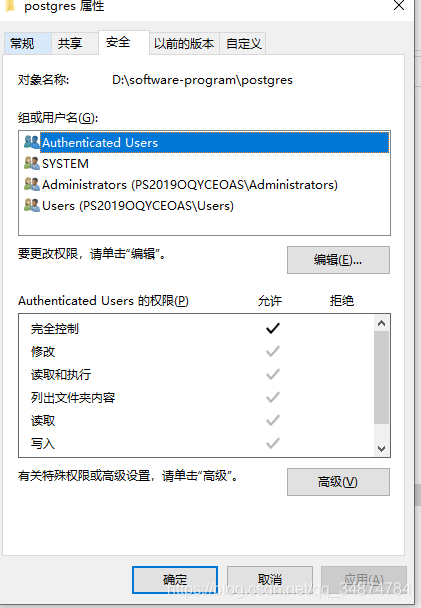
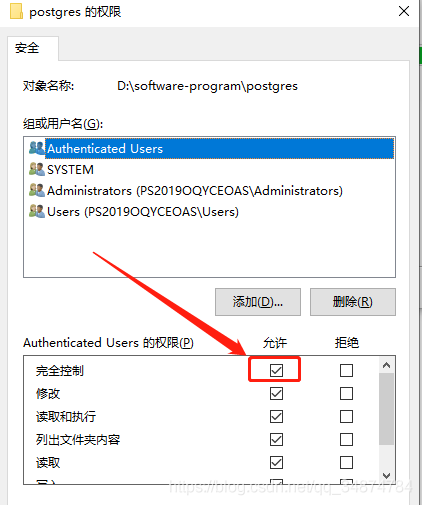
click edit,
each user, each user group, give full control,
uninstall, reinstall postgresql to this directory
login when the following problems occur:
Could not connect to DB: SQLSTATE[08001] SQLConnect: -30082 [IBM][CLI Driver] SQL30082N  Security processing
 failed with reason "24" ("USERNAME AND/OR PASSWORD INVALID").  SQLSTATE=08001
check the relevant solutions:
http://www-01.ibm.com/support/docview.wss?uid=swg21327771
http://www-01.ibm.com/support/docview.wss?uid=swg21416382
and look for the error code on the command line:
[db2inst1@xxx ~]$ db2 ?sql30082N

SQL30082N  Security processing failed with reason "<reason-code>"
      ("<reason-string>").

Explanation:

An error occurred during security processing. The cause of the security
error is described by the "<reason-code>" and corresponding
"<reason-string>" value.

The following is a list of reason codes and corresponding reason
strings:

0 (NOT SPECIFIED)


         The specific security error is not specified.


1 (PASSWORD EXPIRED)


         The password specified in the request has expired.


2 (PASSWORD INVALID)


         The password specified in the request is not valid.


3 (PASSWORD MISSING)


         The request did not include a password.


4 (PROTOCOL VIOLATION)


         The request violated security protocols.


5 (USERID MISSING)


         The request did not include a userid.


6 (USERID INVALID)


         The userid specified in the request is not valid.


7 (USERID REVOKED)


         The userid specified in the request has been revoked.


8 (GROUP INVALID)


         The group specified in the request is not valid.


9 (USERID REVOKED IN GROUP)


         The userid specified in the request has been revoked in the
         group.


10 (USERID NOT IN GROUP)


         The userid specified in the request is not in the group.


11 (USERID NOT AUTHORIZED AT REMOTE LU)


         The userid specified in the request is not authorized at the
         remote Logical Unit.


12 (USERID NOT AUTHORIZED FROM LOCAL LU)


         The userid specified in the request is not authorized at the
         remote Logical Unit when coming from the local Logical Unit.


13 (USERID NOT AUTHORIZED TO TP)


         The userid specified in the request is not authorized to access
         the Transaction Program.


14 (INSTALLATION EXIT FAILED)


         The installation exit failed.


15 (PROCESSING FAILURE)


         Security processing at the server failed.


16 (NEW PASSWORD INVALID)


         the password specified on a change password request did not
         meet the server's requirements.


17 (UNSUPPORTED FUNCTION)


         the security mechanism specified by the client is invalid for
         this server. Some typical examples:


         *  The client sent a new password value to a server that does
            not support the change password function.
         *  The client sent SERVER_ENCRYPT authentication information to
            a server that does not support password encryption.
            Authentication type catalog information must be the same at
            the server and the client.
         *  The client sent a userid (but no password) to a server that
            does not support authentication by userid only.
         *  The client has not specified an authentication type, and the
            server has not responded with a supported type. This might
            include the server returning multiple types from which the
            client is unable to choose.
         *  The CLIENT AUTHENTICATION type is not supported by "IBM Data
            Server Driver for ODBC and CLI" and "IBM Data Server Driver
            package"


18 (NAMED PIPE ACCESS DENIED)


         The named pipe is inaccessible due to a security violation.


19 (USERID DISABLED or RESTRICTED)


         The userid has been disabled, or the userid has been restricted
         from accessing the operating environment at this time.


20 (MUTUAL AUTHENTICATION FAILED)


         The server being contacted failed to pass a mutual
         authentication check. The server is either an imposter, or the
         ticket sent back was damaged.


21 (RESOURCE TEMPORARILY UNAVAILABLE)


         Security processing at the server was terminated because a
         resource was temporarily unavailable. For example, on AIX, no
         user licenses may have been available.


<strong>24 (USERNAME AND/OR PASSWORD INVALID)


         The username specified, password specified, or both, are
         invalid. Some specific causes are:


         1. If you have recently changed permissions on DB2 critical
            files such as db2ckpw or moved to a new Fixpak, the db2iupdt
            command which updates the instance might not have been run.
         2. The username being used might be in an invalid format. For
            example, on UNIX and Linux platforms, usernames must be all
            be lowercase.
         3. An error might have been made in specifying the catalog
            information. For example, the correct authentication type
            might not have been specified or, if applicable, the remote
            server might not have been cataloged on the local system.</strong>


25 (CONNECTION DISALLOWED)


         The security plugin has disallowed the connection.


26 (UNEXPECTED SERVER ERROR)


         The server security plugin encountered an unexpected error. The
         administration notification log file on the server contains
         more specific problem information. The following are examples
         of issues that can cause problems:


         *  The security service was not started.
         *  The userid starting the DB2 service did not have admin
            privileges.


27 (INVALID SERVER CREDENTIAL)


         The server security plugin encountered an invalid server
         credential.


28 (EXPIRED SERVER CREDENTIAL)


         The server security plugin encountered an expired server
         credential.


29 (INVALID CLIENT SECURITY TOKEN)


         The server security plugin encountered an invalid security
         token sent by the client.


30 (CLIENT PLUGIN MISSING API)


         The client security plugin is missing a required API.


31 (WRONG CLIENT PLUGIN TYPE)


         The client security plugin is of the wrong plugin type.


32 (UNKNOWN CLIENT GSS-API PLUGIN)


         The client security plugin does not have a matching GSS-API
         security plugin available for connection to the database.


33 (UNABLE TO LOAD CLIENT PLUGIN)


         The client security plugin cannot be loaded.


34 (INVALID CLIENT PLUGIN NAME)


         The client security plugin name is invalid.


35 (INCOMPATIBLE CLIENT PLUGIN API VERSION)


         The client security plugin reports an API version that is
         incompatible with DB2.


36 (UNEXPECTED CLIENT ERROR)


         The client security plugin encountered an unexpected error.


37 (INVALID SERVER PRINCIPAL NAME)


         The server security plugin encountered an invalid principal
         name.


38 (INVALID CLIENT CREDENTIAL)


         The client security plugin encountered an invalid client
         credential.


39 (EXPIRED CLIENT CREDENTIAL)


         The client security plugin encountered an expired client
         credential.


40 (INVALID SERVER SECURITY TOKEN)


         The client security plugin encountered an invalid security
         token sent by the server.


41 (SWITCH USER INVALID)


         The client is configured to request a trusted connection and
         switch user in the trusted connection. A trusted connection was
         not established and so the switch user request is invalid.


42 (ROOT CAPABILITY REQUIRED)


         Authentication using local client or server passwords is not
         currently enabled.


43 (NON-DB2 QUERY MANAGER PRODUCT DISALLOWED CONNECTION)


         A non-DB2 query manager product has disallowed the connection.

User response:

Ensure that the proper userid and/or password is supplied.

The userid may be disabled, the userid may be restricted to accessing
specific workstations, or the userid may be restricted to certain hours
of operation.

17

         Retry the command with a supported authentication type. Ensure
         that catalog information specifies the correct authentication
         type.


20

         Make sure the authentication mechanism for the server is
         started, and retry.


<strong>24

         Solutions to specific problem causes described previously in
         this message are:


         1. Run DB2IUPDT <InstName> to update the instance.
         2. Ensure that the username created is valid. Review the DB2
            General Naming Rules.
         3. Ensure that catalog information is correct.</strong>


25

         Change the database name used for the connection or the TCP/IP
         address used to connect to this database.


26

         Fix the problem identified by the plugin error message text in
         the administration notification log.


         If you are unable to correct the problem, invoke the
         Independant Trace Facility and retry the scenario to collect
         information for IBM support.


27

         Verify that the server credential is provided during security
         plugin initialization and that it is in a format recognized by
         the security plugin. As the credential will be used to accept
         contexts, it must be an ACCEPT or BOTH credential.


28

         Contact your DBA. The server's credential must be renewed
         before the command is resubmitted. If renewing alters the
         credential handle, then a db2stop and db2start will be
         necessary. For information on how to renew your server's
         credential, consult the documentation available for the
         authentication mechanism used by the security plugin.


29

         Resubmit the statement. If the problem still exists, then
         verify that the client security plugin is generating a valid
         security token.


30

         Check the administration notification log file for the name of
         the required missing API. Add the missing API to the security
         plugin.


31

         Specify the right type of security plugin in the appropriate
         database manager configuration parameter. For example, do not
         specify a userid-password based security plugin for the
         SRVCON_GSSPLUGIN_LIST database manager configuration parameter.


32

         Install the matching security plugin that the database server
         used on the client. Ensure that the indicated security plugin
         is located in the client-plugin directory.


33

         Check the administration notification log file on the client
         for more information. Fix the problem identified by the error
         message text in the administration notification log.


34

         Specify a valid security plugin name. The name should not
         contain any directory path information.


35

         Ensure that the security plugin is using a supported version of
         the APIs and that it is reporting a correct version number.


36

         Check the administration notification log file on the client
         for more information. Fix the problem identified by the error
         message text in the administration notification log.


37

         Check the administration notification log file for the
         principal name. Make sure the principal name is in a format
         that is recognized by the security plugin.


38

         Verify that the client credential (generated by
         db2secGenerateInitialCred or provided as an inbound delegated
         credential) is in a format recognized by the security plugin.
         As the credential will be used to initiate contexts, it must be
         an INITIATE or BOTH credential.


39

         The user issuing the statement must obtain the appropriate
         credentials (or re-obtain their initial credentials) and then
         resubmit the statement.


40

         Resubmit the statement. If the problem still exists, then
         verify that the server security plugin is generating a valid
         security token.


41

         Re-establish a trusted connection with valid credentials and
         re-submit a switch user request.


42

         To enable local client or server authentication for non-root
         installations, the system administrator must run the db2rfe
         script. Alternatively, authentication can be done using a
         security plugin.


43

         If additional explanation is required, contact your
         administrator for the query manager product.

sqlcode: -30082

sqlstate: 08001


   Related information:
   Security plug-in API versioning
   Authentication
   Security plug-ins
seems to be useless until finally, the original code about database connection ini file, db2inst1 was incorrectly written as db2instl – – no words
notice 1 and l, ok, flip the table!
1, start menu — enter services.msc enter, start Service page
2, find Network List Service Properties, right click on it and select property
3, set the start type as automatic, then apply.
systemctl enable lvm2-lvmetad.service
systemctl enable lvm2-lvmetad.socket
systemctl start lvm2-lvmetad.service
systemctl start lvm2-lvmetad.socketerror message
Collecting pyaudio
  Using cached https://files.pythonhosted.org/packages/ab/42/b4f04721c5c5bfc196ce156b3c768998ef8c0ae3654ed29ea5020c749a6b/PyAudio-0.2.11.tar.gz
Building wheels for collected packages: pyaudio
  Running setup.py bdist_wheel for pyaudio ... error
  Complete output from command /usr/bin/python3.5 -u -c "import setuptools, tokenize;__file__='/tmp/pip-install-kg54s8cx/pyaudio/setup.py';f=getattr(tokenize, 'open', open)(__file__);code=f.read().replace('\r\n', '\n');f.close();exec(compile(code, __file__, 'exec'))" bdist_wheel -d /tmp/pip-wheel-nwzkkq3_ --python-tag cp35:
  running bdist_wheel
  running build
  running build_py
  creating build
  creating build/lib.linux-x86_64-3.5
  copying src/pyaudio.py -> build/lib.linux-x86_64-3.5
  running build_ext
  building '_portaudio' extension
  creating build/temp.linux-x86_64-3.5
  creating build/temp.linux-x86_64-3.5/src
  x86_64-linux-gnu-gcc -pthread -DNDEBUG -g -fwrapv -O2 -Wall -Wstrict-prototypes -g -fstack-protector-strong -Wformat -Werror=format-security -Wdate-time -D_FORTIFY_SOURCE=2 -fPIC -I/usr/include/python3.5m -c src/_portaudiomodule.c -o build/temp.linux-x86_64-3.5/src/_portaudiomodule.o
  src/_portaudiomodule.c:29:23: fatal error: portaudio.h: No such file or directory
  compilation terminated.
  error: command 'x86_64-linux-gnu-gcc' failed with exit status 1

  ----------------------------------------
  Failed building wheel for pyaudio
  Running setup.py clean for pyaudio
Failed to build pyaudio
Installing collected packages: pyaudio
  Running setup.py install for pyaudio ... error
    Complete output from command /usr/bin/python3.5 -u -c "import setuptools, tokenize;__file__='/tmp/pip-install-kg54s8cx/pyaudio/setup.py';f=getattr(tokenize, 'open', open)(__file__);code=f.read().replace('\r\n', '\n');f.close();exec(compile(code, __file__, 'exec'))" install --record /tmp/pip-record-1k4o92s5/install-record.txt --single-version-externally-managed --compile:
    running install
    running build
    running build_py
    creating build
    creating build/lib.linux-x86_64-3.5
    copying src/pyaudio.py -> build/lib.linux-x86_64-3.5
    running build_ext
    building '_portaudio' extension
    creating build/temp.linux-x86_64-3.5
    creating build/temp.linux-x86_64-3.5/src
    x86_64-linux-gnu-gcc -pthread -DNDEBUG -g -fwrapv -O2 -Wall -Wstrict-prototypes -g -fstack-protector-strong -Wformat -Werror=format-security -Wdate-time -D_FORTIFY_SOURCE=2 -fPIC -I/usr/include/python3.5m -c src/_portaudiomodule.c -o build/temp.linux-x86_64-3.5/src/_portaudiomodule.o
    src/_portaudiomodule.c:29:23: fatal error: portaudio.h: No such file or directory
    compilation terminated.
    error: command 'x86_64-linux-gnu-gcc' failed with exit status 1

    ----------------------------------------
Command "/usr/bin/python3.5 -u -c "import setuptools, tokenize;__file__='/tmp/pip-install-kg54s8cx/pyaudio/setup.py';f=getattr(tokenize, 'open', open)(__file__);code=f.read().replace('\r\n', '\n');f.close();exec(compile(code, __file__, 'exec'))" install --record /tmp/pip-record-1k4o92s5/install-record.txt --single-version-externally-managed --compile" failed with error code 1 in /tmp/pip-install-kg54s8cx/pyaudio/
Execute the following command:
root@robot:/home/liu# sudo apt-get install portaudio19-dev python-all-dev
Reading package lists... Done
Building dependency tree
Reading state information... Done
python-all-dev is already the newest version (2.7.12-1~16.04).
python-all-dev set to manually installed.
The following packages were automatically installed and are no longer required:
  fonts-lato libruby2.3 linux-headers-4.10.0-28
  linux-headers-4.10.0-28-generic linux-headers-4.13.0-36
  linux-headers-4.13.0-36-generic linux-headers-4.13.0-38
  linux-headers-4.13.0-38-generic linux-headers-4.4.0-124
  linux-headers-4.4.0-124-generic linux-image-4.10.0-28-generic
  linux-image-4.13.0-36-generic linux-image-4.13.0-38-generic
  linux-image-extra-4.10.0-28-generic linux-image-extra-4.13.0-36-generic
  linux-image-extra-4.13.0-38-generic rake ruby ruby-did-you-mean
  ruby-minitest ruby-net-telnet ruby-power-assert ruby-test-unit ruby2.3
  rubygems-integration
Use 'sudo apt autoremove' to remove them.
The following additional packages will be installed:
  libjack-dev libjack0 libportaudiocpp0
Suggested packages:
  jackd1 portaudio19-doc
The following packages will be REMOVED:
  libjack-jackd2-0
The following NEW packages will be installed:
  libjack-dev libjack0 libportaudiocpp0 portaudio19-dev
0 upgraded, 4 newly installed, 1 to remove and 546 not upgraded.
Need to get 359 kB of archives.
After this operation, 2,512 kB of additional disk space will be used.
Do you want to continue?[Y/n] y
Get:1 http://mirrors.sohu.com/ubuntu xenial/universe amd64 libjack0 amd64 1:0.124.1+20140122git5013bed0-3build2 [43.1 kB]
Get:2 http://mirrors.sohu.com/ubuntu xenial/universe amd64 libjack-dev amd64 1:0.124.1+20140122git5013bed0-3build2 [199 kB]
Get:3 http://mirrors.sohu.com/ubuntu xenial/main amd64 libportaudiocpp0 amd64 19+svn20140130-1build1 [15.4 kB]
Get:4 http://mirrors.sohu.com/ubuntu xenial/main amd64 portaudio19-dev amd64 19+svn20140130-1build1 [102 kB]
Fetched 359 kB in 2s (177 kB/s)
dpkg: libjack-jackd2-0:amd64: dependency problems, but removing anyway as you requested:
 simplescreenrecorder depends on libjack-jackd2-0 (>= 1.9.5~dfsg-14) | libjack-0.116; however:
  Package libjack-jackd2-0:amd64 is to be removed.
  Package libjack-0.116 is not installed.
  Package libjack-jackd2-0:amd64 which provides libjack-0.116 is to be removed.
 gstreamer1.0-plugins-good:amd64 depends on libjack-jackd2-0 (>= 1.9.5~dfsg-14) | libjack-0.116; however:
  Package libjack-jackd2-0:amd64 is to be removed.
  Package libjack-0.116 is not installed.
  Package libjack-jackd2-0:amd64 which provides libjack-0.116 is to be removed.
 libavdevice-ffmpeg56:amd64 depends on libjack-jackd2-0 (>= 1.9.5~dfsg-14) | libjack-0.116; however:
  Package libjack-jackd2-0:amd64 is to be removed.
  Package libjack-0.116 is not installed.
  Package libjack-jackd2-0:amd64 which provides libjack-0.116 is to be removed.
 libasound2-plugins:amd64 depends on libjack-jackd2-0 (>= 1.9.5~dfsg-14) | libjack-0.116; however:
  Package libjack-ja
(Reading database ... 494197 files and directories currently installed.)
Removing libjack-jackd2-0:amd64 (1.9.10+20150825git1ed50c92~dfsg-1ubuntu1) ...
Processing triggers for libc-bin (2.23-0ubuntu10) ...
Selecting previously unselected package libjack0:amd64.
(Reading database ... 494188 files and directories currently installed.)
Preparing to unpack .../libjack0_1%3a0.124.1+20140122git5013bed0-3build2_amd64.deb ...
Unpacking libjack0:amd64 (1:0.124.1+20140122git5013bed0-3build2) ...
Selecting previously unselected package libjack-dev.
Preparing to unpack .../libjack-dev_1%3a0.124.1+20140122git5013bed0-3build2_amd64.deb ...
Unpacking libjack-dev (1:0.124.1+20140122git5013bed0-3build2) ...
Selecting previously unselected package libportaudiocpp0:amd64.
Preparing to unpack .../libportaudiocpp0_19+svn20140130-1build1_amd64.deb ...
Unpacking libportaudiocpp0:amd64 (19+svn20140130-1build1) ...
Selecting previously unselected package portaudio19-dev.
Preparing to unpack .../portaudio19-dev_19+svn20140130-1build1_amd64.deb ...
Unpacking portaudio19-dev (19+svn20140130-1build1) ...
Processing triggers for doc-base (0.10.7) ...
Processing 1 added doc-base file...
Setting up libjack0:amd64 (1:0.124.1+20140122git5013bed0-3build2) ...
Setting up libjack-dev (1:0.124.1+20140122git5013bed0-3build2) ...
Setting up libportaudiocpp0:amd64 (19+svn20140130-1build1) ...
Setting up portaudio19-dev (19+svn20140130-1build1) ...
Processing triggers for libc-bin (2.23-0ubuntu10) ...
execute pip3 install PyAudio
again
root@robot:/home/liu# pip3 install pyaudio
Collecting pyaudio
  Using cached https://files.pythonhosted.org/packages/ab/42/b4f04721c5c5bfc196ce156b3c768998ef8c0ae3654ed29ea5020c749a6b/PyAudio-0.2.11.tar.gz
Building wheels for collected packages: pyaudio
  Running setup.py bdist_wheel for pyaudio ... done
  Stored in directory: /root/.cache/pip/wheels/f4/a8/a4/292214166c2917890f85b2f72a8e5f13e1ffa527c4200dcede
Successfully built pyaudio
Installing collected packages: pyaudio
Successfully installed pyaudio-0.2.11
recently when conda installed the software package, the following problems have been occurring. I found a lot of solutions on the Internet but failed to solve my problem. See the link
Collecting package metadata (current_repodata.json): done
Solving environment: failed with current_repodata.json, will retry with next repodata source.
Collecting package metadata (repodata.json): done
Solving environment: failed
Initial quick solve with frozen env failed.  Unfreezing env and trying again.
Solving environment: failedwhen I later looked at the error message, it turned out that it was caused by two commands for using conda-forge. The culprit is the second sentence.
conda config --add channels conda-forge
conda config --set channel_priority strictconda config --set channel_priority flexible
ALTER TABLE `table_name` AUTO_INCREMENT = 1