Author Archives: Robins

wordpress :This block has encountered an error and cannot be previewed

Version update background edit when previously added block is not editable
This block has encountered an error and cannot be previewed
Check the error message React -dom.min.js?Ver =16.9.0:103 TypeError: m.find is not a function
Because I’m using the Stargazer template
Modify the template file functions.php
Add to it
add_action( ‘after_setup_theme’, function() { remove_theme_support( ‘editor-color-palette’ ); });

【fiddler】Error:ConnectionRefused(0x274d)

Keep sorting through the problems you encountered while learning Fiddler.

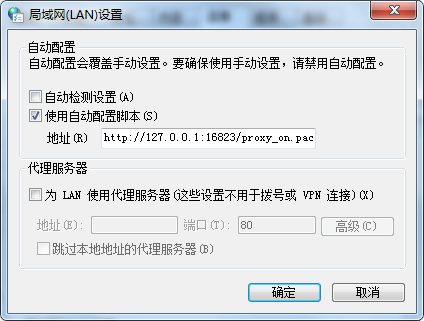
Problem description: Install Fiddler successfully, open Fiddler to intercept chrome/IE HTTP packets, “[Fiddler] The Connection to The upstream proxy/gateway failed,closing Fiddler, Changing your System Proxy Settings,and restarting Fiddler may help. Error: Connectionunion (0x274d).”

Solution:
according to the prompt page, first close the fiddler, and then check the proxy Settings of the system, and check the discovery agent is set to “automatic configuration => using automatic configuration script”, as shown in the figure below, at the same time, the form of tips “automatic configuration overrides manually, be sure to use manually, please disable automatic configuration”, and I will try to “use automatic configuration script” in front of the marquee uncheck more, and then try again to open the fiddler, input the HTTPS site in the browser, the page shows success. Another problem solved, the world feels a lot cleaner.

Connection authorization failure occurred. Reason: local security service non retryable error solution

Above the exception is when connecting to my, very strange, because DB2 USES for such a long time have never seen this problem, the single from the perspective of the exception message is obviously validation fails, the DB2 connect to a user name and password problem, the problem is why such a problem, when the user name and password are correct.

Study found that after is the system differences, the password can’t be in clear text mode is stored in the system, are saved after through the corresponding encryption algorithm, DB2 USES a SHA256 encryption, and a lot of high version of the Linux the default encryption algorithm is the SHA512, such system to create DB2 user password by SHA512 stored in the system, the connection to DB2 by SHA256 password passwords in encrypted and stored in the system, the result is, of course, failure, the solution is as follows:

Open the /etc/pam.d/system-auth file, find the second line of passwd configuration, change sha512 to Sha256, and save;

Rerun the passwd DB2 user and set the password;

Success;

This will replace the system encryption method with SHA256 and then update the saved password.

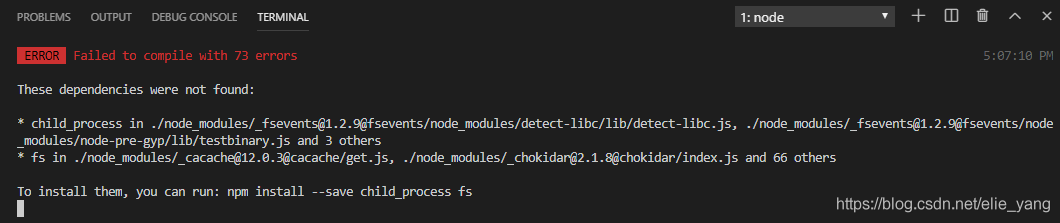
NPM compilation failed: can’t resolve ‘child_ process’

Failed to compile.
Fsevents /node_modules/[email protected]@fsevents/node_modules/ detector-libc /lib/ detector-libc.js
Module not found: Error: Can’t resolve ‘child_process’ in ‘D:\Today\WebFront\node_modules\[email protected]@fsevents\node_modules\detect-libc\lib’

NPM install –save child_process FS prompted by various attempts, also tried to delete node_modules folder to re-install NPM, and even sent the code undo back to re-paste the files with changes, but failed!
Baidu saw that someone had encountered similar problems, and added the following nodes in Webpack.base.config.js:

node: {

        // prevent webpack from injecting useless setImmediate polyfill because Vue
        // source contains it (although only uses it if it's native).
        //setImmediate: false,
        // prevent webpack from injecting mocks to Node native modules
        // that does not make sense for the client
        //dgram: 'empty',
       fs: 'empty',
        //net: 'empty',
        //tls: 'empty',
        child_process: 'empty'
    }

This action will result in a compile without error, but with various warnings, NPM Run Dev will not load the VUE component; It seems that there is no way around this question.
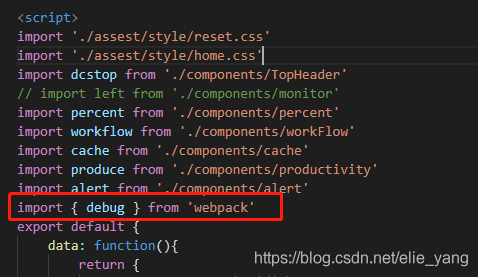
Think carefully about what the code changed before the error: found the following weird import

When I add debugger, the VS tool automatically introduces this for me, kill it, and re-run NPM run Dev
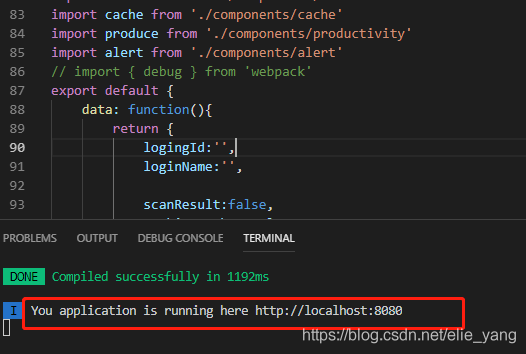
See the long lost green prompt:

Alas, I spent half a day trying to solve the problem, and I learned a lot in the process of finding the problem. There were still many pits in the application of VUE, which led to all kinds of strange mistakes. Record here!

template with C linkage

Error: template with C linkage was encountered during compilation
It bothered me for a long time before I realized what the problem was.
I am using a mixture of C++ and C projects that have header files inside extern “C”,
There is also a section of header files outside of the extern “C”,
I added a C++ header file, but the error occurred because I wrote the header file inside the EXTERn “C”.
So, what files do I add, C++ STL library header files, so ~~~~~
So, the header file can not be added randomly.
 

The MySQL server is running with the — secure file priv option

Problem description: This error occurs when importing data:
Error Code: 1290. The MySQL server is running with the –secure-file-priv option so it cannot execute this statement
Solutions:
Find the my.ini file in the MySQL installation path,
It is generally C disk or D disk, depending on your own installation, my as follows 🙂
D: \ ProgramData/MySQL/MySQL Server 5.7 \ my ini
Find the string “secure_file_priv” and set it to have no value:
secure_file_priv=
To explain,
Secure_file_priv null means that the mySQLD restriction does not allow imports or exports.
secure_file_priv is C:\temp, which restricts mysqld to import and export in the C:\temp directory and not to other directories. When
secure_file_priv has no value, it means that it can be imported or exported from any directory.
 
Then restart the MySQL service as follows:
Type “Services.MSC” into the taskbar search box, find MySQL, and restart it. OK.


Various errors (c + +)

OS X EI Capitan [10.11.6]
Xcode [8.0]
C++
Code:

#include< iostream>
#include< math.h>
#include”MyComplex.h”
usingnamespacestd;
int main(int argc,constchar * argv[]) {
//insert code here…
MyComplex c1;
MyComplex c2.
Cin & gt; > c1;
C2 = c1;
Cout & lt; < c1 < < endl;
Cout & lt; < c2 < < endl;
MyComplex c3.
C3 = c1 + c2; //error1:No viable overloaded ‘=’
Cout & lt; < c1+c2 < < Lendl; //error2: No matching constructor for initialization of ‘MyComplex’
Cout & lt; < c1-c2 < < Lendl; //error
Cout & lt; < c1/c2 < < Lendl; //error
Cout & lt; < c1*c2 < < Lendl; //error
    
Return0;
}

So how is the overloading of = defined?Look at the code.

MyComplex& operator = (MyComplex & rhs){
Real = RHS. GetReal ();
Imaginary = RHS. GetImaginary ();
Return * this;
}

It doesn’t seem to be a problem. By looking at http://www.cplusplus.com/forum/general/153830/ to find the reason of the error:
A temporary object can’t bind to A non-const reference.
(A temporary object cannot be bound to an extraordinary reference, that is, the bound reference must be constant)
Therefore, the parameter of the overloaded = function must be const. (Such a covert mistake is more than enough to cry about…)
Error1 disappears after adding const:

MyComplex& operator = (constMyComplex & rhs){
Real = RHS. GetReal ();
Imaginary = RHS. GetImaginary ();
Return * this;
}
Error2 has the same error cause.

Friend ostream& operator< < (ostream& os,const MyComplex & c);
Const is very important! Want to! !!! After the correction, the errors disappeared

Package inputenc Error: Unicode character , (U+FFØC) (inputenc) not set up for use with L aTeX. See

The article directories
Solution to the problem cause

The problem
Compiled using latex paper, appear the following Error
y.t ex. 75: Package inputenc Error: Unicode character, (U + FF Ø C) (inputenc) not set
the up for use with L aTeX. See the inputenc Package documentation for explanation.
why
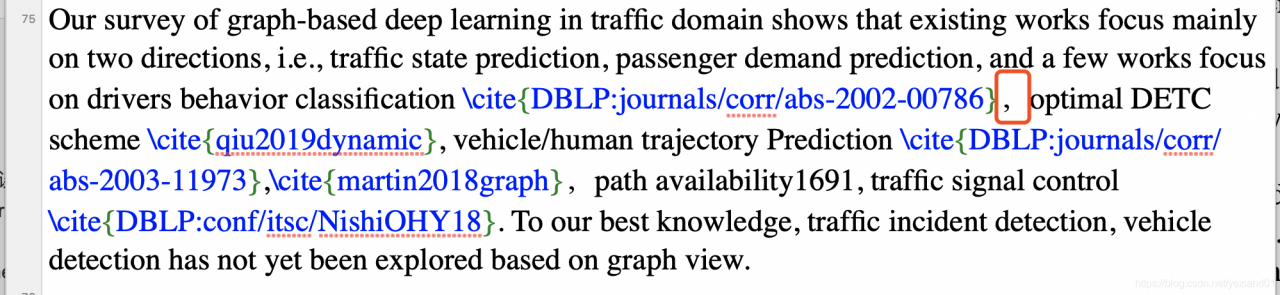
Press the prompt to position to line 75. One comma that I found particularly odd was a Chinese-style comma.

The solution
Remove the Chinese comma and replace it with an English one

Error c2011: “a certain class”: redefinition of “class” type

Reason: A class is defined multiple times, for example in the header file of class A #include “B.h”, and again in the CPP file of class A #include “B.h”
Solution: Add #pragma once to the header to prevent a header from being included multiple times and ensure that the header is compiled once. You can also use # IFNDEF, #define, #endif to prevent redefinition.

Error in Cordova project execution command after Android studio upgrade: could not find gradle wrapper within Android SDK

After upgrading Android Studio to 2.3.1 today, the Cordova project execution command reported “Error:Could not find Gradle Wrapper within Android SDK”. Details are as follows:

Trunk1 Sudo Cordova builds Android
ANDROID_HOME=/Users/fxp/Library/Android/sdk
JAVA_HOME =/Library/Java/JavaVirtualMachines jdk1.8.0 _92. JDK/Contents/Home
Reading build config file: /Users/fxp/Desktop/trunk1/build.json
Error: Could not find gradle wrapper within Android SDK. Might need to update your Android SDK.
Looked here: /Users/fxp/Library/Android/sdk/tools/templates/gradle/wrapper

According to the prompt, I went to check FXP/Users/Library/Android/SDK/tools/templates/gradle/wrapper directory, execute the command:

cd  /Users/fxp/Library/Android/sdk/tools/templates/gradle/wrapper

Just found that this directory does not exist. So I went to check my SDK and found that there was no Templates folder in the SDK/Tools directory! It seems that SDK Tools also need to be updated after Android Studio is updated to version 2.3.1.
Then I go to http://www.androiddevtools.cn to download the SDK Tools, after download decompression, the templates folder is copied to the SDK Tools directory, cordova command will no longer quote this error again.

C++:error C2228: left of ‘.str’ must have class/struct/union

Error C2228: Left of ‘. STR ‘must have class/struct/union

#include <string>
#include <iostream>
#include <vector>

using namespace std;

template <typename T>
class ValueBox {
private:
    T value;

private:

    template<typename U, 
        typename std::enable_if<std::is_class<U>::value && !std::is_same<U, string>::value, U>::type* = nullptr, 
        typename std::enable_if<!class_str<U>::ret, U>::type* = nullptr>
    std::string str(const T&) {
        cout << "1.---------------------" << endl;
        return "null";
    };

    template<typename U, 
        typename std::enable_if<std::is_class<U>::value && std::is_same<U, string>::value, U>::type* = nullptr>
    std::string str(const T&) {
        cout << "2.---------------------" << endl;
        return value;
    };

    template<typename U, 
        typename std::enable_if<std::is_class<U>::value && !std::is_same<U, string>::value, U>::type* = nullptr, 
        typename std::enable_if<class_str<U>::ret, U>::type* = nullptr>
    std::string str(const T&) {
        cout << "3.---------------------" << endl;
        return value.str();
    };

    template<typename U, 
        typename std::enable_if<!std::is_class<U>::value && std::is_arithmetic<U>::value, U>::type* = nullptr>
    std::string str(const T&) {
        cout << "4.---------------------" << endl;
        return std::to_string(value);
    };

public:
    ValueBox(const T& _value) : value(_value) {
    }

    const T& getValue() const {
        return value;
    };

    T& getValue() {
        return value;
    };

    std::string str() {
        return str<T>(value);
    };
};


int main() {
    ValueBox<string> s("sddds");
    cout << s.str() << endl;

    ValueBox<bool> j ( true);
    cout << j.str() << endl;

    ValueBox<int> i(100);
    cout << i.str() << endl;

    ValueBox<float> f ( 10.6f);
    cout << f.str() << endl;

    ValueBox<Box> b1 (Box());
    cout << b1.str() << endl;

    ValueBox<Bin> b2 (Bin());
    cout << b2.str() << endl;

    return 1;
}

The error was caused by the C++ compiler putting ValueBox< Box> b1 (Box()); In b1, Box() is regarded as the function definition, and Box() is regarded as the parameterless function with the return value of Box, except the function name is not defined at this time. There is a common name for the mistake: Most Vexing Parse
The modification methods are as follows:
1. Put Box on a separate line and initialize
Box b; // Box B () cannot be used; In this case, b is defined as a function
ValueBox< Box> b1 (b);
2. Wrap Box() in parentheses so that Box() is not treated as a function
ValueBox< Box> b1 ((Box()));
3. Use the uniform initialization syntax in C++11, that is, use {}
ValueBox< Box> b1 {Box()};
 

–Be alert for C++’s most vexing parse
Item 6. Be alert for C++’s most vexing parse
Effective STL note: Item 6–Be alert for C++’s most vexing parse