Error Message: Exception in thread “main” java.lang. ClassNotFoundException: org.sqlite.JDBC
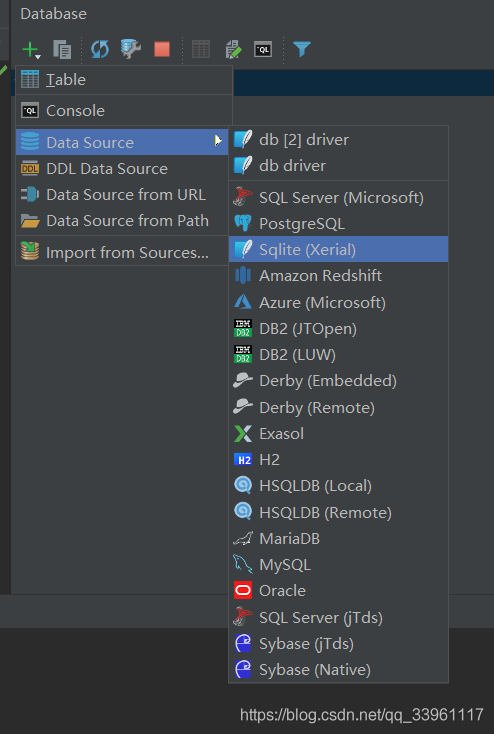
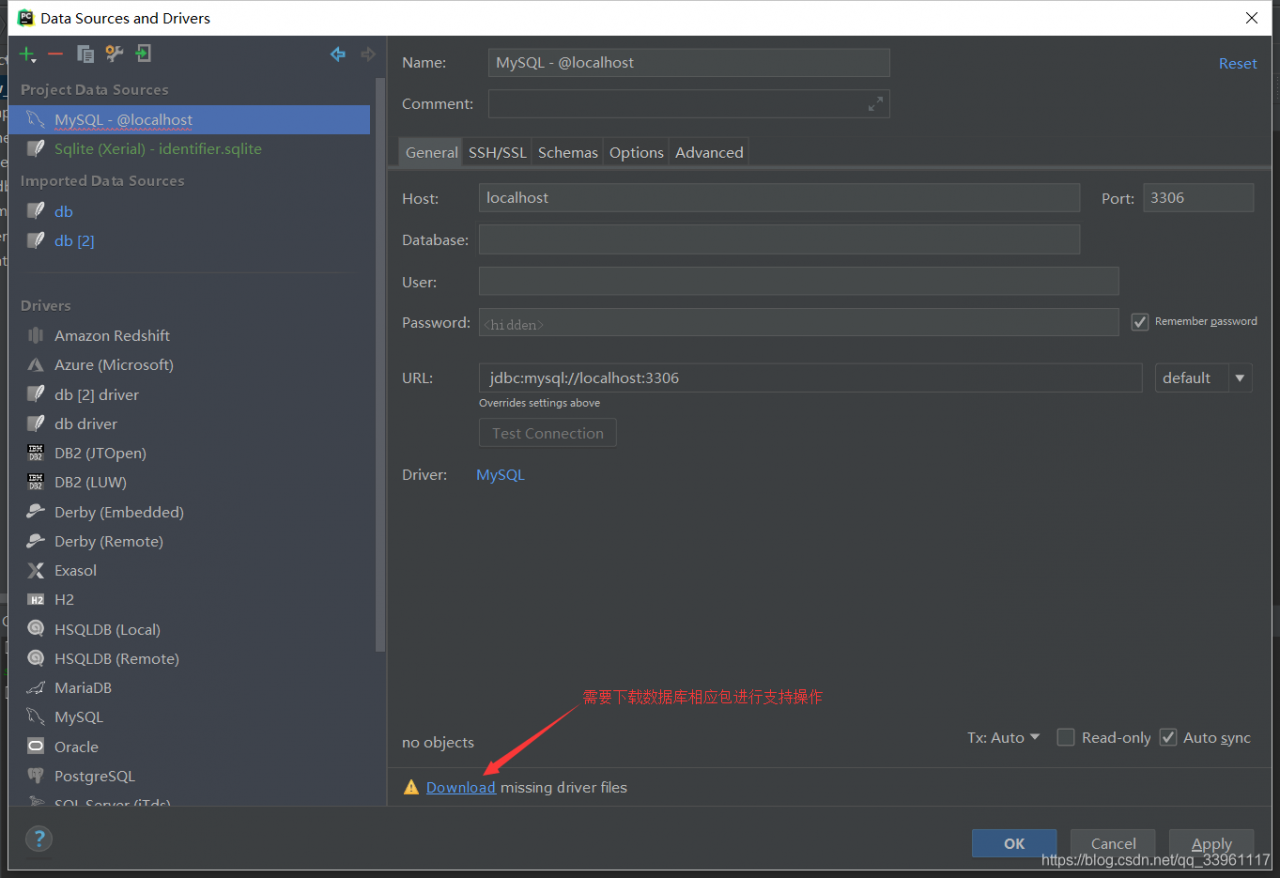
Click the Download to fix this issue
Error Message: Exception in thread “main” java.lang. ClassNotFoundException: org.sqlite.JDBC
Click the Download to fix this issue
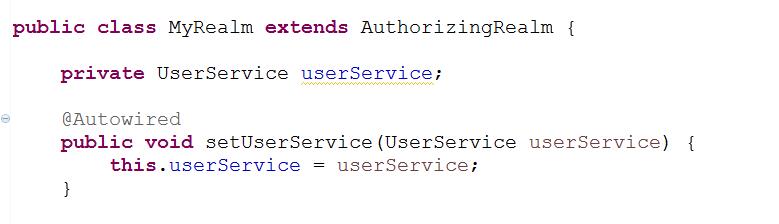
Entangled for a long time, finally found a solution on the Internet
Shiro’s Realm is a Filte, so when it is loaded in web.xml, it will load Filete before Spring, so @Autowired will never be able to find the bean in the Realm. In fact, after the container is started, the Web.xml configuration load order is
ServletContext – context – param – the listener – filter – servlet
Therefore, simply load the Spring configuration file in advance, i.e., place the Spring configuration file before the Shiro configuration file in web.xml, as shown below:
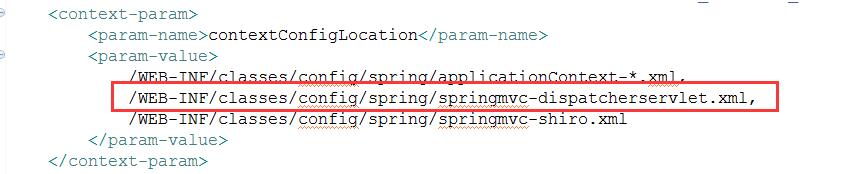
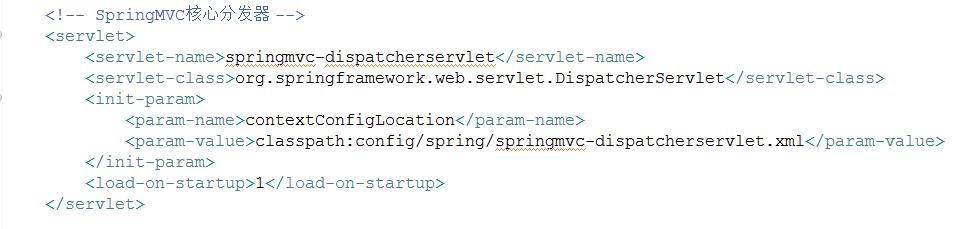
After the above configuration changes, restart the service!
The rest of the injection configuration remains the same, there is no need to set any @Resource, the previous @Autowired will be used.
ERROR: canceling statement due to conflict with recovery
Error Details:
ERROR: canceling statement due to conflict with recovery
DETAIL: User query might have needed to see row versions that must be removed.
Business again
Print (type(object)) to check the current data type, where object is the object to query.
First, there is a code that looks like this:
import re
import requests
from bs4 import BeautifulSoup
import lxml

#get the html data
urlSave = "https://www.douban.com/people/yekingyan/statuses"
req = requests.get(urlSave)
soup = BeautifulSoup(req.text,'lxml')

# After parsing beautifulsoup, get the required data
times = soup.select('div.actions > span')
says = soup.select('div.status-saying > blockquote')
And then I’m going to look at it and I’m going to get the data what is the numeric type
print('says:',type(says))
The result: Says: lt; class ‘list’>
This tells us that the data selected from beautifulSoup in soup.select() is of the list type.
Next, extract the data in the list separately
#Traversing the output
for say in says:
    print(type(say))
Let’s see what type it is
The result: <<; class ‘bs4.element.Tag’> , different from the above six types
Beautiful Soup converts a complex HTML document into a complex tree structure, where each node is a Python object. All objects can be classified into four types:
TagNavigableStringBeautifulSoupComment
Use regular expressions directly to the data
for say in says:
    # Regular expressions to get the necessary data
    say = re.search('<p>(.*?)</p>',say)
There is an error
TypeError: expected string or bytes-like object
Therefore, before the regular expression, the problem is solved by converting the data type. As follows:
for say in says:
    # Convert the data type, otherwise an error will be reported
    say = str(say)
    # Regular expressions to get the necessary data
    say = re.search('<p>(.*?)</p>',say)
Runtime environment: JDK1.8 + Tomcat 6.0. x (maven comes with)
1. Error details
exception:
org.apache.jasper. JasperException: Unable to compile class for JSP:
An error occurred at line: 1 in the generated java file
The type java.io. ObjectInputStream cannot be resolved. It is indirectly referenced from required .class files…
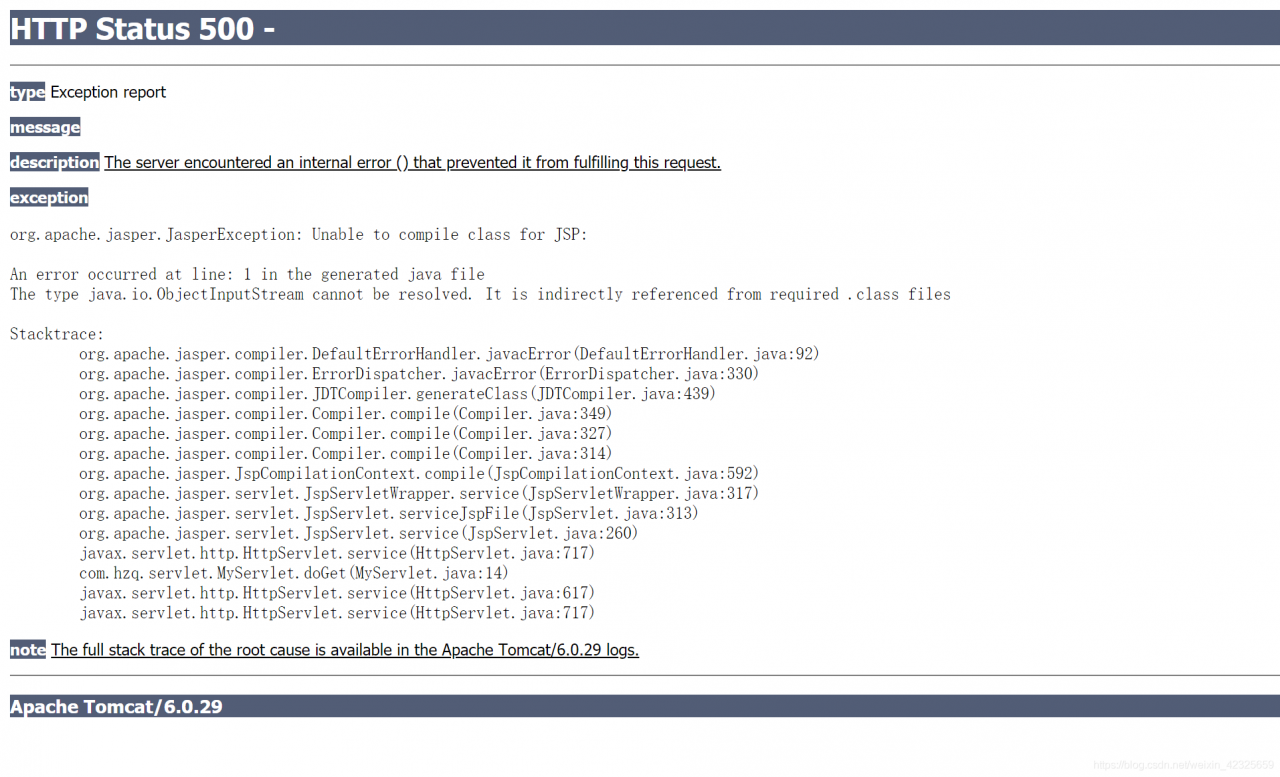
Look at the console error again
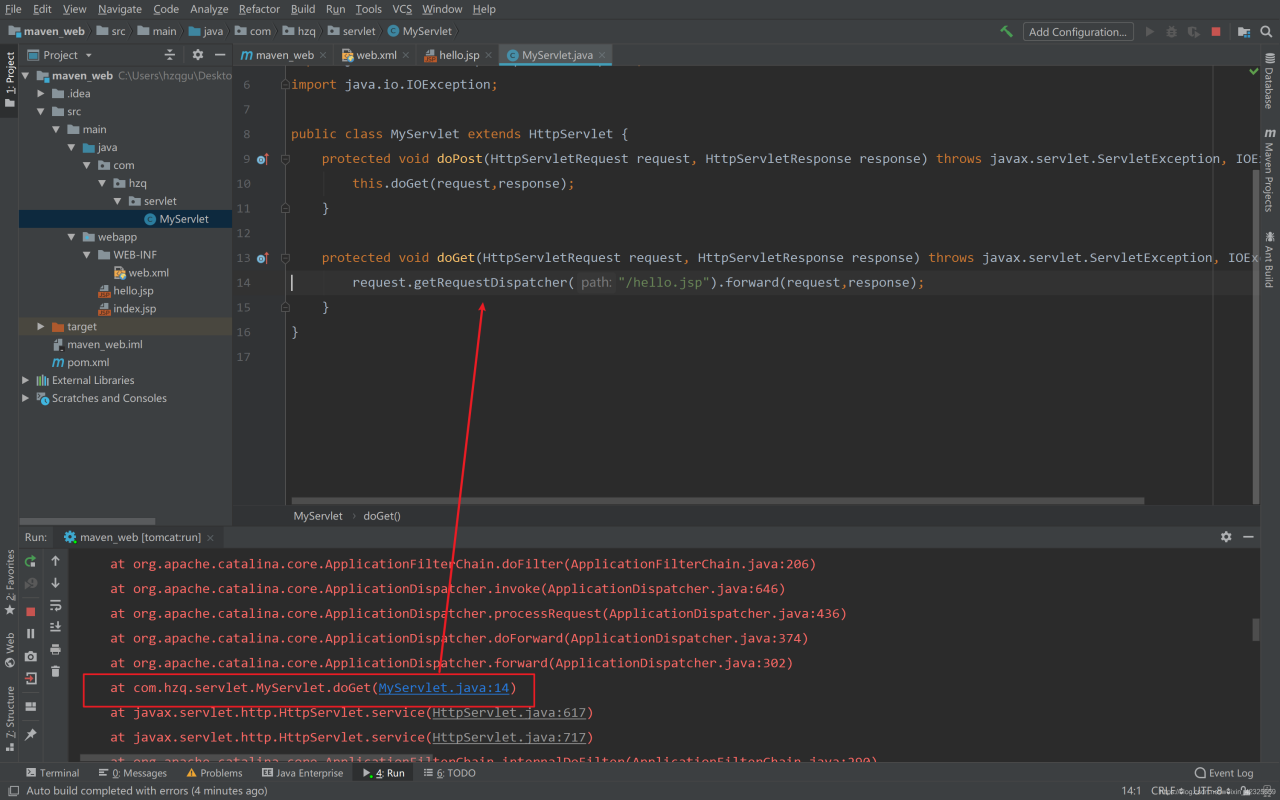
2. the cause of the problem:
maven use skeleton to create web projects, the default tomcat is 6.0, tomcat version is too low or jdk version is high.
3. problem solving:
Method 1: Use a high version of tomcat. Method 2: Use a lower version of jdk. I was using jdk1.8, the results reported an error. After replacing jdk1.7, it ran successfully without errors.
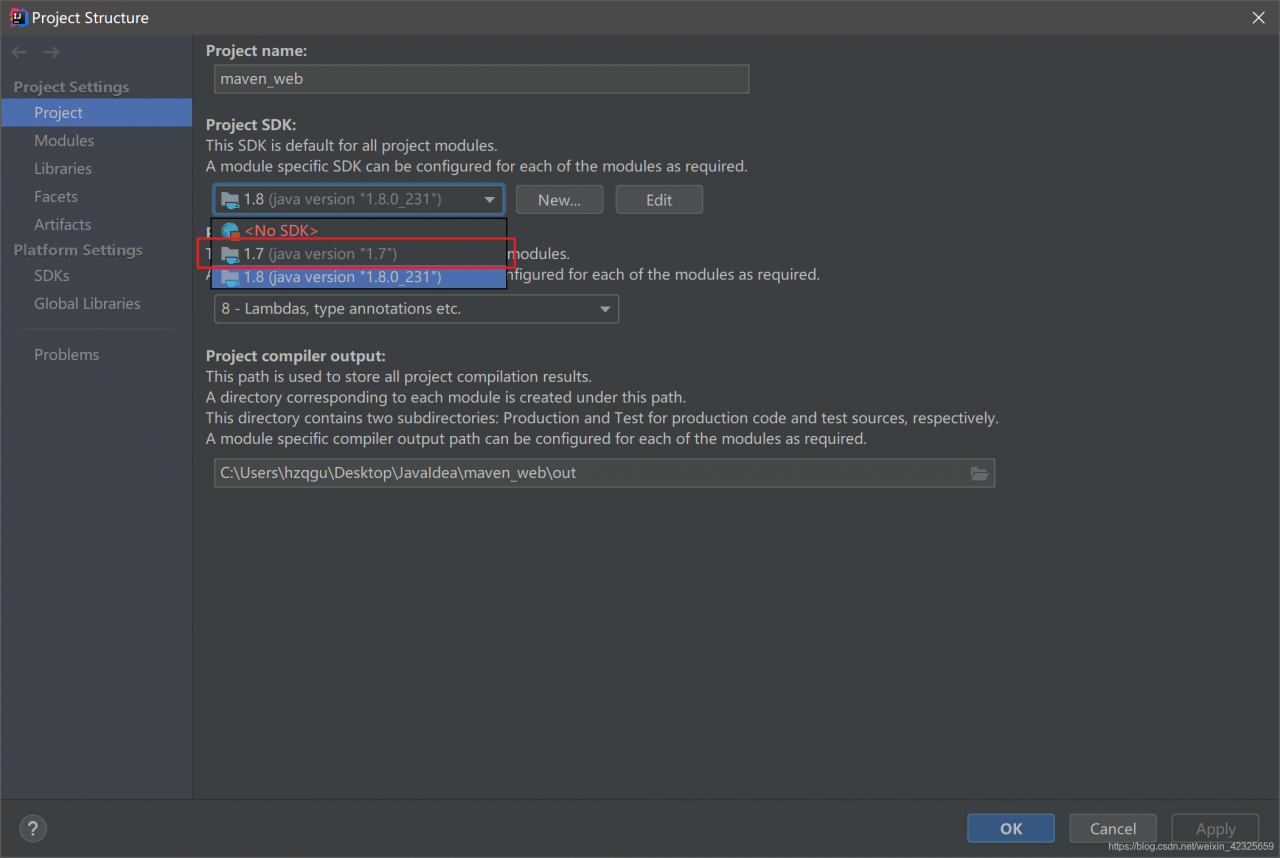
Run successfully:
public class HelloWorld{
  public static void main(String[] args){
	  int[] a = new int[5];
      a[0] = (int) (Math.random() * 100);
      a[1] = (int) (Math.random() * 100);
      a[2] = (int) (Math.random() * 100);
      a[3] = (int) (Math.random() * 100);
      a[4] = (int) (Math.random() * 100);

      System.out.println("The individual random numbers in the array are :");
      for (int i = 0; i < a.length; i++)
          System.out.println(a[i]);

      System.out.println("bubble sorting method: (compare two by two, put the bigger one behind)");
      for (int j = 0; j < a.length; j++) {
          for (int i = 0; i < a.length-j-1; i++) {
              if(a[i]>a[i+1]){
                  int temp = a[i];
                  a[i] = a[i+1];
                  a[i+1] = temp;
              }
          }
      }
      System.out.println("the minimum number is"+a[0]);
  }
}
SpringBoot integration with mybatis service startup exception log
2019-09-18 19:52:17.270 WARN 8320 — [ restartedMain] ConfigServletWebServerApplicationContext : Exception encountered during context initialization – cancelling refresh attempt: org.springframework.beans.factory. BeanCreationException: Error creating bean with name ‘testDtoMapper’ defined in file [D:\workspace\xesWorkspace\xes\target\classes\com\xes\www\core\mapper\TestDtoMapper. class]: Cannot resolve reference to bean ‘sqlSessionFactoryBean’ while setting bean property ‘sqlSessionFactory’; nested exception is org.springframework.beans.factory. NoSuchBeanDefinitionException: No bean named ‘sqlSessionFactoryBean’ available
Check the code and the introduction of jar packages no problem, the problem is the database data source and sqlSessionFactory is not integrated into a piece
maven configuration
<!--spring boot Integrating mybatis dependencies-->
<dependency>
   <groupId>org.mybatis.spring.boot</groupId>
   <artifactId>mybatis-spring-boot-starter</artifactId>
   <version>2.0.0</version>
</dependency>
<dependency>
   <groupId>org.mybatis</groupId>
   <artifactId>mybatis-spring</artifactId>
   <version>1.3.2</version>
</dependency>
<!-- It is not necessary to refer to the following jar package https://mvnrepository.com/artifact/org.apache.ibatis/ibatis-core -->
<!--<dependency>
   <groupId>org.apache.ibatis</groupId>
   <artifactId>ibatis-core</artifactId>
   <version>3.0</version>
</dependency>-->
Mybatis configuration class
@Configuration
@MapperScan(basePackages = {
        "com.xes.www.core.mapper"
}, sqlSessionFactoryRef = "sqlSessionFactoryBean")
public class MybatisConfiguration {
    // Replaces the traditional datasource binding sqlSessionFactoryBean
    @Bean
    public SqlSessionFactoryBean sqlSessionFactoryBean(DataSource dataSource) {
        SqlSessionFactoryBean sqlSessionFactoryBean = new SqlSessionFactoryBean();
        sqlSessionFactoryBean.setDataSource(dataSource);
        return sqlSessionFactoryBean;
    }
}
So here’s the traditional configuration which is configured through XML
< ! – let Spring manage SQLSessionFactory using MyBatis and Spring integration ->;
< bean id=”sqlSessionFactory” class=”org.mybatis.spring.SqlSessionFactoryBean”>
< ! — database connection pooling –>;
< property name=”dataSource” ref=”dataSource” />
< ! — Loading MyBatis global configuration file –>
< property name=”configLocation” value=”classpath:mybatis/SqlMapConfig.xml” />
< /bean>
Error:
Traceback (most recent call last):
File “D:\PyCharm Edu 2020.3.3\plugins\python-ce\helpers\pydev\pydevconsole. py”, line 5, in
from _pydev_comm. pydev_rpc import make_rpc_client, start_rpc_server, start_rpc_server_and_make_client
File “D:\PyCharm Edu 2020.3.3\plugins\python-ce\helpers\pydev_pydev_comm\pydev_rpc. py”, line 4, in
from _pydev_comm. pydev_server import TSingleThreadedServer
File “D:\PyCharm Edu 2020.3.3\plugins\python-ce\helpers\pydev_pydev_comm\pydev_server. py”, line 4, in
from _shaded_thriftpy. server import TServer
File “D:\PyCharm Edu 2020.3.3\plugins\python-ce\helpers\third_party\thriftpy_shaded_thriftpy\server. py”, line 9, in
from shaded_thriftpy. transport import (
File “D:\PyCharm Edu 2020.3.3\plugins\python-ce\helpers\third_party\thriftpy_shaded_thriftpy\transport_init. py”, line 57, in
from .sslsocket import TSSLSocket, TSSLServerSocket # noqa
File “D:\PyCharm Edu 2020.3.3\plugins\python-ce\helpers\third_party\thriftpy_shaded_thriftpy\transport\sslsocket. py”, line 7, in
import ssl
File “D:\Anaconda\lib\ssl. py”, line 98, in
import _ssl # if we can’t import it, let the error propagate
ImportError: DLL load failed while importing _ssl: The specified program could not be found.
How to Fix this error
Link: https://stackoverflow.com/questions/54175042/python-3-7-anaconda-environment-import-ssl-dll-load-fail-error
Copy the following files from anaconda\Library\bin to anaconda/DLLs
libcrypto-1_1-x64.dlllibssl-1_1-x64.dll
Recall SQLServer group sort once to reanalyze
row_number() over ( PARTITION BY t1.col_2 ORDER BY 1 )
-- Code
DELETE FROM table_name t
WHERE t.rowid IN (
	SELECT rid
	FROM(
		SELECT t1.rowid rid,row_number() over ( PARTITION BY t1.col_2 ORDER BY 1 ) rn
		FROM table_name t1
	) t1
	WHERE t1.rn > 1
);

-- PARTITION BY t1.col_2
-- The first grouping is based on the second column

-- ORDER BY 1
-- then sort by the first column

-- row_number()
-- reassign row numbers to the grouped sorted data
-- similar to a grouped set of numbers
-- for example, the first two steps are divided into three groups
-- row_number() will renumber the first group from 1, 1.2.3.4 ....
-- the second group will still be numbered from 1, 1.2.3.4 ....
-- and so on down the line

-- WHERE t1.rn > 1
-- Filter the grouped sorted data to filter out all rows numbered greater than 1 (i.e. duplicate rows)
-- keep only the first record, filter all others greater than 1 and then use t.rowid IN () to delete them to achieve de-duplication
automatic recording program connects the radio station, if someone talking channel automatically recorded
all the recording stored in an audio file of a day, will record the start time, stop time, duration, the starting position in the recording, convenient and rapid positioning, no one spoke automatically stop recording, saving disk,
Multithreading technology, even if the program crashes the recording file will not be damaged
= = = = = = = = = =
Warning:
Please abide by the Radio Management Regulations of the People’s Republic of China when using this procedure. > Regulations of the People’s Republic of China on Radio Administration
This procedure is only used for learning and communication, and shall not be used for illegal purposes
import threading
import pyaudio
import copy
import math
import time
import numpy
import wave

localtime = time.localtime()
localtimestr = time.strftime("%Y-%m-%d-%H-%M-%S",localtime)
#ltime = time.time()
line = 0
class RecordThread(threading.Thread):
    def __init__(self, audiofile="C:/Users/Public/RE/"+localtimestr+".wav"):
        threading.Thread.__init__(self)
        self.bRecord = True
        self.rr = True
        self.audiofile = audiofile
        self.chunk = 1024
        self.format = pyaudio.paInt16
        self.channels = 1
        self.rate = 16000

    def run(self):
        #print("RUN....")
        audio = pyaudio.PyAudio()
        wavfile = wave.open(self.audiofile, 'wb')
        wavfile.setnchannels(self.channels)
        wavfile.setsampwidth(audio.get_sample_size(self.format))
        wavfile.setframerate(self.rate)
        wavstream = audio.open(format=self.format,
                               channels=self.channels,
                               rate=self.rate,
                               input=True,
                               frames_per_buffer=self.chunk)
        global xx
        global yy
        xx = 0
        yy = 0
        global line
        alltime = 0
        ntime1 = 0
        ntime2 = 0
        starttime = 0
        stoptime = 0
        timediff = 0
        while self.bRecord:
            data = wavstream.read(self.chunk)
            wavdata = numpy.fromstring(data,dtype=numpy.short)
            M = []
            for i in range(0,len(wavdata),16000):
                M.append(wavdata[i:i+16000]/10)
                M=map(abslist,M)
                sound = list(map(mean,M))
            if sound[0] > 50:
                #print("over")
                #Write
                xx = 1
                wavfile.writeframes(data)
            else:
                xx = 0
            if xx > yy:
                yy = 1
                #START
                starttime = time.time()
                alltime = round(alltime + timediff,3)

                log("StartTime: "+time.strftime("%Y-%m-%d %H:%M:%S",time.localtime(starttime))+"    开始时间: "+timestr(alltime))
                print("StartTime: "+time.strftime("%Y-%m-%d %H:%M:%S",time.localtime(starttime))+"    开始时间: "+timestr(alltime))
            if xx < yy:
                yy = 0
                #STOP
                stoptime = time.time()
                timediff = round(stoptime - starttime,3)

                srt(str(line)+"\n"+timestr(alltime)+" --> "+timestr(alltime+timediff)+"\n"+str(line)+"\n"+"<font color=#5F9F9F>"+time.strftime("%H:%M:%S",time.localtime(starttime))+"  ->  "+time.strftime("%H:%M:%S",time.localtime(stoptime))+"</font> "+"<font color=#4D4DFF>"+timestr(timediff)+"</font>"+"\n")
                line = line + 1
                log("StopTime:  "+time.strftime("%Y-%m-%d %H:%M:%S",time.localtime(stoptime))+"    结束时间: "+timestr(alltime+timediff)+"\n")
                print("StopTime:  "+time.strftime("%Y-%m-%d %H:%M:%S",time.localtime(stoptime))+"    结束时间: "+timestr(alltime+timediff))
                print("Time: "+timestr(timediff)+"\n")

        wavstream.stop_stream()
        wavstream.close()
        audio.terminate()

    def stoprecord(self):
        print("stop")
        self.bRecord = False

    def pause(self):
        print("pause")
        self.rr = False

    def next(self):
        print("next")
        self.rr = True

def abslist(a):
    return list(map(abs,a))
def mean(a):
    return numpy.longlong(sum(a))/len(a)

def log(msg):
    with open('C:/Users/Public/RE/'+localtimestr+ '.txt','a+') as file:
        file.write(msg+"\n")
        file.close()

def srt(msg):
    with open('C:/Users/Public/RE/'+localtimestr+ '.srt','a+') as file:
        file.write(msg+"\n")
        file.close()


def timestr(sec):
    m,s = divmod(sec,60)
    h,m = divmod(m,60)
    return str("%d:%02d:%.2f"%(h,m,s))


rt = RecordThread()
line = line + 1
#print(timestr(2.65))

log("RUN ...... Start At "+localtimestr+"    SYS OK!"+"  Frequency:91.1Mhz")
srt(str(line)+"\n"+"0:00:00.0 --> 0:00:30.0\n"+"{\\an8}"+"<font color=#FFFF00>"+ str(time.strftime("%Y/%m/%d %H:%M:%S",localtime))+"</font>"+" <font color=#00FFFF>(20:00-21:00)</font>"+"\n"+"<font color=#00FF00>438.025 -5 88.5 <i>QTH Suzhou Jiangsu China</i></font>\n<font color=#3299CC>苏州市业余无线电 472752158</font>\n\n1\n0:00:00.0 --> 0:00:30.0\n{\\an5}请遵守<font color=#FF0000><u><b>《中华人民共和国无线电管理条例》</b></u></font>\n")
print("RUN ...... Start At "+localtimestr+"    SYS OK!"+"  Frequency:91.1Mhz")
rt.start()JsonMappingException: out of START_ARRAY token
How to Fix this error
Json
[
  {
    "id": 4,
    "dmNum": "111102",
    "number": "683272",
    "parentNum": "0",
    "type": "1",
    "name": "dashen",
    "code": "213134",
    "mDefault": "37",
    "description": "please ask",
    "isDel": "0",
    "opFlag": "A",
    "createdBy": "creator",
    "createdTime": "2020-10-15T05:20:17.000+0000",
    "updatedBy": "deleter",
    "updatedTime": "2020-10-15T05:28:18.000+0000",
    "children": null,
    "parentName": null
  },
  {
    "id": 5,
    "dmNum": "111102",
    "number": "68327201",
    "parentNum": "683272",
    "type": "0",
    "name": "temperature data",
    "code": "213135",
    "mDefault": "95",
    "description": "I dont know",
    "isDel": "0",
    "opFlag": "A",
    "createdBy": "creator",
    "createdTime": "2020-10-15T05:20:18.000+0000",
    "updatedBy": "deleter",
    "updatedTime": "2020-10-15T05:27:33.000+0000",
    "children": null,
    "parentName": null
  }
]
Create ObjectMapper
    public static ObjectMapper mapper = new ObjectMapper();

    static {
        // Convert to formatted json
        mapper.enable(SerializationFeature.INDENT_OUTPUT);
        // If there are new fields in the json that do not exist in the entity class, no error will be reported
        mapper.configure(DeserializationFeature.FAIL_ON_UNKNOWN_PROPERTIES, false);
        // Modify date format
        mapper.setDateFormat(new SimpleDateFormat("yyyy-MM-dd HH:mm:ss"));
Java code:
String s1 = httpAPIService
                    .doGet("http://192.168.0.25:8888/modeloutput/selectOutputByModelId?mid=" + mid);
            ModelOutput[] modelOutput =  mapper.readValue(s1, ModelOutput[].class);//Output Table Object
            for (ModelOutput output : modelOutput) {
                //Assignment: metadata number
                deviceOutput.setMetaNum(output.getNumber());
                //Assignment; data encoding
                deviceOutput.setCode(output.getOutputCode());
                deviceOutputMapper.save(deviceOutput);
                System.out.println(deviceOutput);
            }
The outermost layer of this string of JSON data is [], which represents an array of objects, because the Jackson Object Mapper is converting the returned JSON fragment into an object.
Convert to an array object
ModelOutput[] modelOutput = mapper.readValue(s1, ModelOutput[].class);
Iterate through the data in the array. Convert to a Java object.
idea shortcut key: iter
for (ModelOutput output : modelOutput) {
                //Assignment: metadata number
                deviceOutput.setMetaNum(output.getNumber());
                //Assignment; data encoding
                deviceOutput.setCode(output.getOutputCode());
                deviceOutputMapper.save(deviceOutput);
                System.out.println(deviceOutput);
            }
Done!
The problem
After the front end passes JSON format data to the back end, SpringMVC reports
org.springframework.http.converter.HttpMessageNotReadableException:
     * JSON parse error: Can not deserialize instance of java.lang.String out of START_OBJECT token;
     * nested exception is com.fasterxml.jackson.databind.JsonMappingException:
     * Can not deserialize instance of java.lang.String out of START_OBJECT token
     *  at [Source: java.io.PushbackInputStream@6822f8aa; line: 1, column: 88] (through reference chain: com.xxx.XXXDto["employees"])
plan
To solve this problem, we can use one of the Uniform Exception Handling methods in Spring
@ExceptionHandler({HttpMessageNotReadableException.class, JsonMappingException.class, HttpMediaTypeNotSupportedException.class})
    @ResponseBody
    @ResponseStatus(HttpStatus.BAD_REQUEST)
    public Map<String,Object> exceptionHandler(Exception ex){
        Map<String,Object> map = new HashMap<>(3);
        try{
           map.put("code","400");
           map.put("msg",ex.getMessage());
           return map;
        }catch (Exception e){
            log.error("exception handler error",e);
            map.put("code","400");
            map.put("msg",e.getMessage());
            return map;
        }
    }
Solve problems encountered in the process
The above method can handle the problem of JSON formatting errors, but the data content returned to the front end is in the following format
JSON parse error: Can not deserialize instance of java.lang.String out of START_OBJECT token; nested exception is com.fasterxml.jackson.databind.JsonMappingException: Can not deserialize instance of java.lang.String out of START_OBJECT token at [Source: java.io.PushbackInputStream@6822f8aa; line: 1, column: 88] (through reference chain: com.xxx.XXXDto["callBackUrl"])
We can’t see what the problem is at first sight, and even if we are familiar with the error, we can’t immediately find out where the problem is, because we need to process the above data and then send it back to the front end. Right
Finally solve the problem
We debug the source code found, Change is abnormal in springframework org. Springframework. HTTP. Converter. Json. AbstractJackson2HttpMessageConverter
thrown inside 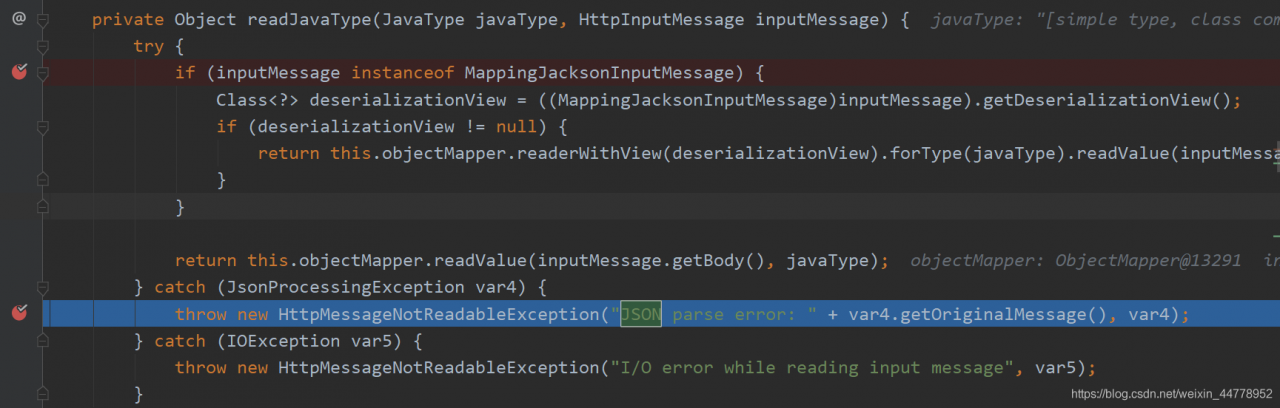 abnormal is
JsonMappingException extends JsonProcessingException HttpMessageNotReadableException, as a result, we only need to add corresponding processing logic unified exception handling, can be returned to the front
@ExceptionHandler({HttpMessageNotReadableException.class, JsonMappingException.class, HttpMediaTypeNotSupportedException.class})
    @ResponseBody
    @ResponseStatus(HttpStatus.BAD_REQUEST)
    public Map<String,Object> exceptionHandler(Exception ex){
        Map<String,Object> map = new HashMap<>(3);
        try{
            if(ex instanceof HttpMessageNotReadableException
                    && ex.getMessage().indexOf("JSON parse error:")>-1){
                map.put("code","400");
                String message=ex.getMessage();
                int beginIndex=message.indexOf("XXXDto[\"");
                int endIndex=message.indexOf("\"])",beginIndex);
                message="parameter"+message.substring(beginIndex+22,endIndex)+" format error";
                map.put("msg",message);
            }else{
                map.put("code","400");
                map.put("msg",ex.getMessage());
            }
            return map;
        }catch (Exception e){
            log.error("exception handler error",e);
            map.put("code","400");
            map.put("msg",e.getMessage());
            return map;
        }
    }