[Exception] javax.net.ssl.SSLHandshakeException: sun.security.validator.ValidatorException: PKIX path validation failed: java.security.cert.CertPathValidatorException: validity check failed

1. Abnormal information

22 : 20 : 12.637 [main] ERROR com.talkilla.talkillalexile.common.utils.HttpUtils- sun.security.validator.ValidatorException: PKIX path validation failed: java.security.cert.CertPathValidatorException: validity check failed,{}
javax.net.ssl.SSLHandshakeException: sun.security.validator.ValidatorException: PKIX path validation failed: java.security.cert.CertPathValidatorException: validity check failed
    at sun.security.ssl.Alerts.getSSLException(Alerts.java: 192 )
    at sun.security.ssl.SSLSocketImpl.fatal(SSLSocketImpl.java: 1946 )
    at sun.security.ssl.Handshaker.fatalSE(Handshaker.java: 316 )
    at sun.security.ssl.Handshaker.fatalSE(Handshaker.java: 310 )
    at sun.security.ssl.ClientHandshaker.serverCertificate(ClientHandshaker.java: 1640 )
    at sun.security.ssl.ClientHandshaker.processMessage(ClientHandshaker.java: 223 )
    at sun.security.ssl.Handshaker.processLoop(Handshaker.java: 1037 )
    at sun.security.ssl.Handshaker.process_record(Handshaker.java: 965 )
    at sun.security.ssl.SSLSocketImpl.readRecord(SSLSocketImpl.java: 1064 )
    at sun.security.ssl.SSLSocketImpl.performInitialHandshake(SSLSocketImpl.java: 1367 )
    at sun.security.ssl.SSLSocketImpl.startHandshake(SSLSocketImpl.java: 1395 )
    at sun.security.ssl.SSLSocketImpl.startHandshake(SSLSocketImpl.java: 1379 )
    at okhttp3. internal .connection.RealConnection.connectTls(RealConnection.java: 241 )
    at okhttp3. internal .connection.RealConnection.establishProtocol(RealConnection.java: 198 )
    at okhttp3. internal .connection.RealConnection.buildConnection(RealConnection.java: 174 )
    at okhttp3. internal .connection.RealConnection.connect(RealConnection.java: 114 )
    at okhttp3. internal .connection.StreamAllocation.findConnection(StreamAllocation.java: 193 )
    at okhttp3. internal .connection.StreamAllocation.findHealthyConnection(StreamAllocation.java: 129 )
    at okhttp3. internal .connection.StreamAllocation.newStream(StreamAllocation.java: 98 )
    at okhttp3. internal .connection.ConnectInterceptor.intercept (ConnectInterceptor.java: 42 )
    at okhttp3. internal .http.RealInterceptorChain.proceed(RealInterceptorChain.java: 92 )
    at okhttp3. internal .http.RealInterceptorChain.proceed(RealInterceptorChain.java: 67 )
    at okhttp3. internal .cache.CacheInterceptor.intercept(CacheInterceptor.java: 109 )
    at okhttp3. internal .http.RealInterceptorChain.proceed(RealInterceptorChain.java: 92 )
    at okhttp3. internal .http.RealInterceptorChain.proceed(RealInterceptorChain.java: 67 )
    at okhttp3. internal .http.BridgeInterceptor.intercept(BridgeInterceptor.java: 93 )
    at okhttp3. internal .http.RealInterceptorChain.proceed(RealInterceptorChain.java: 92 )
    at okhttp3. internal .http.RetryAndFollowUpInterceptor.intercept(RetryAndFollowUpInterceptor.java: 124 )
    at okhttp3. internal .http.RealInterceptorChain.proceed(RealInterceptorChain.java: 92 )
    at okhttp3. internal .http.RealInterceptorChain.proceed(RealInterceptorChain.java: 67 )
    at okhttp3.RealCall.getResponseWithInterceptorChain(RealCall.java: 170 )
    at okhttp3.RealCall.execute(RealCall.java: 60 )
    at com.talkilla.talkillalexile.common.utils.HttpUtils.handleSimpleResponse(HttpUtils.java: 410 )
    at com.talkilla.talkillalexile.common.utils.HttpUtils. get (HttpUtils.java: 66 )
    at com.talkilla.talkillalexile.DemoTest.main(DemoTest.java: 20 )
Caused by: sun.security.validator.ValidatorException: PKIX path validation failed: java.security.cert.CertPathValidatorException: validity check failed
    at sun.security.validator.PKIXValidator.doValidate(PKIXValidator.java: 362 )
    at sun.security.validator.PKIXValidator.engineValidate(PKIXValidator.java: 270 )
    at sun.security.validator.Validator.validate(Validator.java: 262 )
    at sun.security.ssl.X509TrustManagerImpl.validate(X509TrustManagerImpl.java: 330 )
    at sun.security.ssl.X509TrustManagerImpl.checkTrusted(X509TrustManagerImpl.java: 237 )
    at sun.security.ssl.X509TrustManagerImpl.checkServerTrusted(X509TrustManagerImpl.java: 132 )
    at sun.security.ssl.ClientHandshaker.serverCertificate(ClientHandshaker.java: 1622 )
    ... 30 common frames omitted
Caused by: java.security.cert.CertPathValidatorException: validity check failed
    at sun.security.provider.certpath.PKIXMasterCertPathValidator.validate(PKIXMasterCertPathValidator.java: 135 )
    at sun.security.provider.certpath.PKIXCertPathValidator.validate(PKIXCertPathValidator.java: 238 )
    at sun.security.provider.certpath.PKIXCertPathValidator.validate(PKIXCertPathValidator.java: 146 )
    at sun.security.provider.certpath.PKIXCertPathValidator.engineValidate(PKIXCertPathValidator.java: 85 )
    at java.security.cert.CertPathValidator.validate(CertPathValidator.java: 292 )
    at sun.security.validator.PKIXValidator.doValidate(PKIXValidator.java: 357 )
    ... 36 common frames omitted
Caused by: java.security.cert.CertificateExpiredException: NotAfter: Fri Mar 27  13 : 09 : 06 CST 2020 
    at sun.security.x509.CertificateValidity.valid(CertificateValidity.java: 274 )
    at sun.security.x509.X509CertImpl.checkValidity(X509CertImpl.java: 629 )
    at sun.security.provider.certpath.BasicChecker.verifyValidity(BasicChecker.java: 190 )
    at sun.security.provider.certpath.BasicChecker.check(BasicChecker.java: 144 )
    at sun.security.provider.certpath.PKIXMasterCertPathValidator.validate(PKIXMasterCertPathValidator.java: 125 )
    ... 41 common frames omitted
Exception in thread " main " java.lang.RuntimeException: javax.net.ssl.SSLHandshakeException: sun.security.validator.ValidatorException: PKIX path validation failed: java.security.cert.CertPathValidatorException: validity check failed
    at com.talkilla.talkillalexile.common.utils.HttpUtils.handleSimpleResponse(HttpUtils.java: 416 )
    at com.talkilla.talkillalexile.common.utils.HttpUtils. get (HttpUtils.java: 66 )
    at com.talkilla.talkillalexile.DemoTest.main(DemoTest.java: 20 )
Caused by: javax.net.ssl.SSLHandshakeException: sun.security.validator.ValidatorException: PKIX path validation failed: java.security.cert.CertPathValidatorException: validity check failed
    at sun.security.ssl.Alerts.getSSLException(Alerts.java: 192 )
    at sun.security.ssl.SSLSocketImpl.fatal(SSLSocketImpl.java: 1946 )
    at sun.security.ssl.Handshaker.fatalSE(Handshaker.java: 316 )
    at sun.security.ssl.Handshaker.fatalSE(Handshaker.java: 310 )
    at sun.security.ssl.ClientHandshaker.serverCertificate(ClientHandshaker.java: 1640 )
    at sun.security.ssl.ClientHandshaker.processMessage(ClientHandshaker.java: 223 )
    at sun.security.ssl.Handshaker.processLoop(Handshaker.java: 1037 )
    at sun.security.ssl.Handshaker.process_record(Handshaker.java: 965 )
    at sun.security.ssl.SSLSocketImpl.readRecord(SSLSocketImpl.java: 1064 )
    at sun.security.ssl.SSLSocketImpl.performInitialHandshake(SSLSocketImpl.java: 1367 )
    at sun.security.ssl.SSLSocketImpl.startHandshake(SSLSocketImpl.java: 1395 )
    at sun.security.ssl.SSLSocketImpl.startHandshake(SSLSocketImpl.java: 1379 )
    at okhttp3. internal .connection.RealConnection.connectTls(RealConnection.java: 241 )
    at okhttp3. internal .connection.RealConnection.establishProtocol(RealConnection.java: 198 )
    at okhttp3. internal .connection.RealConnection.buildConnection(RealConnection.java: 174 )
    at okhttp3. internal .connection.RealConnection.connect(RealConnection.java: 114 )
    at okhttp3. internal .connection.StreamAllocation.findConnection(StreamAllocation.java: 193 )
    at okhttp3. internal .connection.StreamAllocation.findHealthyConnection(StreamAllocation.java: 129 )
    at okhttp3. internal .connection.StreamAllocation.newStream(StreamAllocation.java: 98 )
    at okhttp3. internal .connection.ConnectInterceptor.intercept (ConnectInterceptor.java: 42 )
    at okhttp3. internal .http.RealInterceptorChain.proceed(RealInterceptorChain.java: 92 )
    at okhttp3. internal .http.RealInterceptorChain.proceed(RealInterceptorChain.java: 67 )
    at okhttp3. internal .cache.CacheInterceptor.intercept(CacheInterceptor.java: 109 )
    at okhttp3. internal .http.RealInterceptorChain.proceed(RealInterceptorChain.java: 92 )
    at okhttp3. internal .http.RealInterceptorChain.proceed(RealInterceptorChain.java: 67 )
    at okhttp3. internal .http.BridgeInterceptor.intercept(BridgeInterceptor.java: 93 )
    at okhttp3. internal .http.RealInterceptorChain.proceed(RealInterceptorChain.java: 92 )
    at okhttp3. internal .http.RetryAndFollowUpInterceptor.intercept(RetryAndFollowUpInterceptor.java: 124 )
    at okhttp3. internal .http.RealInterceptorChain.proceed(RealInterceptorChain.java: 92 )
    at okhttp3. internal .http.RealInterceptorChain.proceed(RealInterceptorChain.java: 67 )
    at okhttp3.RealCall.getResponseWithInterceptorChain(RealCall.java: 170 )
    at okhttp3.RealCall.execute(RealCall.java: 60 )
    at com.talkilla.talkillalexile.common.utils.HttpUtils.handleSimpleResponse(HttpUtils.java: 410 )
    ... 2 more
Caused by: sun.security.validator.ValidatorException: PKIX path validation failed: java.security.cert.CertPathValidatorException: validity check failed
    at sun.security.validator.PKIXValidator.doValidate(PKIXValidator.java: 362 )
    at sun.security.validator.PKIXValidator.engineValidate(PKIXValidator.java: 270 )
    at sun.security.validator.Validator.validate(Validator.java: 262 )
    at sun.security.ssl.X509TrustManagerImpl.validate(X509TrustManagerImpl.java: 330 )
    at sun.security.ssl.X509TrustManagerImpl.checkTrusted(X509TrustManagerImpl.java: 237 )
    at sun.security.ssl.X509TrustManagerImpl.checkServerTrusted(X509TrustManagerImpl.java: 132 )
    at sun.security.ssl.ClientHandshaker.serverCertificate(ClientHandshaker.java: 1622 )
    ... 30 more
Caused by: java.security.cert.CertPathValidatorException: validity check failed
    at sun.security.provider.certpath.PKIXMasterCertPathValidator.validate(PKIXMasterCertPathValidator.java: 135 )
    at sun.security.provider.certpath.PKIXCertPathValidator.validate(PKIXCertPathValidator.java: 238 )
    at sun.security.provider.certpath.PKIXCertPathValidator.validate(PKIXCertPathValidator.java: 146 )
    at sun.security.provider.certpath.PKIXCertPathValidator.engineValidate(PKIXCertPathValidator.java: 85 )
    at java.security.cert.CertPathValidator.validate(CertPathValidator.java: 292 )
    at sun.security.validator.PKIXValidator.doValidate(PKIXValidator.java: 357 )
    ... 36 more
Caused by: java.security.cert.CertificateExpiredException: NotAfter: Fri Mar 27  13 : 09 : 06 CST 2020 
    at sun.security.x509.CertificateValidity.valid(CertificateValidity.java: 274 )
    at sun.security.x509.X509CertImpl.checkValidity(X509CertImpl.java: 629 )
    at sun.security.provider.certpath.BasicChecker.verifyValidity(BasicChecker.java: 190 )
    at sun.security.provider.certpath.BasicChecker.check(BasicChecker.java: 144 )
    at sun.security.provider.certpath.PKIXMasterCertPathValidator.validate(PKIXMasterCertPathValidator.java: 125 )
    ... 41 more

2. Abnormal causes and solutions

The https certificate has expired, just update the certificate
Caused by: java.sql.SQLTransientConnectionException: HikariPool-1 – Connection is not available, request timed out after 30005ms.

An online order history data field refresh operation, 3 tables with more than 1 million data. Since the synchronization update is too slow for about 20 minutes or more, the different method is adopted.

The local library refresh is okay, but the following exception occurs when the online library is reached:

### Error updating database.  Cause: org.springframework.jdbc.CannotGetJdbcConnectionException: Failed to obtain JDBC Connection; nested exception is java.sql.SQLTransientConnectionException: HikariPool-1 - Connection is not available, request timed out after 30005ms.
### Cause: org.springframework.jdbc.CannotGetJdbcConnectionException: Failed to obtain JDBC Connection; nested exception is java.sql.SQLTransientConnectionException: HikariPool-1 - Connection is not available, request timed out after 30005ms.
    at org.apache.ibatis.exceptions.ExceptionFactory.wrapException(ExceptionFactory.java:30)
    at org.apache.ibatis.session.defaults.DefaultSqlSession.update(DefaultSqlSession.java:200)
    at sun.reflect.GeneratedMethodAccessor380.invoke(Unknown Source)
    at sun.reflect.DelegatingMethodAccessorImpl.invoke(DelegatingMethodAccessorImpl.java:43)
    at java.lang.reflect.Method.invoke(Method.java:498)
    at org.mybatis.spring.SqlSessionTemplate$SqlSessionInterceptor.invoke(SqlSessionTemplate.java:433)
    ... 24 more
Caused by: org.springframework.jdbc.CannotGetJdbcConnectionException: Failed to obtain JDBC Connection; nested exception is java.sql.SQLTransientConnectionException: HikariPool-1 - Connection is not available, request timed out after 30005ms.
    at org.springframework.jdbc.datasource.DataSourceUtils.getConnection(DataSourceUtils.java:81)
    at org.mybatis.spring.transaction.SpringManagedTransaction.openConnection(SpringManagedTransaction.java:82)
    at org.mybatis.spring.transaction.SpringManagedTransaction.getConnection(SpringManagedTransaction.java:68)
    at org.apache.ibatis.executor.BaseExecutor.getConnection(BaseExecutor.java:338)
    at org.apache.ibatis.executor.SimpleExecutor.prepareStatement(SimpleExecutor.java:84)
    at org.apache.ibatis.executor.SimpleExecutor.doUpdate(SimpleExecutor.java:49)
    at org.apache.ibatis.executor.BaseExecutor.update(BaseExecutor.java:117)
    at org.apache.ibatis.executor.CachingExecutor.update(CachingExecutor.java:76)
    at sun.reflect.GeneratedMethodAccessor381.invoke(Unknown Source)
    at sun.reflect.DelegatingMethodAccessorImpl.invoke(DelegatingMethodAccessorImpl.java:43)
    at java.lang.reflect.Method.invoke(Method.java:498)
    at org.apache.ibatis.plugin.Plugin.invoke(Plugin.java:63)
    at com.sun.proxy.$Proxy521.update(Unknown Source)
    at org.apache.ibatis.session.defaults.DefaultSqlSession.update(DefaultSqlSession.java:198)
    ... 28 more
Caused by: java.sql.SQLTransientConnectionException: HikariPool-1 - Connection is not available, request timed out after 30005ms.
    at com.zaxxer.hikari.pool.HikariPool.createTimeoutException(HikariPool.java:669)
    at com.zaxxer.hikari.pool.HikariPool.getConnection (HikariPool.java: 183 )
    at com.zaxxer.hikari.pool.HikariPool.getConnection (HikariPool.java: 148 )
    at com.zaxxer.hikari.HikariDataSource.getConnection (HikariDataSource.java: 128 )
    at com.zaxxer.hikari.HikariDataSource$$FastClassBySpringCGLIB$$eeb1ae86.invoke(<generated>)
    at org.springframework.cglib.proxy.MethodProxy.invoke(MethodProxy.java:204)
    at org.springframework.aop.framework.CglibAopProxy$CglibMethodInvocation.invokeJoinpoint(CglibAopProxy.java:746)
    at org.springframework.aop.framework.ReflectiveMethodInvocation.proceed(ReflectiveMethodInvocation.java:163)
    at org.springframework.aop.support.DelegatingIntroductionInterceptor.doProceed(DelegatingIntroductionInterceptor.java:136)
    at org.springframework.aop.support.DelegatingIntroductionInterceptor.invoke(DelegatingIntroductionInterceptor.java:124)
    at org.springframework.aop.framework.ReflectiveMethodInvocation.proceed(ReflectiveMethodInvocation.java:185)
    at org.springframework.aop.framework.CglibAopProxy$DynamicAdvisedInterceptor.intercept(CglibAopProxy.java:688)
    at com.zaxxer.hikari.HikariDataSource$$EnhancerBySpringCGLIB$$f68c05a.getConnection(<generated>)
    at org.springframework.jdbc.datasource.DataSourceUtils.fetchConnection(DataSourceUtils.java:151)
    at org.springframework.jdbc.datasource.DataSourceUtils.doGetConnection(DataSourceUtils.java:115)
    at org.springframework.jdbc.datasource.DataSourceUtils.getConnection(DataSourceUtils.java:78)

Two, the solution

Through the exception, it can be found that the database connection cannot be obtained. It is guessed that the number of connections is insufficient. Therefore, modify the HikariPool connection pool configuration to solve the problem.

before fixing:

spring:
  datasource:
    hikari:
      connection-test-query: SELECT 1 FROM DUAL
      connection-timeout: 30000
      maximum-pool-size: 20
      max-lifetime: 1800000
      minimum-idle: 5
      connection-init-sql: SET NAMES utf8mb4

After modification:

spring:
  datasource:
    hikari:
      connection-test-query: SELECT 1 FROM DUAL
      connection-timeout: 600000
      maximum-pool-size: 500
      max-lifetime: 1800000
      minimum-idle: 20
      validation-timeout: 3000
      idle-timeout: 60000
      connection-init-sql: SET NAMES utf8mb4

[SSH error] ssh_exchange_identification: read: Connection reset by peer

When logging in remotely, the following error occurred in ssh root@xxxxxxxxx

ssh_exchange_identification: read: Connection reset by peer

Solution: Log in to the remote server to change the configuration file and add

[root@localhost ~]# vi /etc/ hosts.allow
########################

##Allow all ip hosts to be able to connect to this machine·
sshd: ALL 

[root@localhost ~]# systemctl restart sshd

[Exception]’ascii’ codec can’t decode byte 0xe8 in position 2: ordinal not in range(128)

1. The cause of the abnormality

This is an error related to python

 Because by default, Python uses the ascii encoding method, and when Python converts between encoding methods, it will use unicode as the “intermediate encoding”, but the maximum unicode is only as long as 128, so here when trying to encode ascii characters When the string was converted into “intermediate code” unicode, the above error was reported because it exceeded its range.


Two, the solution

Add a sitecustomize.py file in the /usr/lib/python2.7/site-packages/ directory, the content is as follows:

import sys
sys.setdefaultencoding( ' utf-8 ' )

[Solved] com.mysql.jdbc.exceptions.jdbc4.MySQLNonTransientConnectionException: Could not create connection to database server.

1. Abnormal information

com.mysql.jdbc.exceptions.jdbc4.MySQLNonTransientConnectionException: Could not create connection to database server.
    at sun.reflect.NativeConstructorAccessorImpl.newInstance0(Native Method) ~[na:1.8.0_231]
    at sun.reflect.NativeConstructorAccessorImpl.newInstance(NativeConstructorAccessorImpl.java:62) ~[na:1.8.0_231]
    at sun.reflect.DelegatingConstructorAccessorImpl.newInstance(DelegatingConstructorAccessorImpl.java:45) ~[na:1.8.0_231]
    at java.lang.reflect.Constructor.newInstance(Constructor.java:423) ~[na:1.8.0_231]
    at com.mysql.jdbc.Util.handleNewInstance(Util.java:389) ~[mysql-connector-java-5.1.35.jar:5.1.35]
    at com.mysql.jdbc.Util.getInstance(Util.java:372) ~[mysql-connector-java-5.1.35.jar:5.1.35]
    at com.mysql.jdbc.SQLError.createSQLException(SQLError.java:958) ~[mysql-connector-java-5.1.35.jar:5.1.35]
    at com.mysql.jdbc.SQLError.createSQLException(SQLError.java:937) ~[mysql-connector-java-5.1.35.jar:5.1.35]
    at com.mysql.jdbc.SQLError.createSQLException(SQLError.java:926) ~[mysql-connector-java-5.1.35.jar:5.1.35]
    at com.mysql.jdbc.SQLError.createSQLException(SQLError.java:872) ~[mysql-connector-java-5.1.35.
Caused by: java.lang.NullPointerException: null
    at com.mysql.jdbc.ConnectionImpl.getServerCharset(ConnectionImpl.java:2989) ~[mysql-connector-java-5.1.35.jar:5.1.35]
    at com.mysql.jdbc.MysqlIO.sendConnectionAttributes(MysqlIO.java:1873) ~[mysql-connector-java-5.1.35.jar:5.1.35]
    at com.mysql.jdbc.MysqlIO.proceedHandshakeWithPluggableAuthentication(MysqlIO.java:1802) ~[mysql-connector-java-5.1.35.jar:5.1.35]
    at com.mysql.jdbc.MysqlIO.doHandshake(MysqlIO.java:1206) ~[mysql-connector-java-5.1.35.jar:5.1.35]
    at com.mysql.jdbc.ConnectionImpl.coreConnect(ConnectionImpl.java:2239) ~[mysql-connector-java-5.1.35.jar:5.1.35]
    at com.mysql.jdbc.ConnectionImpl.connectOneTryOnly(ConnectionImpl.java:2270) ~[mysql-connector-java-5.1.35.jar:5.1.35]
    ... 105 common frames omitted

Two, the solution

1. Check your mysql version

select version();

For example, my version is: 8.0.3

2. Update the version of mysql-connector-java to be consistent with the version of mysql, which is version 8.

<!-- https://mvnrepository.com/artifact/mysql/mysql-connector-java -->
<dependency>
    <groupId>mysql</groupId>
    <artifactId>mysql-connector-java</artifactId>
    <version>8.0.20</version>
</dependency>

[Maven Error] Exception in thread “main” java.lang.UnsupportedClassVersionError: org/apache/maven/cli/MavenCli : Unsupported major.minor version 51.0

1. Abnormal information

Exception in thread "main" java.lang.UnsupportedClassVersionError: org/apache/maven/cli/MavenCli : Unsupported major.minor version 51.0
        at java.lang.ClassLoader.defineClass1(Native Method)
        at java.lang.ClassLoader.defineClassCond(ClassLoader.java:637)
        at java.lang.ClassLoader.defineClass(ClassLoader.java:621)
        at java.security.SecureClassLoader.defineClass(SecureClassLoader.java:141)
        at java.net.URLClassLoader.defineClass(URLClassLoader.java:283)
        at java.net.URLClassLoader.access$000(URLClassLoader.java:58)
        at java.net.URLClassLoader$1.run(URLClassLoader.java:197)
        at java.security.AccessController.doPrivileged(Native Method)
        at java.net.URLClassLoader.findClass(URLClassLoader.java:190)
        at org.codehaus.plexus.classworlds.realm.ClassRealm.loadClassFromSelf(ClassRealm.java:401)
        at org.codehaus.plexus.classworlds.strategy.SelfFirstStrategy.loadClass(SelfFirstStrategy.java:42)
        at org.codehaus.plexus.classworlds.realm.ClassRealm.unsynchronizedLoadClass(ClassRealm.java:271)
        at org.codehaus.plexus.classworlds.realm.ClassRealm.loadClass(ClassRealm.java:254)
        at org.codehaus.plexus.classworlds.realm.ClassRealm.loadClass(ClassRealm.java:239)
        at org.codehaus.plexus.classworlds.launcher.Launcher.getMainClass(Launcher.java:144)
        at org.codehaus.plexus.classworlds.launcher.Launcher.launchEnhanced(Launcher.java:266)
        at org.codehaus.plexus.classworlds.launcher.Launcher.launch(Launcher.java:229)
        at org.codehaus.plexus.classworlds.launcher.Launcher.mainWithExitCode(Launcher.java:415)
        at org.codehaus.plexus.classworlds.launcher.Launcher.main(Launcher.java:356)


The solution(Two Methods):

1. Check whether your JAVA_HOME environment variable is configured correctly, and verify by echo $JAVA_HOME (this is the situation I encountered)

2. Check whether the jdk version your maven depends on is compatible with your locally installed jdk version

Error resolution: Handler dispatch failed; nested exception is java.lang.NoClassDefFoundError: javax/xml/bind/Datatype

Error details:

org.springframework.web.util.NestedServletException: Handler dispatch failed; nested exception is java.lang.NoClassDefFoundError: javax/xml/bind/ DatatypeConverter
    at org.springframework.web.servlet.DispatcherServlet.doDispatch(DispatcherServlet.java: 1053 )
    at org.springframework.web.servlet.DispatcherServlet.doService(DispatcherServlet.java: 942 )
    at org.springframework.web.servlet.FrameworkServlet.processRequest(FrameworkServlet.java: 1005) 
    ……

the reason:

It is caused by the lack of jaxb-api package. In Java 8 and previous versions, the jar package jaxb is included by default; but in Java SE 9.0, this package is no longer included. If you use it, you need to import it manually.

JAXB API is the API of java EE, so this Jar package is no longer included in java SE 9.0.
The concept of modules was introduced in Java 9. By default, Java SE will no longer include the Jar package of Java EE, and this API will
be bundled together on Java 6/7/8 .


solve:


  1. Manually import the following packages:
    <!--Solve Handler dispatch failed; nested exception is java.lang.NoClassDefFoundError: javax/xml/bind/DatatypeConverter-->
            <dependency>
                <groupId>javax.xml.bind</groupId>
                <artifactId>jaxb-api</artifactId>
                <version>2.3.0</version>
            </dependency>
            <dependency>
                <groupId>com.sun.xml.bind</groupId>
                <artifactId>jaxb-impl</artifactId>
                <version>2.3.0</version>
            </dependency>
            <dependency>
                <groupId>com.sun.xml.bind</groupId>
                <artifactId>jaxb-core</artifactId>
                <version>2.3.0</version>
            </dependency>
            <dependency>
                <groupId>javax.activation</groupId>
                <artifactId>activation</artifactId>
                <version>1.1.1</version>
            </dependency>

[Solved] Unexpected error while saving file: xxx.ipynb database or disk is full

https://stackoverflow.com/questions/49175406/jupyter-notebook-operationalerrordisk-io-error

ipython profile create
#But an error is reported ImportError: No module named IPython

Try to install ipython, but:

pip install ipython

#But an error:
ERROR: Could not install packages due to an EnvironmentError: [Errno 28 ] There is no space on the device:

because the tmp folder is too big, check the folder size:

du -lh --max-depth= 1

After trying to delete some files in the root directory, after deleting 20G, the problem is solved.

[Samtools] Run error: error while loading shared libraries: libcrypto.so.1.0.0 or libncurses.so.5 or libtinfow.so.5

After samtools is installed with conda, there is always an error that the shared library is missing. Even if you can use samtools when you just installed it, but installing other related software in the same environment later, there may be conflicts, resulting in library replacement, and thus an error.

To avoid this situation, it may be best to give samtools a separate environment. But I don’t like this. My habit is to build an environment only after doing one thing. Otherwise, there are too many environments and I have forgotten it myself.

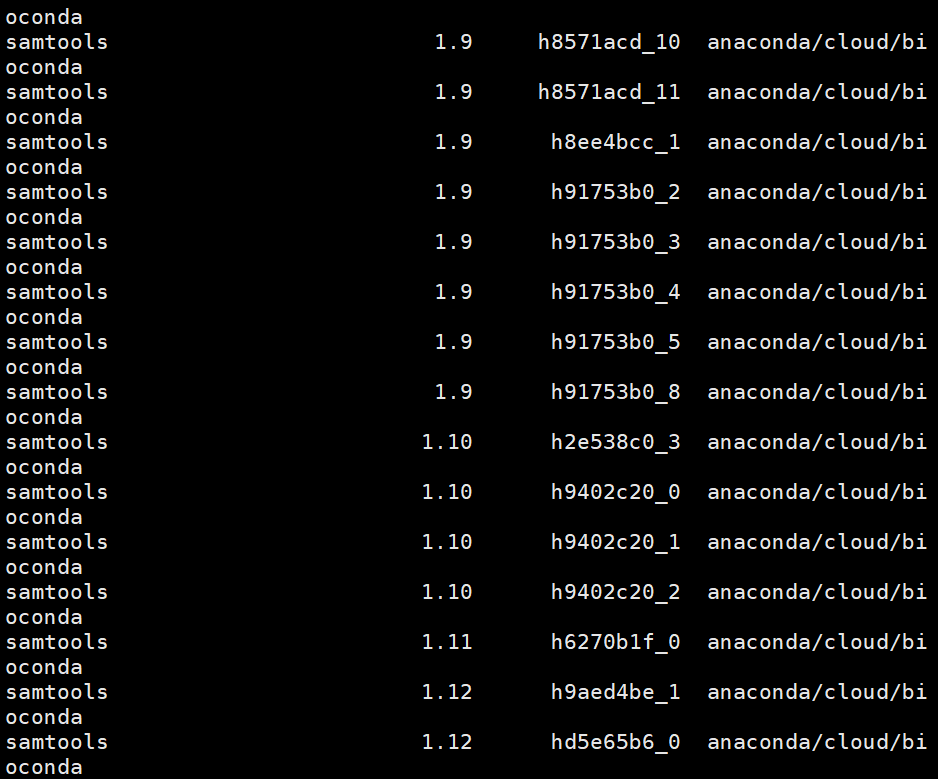
Many online answers analyzed the reasons and said: The version of samtools is above 1.9, but the version of samtools installed by conda is still 1.7. So it is recommended to install version 1.9 mandatory:conda install -c bioconda samtools=1.9 --force-reinstall

This answer may work for some people. But in fact, conda is already over 1.9:conda search samtools
image.png

The version I installed is 1.10 by default, and this library is still missing. In short, there is still a mismatch in the version of the dependent library.

This issue has many issues on github, such as libtinfow.so.5

The developer recommends soft linking from elsewhere (downgrade).

For example, my samtools lacks libcrypto.so.1.0.0, libncurses.so.5, libtinfow.so.5.
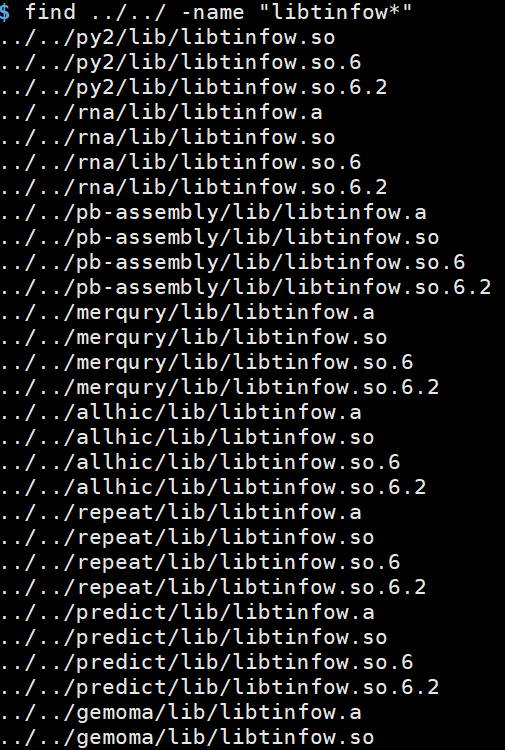
First find the same dependent libraries of other software, and the soft link can be the above name.

find ./ -name "libtinfow*"
ln -s ../../predict/lib/libtinfow.so.6 libtinfow.so.5

image.png

Other missing libraries are similar, if they fail, you can try a few more. There is not much difference between adjacent versions.

ln -s libcrypto.so.1.1 libcrypto.so.1.0.0
ln -s /lib64/libbz2.so.1 /usr/lib64/libbz2.so.1.0

Rsync Error: Operation not permitted [How to Solve]

1. The problem is reported: Operation not permitted.

Solution:

Add a parameter in the configuration file,

fake super = yes
#Or change the running user to root
uid = root
gid = root

2. The problem is reported:

[root@nfs01 ~]# rsync -av -P /data/ rsync_password@ 10.0 . 0.41 ::data
Password: 
@ERROR: auth failed on module data
rsync error: error starting client -server protocol (code 5 ) at main.c( 1648 ) [sender= 3.1 . 2 ]

Solution: change the password file permissions

[root@backup ~]# chmod  600 /etc/rsync.password