Category Archives: JAVA

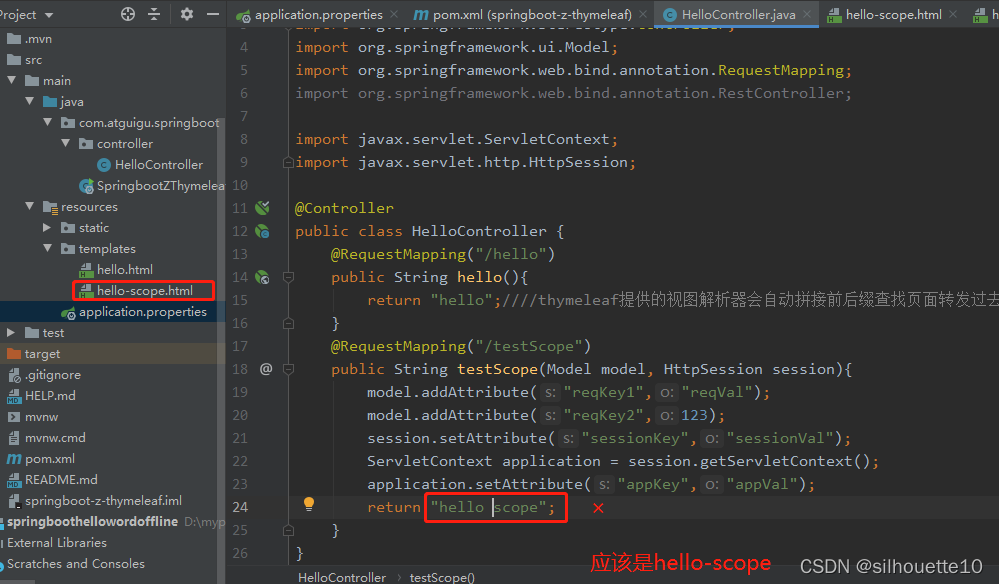
org.thymeleaf.exceptions.TemplateInputException: Error resolving template [hello scope], template mi

org.thymeleaf.exceptions.TemplateInputException: Error resolving template [hello scope], template might not exist or might not be accessible by any of the configured Template Resolvers
at org.thymeleaf.engine.TemplateManager.resolveTemplate(TemplateManager.java:869) ~[thymeleaf-3.0.11.RELEASE.jar:3.0.11.RELEASE]
at org.thymeleaf.engine.TemplateManager.parseAndProcess(TemplateManager.java:607) ~[thymeleaf-3.0.11.RELEASE.jar:3.0.11.RELEASE]
at org.thymeleaf.TemplateEngine.process(TemplateEngine.java:1098) [thymeleaf-3.0.11.RELEASE.jar:3.0.11.RELEASE]
at org.thymeleaf.TemplateEngine.process(TemplateEngine.java:1072) [thymeleaf-3.0.11.RELEASE.jar:3.0.11.RELEASE]
at org.thymeleaf.spring5.view.ThymeleafView.renderFragment(ThymeleafView.java:362) [thymeleaf-spring5-3.0.11.RELEASE.jar:3.0.11.RELEASE]
at org.thymeleaf.spring5.view.ThymeleafView.render(ThymeleafView.java:189) [thymeleaf-spring5-3.0.11.RELEASE.jar:3.0.11.RELEASE]
at org.springframework.web.servlet.DispatcherServlet.render(DispatcherServlet.java:1373) [spring-webmvc-5.2.12.RELEASE.jar:5.2.12.RELEASE]
at org.springframework.web.servlet.DispatcherServlet.processDispatchResult(DispatcherServlet.java:1118) [spring-webmvc-5.2.12.RELEASE.jar:5.2.12.RELEASE]
at org.springframework.web.servlet.DispatcherServlet.doDispatch(DispatcherServlet.java:1057) [spring-webmvc-5.2.12.RELEASE.jar:5.2.12.RELEASE]
at org.springframework.web.servlet.DispatcherServlet.doService(DispatcherServlet.java:943) [spring-webmvc-5.2.12.RELEASE.jar:5.2.12.RELEASE]
at org.springframework.web.servlet.FrameworkServlet.processRequest(FrameworkServlet.java:1006) [spring-webmvc-5.2.12.RELEASE.jar:5.2.12.RELEASE]
at org.springframework.web.servlet.FrameworkServlet.doGet(FrameworkServlet.java:898) [spring-webmvc-5.2.12.RELEASE.jar:5.2.12.RELEASE]
at javax.servlet.http.HttpServlet.service(HttpServlet.java:626) [tomcat-embed-core-9.0.41.jar:4.0.FR]
at org.springframework.web.servlet.FrameworkServlet.service(FrameworkServlet.java:883) [spring-webmvc-5.2.12.RELEASE.jar:5.2.12.RELEASE]
at javax.servlet.http.HttpServlet.service(HttpServlet.java:733) [tomcat-embed-core-9.0.41.jar:4.0.FR]
at


Solution: The method I wrote in the controller layer was wrongly written
[Solved] write javaBean error, fastjson version 1.2.76, class org.apache.flink.table.data.binary

An exception is thrown when using the static variable Map as a return

com.alibaba.fastjson.JSONException: write javaBean error, fastjson version 1.2.76, class org.apache.flink.table.data.binary.BinaryStringData, fieldName : id, Memory segment does not represent off heap memory

The rest of the code remains unchanged, and only an empty new Map is returned. The result is normal, which proves that there is a problem with the encoding of the fields inside, so it can be re-encoded
for (Map<String, Object> map : FakerConstant.TABLE_ROW_DATA_RESULT) {
            Map<String, Object> m = new HashMap<>();
            map.forEach((key, value) -> {
                m.put(
                        // You need to re-encode it, otherwise it will report FastJson exception. write javaBean error, fastjson version 1.2.76
                        new String(key.getBytes(), StandardCharsets.UTF_8),
                        new String(String.valueOf(value).getBytes(), StandardCharsets.UTF_8)););
            });
            res.add(m);
        }

[Solved] Redis Client On Error: Error: write ECONNABORTED Config right

Solve the redis client on error: error: write econnaborted config rightwe

Problem Description:
Solution:

1. First, check whether the firewall of Linux is turned on

Turn off the firewall

[root@localhost]# systemctl stop firewalld.service

Open 6379 port

[root@localhost]# sudo firewall-cmd --zone=public --add-port=6379/tcp --permanent
success
[root@localhost]# sudo firewall-cmd --reload
success

2. Check whether the redis startup configuration is correct

Check whether redis is started

 ps -ef | grep redis

For versions above redis 3.2, Internet access is not allowed by default, and needs to be modified redis.conf configuration file

Modify peetected-mode

Modify peotected-mode yes
to: protected-mode no.
#The protected-mode parameter is used to disable access to redis from outside the network, if enabled, only the localhost ip (127.0.0.1) will be able to access Redis

Close bind 127.0.0.1

Comment out bind 127.0.0.1, or modify bind 0.0.0.0, to allow access to all ip addresses

After modifying the configuration file, remember to restart redis,

./redis-server /usr/local/redis/redis.conf

Java database Druid error: com.alibaba.druid.pool.DruidDataSource error

1. Error information

Feb 02, 2022 10:44:44 AM com.alibaba.druid.pool.DruidDataSource error
WARNING: init datasource error, url: jdbc:mysql://localhost:3306/xuesheng?useSSL=false&useUnicode=true&characterEncoding=utf-8&serverTimezone=Asia/Shanghai
java.sql.SQLException: Access denied for user ''@'localhost' (using password: YES)
	at com.mysql.cj.jdbc.exceptions.SQLError.createSQLException(SQLError.java:129)
	at com.mysql.cj.jdbc.exceptions.SQLError.createSQLException(SQLError.java:97)
	at com.mysql.cj.jdbc.exceptions.SQLExceptionsMapping.translateException(SQLExceptionsMapping.java:122)
	at com.mysql.cj.jdbc.ConnectionImpl.createNewIO(ConnectionImpl.java:836)
	at com.mysql.cj.jdbc.ConnectionImpl.<init>(ConnectionImpl.java:456)
	at com.mysql.cj.jdbc.ConnectionImpl.getInstance(ConnectionImpl.java:246)
	at com.mysql.cj.jdbc.NonRegisteringDriver.connect(NonRegisteringDriver.java:198)
	at com.alibaba.druid.pool.DruidAbstractDataSource.createPhysicalConnection(DruidAbstractDataSource.java:1570)
	at com.alibaba.druid.pool.DruidAbstractDataSource.createPhysicalConnection(DruidAbstractDataSource.java:1636)
	at com.alibaba.druid.pool.DruidDataSource.init(DruidDataSource.java:874)
	at com.alibaba.druid.pool.DruidDataSource.getConnection(DruidDataSource.java:1246)
	at com.alibaba.druid.pool.DruidDataSource.getConnection(DruidDataSource.java:1242)
	at com.alibaba.druid.pool.DruidDataSource.getConnection(DruidDataSource.java:89)
	at com.qzxiaofeng.jdbc.DruidDemo.main(DruidDemo.java:21)

Feb 02, 2022 10:44:44 AM com.alibaba.druid.pool.DruidDataSource error
WARNING: {dataSource-1} init error
java.sql.SQLException: Access denied for user ''@'localhost' (using password: YES)
	at com.mysql.cj.jdbc.exceptions.SQLError.createSQLException(SQLError.java:129)
	at com.mysql.cj.jdbc.exceptions.SQLError.createSQLException(SQLError.java:97)
	at com.mysql.cj.jdbc.exceptions.SQLExceptionsMapping.translateException(SQLExceptionsMapping.java:122)
	at com.mysql.cj.jdbc.ConnectionImpl.createNewIO(ConnectionImpl.java:836)
	at com.mysql.cj.jdbc.ConnectionImpl.<init>(ConnectionImpl.java:456)
	at com.mysql.cj.jdbc.ConnectionImpl.getInstance(ConnectionImpl.java:246)
	at com.mysql.cj.jdbc.NonRegisteringDriver.connect(NonRegisteringDriver.java:198)
	at com.alibaba.druid.pool.DruidAbstractDataSource.createPhysicalConnection(DruidAbstractDataSource.java:1570)
	at com.alibaba.druid.pool.DruidAbstractDataSource.createPhysicalConnection(DruidAbstractDataSource.java:1636)
	at com.alibaba.druid.pool.DruidDataSource.init(DruidDataSource.java:874)
	at com.alibaba.druid.pool.DruidDataSource.getConnection(DruidDataSource.java:1246)
	at com.alibaba.druid.pool.DruidDataSource.getConnection(DruidDataSource.java:1242)
	at com.alibaba.druid.pool.DruidDataSource.getConnection(DruidDataSource.java:89)
	at com.qzxiaofeng.jdbc.DruidDemo.main(DruidDemo.java:21)

Feb 02, 2022 10:44:44 AM com.alibaba.druid.pool.DruidDataSource info
WARNING: {dataSource-1} inited
Exception in thread "main" java.sql.SQLException: Access denied for user ''@'localhost' (using password: YES)
	at com.mysql.cj.jdbc.exceptions.SQLError.createSQLException(SQLError.java:129)
	at com.mysql.cj.jdbc.exceptions.SQLError.createSQLException(SQLError.java:97)
	at com.mysql.cj.jdbc.exceptions.SQLExceptionsMapping.translateException(SQLExceptionsMapping.java:122)
	at com.mysql.cj.jdbc.ConnectionImpl.createNewIO(ConnectionImpl.java:836)
	at com.mysql.cj.jdbc.ConnectionImpl.<init>(ConnectionImpl.java:456)
	at com.mysql.cj.jdbc.ConnectionImpl.getInstance(ConnectionImpl.java:246)
	at com.mysql.cj.jdbc.NonRegisteringDriver.connect(NonRegisteringDriver.java:198)
	at com.alibaba.druid.pool.DruidAbstractDataSource.createPhysicalConnection(DruidAbstractDataSource.java:1570)
	at com.alibaba.druid.pool.DruidAbstractDataSource.createPhysicalConnection(DruidAbstractDataSource.java:1636)
	at com.alibaba.druid.pool.DruidDataSource.init(DruidDataSource.java:874)
	at com.alibaba.druid.pool.DruidDataSource.getConnection(DruidDataSource.java:1246)
	at com.alibaba.druid.pool.DruidDataSource.getConnection(DruidDataSource.java:1242)
	at com.alibaba.druid.pool.DruidDataSource.getConnection(DruidDataSource.java:89)
	at com.qzxiaofeng.jdbc.DruidDemo.main(DruidDemo.java:21)

II My configuration is as follows
1 Test code

public class DruidDemo {
    public static void main(String[] args) throws Exception {

        //3.Load the configuration file
        Properties prop=new Properties();
        prop.load(new FileInputStream("src/druid.properties"));
        //4. Get the connection pool object
        DataSource dataSource = DruidDataSourceFactory.createDataSource(prop);
        //5. Get the corresponding database connection
        Connection connection = dataSource.getConnection();
        System.out.println(connection);

//        System.out.println(System.getProperty("user.dir"));
    }
}

2. Configuration of guide package in maven

<!--         druid-->
        <dependency>
            <groupId>com.alibaba</groupId>
            <artifactId>druid</artifactId>
            <version>1.1.12</version>
        </dependency>

3.druid.properties configuration

driverClassName=com.mysql.cj.jdbc.Driver
url=jdbc:mysql://localhost:3306/xuesheng?useSSL=false&useUnicode=true&characterEncoding=utf-8&serverTimezone=Asia/Shanghai
user=root
password=123456
# initialize the number of connections
initialSize=5
#Maximum number of connections
maxActive=10
#Maximum waiting time
maxWait=3000

3. Solution

Change the user to username in druid.properties

[Solved] Springboot Error: Error creating bean with name ‘dataSource‘ defined in class path resource

Springboot reports error creating bean with name ‘datasource’ defined in class path resource, factory method ‘datasource’ three exception; nested exception is org.springframework.boot.autoconfigure.jdbc.Datasourceproperties $datasourcebeancreationexception: failed to determine a suitabledriver class solution

Problem background solution experience Lyric: cut me apart from two spirits

Problem background:

An error is reported when connecting to MySQL:

Caused by: org.springframework.beans.factory.BeanCreationException: Error creating bean with name 'dataSource' defined in class path resource [org/springframework/boot/autoconfigure/jdbc/DataSourceConfiguration$Hikari.class]: Bean instantiation via factory method failed; nested exception is org.springframework.beans.BeanInstantiationException: Failed to instantiate [com.zaxxer.hikari.HikariDataSource]: Factory method 'dataSource' threw exception; nested exception is org.springframework.boot.autoconfigure.jdbc.DataSourceProperties$DataSourceBeanCreationException: Failed to determine a suitable driver class
	at org.springframework.beans.factory.support.ConstructorResolver.instantiate(ConstructorResolver.java:658)
org.springframework.context.support.AbstractApplicationContext.refresh(AbstractApplicationContext.java:583)
	at org.springframework.boot.SpringApplication.refresh(SpringApplication.java:732)
	at org.springframework.boot.SpringApplication.refreshContext(SpringApplication.java:414)
	at org.springframework.boot.SpringApplication.run(SpringApplication.java:302)
Caused by: org.springframework.beans.BeanInstantiationException: Failed to instantiate [com.zaxxer.hikari.HikariDataSource]: Factory method 'dataSource' threw exception; nested exception is org.springframework.boot.autoconfigure.jdbc.DataSourceProperties$DataSourceBeanCreationException: Failed to determine a suitable driver class
	at org.springframework.beans.factory.support.SimpleInstantiationStrategy.instantiate(SimpleInstantiationStrategy.java:185)
	at org.springframework.beans.factory.support.ConstructorResolver.instantiate(ConstructorResolver.java:653)
	... 87 more
Caused by: org.springframework.boot.autoconfigure.jdbc.DataSourceProperties$DataSourceBeanCreationException: Failed to determine a suitable driver class

Solution:

1. It can be seen from the error report that the configuration of datasource database cannot be found. After inspection, it was forgotten in application The YML configuration file configures the database information

spring:
  datasource:
      #url: jdbc:mysql://[ip]:[port]/[name]?useSSL=false&useUnicode=true&characterEncoding=utf-8&allowMultiQueries=true&allowPublicKeyRetrieval=true&serverTimezone=Asia/Shanghai
    url: jdbc:mysql://localhost:3306/mysqlTest?serverTimezone=UTC&characterEncoding=UTF-8
    username: root
    password: 123456
    driver-class-name: com.mysql.cj.jdbc.Driver
  sql:
    init:
      encoding: utf-8

[Solved] stream Convert list to map Error: java.lang.IllegalStateException: Duplicate key

I background

In many scenarios, the data of List needs to be transformed into the key-value pairs of Map scenarios to facilitate quick query data. For example: the need to query the corresponding person name details scenario according to the work number. There are two kinds of scenarios, the first one is to query the database once by each work number, which is obviously not reasonable because it is not good for DB pressure and connection. The second will be a collection of work number (need to consider the volume of data scenarios, Oracle supports a maximum of one thousand, mysql, although no online, but consider the performance and memory consumption need to consider the upper limit recommended 1000 below), the next is the second way to expand.

Translated with www.DeepL.com/Translator (free version)

II Development practice

List<User> userList = new ArrayList<>();

userList.add(User.builder().id(123).name("TEST123").build());

userList.add(User.builder().id(1231).name("TEST1231").build());

userList.add(User.builder().id(1232).name("TEST1232").build());

userList.add(User.builder().id(1233).name("TEST1233").build());

userList.add(User.builder().id(1234).name("TEST1234").build());

1.The stream implementation was not available before Java 1.8

Map<String, Long> idNameMap = new HashMap<String, Long>();

for(User user : userList ){

     idNameMap.put(user.getName(),  user.getId());

}

return idNameMap ;

2.Java 1.8 onwards supports stream implementation

return userList.stream().collect(Collectors.toMap(User::getName, User::getId);

III Existing problems

If you use the 2.1 way, the possible problems, if there are two data with the same name in the data, it will report an error java.lang.IllegalStateException: Duplicate key.

When using stream stream, it will not overwrite the data directly like the above way, but will report an error. So it needs to be optimized as

return userList.stream().collect(Collectors.toMap(User::getName, User::getId , (entity1, entity2) -> entity1);

It can solve the problem of error reporting.

[Solved] Hibernate Error: Row was updated or deleted by another transaction

Row was updated or deleted by another transaction (or unsaved-value mapping was incorrect) Hibernate Error:

org.hibernate.StaleObjectStateException:Row was updated or deleted by another transaction (or unsaved-value mapping was incorrect)

Error reporting reason:

1. The current version is not consistent with the db database version, the data is modified when the value of the form object in the version and the value of the corresponding record in the database version is not consistent, which makes the update method in the call, the version is not consistent with the reverse error.
2. Two or more sessions have modified the same record

Encountering such an exception indicates that the object of the operation uses an optimistic lock or the defined POJO defines the version field

Solution:

1. When submitting the form data, submit the version as well
2. First query the value of the version of the corresponding record in the database and assign it to the entity object to be modified, and then execute the update operation (after modifying the database data, the value of its version will change, so at this time the update operation needs to obtain the latest version value, assign it to the operation object, and then execute the update operation)

[Solved] springboot Project Run Error: HikariPool-1 – Exception during pool initialization.

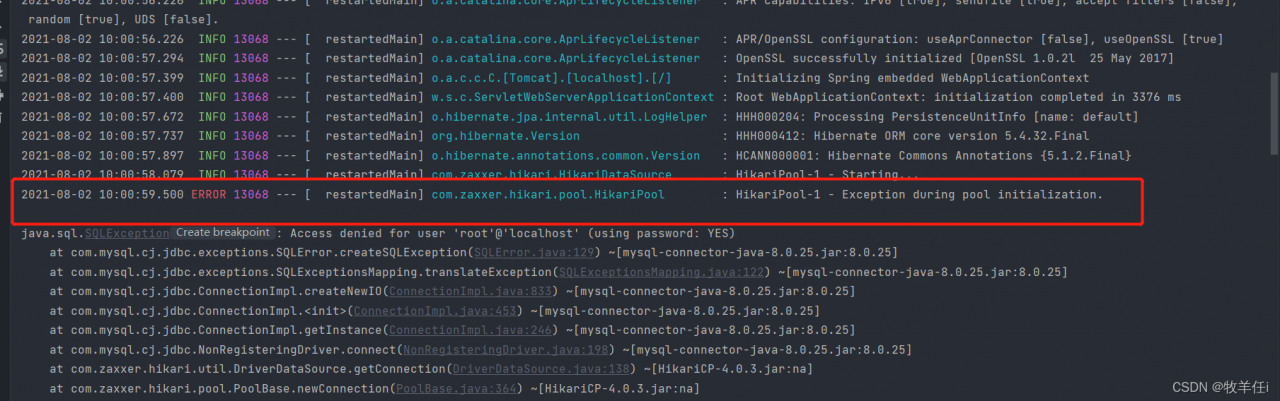
Let’s take a look at the screenshot of the error report first:
he said that an exception occurred during the initialization of hikaripool-1-pool, which led to the failure of project startup
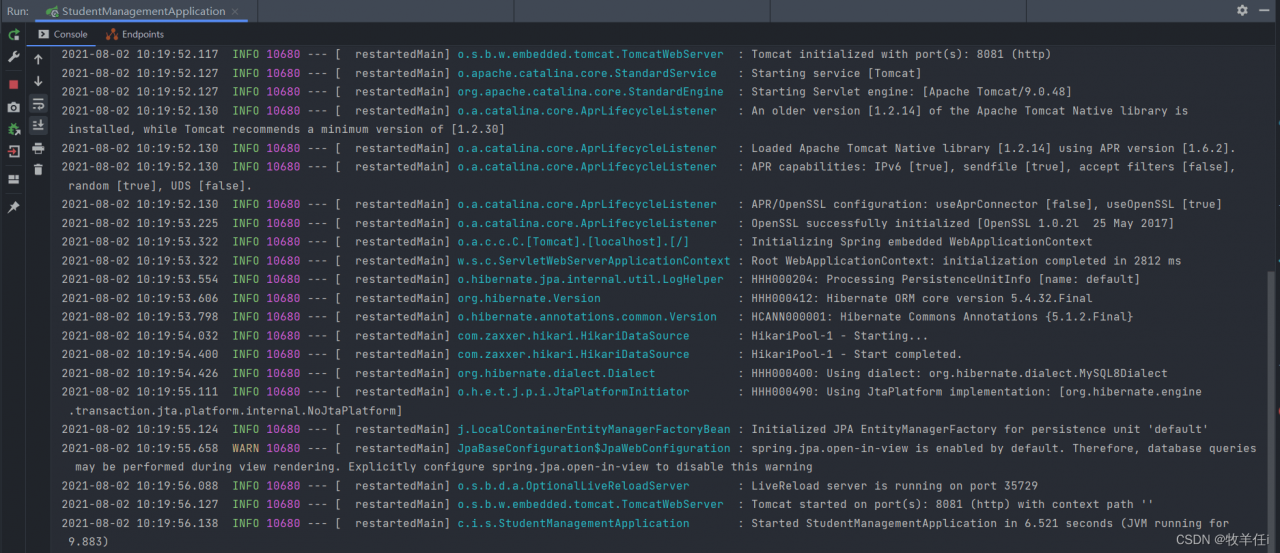
reason: JDBC connection failed

solution:

Step 1: check the application first After the URL in yaml is 3360/(database name), check whether there is this name in your database
Step 2: check whether the username and password are the same as when designing the database. Usually, we use root and 123456 when designing. Because when you import a new project, these things are easy to forget to change and report errors. So check whether the address, port and database name are the same as your own

in addition, if you are using springboot 2.0 or above

Should be configured as driver ‐ class ‐ Name: com.mysql.cj.jdbc.Driver

 datasource:
    #                              //PATH     PORT   DATABASE_NAME
    url: jdbc:mysql://${MYSQL_HOST:localhost}:3306/studentmanagement
    username: root
    password: 123456
    driver-class-name: com.mysql.cj.jdbc.Driver

After we finish the modification, let’s check the operation again:

The project is running successfully

[Solved] Idea 2021.3 Maven 3.8.1 Error: Blocked mirror for repositories

The blocked mirror for repositories problem is due to Maven 3 8.1 from the beginning, the HTTP connection is blocked in the configuration file by default
idea has the following solutions to solve this problem
1. Replace the use of Maven for version 3.6.3 https://dlcdn.apache.org/maven/maven-3/3.6.3/binaries/apache-maven-3.6.3-bin.zip

2. When idea loads external configuration files, it will load the settings.xml in the \plugins\maven\lib\maven3\conf folder in the installation directory first, comment the file

<mirror>
      <id>maven-default-http-blocker</id>
      <mirrorOf>external:http:*</mirrorOf>
      <name>Pseudo repository to mirror external repositories initially using HTTP.</name>
      <url>http://0.0.0.0/</url>
      <blocked>true</blocked>
    </mirror>

It will take effect

[Solved] POI Read excel Error: Your InputStream was neither an OLE2 stream, nor an OOXML stream

When Java uses POI to read Excel files with XLS suffix, an error is reported:

Your InputStream was neither an OLE2 stream, nor an OOXML stream

Error code:

Workbook wb = WorkbookFactory.create(is);

Click the Create method to see the source code of POI:

public static Workbook create(InputStream inp) throws IOException, InvalidFormatException {
        if (!((InputStream)inp).markSupported()) {
            inp = new PushbackInputStream((InputStream)inp, 8);
        }

        if (POIFSFileSystem.hasPOIFSHeader((InputStream)inp)) {
            return new HSSFWorkbook((InputStream)inp);
        } else if (POIXMLDocument.hasOOXMLHeader((InputStream)inp)) {
            return new XSSFWorkbook(OPCPackage.open((InputStream)inp));
        } else {
            throw new IllegalArgumentException("Your InputStream was neither an OLE2 stream, nor an OOXML stream");
        }
    }

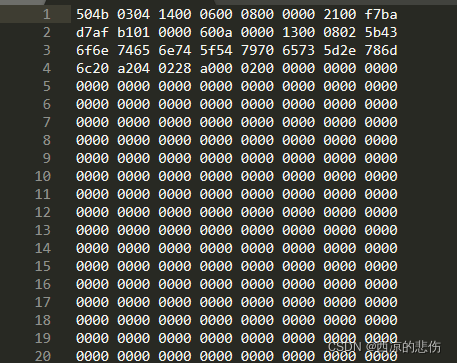
The haspoofshade and hasooxmlreader in the two IFS are to read the first 8 bytes of the excel file stream to determine the file information. If it is not an excel type file or a binary type file, the exception “your InputStream was neither an ole2 stream, nor an OOXML stream” will be thrown directly

Analysis:
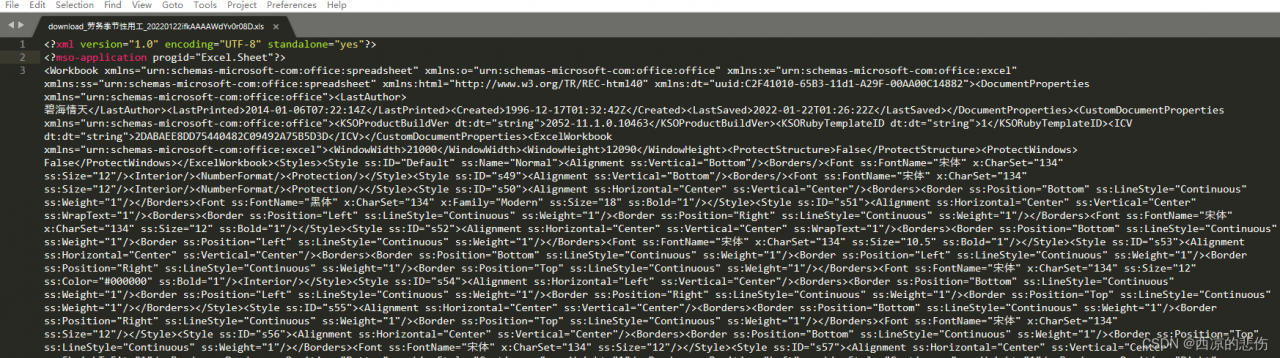
open the problematic XLS file with sublime text text editor or Notepad + +, which is XML in text form:

Open other normal XLS files with sublime text text editor as follows, which are binary:

Reason for the problem:
the XLS file in question is actually an office openxml file, also known as spreadsheetml format (XML format of Excel). Its suffix should be XML instead of XLS. It is not a standard excel file, so it will report an error when reading with POI.

Solution:
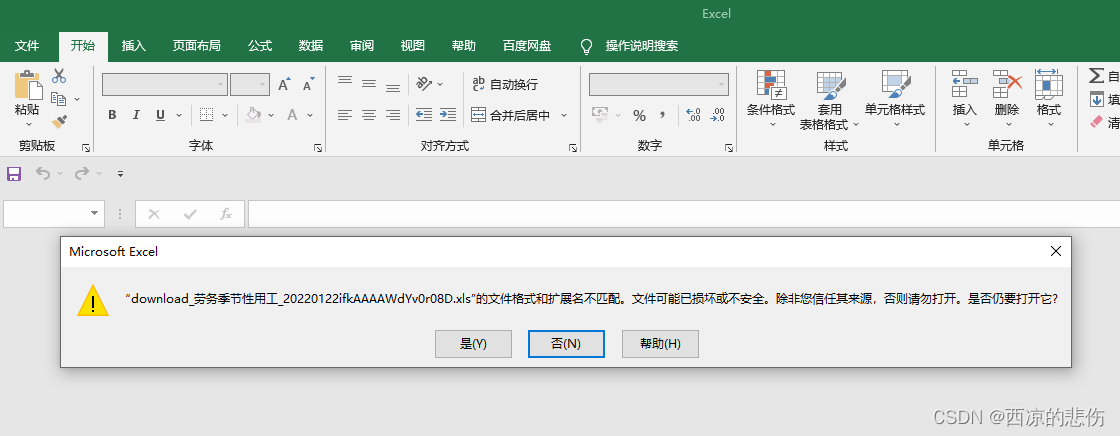
use Excel to open the problematic XLS file, as follows:
select Yes, then save the file as XLS format, and then use POI analysis to avoid reporting errors