Category Archives: JAVA

[Solved] JNI Error: ld: error: too many errors emitted, stopping now (use -error-limit=0 to see all errors)

1. Error description

ld: error: too many errors emitted, stopping now (use -error-limit=0 to see all errors)

What went wrong:
Execution failed for task ‘:app:externalNativeBuildDebug’.

Build command failed.
Error while executing process D:\ProgramFiles\Android\sdk\cmake\3.6.4111459\bin\cmake.exe with arguments

2. Cause of error

When developing JNI, this error occurs during compilation. It may be that the path of NDK is not set

3. Solutions

Add the path to the NDK in local.properties in the project directory
eg:

ndk.dir=D\:\\ProgramFiles\\Android\\sdk\\ndk\\21.3.6528147

[Solved] Maven Project Error: error in opening zip file

Cause:

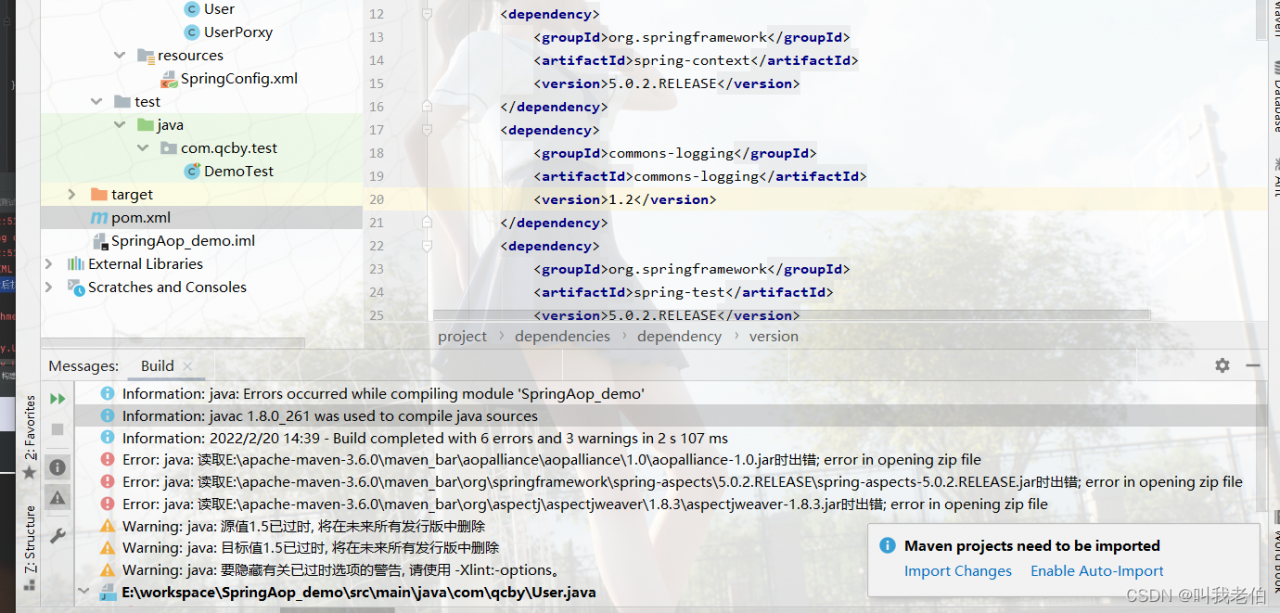
Create a maven project in idea and import pom.xml, related configuration. The following error occurred while running

****.***.***error in opening zip file

This error report occurs due to a jar version conflict in maven.

Solution:
Delete the maven local repository jar package, and then idea in the project refresh, let maven re-download dependencies. (the error reported in those lines, there is a corresponding path, you can delete it)

According to the error path, delete the corresponding jar from your computer. When you come back and refresh, it’s finished.

[How to Solve] error at ::0 formal unbound in pointcut

error at ::0 formal unbound in pointcut

This error was reported when using aop’s @before for log prenotification

Error code here

	@Before(value = "webLogAspect()")
    public void logBefore(JoinPoint joinPoint,Object ret) {
        ServletRequestAttributes attributes = (ServletRequestAttributes) RequestContextHolder.getRequestAttributes();
        HttpServletRequest request = attributes.getRequest();
        //在attribute中加入开始时间
        request.setAttribute("time",System.currentTimeMillis());
    }

Then, after I remove the second parameter, it is normal

@Before(value = "webLogAspect()")
public void logBefore(JoinPoint joinPoint) {

Explain that other operations are required when multiple parameters are used, otherwise an error will be reported

@Before(value = "webLogAspect() && args(ret)")
public void logBefore(JoinPoint joinPoint, Object ret) {

Problem-solving

[Solved] JAVA Mail Sent Error: Sending the email to the following server failed

Htmlemail uses QQ corporate email to send problem summary

After the local mail sending test is passed according to the parameter information on htmlemail, deploy the service on the ECs to test the mail sending. The first error is reported:

Sending the email to the following server failed : smtp.exmail.qq.com:25

Ping smtp.com directly on the ECS exmail. qq. COM domain name found that the external network on the server is not connected. After opening the external network permission, the above error still exists.
browse the document and try to switch smtpport to port 465:

HtmlEmail.setSmtpPort(465);

Error still reported:

Sending the email to the following server failed : smtp.exmail.qq.com:465
Could not connect SMTP host:smtp.exmail.qq.com, port 465, response: -1

It is found that sslonconnect needs to be set to true when switching to port 465

HtmlEmail.setSSLOnConnect(true);

After modification, the error information is changed to:

Invalid address

Finally, switch smtpport to 587:

HtmlEmail.setSmtpPort(587);

Finally, no error is reported. Record it for review later.

[Solved] Invocation of init method failed; nested exception is java.lang.NoSuchMethodError:

Running error

***************************
APPLICATION FAILED TO START
***************************

Description:

An attempt was made to call a method that does not exist. The attempt was made from the following location:

    org.springframework.scheduling.quartz.SchedulerAccessor.registerListeners(SchedulerAccessor.java:351)

The following method did not exist:

    org.quartz.Scheduler.getListenerManager()Lorg/quartz/ListenerManager;

The method's class, org.quartz.Scheduler, is available from the following locations:

    jar:file:/D:/repository/org/opensymphony/quartz/quartz/1.6.1/quartz-1.6.1.jar!/org/quartz/Scheduler.class

It was loaded from the following location:

    file:/D:/repository/org/opensymphony/quartz/quartz/1.6.1/quartz-1.6.1.jar


Action:

Correct the classpath of your application so that it contains a single, compatible version of org.quartz.Scheduler

Analysis: it worked well before, but suddenly it didn’t work. Reading the report incorrectly may be caused by the jar package conflict of the scheduled task

1. A global check reveals that shiro-all has introduced this jar package
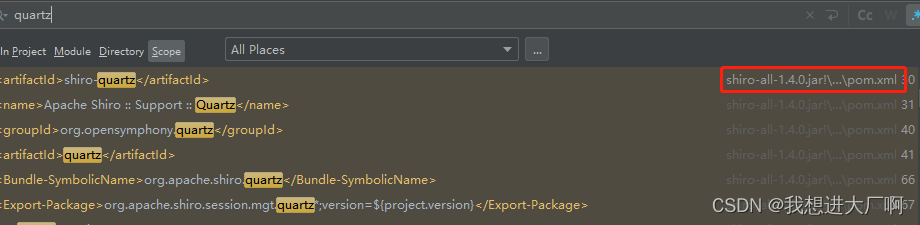
Solution:

When querying the dependency, I found that it is an optional part of shiro, so I exclude it directly.

<dependency>
    <groupId>org.apache.shiro</groupId>
    <artifactId>shiro-all</artifactId>
    <version>1.4.0</version>
    <exclusions>
        <exclusion>
            <groupId>org.apache.shiro</groupId>
            <artifactId>shiro-quartz</artifactId>
        </exclusion>
    </exclusions>
</dependency>

If the shiro-all package is introduced in a jar package, the following code can be placed under the parent package introduced by the project

     <exclusions>
        <exclusion>
            <groupId>org.apache.shiro</groupId>
            <artifactId>shiro-quartz</artifactId>
        </exclusion>
    </exclusions>


[Solved] Failed to start bean ‘documentationPluginsBootstrapper‘; nested exception is java.lang.NullPointerEx

Description:

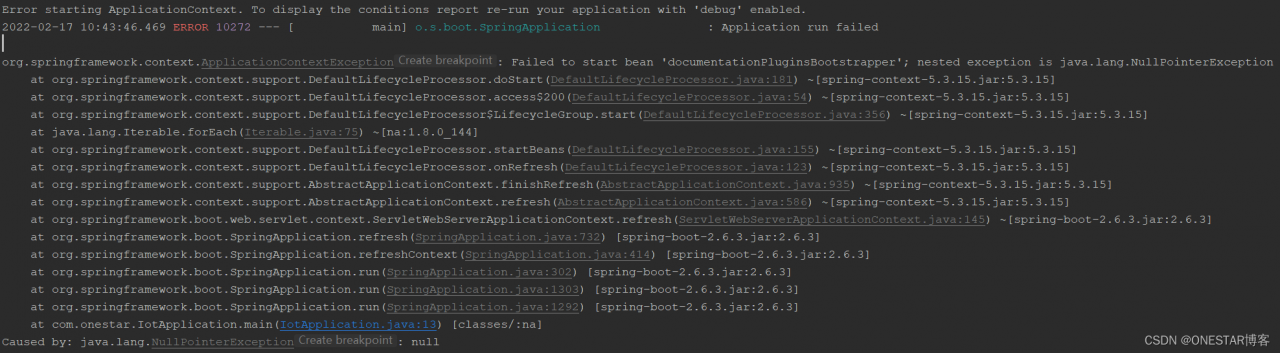
When using springboot to integrate swagger2config, an error is reported. The error information is as follows:

Analysis:

I am using Springboot 2.6.3, Spring Boot 2.6.X uses PathPatternMatcher to match paths, the path matching used by Springfox referenced by Swagger is based on AntPathMatcher, so it needs to be configured.

Solution:

Add the following configuration to the YML configuration file:

spring:
  mvc:
    pathmatch:
      matching-strategy: ANT_PATH_MATCHER

JAVA: How to Read JSON Format Data (Web Game Development)

Here is a example code on how to read Json format datas for web game development.


How to Read JSON Format Data with JAVA

/** 
 *  
 * @param result JSON string 
 * @param name JSON array name 
 * @param fields The fields contained in the JSON string 
 * @return Returns a list of type List<Map<String,Object>>, Map<String,Object> corresponding to the structure "id": "1" 
 */  
public static List<Map<String, Object>> convertJSON2List(String result,  
        String name, String[] fields) {  
    List<Map<String, Object>> list = new ArrayList<Map<String, Object>>();  
    try {  
        JSONArray array = new JSONObject(result).getJSONArray(name);  
 
        for (int i = 0; i < array.length(); i++) {  
            JSONObject object = (JSONObject) array.opt(i);  
            Map<String, Object> map = new HashMap<String, Object>();  
            for (String str : fields) {  
                map.put(str, object.get(str));  
            }  
            list.add(map);  
        }  
    } catch (JSONException e) {  
        Log.e("error", e.getMessage());  
    }  
    return list;  
}


[Solved] rocketmq Startup Error: Error: Could not create the Java Virtual Machine.

Java HotSpot ™ 64-Bit Server VM warning: Option UseConcMarkSweepGC was deprecated

It may be a JDK version problem

jdk1.8 is OK
if you want to use a higher version, such as jdk11

Windows:
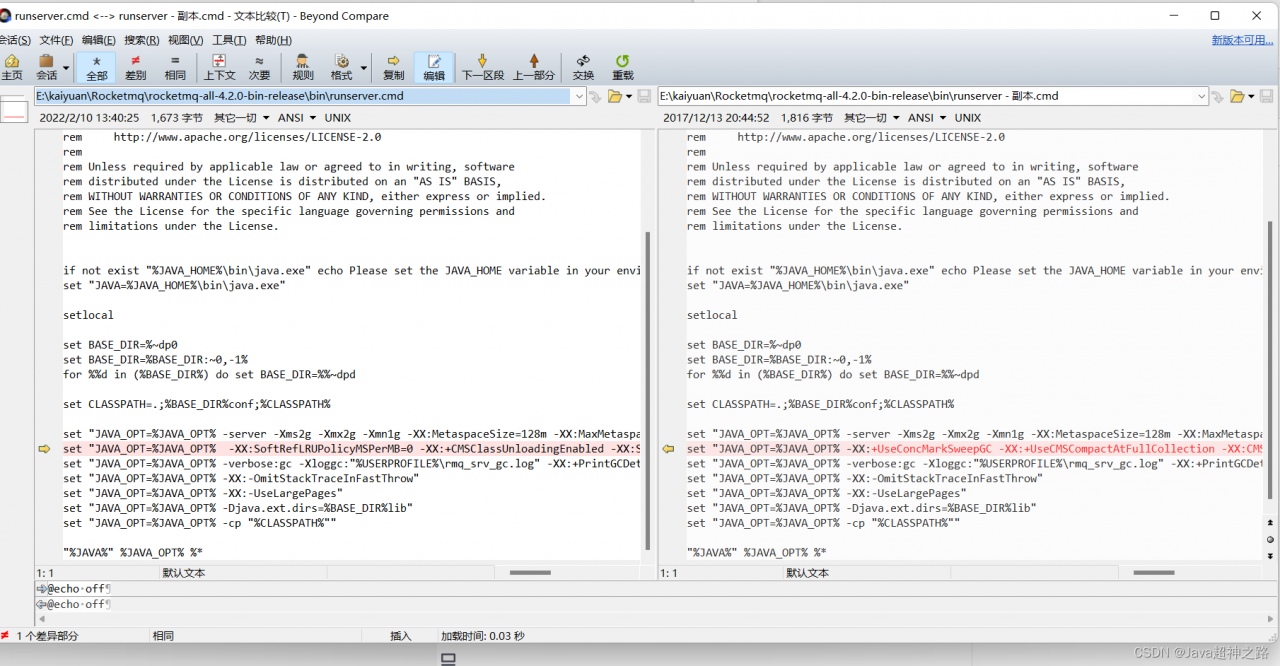
Modify bin\runserver.cmd
Linux:
Modify bin\runserver.sh
before modification:

set "JAVA_OPT=%JAVA_OPT% -XX:+UseConcMarkSweepGC -XX:+UseCMSCompactAtFullCollection -XX:CMSInitiatingOccupancyFraction=70 -XX:+CMSParallelRemarkEnabled -XX:SoftRefLRUPolicyMSPerMB=0 -XX:+CMSClassUnloadingEnabled -XX:SurvivorRatio=8 -XX:-UseParNewGC"

After modification:

set "JAVA_OPT=%JAVA_OPT%  -XX:SoftRefLRUPolicyMSPerMB=0 -XX:+CMSClassUnloadingEnabled -XX:SurvivorRatio=8"

[Solved] Error:java: Compilation failed: internal java compiler error

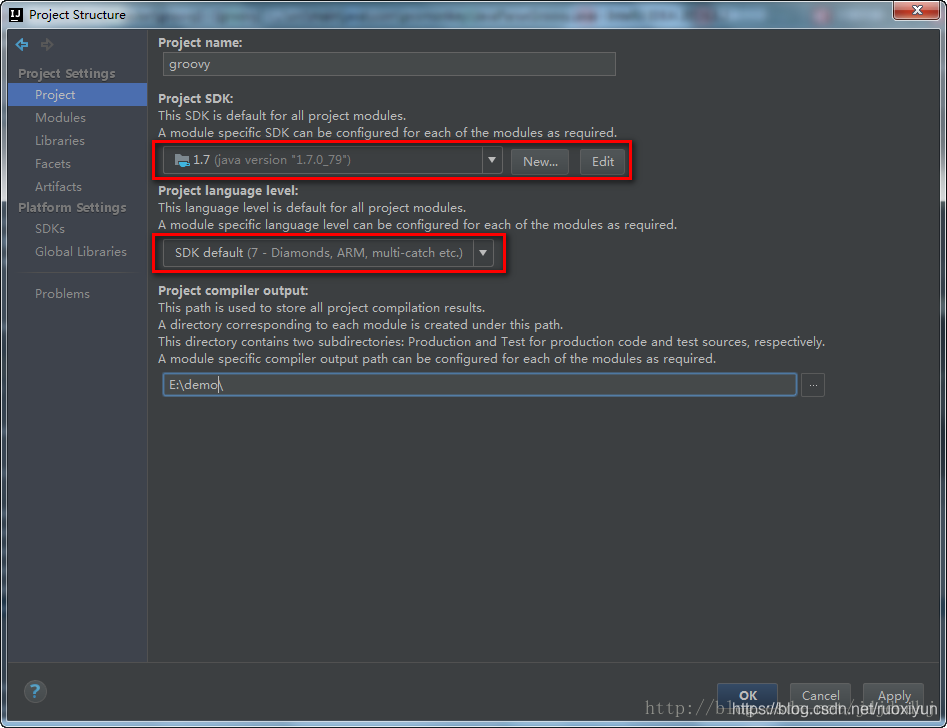
1, view the project’s jdk (Ctrl+Alt+shift+S)
File ->Project Structure->Project Settings ->Project

2. view the jdk of the project (Ctrl+Alt+shift+S)
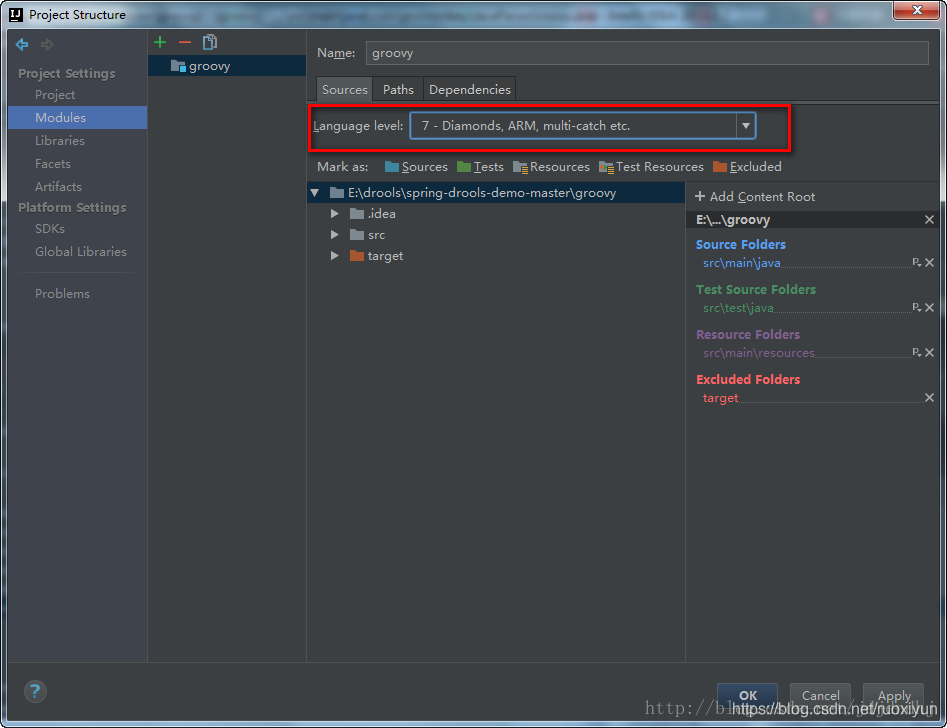
File ->Project Structure->Project Settings -> Modules -> (the name of the project needs to be modified) -> Sources ->

3. View Java configuration in idea
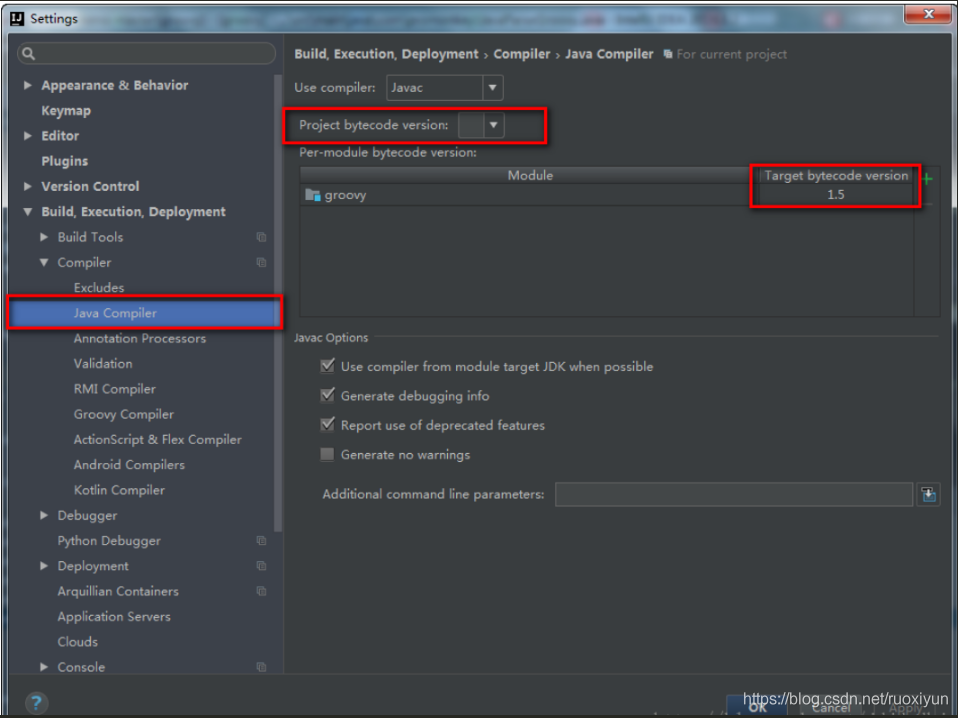
File ->Setting ->Build,Execution,Deployment -> Compiler -> Java Compiler

If the above three steps still fail
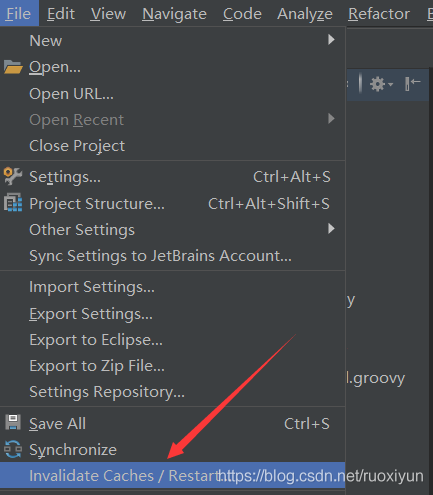
Clear IDEA cache Restart IDEA
File->Invalidate Caches/Restart

IDEA Compile Error: java Compilation failed internal java compiler error

idea compilation failed, reporting java: Compilation failed: internal java compiler error
Check if the local jdk version is exactly the same

    File ->Project Structure->Project Settings ->Project->Project SDKFile ->Project Structure->Project Settings->Modules->Project->Language levelFile ->Project Structure->Platform->SDKs->JDK home pathSettings->Build,Execution,Deployment->Java Compiler->Per-module butecode version

[Solved] AndroidStudio libcrypto.a(armcap.o):armcap.c:function OPENSSL_cpuid_setup: error: undefined referen

1. Error reporting:

The error of Android C + + OpenSSL link is as follows:

I:/webrtc/android/openssl-1.1.1k/output-armeabi-v7a/lib/libcrypto.a(armcap.o):armcap.c:function OPENSSL_cpuid_setup: error: undefined reference to 'sigfillset'

I:/webrtc/android/openssl-1.1.1k/output-armeabi-v7a/lib/libcrypto.a(armcap.o):armcap.c:function OPENSSL_cpuid_setup: error: undefined reference to 'sigdelset'

I:/webrtc/android/openssl-1.1.1k/output-armeabi-v7a/lib/libcrypto.a(armcap.o):armcap.c:function OPENSSL_cpuid_setup: error: undefined reference to 'sigdelset'

I:/webrtc/android/openssl-1.1.1k/output-armeabi-v7a/lib/libcrypto.a(armcap.o):armcap.c:function OPENSSL_cpuid_setup: error: undefined reference to 'sigdelset'

I:/webrtc/android/openssl-1.1.1k/output-armeabi-v7a/lib/libcrypto.a(armcap.o):armcap.c:function OPENSSL_cpuid_setup: error: undefined reference to 'sigdelset'

I:/webrtc/android/openssl-1.1.1k/output-armeabi-v7a/lib/libcrypto.a(ui_openssl.o):ui_openssl.c:function open_console: error: undefined reference to 'tcgetattr'

I:/webrtc/android/openssl-1.1.1k/output-armeabi-v7a/lib/libcrypto.a(ui_openssl.o):ui_openssl.c:function read_string_inner: error: undefined reference to 'signal'

I:/webrtc/android/openssl-1.1.1k/output-armeabi-v7a/lib/libcrypto.a(ui_openssl.o):ui_openssl.c:function read_string_inner: error: undefined reference to 'tcsetattr'

I:/webrtc/android/openssl-1.1.1k/output-armeabi-v7a/lib/libcrypto.a(ui_openssl.o):ui_openssl.c:function read_string_inner: error: undefined reference to 'tcsetattr'

clang++: error: linker command failed with exit code 1 (use -v to see invocation)

2. Reason:

Sigdelset, sigfillset and signal cannot be found in the SDK of Android

3. Solution:

Modify the minSdkVersion of build.grandle to a version number after 21:

apply plugin: 'com.android.application'
def LIBWEBRTC_HOME_PATH = "I:/webrtc/android/webrtc_m84_20201001/webrtc_android/src/"
//def LIBWEBRTC_HOME_PATH = "I:/webrtc/android/androidnativeapi/app/webrtc/"
android {
    compileSdkVersion 28
    defaultConfig {
        applicationId "org.webrtc.examples.androidnativeapi"
        minSdkVersion 21
        targetSdkVersion 28
        versionCode 1
        versionName "1.0"
        testInstrumentationRunner "android.support.test.runner.AndroidJUnitRunner"
        externalNativeBuild {
            cmake {
                arguments "-DLIBWEBRTC_HOME_PATH=" + LIBWEBRTC_HOME_PATH,
                        "-DANDROID_STL=c++_static"
            }
        }
        ndk {
            abiFilters  "armeabi-v7a"
        }
    }
    buildTypes {
        release {
            minifyEnabled false
            proguardFiles getDefaultProguardFile('proguard-android.txt'), 'proguard-rules.pro'
        }
    }
    externalNativeBuild {
        cmake {
            path "src/main/cpp/CMakeLists.txt"
        }
    }
    compileOptions {
        sourceCompatibility JavaVersion.VERSION_1_8
        targetCompatibility JavaVersion.VERSION_1_8
    }
    sourceSets {
        main {
            // 1. configure the root directory libs to load third-party so libraries, (it is best not to create jniLibs, in the many open source libraries may cause conflicts, not yet found)
            // 2. automatically copy the so libraries in the libs directory to the specified directory when running
            // 3. If you don't need to recompile the so you created, you can copy the so generated by (app/build/intermediates/transforms) to this directory
            jniLibs.srcDirs = ['libs']
            // If it is a single folder, you can directly configure it as follows
            // jniLibs.srcDir 'libs'
        }
    }
    buildToolsVersion '28.0.2'//ADD
}
repositories {
    flatDir{
        dirs'libs'
    }
}

dependencies {
    implementation fileTree(dir: "libs", include: ["*.aar"])

    //implementation fileTree(include: ['*.jar'], dir: 'libs')
    implementation 'com.android.support:appcompat-v7:28.0.0-rc02'
    implementation 'com.android.support.constraint:constraint-layout:1.1.3'
    testImplementation 'junit:junit:4.12'
    androidTestImplementation 'com.android.support.test:runner:1.0.2'
    androidTestImplementation 'com.android.support.test.espresso:espresso-core:3.0.2'
    //implementation(name: 'libwebrtc', ext: 'aar')
    //implementation 'org.webrtc:google-webrtc:1.0.+'
}