Category Archives: How to Fix

[How to Fix] MySQL Workbench for Mac Flashback

After MySQL workbench 8.0.23 Mac version is installed successfully, double-click to open and flash back

Start at the command line and you can see the error:

Fatal Python error: initfsencoding: unable to load the file system codec, sys.path = ['/Users/georgi/Applications/MySQLWorkbench.app/Contents/Resources/libraries', '/Library/Frameworks/Python.framework/Versions/3.7/lib/python37.zip', '/Library/Frameworks/Python.framework/Versions/3.7/lib/python3.7', '/Library/Frameworks/Python.framework/Versions/3.7/lib/python3.7/lib-dynload']
ModuleNotFoundError: No module named 'encodings'

The reason is python

Solution:

1. Scheme 1: command line startup

PYTHONPATH=/Library/Developer/CommandLineTools/Library/Frameworks/Python3.framework/Versions/3.7/lib/python3.7 /Applications/MySQLWorkbench.app/Contents/MacOS/MySQLWorkbench

2. Scheme 2: modify the MySQL workbench running file

cd /Applications/MySQLWorkbench.app/Contents/MacOS
mv MySQLWorkbench MySQLWorkbench.bak
echo "PYTHONPATH=/Library/Developer/CommandLineTools/Library/Frameworks/Python3.framework/Versions/3.7/lib/python3.7 /Applications/MySQLWorkbench.app/Contents/MacOS/MySQLWorkbench.bak" > MySQLWorkbench
chmod +x MySQLWorkbench

After executing the above commands, double-click MySQL workbench to start normally

reference resources: https://bugs.mysql.com/bug.php?id=102364
ReflectionUtils can not access XXX “private final”

code:

RedisConnection redisConnection = redisConectionFactory.getConnection();
        Field jedisField = ReflectionUtils.findField(JedisConnection.class, "jedis");
        Jedis jedis = (Jedis) ReflectionUtils.getField(jedisField, redisConnection);

Reflection problems
code changes:

RedisConnection redisConnection = redisConectionFactory.getConnection();
        Field jedisField = ReflectionUtils.findField(JedisConnection.class, "jedis");
        // Use only when getting properties modified with private
        jedisField.setAccessible(true);
        Jedis jedis = (Jedis) ReflectionUtils.getField(jedisField, redisConnection);

HTTP Basic: Access denied

Problem: git push error HTTP basic: access denied

Reason: the user name and password configured by local git are inconsistent with those registered on gitlabs.

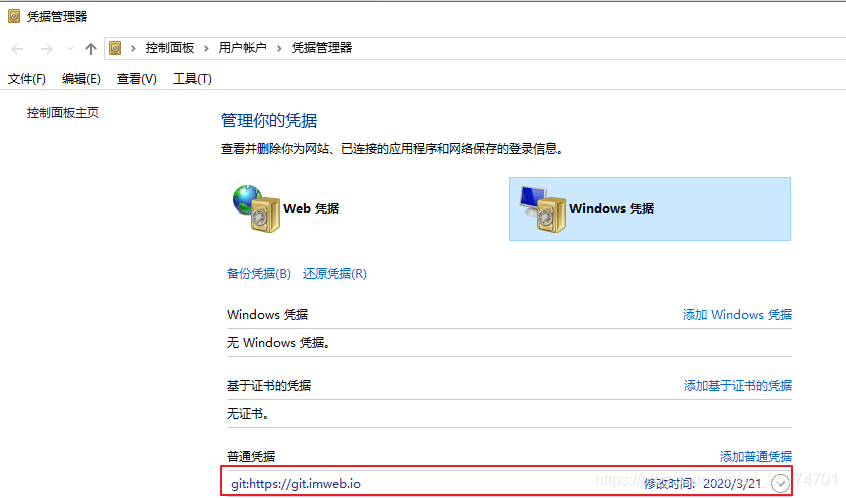
Solution: enter control panel user account credential manager?Windows credentials, find git in it, click Edit password, and update to the latest password

reference

ImageIO.read () unsupported image type when reading picture_ exception Unsupported Image Type

ImageIO.read Error in reading a picture:

javax.imageio.IIOException : Unsupported Image Type_ exception Unsupported Image Type

Adding dependencies to Maven projects can solve this problem

<dependency>
	<groupId>com.twelvemonkeys.imageio</groupId>
	<artifactId>imageio-jpeg</artifactId>
	<version>3.3.2</version>
</dependency>

File.createNewFile report errors java.io.IOException , resolved

if (!targetFile.exists()){
    targetFile.createNewFile();
  }

When creating a file, we may be in a series of folders. When the folder does not exist, we cannot create a file

 File targetFile = new File(videoFramesPath+File.separator + dir + File.separator + UUID.randomUUID().toString() + ".jpg");

Solution:
judge whether the folder exists before creating the file,

if (!targetFile.getParentFile().exists()){
  targetFile.getParentFile().mkdirs();
}
if (!targetFile.exists()){
    targetFile.createNewFile();
}

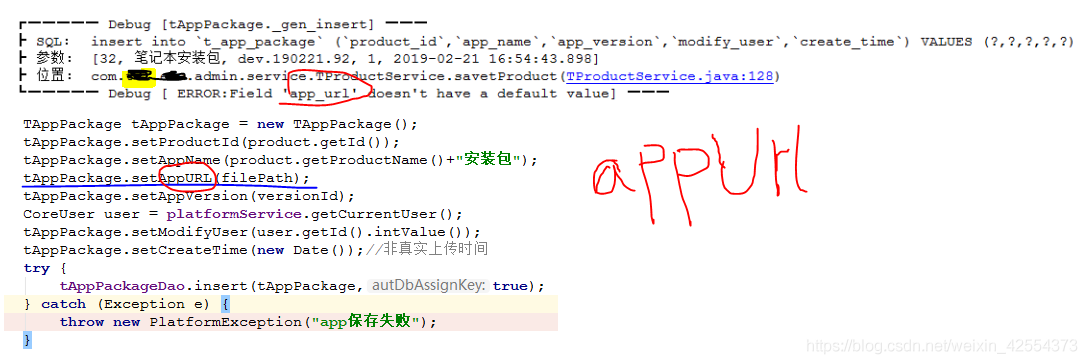
Error: field * doesn’t have a default value

https://www.cnblogs.com/sdfd101/p/5111851.html

There are two conventional methods

Solution 1: (enough)

In the database, set the default value for the error reporting field, integer: 0, string: null,

Find the corresponding table – design table – default selection box (set default value)

Solution 2:

MySQL installation directory – & gt; search open my.ini , find
sql mode = strict_ TRANS_ TABLES,NO_ AUTO_ CREATE_ USER,NO_ ENGINE_ SUBSTITUTION”

Amend to read

sql-mode=“NO_ AUTO_ CREATE_ USER,NO_ ENGINE_ SUBSTITUTION”

Then restart mysql

My own mistake is that the entity class doesn’t follow the hump rule. The appurl written by the entity class can be changed to appurl. I don’t pay attention to this very often

Idea submits code to git / code cloud warehouse for the first time

I’m too lazy. I’ve never tried to submit code to my own warehouse. Today, I’m stimulated to submit a demo
for specific settings, please refer to:

https://blog.csdn.net/ilv_ xj/article/details/82662465

When I pushed the code, I reported “push rejected”
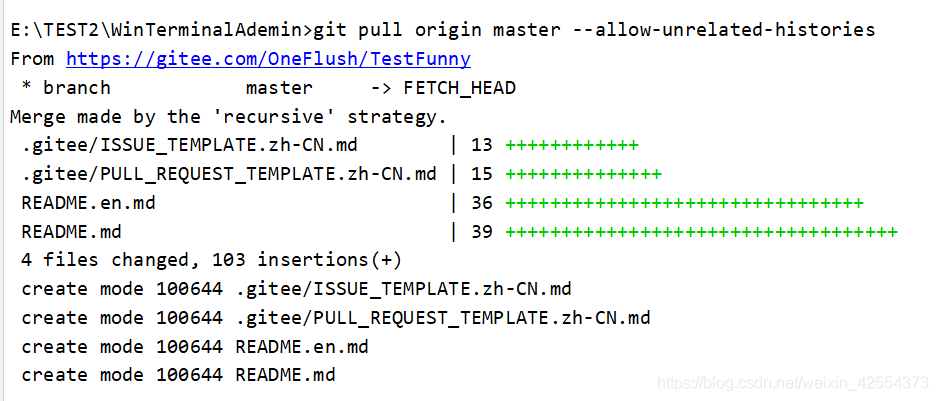
Baidu gave me a reliable solution, which is outputting git pull origin master — allow unrelated histories on the idea console (ALT + F12)

If you haven’t saved your git account and password before, windows will jump out of a similar login box, enter your git account and password, and then you will see the figure below to show that you can go to push. It’s successful

com.qcloud.cos.exception.CosServiceException Access Denied

com.qcloud.cos.exception.CosServiceException Access Denied. (Status Code 403; Error Code AccessDenied; Request ID NWRlNjM3NDVfY2FhMzNiMGFfNjgzMV8yMDc3MzVl); Trace ID OGVmYzZiMmQzYjA2OWNhODk0NTRkMTBiOWVmMDAxODc0OWRkZjk0ZDM1NmI1M2E2MTRlY2MzZDhmNmI5MWI1OTQyYWVlY2QwZTk2MDVmZDQ3MmI2Y2I4ZmI5ZmM4ODFjYjEzMGU3N2I0OTJjYTAwYWExNjJhODI1NTRkOGZlM2Y=

**Reason: * there is no cos bucket. Please check the appid secretid secretkey configuration file and bucket details in the account