VM682:1 Uncaught SyntaxError: Unexpected token u in JSON at position 0

To solve
Clear the cache The opened tag page full It is ok to try again
Category Archives: Error
Cmake Error The C compiler identification is GNU 7.5.0 — The CXX compiler identification is unknown
-- The C compiler identification is GNU 7.5.0
-- The CXX compiler identification is unknown
-- Check for working C compiler: /usr/bin/cc
-- Check for working C compiler: /usr/bin/cc -- works
-- Detecting C compiler ABI info
-- Detecting C compiler ABI info - done
-- Detecting C compile features
-- Detecting C compile features - done
CMake Error at CMakeLists.txt:2 (project):
  No CMAKE_CXX_COMPILER could be found.

  Tell CMake where to find the compiler by setting either the environment
  variable "CXX" or the CMake cache entry CMAKE_CXX_COMPILER to the full path
  to the compiler, or to the compiler name if it is in the PATH.


-- Configuring incomplete, errors occurred!
See also "/home/xxx/train_lianxi/build/CMakeFiles/CMakeOutput.log".
See also "/home/xxx/train_lianxi/build/CMakeFiles/CMakeError.log".
Install GCC, g++
sudo apt-get install gcc g++
How to Fix Node SASS Error in Vue + webpack project after nodejs upgrade
Upgrade to the v8 ^ above to the environment of the node, the node-sass error solution
Today, I upgraded the system of my colleague’s computer and also upgraded all the software. I found that there was an error in the original project. The general error message is as follows:
 ERROR  Failed to compile with 1 errors                                                                      PM 1:56:26

 error  in ./src/components/Hello.vue

Module build failed: Error: Missing binding /Users/fungleo/Sites/MyWork/vuedemo2/node_modules/node-sass/vendor/darwin-x64-57/binding.node
Node Sass could not find a binding for your current environment: OS X 64-bit with Node.js 8.x

Found bindings for the following environments:
  - OS X 64-bit with Node.js 6.x

This usually happens because your environment has changed since running `npm install`.
Run `npm rebuild node-sass --force` to build the binding for your current environment.
    at module.exports (/Users/fungleo/Sites/MyWork/vuedemo2/node_modules/node-sass/lib/binding.js:15:13)
    at Object.<anonymous> (/Users/fungleo/Sites/MyWork/vuedemo2/node_modules/node-sass/lib/index.js:14:35)
    at Module._compile (module.js:635:30)
    at Object.Module._extensions..js (module.js:646:10)
    at Module.load (module.js:554:32)
    at tryModuleLoad (module.js:497:12)
    at Function.Module._load (module.js:489:3)
    at Module.require (module.js:579:17)
    at require (internal/module.js:11:18)
    at Object.<anonymous> (/Users/fungleo/Sites/MyWork/vuedemo2/node_modules/sass-loader/lib/loader.js:3:14)
    at Module._compile (module.js:635:30)
    at Object.Module._extensions..js (module.js:646:10)
    at Module.load (module.js:554:32)
    at tryModuleLoad (module.js:497:12)
    at Function.Module._load (module.js:489:3)
    at Module.require (module.js:579:17)

 @ ./~/vue-style-loader!./~/css-loader?{"minimize":false,"sourceMap":false}!./~/vue-loader/lib/style-compiler?{"vue":true,"id":"data-v-2d1bdf0c","scoped":false,"hasInlineConfig":false}!./~/sass-loader/lib/loader.js?{"sourceMap":false}!./~/vue-loader/lib/selector.js?type=styles&index=0!./src/components/Hello.vue 4:14-394 13:3-17:5 14:22-402
 @ ./src/components/Hello.vue
 @ ./src/router/index.js
 @ ./src/main.js
 @ multi ./build/dev-client ./src/main.js

> Listening at http://localhost:8080
This code was copied on my computer after I upgraded Node. But that’s the general idea, depending on the location of the project and so on, it will be different.
node-sass not compatible with n>v8 version> That’s easy to solve. Execute under the current project
npm i node-sass -DThen the project went back to normal.
When the project error, do not worry, carefully look at the error code, it is not possible to use the translation tool to translate. Generally speaking, a solution can be found quickly.
This article by Fungleo original, allow to reprint, but reprint must retain the first link.
[Fixed]ERROR: canceling statement due to conflict with recovery
ERROR: canceling statement due to conflict with recovery
Error Details:
ERROR: canceling statement due to conflict with recovery
DETAIL: User query might have needed to see row versions that must be removed.
Business again
-
- system USES postgresql main library database architecture, main library used in WeChat small program mainly used in the business of writing data from library with the method of flow to copy from the main library update for library data, for the application of the library service is the background of query statistics web applications when the query statistics in the background, the SQL query is slower, table is updated data, and the query used to query for a long time will be following the above error </ ol>
-
- Question why
-
- Executive time on the main library query process, due to this query involves records may be updated, or deleted in the main library, according to the PostgreSQL MVCC mechanism, update, or delete data is not immediately deleted from the physical block, but after autovacuum process VACUUM data of the old version, the main library to update, or delete data on the old version, after VACUUM from the library will also carry out the operation, thus conflict with from the current query library, cause the query to interrupt and throw more mistakes.
-
- The solution
-
- On a business level
-
- From the business can optimize the slow SQL, whether the data table is too large, whether need to separate the database table, frequently update the frequent table analysis and vacuum and so on. Or segmenting query, avoid peak period data update time, etc
-
- From the database level
-
- Modify the maxSTANDBY_ STREAMING_DELAY parameter
-
- This parameter for 30 seconds, by default when executing SQL for library, may have clashed with is application of a WAL, this query if there is no execution is suspended for 30 seconds, 30 seconds note not for library individual queries allow maximum execution time, refers to allow maximum when case library application on a WAL WAL delay time, so for library query execution time may be less than the value of this setting has been suspended, this parameter can be set to 1, said from the library when WAL application process and executed queries from the library, a WAL application process waits until from the database query execution. (When I was processing, I set a larger value of 120, although occasionally an error will be reported, but the frequency of error will be much less, it is suggested that this exception can be caught in background processing, and the query user will be reminded that the query is currently busy, please try again later)
-
- Modify the hotstandby_feedback parameter
-
- By default when performing a query from the library will not notify the main library, set this parameter to on after from library to execute queries will notify the main library, when from library query execution process, the main library won’t clean up the data from library need old version, therefore, the query from the library will not be suspended, however, this method also can bring certain disadvantages, table may appear on the main library expansion, the expansion of the main library table level and on the table write transactions and execution time from the library, this parameter is off by default. (This approach is risky, I haven’t tested it)
- After modifying the parameter configuration, you need to reload the database configuration file
JSON parse error: Can not deserialize instance of java.lang.String out of START_OBJECT token
The problem
After the front end passes JSON format data to the back end, SpringMVC reports
org.springframework.http.converter.HttpMessageNotReadableException:
     * JSON parse error: Can not deserialize instance of java.lang.String out of START_OBJECT token;
     * nested exception is com.fasterxml.jackson.databind.JsonMappingException:
     * Can not deserialize instance of java.lang.String out of START_OBJECT token
     *  at [Source: java.io.PushbackInputStream@6822f8aa; line: 1, column: 88] (through reference chain: com.xxx.XXXDto["employees"])
plan
To solve this problem, we can use one of the Uniform Exception Handling methods in Spring
@ExceptionHandler({HttpMessageNotReadableException.class, JsonMappingException.class, HttpMediaTypeNotSupportedException.class})
    @ResponseBody
    @ResponseStatus(HttpStatus.BAD_REQUEST)
    public Map<String,Object> exceptionHandler(Exception ex){
        Map<String,Object> map = new HashMap<>(3);
        try{
           map.put("code","400");
           map.put("msg",ex.getMessage());
           return map;
        }catch (Exception e){
            log.error("exception handler error",e);
            map.put("code","400");
            map.put("msg",e.getMessage());
            return map;
        }
    }
Solve problems encountered in the process
The above method can handle the problem of JSON formatting errors, but the data content returned to the front end is in the following format
JSON parse error: Can not deserialize instance of java.lang.String out of START_OBJECT token; nested exception is com.fasterxml.jackson.databind.JsonMappingException: Can not deserialize instance of java.lang.String out of START_OBJECT token at [Source: java.io.PushbackInputStream@6822f8aa; line: 1, column: 88] (through reference chain: com.xxx.XXXDto["callBackUrl"])
We can’t see what the problem is at first sight, and even if we are familiar with the error, we can’t immediately find out where the problem is, because we need to process the above data and then send it back to the front end. Right
Finally solve the problem
We debug the source code found, Change is abnormal in springframework org. Springframework. HTTP. Converter. Json. AbstractJackson2HttpMessageConverter
thrown inside 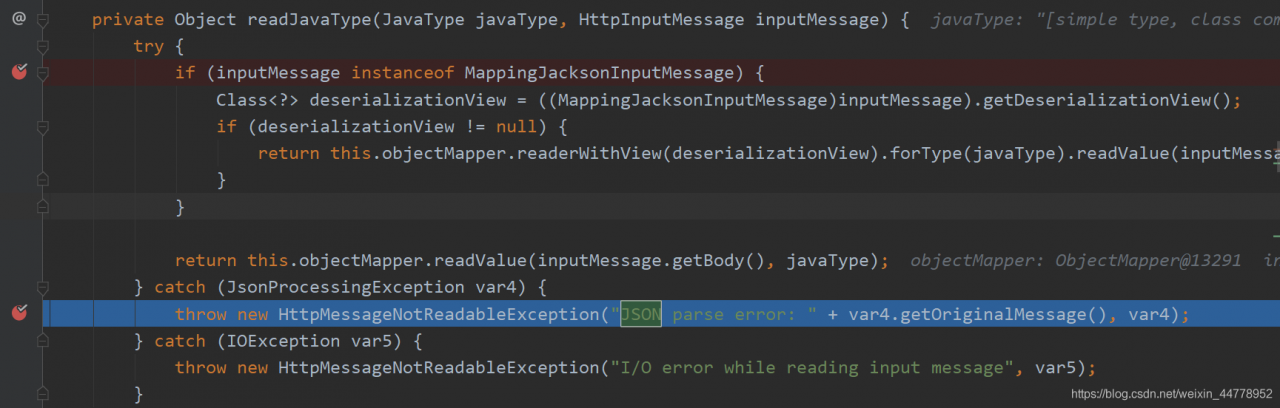 abnormal is
JsonMappingException extends JsonProcessingException HttpMessageNotReadableException, as a result, we only need to add corresponding processing logic unified exception handling, can be returned to the front
@ExceptionHandler({HttpMessageNotReadableException.class, JsonMappingException.class, HttpMediaTypeNotSupportedException.class})
    @ResponseBody
    @ResponseStatus(HttpStatus.BAD_REQUEST)
    public Map<String,Object> exceptionHandler(Exception ex){
        Map<String,Object> map = new HashMap<>(3);
        try{
            if(ex instanceof HttpMessageNotReadableException
                    && ex.getMessage().indexOf("JSON parse error:")>-1){
                map.put("code","400");
                String message=ex.getMessage();
                int beginIndex=message.indexOf("XXXDto[\"");
                int endIndex=message.indexOf("\"])",beginIndex);
                message="parameter"+message.substring(beginIndex+22,endIndex)+" format error";
                map.put("msg",message);
            }else{
                map.put("code","400");
                map.put("msg",ex.getMessage());
            }
            return map;
        }catch (Exception e){
            log.error("exception handler error",e);
            map.put("code","400");
            map.put("msg",e.getMessage());
            return map;
        }
    }
How to Fix Cannot convert value of type Error
Error: Cannot convert value of type ‘org.apache.ibatis.session.defaults.DefaultSqlSessionFactory’ to required type ‘org.mybatis.spring. SqlSessionTemplate’ for property ‘sqlSessionTemplate’: no matching editors or conversion strategy foun
How to Fix:

It’s sqlSessionFactoryBeanName not sqlSessionTemplateBeanName
Mac error: SH: Vue cli service: command not found
An error below: sh: vue - cli - service: command not found
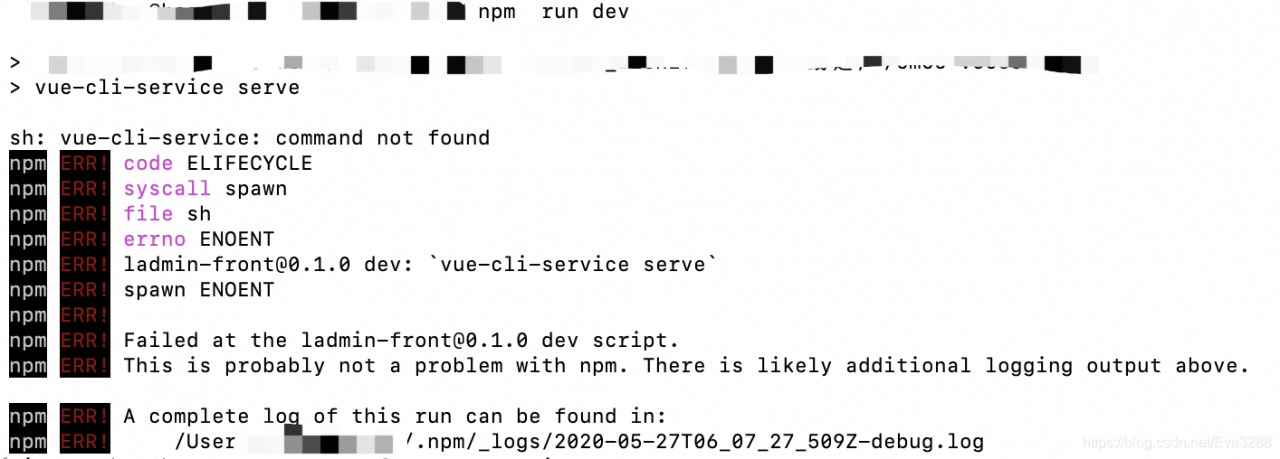
solution:
terminal execute the command
#clear cache
npm cache clean --force
#reinstall
npm/cnpm  install
Another online article roughly said 3 solutions
1. Reinstall the
delete folder node_modules in carrying out NPM/CNPM install to install
2. Specify the path
./node_modules/.bin/vue-cli-service build
3. Global installation
npm install @vue/cli-service -g
NODE_ENV=production
Try a few times more, if other reasons can refer to https://stackoverflow.com/questions/51172064/command-not-found-with-vue-cli
How to Fix the common Warning Errors after Vue Project Startup
There are multiple modules with names that only differ in casing.This can lead to unexpected........

cause: Inconsistent file name and reference, one uppercase letter, one lowercase letter. For example, the file name is app.js, but when you referenced it, you wrote app.js
. ‘@/API/oa/workingHours aWorkinghoursAllowed/index’; I have written the file name AworkingChina Allowed as AworkingChina Allowed, which is why the above warning appears
52:12-24 Critical dependency: the request of a dependency is an expression

the reason: not in the main. Js file directly defining methods and instance of the prototype and note the red box part is problem solving
just began to found the problem and made for a long time have no problem, also a lot of related articles, baidu is not yet finally settled gave up, first put the
there behind the project are not busy, just use the most stupid way all commented out the code at the beginning, then one line to the test, the result unexpectedly directly to find the problems in one fell swoop
Image not found Return status code 404 (Not Found)
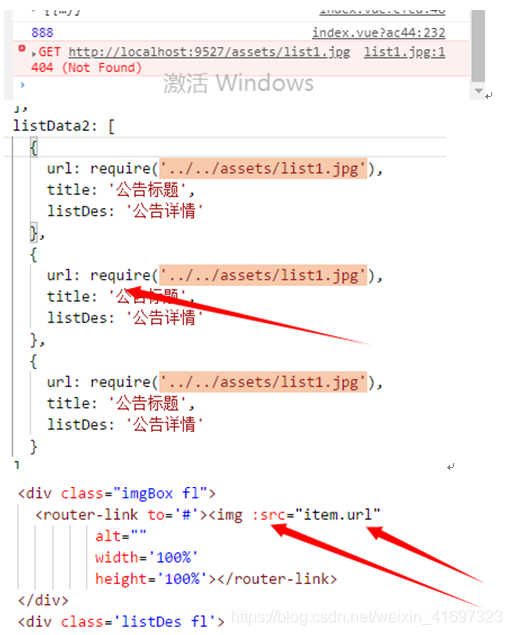
1- Write the URL in the data :require(‘./assets/images/logo.png ‘)
2- Write in the template
Request processing failed; nested exception is tk.mybatis.mapper.MapperException: The current entity class does not contain a property named rnable!

cause: front-background field names do not match
Error: listen EADDRNOTAVAIL 192.168.1.166:9527
at Object.exports._errnoException (util.js:1020:11)
at exports._exceptionWithHostPort (util.js:1043:20)
at Server._listen2 (net.js:1245:19)
at listen (net.js:1294:10)
at net.js:1404:9
at _combinedTickCallback (internal/process/next_tick.js:83:11)
at process._tickCallback (internal/process/next_tick.js:104:9)
at Module.runMain (module.js:606:11)
at run (bootstrap_node.js:389:7)
at startup (bootstrap_node.js:149:9)
at bootstrap_node.js:504:3
Reason: The server IP address has been changed
Error occured while trying to proxy to: localhost:9527/api//auth/jwt/token and returns the status code 500
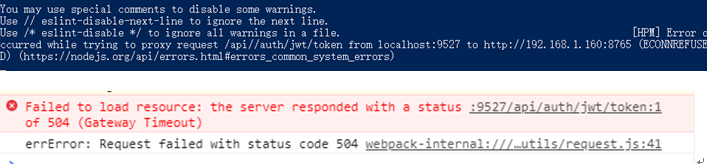
Cause: The background server is not on or down
RuntimeError: ONNX export failed: Couldn‘t export operator aten::upsample_bilinear2d
pth –> Onnx error
RuntimeError: ONNX export failed: Couldn't export operator aten::upsample_bilinear2d
Solution:
   torch.onnx.export(model, input, onnx_path, verbose=True, input_names=input_names, output_names=output_names)
#add:opset_version=11
   torch.onnx.export(model, input, onnx_path, verbose=True, input_names=input_names, output_names=output_names, opset_version=11)
package golang.org/x/net/XXX: unrecognized import path “golang.org/x/net/xxx“…
bug:
package golang.org/x/net/websocket: unrecognized import path “golang.org/x/net/websocket”: https fetch: Get “https://golang.org/x/net/websocket?go-get=1”: dial tcp 216.239.37.1:443: connectex: A connection attempt failed because the connected party did not properly respond after a period of time, or established connection failed because connected host has failed to respond.
Causes.
When you need to use the corresponding package, the automatic download error
Solution.
File->Settings->Go->Go Modules
Check Start Go Module Integration and enter GOPROXY=https://goproxy.io, apply it, then go to download again.
Vue Error: command failed: npm install –loglevel error –registry=https://registry.npm.taobao.org
Use the vue – cli error creating project is reported as follows: the command failed: NPM install – loglevel error – registry=https://registry.npm.taobao.org – disturl=https://npm.taobao.org/dist
Summarizes the has the following solutions:
to ensure the vue – used in cli NPM, node and so on, the version. Then try the following methods:
1. NPM install chromedriver – chromedriver_cdnurl=http://cdn.npm.taobao.org/dist/chromedriver
2. NPM cache clean — force removal of NPM’s cache
AOP Error Cannot resolve reference to bean ‘txPointCut‘ while setting bean property ‘po
Three packets are missing (
Aspectjrt,
aspectjweaver,
com.springsource.org.aopalliance org. Aspectj aspectjrt 1.9.6
Org. Aspectj aspectjweaver 1.9.6
Org. Aopalliance com.springsource.org.aopalliance 1.0.0
Configuration XML: <The XML version = “1.0” encoding = “utf-8”?>