Category Archives: Error

Duplicate entry ‘1’ for key’PRIMARY’ (How to Solve)

When using MySQL+ibatis for insert test, an error is reported: The information is as follows:

Test insert
com.ibatis.common.jdbc.exception.NestedSQLException:   
--- The error occurred in com/study/ibatis/Student.xml.  
--- The error occurred while applying a parameter map.  
--- Check the addStudent-InlineParameterMap.  
--- Check the statement (update failed).  
--- Cause: com.mysql.jdbc.exceptions.jdbc4.MySQLIntegrityConstraintViolationException: Duplicate entry '1' for key 'PRIMARY'
    at com.ibatis.sqlmap.engine.mapping.statement.MappedStatement.executeUpdate(MappedStatement.java:107)
    at com.ibatis.sqlmap.engine.impl.SqlMapExecutorDelegate.insert(SqlMapExecutorDelegate.java:393)
    at com.ibatis.sqlmap.engine.impl.SqlMapSessionImpl.insert(SqlMapSessionImpl.java:82)
    at com.ibatis.sqlmap.engine.impl.SqlMapClientImpl.insert(SqlMapClientImpl.java:58)
    at com.study.ibatis.StudentDaoImpl.addStudent(StudentDaoImpl.java:33)
    but com.study.ibatis.TestIbatis.main (TestIbatis.java: 14 )
Caused by: com.mysql.jdbc.exceptions.jdbc4.MySQLIntegrityConstraintViolationException: Duplicate entry '1' for key 'PRIMARY'
    at sun.reflect.NativeConstructorAccessorImpl.newInstance0(Native Method)
    at sun.reflect.NativeConstructorAccessorImpl.newInstance(NativeConstructorAccessorImpl.java:39)
    at sun.reflect.DelegatingConstructorAccessorImpl.newInstance(DelegatingConstructorAccessorImpl.java:27)
    at java.lang.reflect.Constructor.newInstance(Constructor.java:513)
    at com.mysql.jdbc.Util.handleNewInstance(Util.java:406)
    at com.mysql.jdbc.Util.getInstance(Util.java:381)
    at com.mysql.jdbc.SQLError.createSQLException(SQLError.java:1015)
    at com.mysql.jdbc.SQLError.createSQLException(SQLError.java:956)
    at com.mysql.jdbc.MysqlIO.checkErrorPacket(MysqlIO.java:3491)
    at com.mysql.jdbc.MysqlIO.checkErrorPacket(MysqlIO.java:3423)
    at com.mysql.jdbc.MysqlIO.sendCommand(MysqlIO.java:1936)
    at com.mysql.jdbc.MysqlIO.sqlQueryDirect(MysqlIO.java:2060)
    at com.mysql.jdbc.ConnectionImpl.execSQL(ConnectionImpl.java:2542)
    at com.mysql.jdbc.PreparedStatement.executeInternal(PreparedStatement.java:1734)
    at com.mysql.jdbc.PreparedStatement.execute(PreparedStatement.java:995)
    at com.ibatis.sqlmap.engine.execution.SqlExecutor.executeUpdate(SqlExecutor.java:80)
    at com.ibatis.sqlmap.engine.mapping.statement.MappedStatement.sqlExecuteUpdate(MappedStatement.java:216)
    at com.ibatis.sqlmap.engine.mapping.statement.MappedStatement.executeUpdate(MappedStatement.java:94)
    ... 5 more
false

The meaning of the error is: Repeatedly input the “1” key as “primary” to enter the database, and when querying the table tbl_student, three records were found, one of which was a primary key. Considering that when I was testing, the default primary key in the database was 1. So delete the record whose primary key is 1 in the database. Then the test passed.

Summary: I set the primary key in ibatis to the default 1. As a result, the test starts directly from the default 1. Then an error is reported, and the default value of the primary key is set to null to solve the problem.
[Solved] Vue’s error: Uncaught TypeError: Cannot assign to read only property’exports’ of object’#

 I just ran a previous demo of Vue+webpack. After running, there was no expected effect and an error was reported.

Uncaught TypeError: Cannot assign to read only property’exports’ of object’#<Object>’


Click on the wrong file and mark the wrong place as this piece of code:

import {normalTime} from'./timeFormat'; 

module.exports = {
  normalTime
};

Is module.exports;

The reason is: The code above is ok. You can mix  and . You can’t mix  and . require export import module.exports

there is nothing wrong with the code. When webpack is packaged, you can mix require and export in the js file. But import and module.exports cannot be mixed.

Because import and module.exports are not allowed to be mixed in webpack 2,

The solution is to change it to ES6.

import {normalTime} from'./timeFormat' ;

export default normalTime;

Finally it runs successfully.

How to Solve Pydicom Read Dicom File Error: OSError

Before using pydicom to read dicom files, everything is normal, but when reading a batch of data recently, an error will be reported

Read code

file = pydicom.read_file(filepath)
data = file.pixel_array

The problem lies in the attribute of pixel_array, the error is reported as follows

OSError                                   Traceback (most recent call last)
c:\python35\lib\site-packages\pydicom\pixel_data_handlers\pillow_handler.py in get_pixeldata(dicom_dataset)
    196                 fio = io.BytesIO(pixel_data)
--> 197                 decompressed_image = Image.open(fio)
    198             except IOError as e:

c:\python35\lib\site-packages\PIL\Image.py in open(fp, mode)
   2571     raise IOError("cannot identify image file %r"
-> 2572                   % (filename if filename else fp))
   2573 

OSError: cannot identify image file <_io.BytesIO object at 0x000002418FC85CA8>

During handling of the above exception, another exception occurred:

NotImplementedError                       Traceback (most recent call last)
<ipython-input-55-c00f3f09682d> in <module>()
----> 1 file.pixel_array

c:\python35\lib\site-packages\pydicom\dataset.py in pixel_array(self)
    899             The Pixel Data (7FE0,0010) as a NumPy ndarray.
    900         """
--> 901         self.convert_pixel_data()
    902         return self._pixel_array
    903 

c:\python35\lib\site-packages\pydicom\dataset.py in convert_pixel_data(self)
    845         )
    846 
--> 847         raise last_exception
    848 
    849     def decompress(self):

c:\python35\lib\site-packages\pydicom\dataset.py in convert_pixel_data(self)
    813             try:
    814                 # Use the handler to get a 1D numpy array of the pixel data
--> 815                 arr = handler.get_pixeldata(self)
    816                 self._pixel_array = reshape_pixel_array(self, arr)
    817 

c:\python35\lib\site-packages\pydicom\pixel_data_handlers\pillow_handler.py in get_pixeldata(dicom_dataset)
    197                 decompressed_image = Image.open(fio)
    198             except IOError as e:
--> 199                 raise NotImplementedError(e.strerror)
    200             UncompressedPixelData.extend(decompressed_image.tobytes())
    201     except Exception:

NotImplementedError: None


Solution:

this compression format can not be read with pydicom, using SimpleITK can solve

file = sitk.ReadImage (filepath) 
data = sitk.GetArrayFromImage (file)

Start error in maven web project java.lang.ClassNotFoundException: org.springframework.web.util.Log4jConfigListener

Environment: Groovy/Grails Tool Suite 3.1.0.RELEASE ( BASED ON ECLIPSE JUNO 3.8.1 ), JDK1.6, Maven3.05, Tomcat6

wrong description:

SEVERE: Error configuring application listener of class org.springframework.web.util.Log4jConfigListener
java.lang.ClassNotFoundException: org.springframework.web.util.Log4jConfigListener

Problem resolution:

All dependencies (jdk/jar/classes) in the Maven project are managed by it. So if it is determined that the package or file (org.springframework.web.util.Log4jConfigListener) does exist in the project, it must be due to the fact that the project does not add a maven dependency.

solution:

ctrl+Enter error project->Deployment Assembly->Add->Java buid path entries->Next->Maven Dependencies

Clear!

At this time, there are more sub-nodes spring-web-3.2.3.RELEASE.jar under the related project module in the Servers module (the package where the Log4jConfigListener class configured in web.xml is located)

[Solved] RSA encryption request error: javax.crypto.badpaddingexception: decryption error

📖 Abstract


Share today — RSA encryption request error: javax. Crypto. Badpaddingexception: decryption error , welcome to pay attention!

Read related articles: spring boot + security based on the separation of the front and back RSA password encryption login process


🌂 resolvent

In the login method, the space can be replaced by a + sign, just ask if you want to be coquettish

String inputDecryptData = "";
        try {
            Object privateKey = redisUtil.get(Constant.RSA_PRIVATE_KEY);

            inputDecryptData =  RSAUtils.decrypt(password.replaceAll(" ","+"), RSAUtils.getPrivateKey(privateKey.toString()));
        } catch (Exception e) {
            log.error("RSA encryption and decryption exceptions occurred ======>", e);
            throw new BizException("RSA encryption and decryption exception occurred");
        }

Finally, thank you for watching patiently, leaving a like collection is your greatest encouragement to me!

Solution of Vue router loading components on demand

Now you can see the official website to explain how to load components on demand as follows:

// The combination of vue asynchronous components and webpack's [code chunking point] feature enables on-demand loading
const App = () => import('../component/Login.vue');

We usually report this error when using it:

Module build failed: SyntaxError: Unexpected token

It can be found that Import reported an error because Babel couldn’t resolve the error and needed to download the plug-in

cnpm install babel-plugin-syntax-dynamic-import --save-dev

Modify . Babelrc after downloading

{
  "presets": [
    ["env", { "modules": false }],
    "stage-3"
  ],
  "plugins": ["syntax-dynamic-import"]
}

In this way, it can be introduced on demand

[Solved] MYSQLD: Can‘t create directory ‘/usr/local/mysql/data/’(Errcode:2 -No such file or directory)

Detailed error information of MySQL version 5.7.31 startup

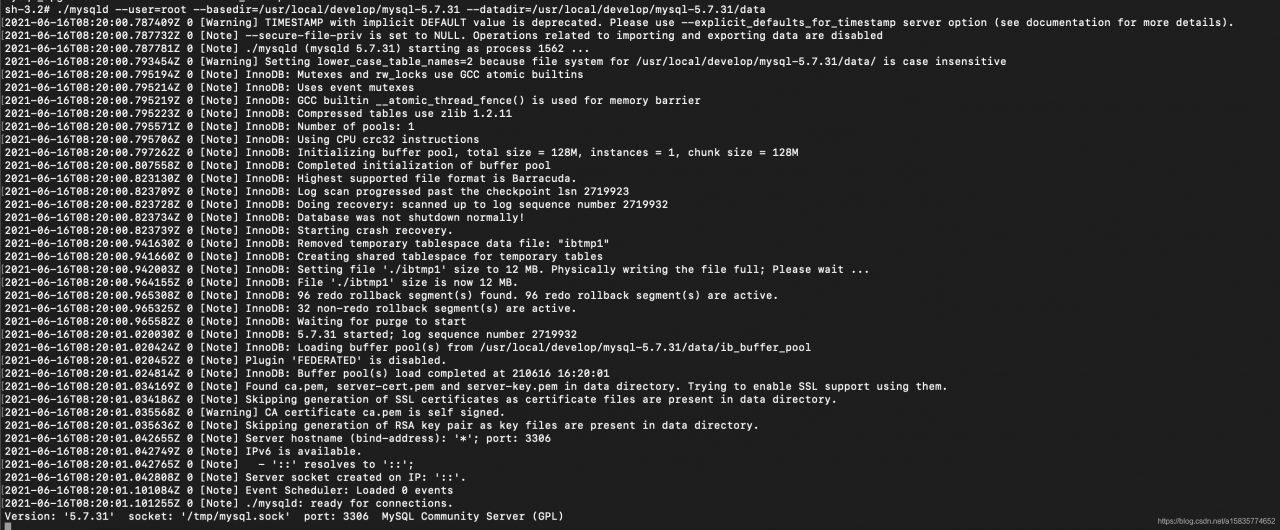
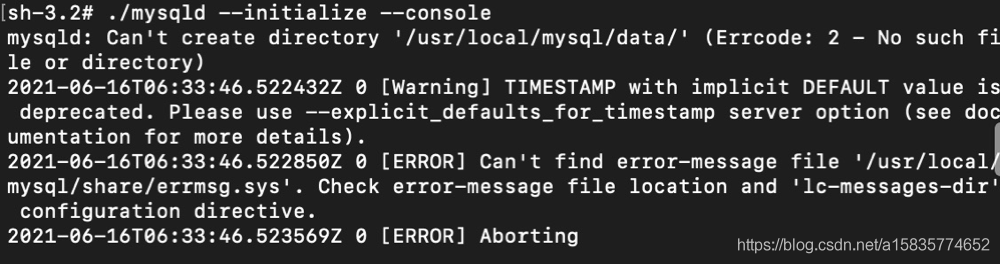
MySQL version   Mysql-5.7.31 initialization error information is shown in the figure below

The configuration file is correct   There’s no problem with the permissions of my.cnf configuration file. How can the default initialization still go to the/usr/local/MySQL directory

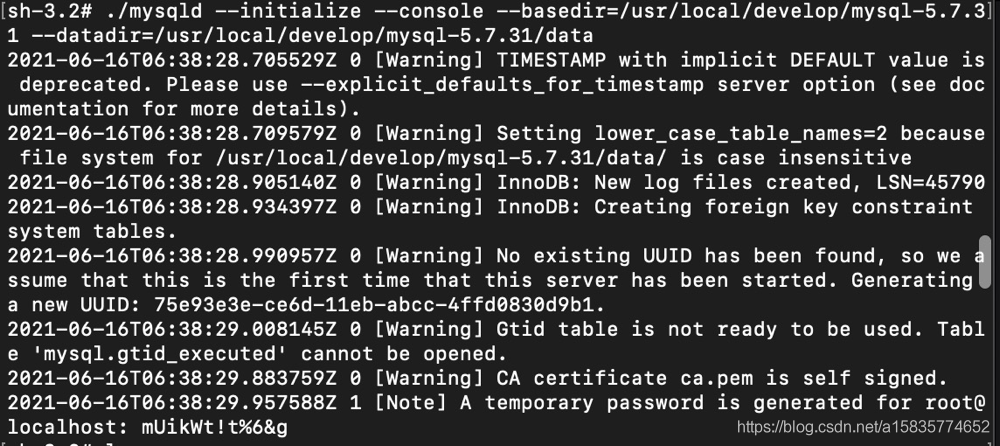
A complete solution   Specify basedir and dataDir again during initialization

mysqld –initialize –console –basedir=/usr/local/develop/mysql-5.7.31 –datadir=/usr/local/develop/mysql-5.7.31/data

So far, the problem has been solved   Successfully initialized

I’m sending you a question   But there will be problems when starting, as shown in the figure

This is a very special problem
A complete solution

./mysqld –user=root –basedir=/usr/local/develop/mysql-5.7.31 –datadir=/usr/local/develop/mysql-5.7.31/data

Be careful not to add start after the start command   Otherwise, it will prompt another error
As shown in the picture

After the start command is executed successfully, check whether MySQL exists

ps -ef |grep mysql

end

How to Solve ES error: “illegal_argument_exception”

The specific errors reported by ES are as follows:

{
“error”: {
“root_cause”: [
{
“type”: “illegal_argument_exception”,
“reason”: “Fielddata is disabled on text fields by default. Set fielddata=true on [createHour] in order to load fielddata in memory by uninverting the inverted index. Note that this can however use significant memory. Alternatively use a keyword field instead.”
}
],
“type”: “search_phase_execution_exception”,
“reason”: “all shards failed”,
“phase”: “query”,
“grouped”: true,
“failed_shards”: [
{
“shard”: 0,
“index”: “gmall1205_order”,
“node”: “LCQa858ERH6qw_7asM2R3Q”,
“reason”: {
“type”: “illegal_argument_exception”,
“reason”: “Fielddata is disabled on text fields by default. Set fielddata=true on [createHour] in order to load fielddata in memory by uninverting the inverted index. Note that this can however use significant memory. Alternatively use a keyword field instead.”
}
}
],
“caused_by”: {
“type”: “illegal_argument_exception”,
“reason”: “Fielddata is disabled on text fields by default. Set fielddata=true on [createHour] in order to load fielddata in memory by uninverting the inverted index. Note that this can however use significant memory. Alternatively use a keyword field instead.”,
“caused_by”: {
“type”: “illegal_argument_exception”,
“reason”: “Fielddata is disabled on text fields by default. Set fielddata=true on [createHour] in order to load fielddata in memory by uninverting the inverted index. Note that this can however use significant memory. Alternatively use a keyword field instead.”
}
}
},
“status”: 400
}

2: The statement that caused this error query:

GET gmall1205_order/_search
{
“query” : {
“bool” : {
“filter” : {
“term” : {
“createDate” : “2019-09-17”
}
}
}
},
“aggregations” : {
“groupby_createHour” : {
“terms” : {
“field” : “createHour”,
“size” : 24
},
“aggregations” : {
“sum_totalamount” : {
“sum” : {
“field” : “totalAmount”
}
}
}
}
}
}

3: java code:

@Override
public Map getOrderAmontHourMap(String date) {

    SearchSourceBuilder searchSourceBuilder = new SearchSourceBuilder();
    BoolQueryBuilder boolQueryBuilder = new BoolQueryBuilder();
    boolQueryBuilder.filter(new TermQueryBuilder("createDate",date));
    searchSourceBuilder.query(boolQueryBuilder);
    TermsBuilder termsBuilder = AggregationBuilders.terms("groupby_createHour")
            .field("createHour.keyword").size(24);
    SumBuilder sumBuilder = AggregationBuilders.sum("sum_totalamount").field("totalAmount");

    termsBuilder.subAggregation(sumBuilder);
    searchSourceBuilder.aggregation(termsBuilder);


    Search search = new Search.Builder(searchSourceBuilder.toString()).addIndex(GmallConstant.ES_INDEX_ORDER).addType("_doc").build();

    System.out.println(searchSourceBuilder.toString());

    Map<String,Double> hourMap=new HashMap<>();
    try {
        SearchResult searchResult = jestClient.execute(search);
        System.out.println("====>"+searchResult.toString() + searchResult.getTotal());
        List<TermsAggregation.Entry> buckets = searchResult.getAggregations().getTermsAggregation("groupby_createHour").getBuckets();
        for (TermsAggregation.Entry bucket : buckets) {
            Double hourAmount = bucket.getSumAggregation("sum_totalamount").getSum();
            String hourkey = bucket.getKey();
            hourMap.put(hourkey,hourAmount);
        }
    } catch (IOException e) {
        e.printStackTrace();
    }

    return hourMap;
}

Error analysis:

“Fielddata is disabled on text fields by default. Set fielddata=true on [createHour] in order to load fielddata in memory by uninverting the inverted index. Note that this can however use significant memory. Alternatively use a keyword field instead

The Fielddata text field is disabled by default. Set fielddata = true (createHour) in order to load fielddata uninverting inverting index in memory. Note that this can use a lot of memory. Or use a keyword field


4: Solution

The first:

GET gmall1205_order/_search
{
“query” : {
“bool” : {
“filter” : {
“term” : {
“createDate” : “2019-09-17”
}
}
}
},
“aggregations” : {
“groupby_createHour” : {
“terms” : {
“field” : “createHou.keyword”,
“size” : 24
},
“aggregations” : {
“sum_totalamount” : {
“sum” : {
“field” : “totalAmount”
}
}
}
}
}
}


 The second: the solution, custom indexing rules, do not use the default value to create the index

PUT gmall1205_order
{
“mappings” : {
“_doc” : {
“properties” : {
“provinceId” : {
“type” : “keyword”
},
“consignee” : {
“type” : “keyword”,
“index”:false
},
“consigneeTel” : {
“type” : “keyword”,
“index”:false
},
“createDate” : {
“type” : “keyword”
},
“createHour” : {
“type” : “keyword”
},
“createHourMinute” : {
“type” : “keyword”
},
“createTime” : {
“type” : “keyword”
},
“deliveryAddress” : {
“type” : “keyword”
},
“expireTime” : {
“type” : “keyword”
},
“id” : {
“type” : “keyword”
},
“imgUrl” : {
“type” : “keyword”,
“index”:false
},
“operateTime” : {
“type” : “keyword”
},
“orderComment” : {
“type” : “keyword”,
“index”:false
},
“orderStatus” : {
“type” : “keyword”
},
“outTradeNo” : {
“type” : “keyword”,
“index”:false
},
“parentOrderId” : {
“type” : “keyword”
},
“paymentWay” : {
“type” : “keyword”
},
“totalAmount” : {
“type” : “double”
},
“trackingNo” : {
“type” : “keyword”
},
“tradeBody” : {
“type” : “keyword”,
“index”:false
},
“userId” : {
“type” : “keyword”
}
}
}
}
}

The reason and solution for the error ECONNRESET of the httpClieint request of Node.js

Background note

Recently, there is the following scene in a work project:

Use Node.js express framework to implement a file system server side, which has an API for uploading files on the client side. The client uses Node.js HttpClient to call the server-side API to upload files.

The client has no problems when uploading small files. When uploading large files, the httpClient request reports the following error.

{ [Error: socket hang up] code: 'ECONNRESET' } 

I googled a lot of information, and finally looked at the relevant source code of Node.js and finally learned the cause and solution of the problem.

problem causes

The reason for this problem is: The HttpServer provided by Node.js has a default timeout of 2 minutes. When the processing time of a request exceeds 2 minutes, HttpServer will automatically close the socket of the request, so the client receives ECONNRESET Error message again . Node.js can refer to the source code .

Below we use an example to verify.

Service-Terminal:

The server side uses the express framework to register a GET method routing processing function with a path of “”. In the route processing function, the timeout processing is set through the setTimeout method, and the request will be responded to after the timeout is 3 minutes.

const express = require('express' );
const util = require('util' );
const app = express();

app.get( "/", function (req, res, next) {
    util.log( "Received a request." );

    setTimeout( function () {
        res.setHeader( 'transfer-encoding','chunked' );
        res.status( 200 );
        util.log( "timeout" )
        res.write( "hello world" );
        res.end();
    }, 3 * 60 * 1000 )
});
var server = app.listen(3001, function () {
    sutil.log( "server listening at port 3001......" );
});

Client:

The client requests the server-side interface by calling the http.request method, and prints the returned information.

const http = require('http' );
const util = require('util' )

var opt = {
    host: 'localhost' ,
    port: 3001 ,
    method: 'GET' ,
};
var req = http.request(opt, function (res) {
    util.log( 'STATUS:' , res.statusCode);
    res.setEncoding( 'utf8' );
     var resultText ='' ;
    res.on( 'data', (chunk) => {
        resultText += chunk;
    });
    res.on( 'end', () => {
        util.log(resultText);
    });
});

req.on( 'error', (e) => {
    util.log(e);
});

util.log( "start request..." )
req.end();

Start the server first, then start the client. The result of the request is as follows:

Service-Terminal:

bbash- 3.2 $ node app.js                                                                                                                                                           
 12 Nov 21 : 02 : 16 -server listening at port 3001 ......                                                                                                                              
 12 Nov 21 : 02 : 22 - Received a request.                                                                                                                                               
 12 Nov21 : 05 : 22 -timeout

Client:

bash- 3.2 $ node app.js                                                                                                                                                               
 12 Nov 21 : 02 : 22 - start request...                                                                                                                                                  
 12 Nov 21 : 04 : 22 -{[Error: socket hang up] code: ' ECONNRESET ' }

From the above running results, it can be seen that the client reported an error ECONNRESET after waiting for 2 minutes for the request.

solution

Solution: Call the server.setTimeout() method on the server side to set the server-side timeout to a larger value or directly turn off the timeout mechanism (set the timeout time to 0 to turn it off) .

Just use the above code, the client remains unchanged, and the server calls the server.setTimeout() method at the end of the file, as shown below,

var server = app.listen(3001, function () {
    sutil.log( "server listening at port 3001......" );
});
server.setTimeout( 0)

Start the server first, and then start the client, the results are as follows:

Service-Terminal:

bash- 3.2 $ node app.js    
 12 Nov 21 : 37 : 22 -server listening at port 3001 ......                                    
 12 Nov 21 : 37 : 29 - Received a request.                                                    
 12 Nov 21 : 40 : 29 -timeout

Client:

bash- 3.2 $ node app.js         
 12 Nov 21 : 37 : 29 - start request...                                                       
 12 Nov 21 : 40 : 29 -STATUS: 200                                                             
12 Nov 21 : 40 : 29 -hello world

It can be seen from the above running results that the client can normally receive the return result from the server.

(done)

Elasticsearch 6.2.3 version executes aggregation error Fielddata is disabled on text fields by default

Background note

Execute the example of “Elasticsearch Authoritative Guide”, when executing aggregate query, error  Fielddata is disabled on text fields by default.

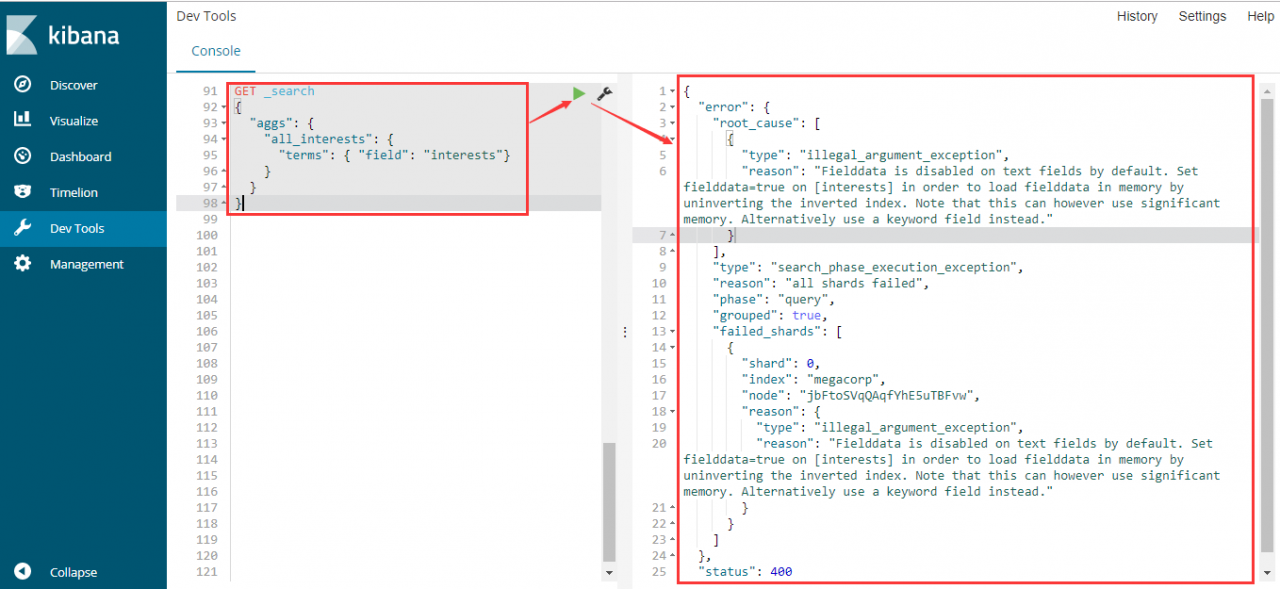
1) The aggregation statement is as follows:

GET _search
{
  "aggs": {
    "all_interests": {
      "terms": { "field": "interests"}
    }
  }
}


2) The error message is as follows:

{
  "error": {
    "root_cause": [
      {
        "type": "illegal_argument_exception",
        "reason": "

Fielddata is disabled on text fields by default.

 Set fielddata=true on [interests] in order to load fielddata in memory by uninverting the inverted index. Note that this can however use significant memory. Alternatively use a keyword field instead."
      }
    ],
    "type": "search_phase_execution_exception",
    "reason": "all shards failed",
    "phase": "query",
    "grouped": true,
    "failed_shards": [
      {
        "shard": 0,
        "index": "megacorp",
        "node": "jbFtoSVqQAqfYhE5uTBFvw",
        "reason": {
          "type": "illegal_argument_exception",
          "reason": "Fielddata is disabled on text fields by default. Set fielddata=true on [interests] in order to load fielddata in memory by uninverting the inverted index. Note that this can however use significant memory. Alternatively use a keyword field instead."
        }
      }
    ]
  },
  "status": 400
}


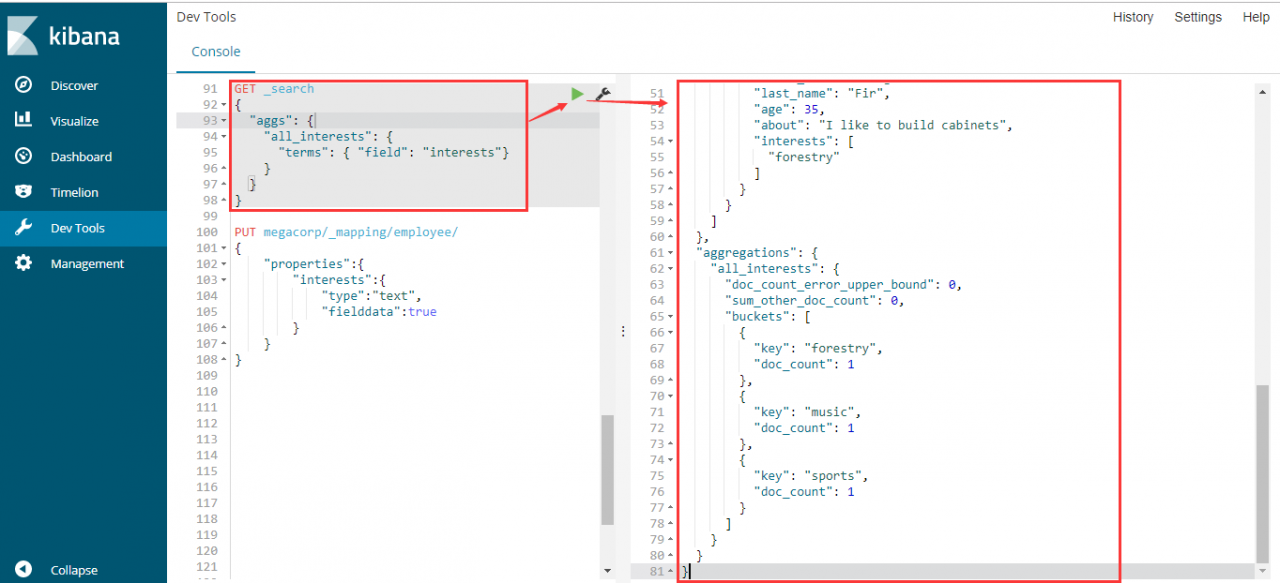
3) The screenshot of Kibana’s Dev Tools execution is as follows:


Cause Analysis

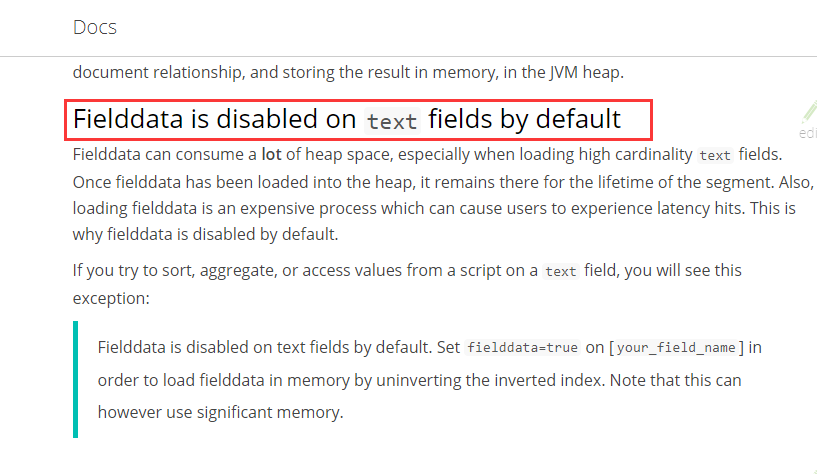
After Elasticsearch 5.x version, operations such as sorting and aggregation are cached in memory with a separate data structure (fielddata), which is not enabled by default and needs to be enabled separately .

For details, please refer to: fielddata


solution

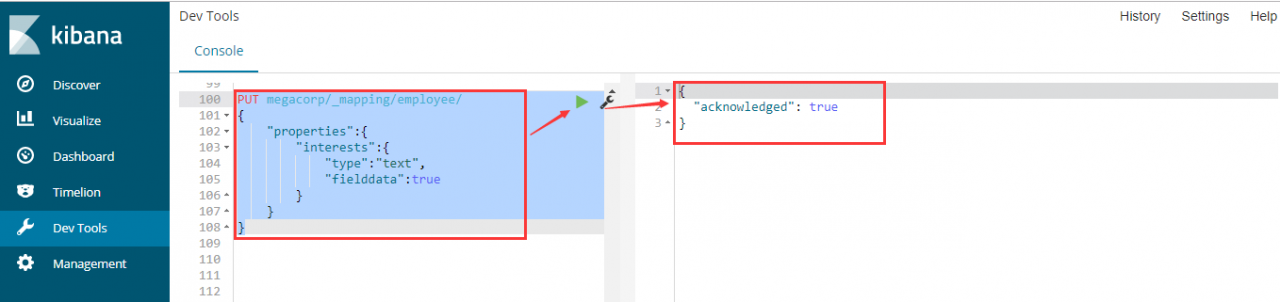
1) Execute the following statement to enable the mapping of the interests field:

PUT megacorp/_mapping/employee/
{
    "properties":{
        "interests":{
            "type":"text",
            "fielddata":true
        }
    }
}


2) Execute the opening mapping statement in Dev Tools of Kibana, the screenshot is as follows:


3) Implement the aggregation statement again, and the results are as follows:

{
  "took": 455,
  "timed_out": false,
  "_shards": {
    "total": 5,
    "successful": 5,
    "skipped": 0,
    "failed": 0
  },
  "hits": {
    "total": 3,
    "max_score": 1,
    "hits": [
      {
        "_index": "megacorp",
        "_type": "employee",
        "_id": "2",
        "_score": 1,
        "_source": {
          "first_name": "Jane",
          "last_name": "Smith",
          "age": 32,
          "about": "I like to collect rock albums",
          "interests": [
            "music"
          ]
        }
      },
      {
        "_index": "megacorp",
        "_type": "employee",
        "_id": "1",
        "_score": 1,
        "_source": {
          "first_name": "John",
          "last_name": "Smith",
          "age": 25,
          "about": "I love to go rock climbing",
          "interests": [
            "sports"
          ]
        }
      },
      {
        "_index": "megacorp",
        "_type": "employee",
        "_id": "3",
        "_score": 1,
        "_source": {
          "first_name": "Douglas",
          "last_name": "Fir",
          "age": 35,
          "about": "I like to build cabinets",
          "interests": [
            "forestry"
          ]
        }
      }
    ]
  },
  "aggregations": {
    "all_interests": {
      "doc_count_error_upper_bound": 0,
      "sum_other_doc_count": 0,
      "buckets": [
        {
          "key": "forestry",
          "doc_count": 1
        },
        {
          "key": "music",
          "doc_count": 1
        },
        {
          "key": "sports",
          "doc_count": 1
        }
      ]
    }
  }
}


4) In Kibana’s Dev Tools, the execution effect screenshot is as follows:

How to Solve Expdp Error ORA-39126

11.2.0.2, expdp reports an error:

ORA-39126: Worker unexpected fatal error in KUPW$WORKER.GET_TABLE_DATA_OBJECTS []
ORA-31642: the following SQL statement fails:
BEGIN “SYS”.”DBMS_CUBE_EXP”.SCHEMA_CALLOUT(:1,0,1,’11.02.00.00.00′); END;
ORA-06512: at “SYS.DBMS_SYS_ERROR”, line 86
ORA-06512: at “SYS.DBMS_METADATA”, line 1245
ORA-04063: package body “SYS.DBMS_CUBE_EXP” has errors
ORA-06508: PL/SQL: could not find program unit being called: “SYS.DBMS_CUBE_EXP”

ORA-06512: at “SYS.DBMS_SYS_ERROR”, line 86
ORA-06512: at “SYS.KUPW$WORKER”, line 8353

Query the oracle document ID 1328829.1, the reason is

OLAP objects remain existing in data dictionary while OLAP is not installed or was de-installed. Verify with:

connect / as sysdba
SELECT * FROM SYS.EXPPKGACT$ WHERE PACKAGE = ‘DBMS_CUBE_EXP’;
Solution:
-- backup the table SYS.EXPPKGACT$ before deleting the row
SQL> CREATE TABLE SYS.EXPPKGACT$_BACKUP AS SELECT * FROM SYS.EXPPKGACT$;


-- delete the DBMS_CUBE_EXP from the SYS.EXPPKGACT$
SQL> DELETE FROM SYS.EXPPKGACT$ WHERE PACKAGE = 'DBMS_CUBE_EXP' AND SCHEMA= 'SYS';
SQL> COMMIT;

AN ERROR MESSAGE APPEARS WHEN TOMCAT DEPLOYS A NEW PROJECT: INVALID BYTE TAG IN CONSTANT POOL: 15

The above pile of tomcat startup prompt information is omitted, the following is the specific information of the error:
org.apache.tomcat.util.bcel.classfile.ClassFormatException: Invalid byte tag in constant pool: 15
at org.apache.tomcat.util.bcel .classfile.Constant.readConstant(Constant.java:131)
at org.apache.tomcat.util.bcel.classfile.ConstantPool.<init>(ConstantPool.java:60)
at org.apache.tomcat.util.bcel.classfile .ClassParser.readConstantPool(ClassParser.java:209)
at org.apache.tomcat.util.bcel.classfile.ClassParser.parse(ClassParser.java:119)
at org.apache.catalina.startup.ContextConfig.processAnnotationsStream(ContextConfig.java :1911)
at org.apache.catalina.startup.ContextConfig.processAnnotationsJar(ContextConfig.java:1800)
at org.apache.catalina.startup.ContextConfig.processAnnotationsUrl(ContextConfig.java:1759)
at org.apache.catalina.startup.ContextConfig.processAnnotations(ContextConfig.java:1745)
at org.apache.catalina.startup.ContextConfig.webConfig (ContextConfig.java:1249)
at org.apache.catalina.startup.ContextConfig.configureStart(ContextConfig.java:876)
at org.apache.catalina.startup.ContextConfig.lifecycleEvent(ContextConfig.java:317)
at org.apache. catalina.util.LifecycleSupport.fireLifecycleEvent(LifecycleSupport.java:119)
at org.apache.catalina.util.LifecycleBase.fireLifecycleEvent(LifecycleBase.java:89)
at org.apache.catalina.core.StandardContext.startInternal(StandardContext.java: 5061)
at org.apache.catalina.util.LifecycleBase.start(LifecycleBase.java:145)
at org.apache.catalina.core.ContainerBase.addChildInternal(ContainerBase.java:812)
at org.apache.catalina.core.ContainerBase.addChild (ContainerBase.java:787)
at org.apache.catalina.core.StandardHost.addChild(StandardHost.java:607)
at org.apache.catalina.startup.HostConfig.deployDirectory(HostConfig.java:1044)
at org.apache. catalina.startup.HostConfig.deployDirectories(HostConfig.java:967)
at org.apache.catalina.startup.HostConfig.deployApps(HostConfig.java:472)
at org.apache.catalina.startup.HostConfig.check(HostConfig.java: 1346)
at org.apache.catalina.startup.HostConfig.lifecycleEvent(HostConfig.java:294)
at org.apache.catalina.util.LifecycleSupport.fireLifecycleEvent(LifecycleSupport.java:119)
at org.apache.catalina.util.LifecycleBase.fireLifecycleEvent(LifecycleBase.java:89)
at org.apache.catalina.core.ContainerBase.backgroundProcess (ContainerBase.java:1233)
at org.apache.catalina.core.ContainerBase$ContainerBackgroundProcessor.processChildren(ContainerBase.java:1391)
at org.apache.catalina.core.ContainerBase$ContainerBackgroundProcessor.processChildren(ContainerBase.java:1401)
at org.apache.catalina.core.ContainerBase$ContainerBackgroundProcessor.run(ContainerBase.java:1380)
at java.lang.Thread.run(Thread.java:745)


 First paste the error message in the control column, the following is the solution:

First of all, I deleted all the deployed projects, and then restarted tomcat, it can start successfully, and can see the welcome page, and then deploy a few small servlet test pages written by myself in turn, it is fine, and it runs normally.

However, this error was reported when some projects were deployed. The error message on the Internet seems to be very small. After all the hardships, I finally found a usable solution. The specifics are posted as follows to warn myself and benefit future generations:

{tomcat path}/conf/web.xml modification method:

<web-app version=”3.0″ xmlns=”http://java.sun.com/xml/ns/javaee” xmlns:xsi=”http://www.w3.org/2001/XMLSchema-instance” xsi :schemaLocation=”http://java.sun.com/xml/ns/javaee http://java.sun.com/xml/ns/javaee/web-app_3_0.xsd” metadata-complete=”true”>