Author Archives: Robins

Vue calculates attributes and passes parameters to the computed method

Vue computes attribute computed that no direct arguments can be passed
You can use closure functions to implement the need to pass parameters

<template>
  <span>{{fmtWeight(1)}}</span>
</template>

<script>
export default {
  data() {
    return {
      weight: 100
    };
  },
  computed: {
    fmtWeight() {
      return num => {
        return this.weight.toFixed(num)
      }
    }
  }
};
</script>

PHP & nbsp; built in server array

$_SERVER[‘PHP_SELF’] $_SERVER[‘PHP_SELF’] $_SERVER[‘PHP_SELF’] $_SERVER[‘PHP_SELF’]
$_SERVER[‘argv’] # Parameters passed to the script.
$_SERVER[‘argc’] # contains the number of command-line arguments passed to the program (if running in command-line mode).
$_SERVER[‘GATEWAY_INTERFACE’] # Version of the CGI specification used by the server. For example, “CGI/1.1”.
$_SERVER[‘SERVER_NAME’] # Host name of the server on which the script is currently running.
$_SERVER[‘SERVER_SOFTWARE’] # The string that identifies the server, given in the header in response to the request.
$_SERVER[‘SERVER_PROTOCOL’] # Name and version of the communication protocol when the page is requested. For example, “HTTP/1.0”.
$_SERVER[‘REQUEST_METHOD’] # Request method for page access. For example: “GET”, “HEAD”, “POST”, “PUT”.
$_SERVER[‘QUERY_STRING’] # $_SERVER[‘QUERY_STRING’] #
$_SERVER[‘DOCUMENT_ROOT’] # The document root where the script is currently running. Define in the server configuration file.
$_SERVER[‘HTTP_ACCEPT’] # The contents of the Accept: header for the current request.
$_SERVER[‘HTTP_ACCEPT_CHARSET’] # Accept-charset: the contents of the header for the current request. For example: “ISO-8859-1,*, UTF-8”.
$_SERVER[‘HTTP_ACCEPT_ENCODING’] # The contents of the Accept-Encoding: header of the current request. For example: “gzip”.
$_SERVER[‘HTTP_ACCEPT_LANGUAGE’]# Accept-language: contents of the header for the current request. For example: “en”.
$_SERVER[‘HTTP_CONNECTION’] # Connection of the current request: the contents of the header. For example: “Keep-Alive”.
$_SERVER[‘HTTP_HOST’] # The contents of the Host: header for the current request.
$_SERVER[‘HTTP_REFERER’] # link to the URL of the previous page of the current page.
$_SERVER[‘HTTP_USER_AGENT’] # Current request User_Agent: contents of header.
$_SERVER[‘HTTPS’] — Set to a non-null value (ON) if accessed over HTTPS, otherwise off
_server [‘REMOTE_ADDR’] # IP address of the user browsing the current page.
$_SERVER[‘REMOTE_HOST’] # Host name of the user browsing the current page.
$_SERVER[‘REMOTE_PORT’] # The port used by the user to connect to the server.
$_SERVER[‘SCRIPT_FILENAME’] $_SERVER[‘SCRIPT_FILENAME’]
$_SERVER[‘SERVER_ADMIN’] # admin information
_server [‘SERVER_PORT’] # port used by server
$>rver [‘SERVER_SIGNATURE’] # string containing the server version and virtual host name.
$_SERVER[‘PATH_TRANSLATED’] # The base path to the file system (not the document root) where the script is currently located.
$_SERVER[‘SCRIPT_NAME’] # This is useful when the page needs to point to itself.
$_SERVER[‘REQUEST_URI’] # The URI required to access this page. For example, “/index.html”.
$_SERVER[‘PHP_AUTH_USER’] # When PHP is running as an Apache module and is using HTTP authentication, this variable is the user name entered by the user.
$_SERVER[‘PHP_AUTH_PW’] # When PHP is running as an Apache module and is using HTTP authentication, this variable is the password entered by the user.
$_SERVER[‘AUTH_TYPE’] # When PHP is running as an Apache module and is using HTTP authentication, this variable is the type of authentication.

Spring error: ora-01017: invalid username / password; login denied

Today, during the integration of Spring and MyBatis, we conducted tests and found that the SQL query could not connect to the database. The exception log is as follows:

org.mybatis.spring.MyBatisSystemException: nested exception is org.apache.ibatis.exceptions.PersistenceException: 
### Error querying database.  Cause: org.springframework.jdbc.CannotGetJdbcConnectionException: Could not get JDBC Connection; nested exception is org.apache.commons.dbcp.SQLNestedException: Cannot create PoolableConnectionFactory (ORA-01017: invalid username/password; logon denied
)
### The error may exist in com/summerzhou/base/mapper/SysuserMapper.xml
### The error may involve com.summerzhou.base.mapper.SysuserMapper.selectByPrimaryKey
### The error occurred while executing a query
### Cause: org.springframework.jdbc.CannotGetJdbcConnectionException: Could not get JDBC Connection; nested exception is org.apache.commons.dbcp.SQLNestedException: Cannot create PoolableConnectionFactory (ORA-01017: invalid username/password; logon denied
)
	at org.mybatis.spring.MyBatisExceptionTranslator.translateExceptionIfPossible(MyBatisExceptionTranslator.java:75)
	at org.mybatis.spring.SqlSessionTemplate$SqlSessionInterceptor.invoke(SqlSessionTemplate.java:371)
	at com.sun.proxy.$Proxy3.selectOne(Unknown Source)
	at org.mybatis.spring.SqlSessionTemplate.selectOne(SqlSessionTemplate.java:163)
	at org.apache.ibatis.binding.MapperMethod.execute(MapperMethod.java:63)
	at org.apache.ibatis.binding.MapperProxy.invoke(MapperProxy.java:43)
	at com.sun.proxy.$Proxy4.selectByPrimaryKey(Unknown Source)
	at com.summerzhou.test.TestClass.findUserById(TestClass.java:27)
	at sun.reflect.NativeMethodAccessorImpl.invoke0(Native Method)
	at sun.reflect.NativeMethodAccessorImpl.invoke(NativeMethodAccessorImpl.java:57)
	at sun.reflect.DelegatingMethodAccessorImpl.invoke(DelegatingMethodAccessorImpl.java:43)
	at java.lang.reflect.Method.invoke(Method.java:606)
	at org.junit.runners.model.FrameworkMethod$1.runReflectiveCall(FrameworkMethod.java:47)
	at org.junit.internal.runners.model.ReflectiveCallable.run(ReflectiveCallable.java:12)
	at org.junit.runners.model.FrameworkMethod.invokeExplosively(FrameworkMethod.java:44)
	at org.junit.internal.runners.statements.InvokeMethod.evaluate(InvokeMethod.java:17)
	at org.junit.internal.runners.statements.RunBefores.evaluate(RunBefores.java:26)
	at org.junit.runners.ParentRunner.runLeaf(ParentRunner.java:271)
	at org.junit.runners.BlockJUnit4ClassRunner.runChild(BlockJUnit4ClassRunner.java:70)
	at org.junit.runners.BlockJUnit4ClassRunner.runChild(BlockJUnit4ClassRunner.java:50)
	at org.junit.runners.ParentRunner$3.run(ParentRunner.java:238)
	at org.junit.runners.ParentRunner$1.schedule(ParentRunner.java:63)
	at org.junit.runners.ParentRunner.runChildren(ParentRunner.java:236)
	at org.junit.runners.ParentRunner.access$000(ParentRunner.java:53)
	at org.junit.runners.ParentRunner$2.evaluate(ParentRunner.java:229)
	at org.junit.runners.ParentRunner.run(ParentRunner.java:309)
	at org.eclipse.jdt.internal.junit4.runner.JUnit4TestReference.run(JUnit4TestReference.java:86)
	at org.eclipse.jdt.internal.junit.runner.TestExecution.run(TestExecution.java:38)
	at org.eclipse.jdt.internal.junit.runner.RemoteTestRunner.runTests(RemoteTestRunner.java:538)
	at org.eclipse.jdt.internal.junit.runner.RemoteTestRunner.runTests(RemoteTestRunner.java:760)
	at org.eclipse.jdt.internal.junit.runner.RemoteTestRunner.run(RemoteTestRunner.java:460)
	at org.eclipse.jdt.internal.junit.runner.RemoteTestRunner.main(RemoteTestRunner.java:206)

The user/password is not valid. I have tried Oracle and the password is correct. Then check db.properties to see that the username and password are correct

driverClassName=oracle.jdbc.driver.OracleDriver
url=jdbc:oracle:thin:@192.168.25.129:1521:orcl
username=tommy
password=***

Use the Spring Framework to get a DataSource instance. Check the userName of the DataSource and find that the result is X, not Tommy specified in the DB file.

    @Test
    public void setDateSource() {
		BasicDataSource dataSource = (BasicDataSource) applicationContext.getBean("dataSource");
		System.out.println(dataSource.getUsername());
    }

I suddenly realized that x was the username of my native. I looked it up. context:property-placeholder> Is used to activate “${} placeholder, parsing the location attribute defined in the file, generated a accomplished instance, accomplished to externalize based on Java properties format defined properties, and can make the programmer to customize the specific environmental properties, such as a database url and password, so that we can only change the corresponding properties file, without affecting framework.
in my definition of db. The properties, the user name of the key for the username, dataSource injection of attribute value is ${username}, but this username is not the values in the file. Because is accomplished not only in the specified attributes defined in the properties file, also will check the properties in the Java runtime environment. We can customize the order in which the properties are checked by the system-properties-mode property, which has four values:
1) ENVIRONMENT: default property, which is read in the runtime first, or in the properties file specified in the location if the specified property value is not obtained.
2) None: Never check the system properties, only resolve the properties file
) Override: system-local properties
4>allback: properties before system
In conclusion, there are two solutions:
1. The key from the properties file before fully coupled with JDBC., so when reading properties don’t conflict with system properties

jdbc.driverClassName=oracle.jdbc.driver.OracleDriver
jdbc.url=jdbc:oracle:thin:@192.168.25.129:1521:orcl
jdbc.username=tommy
jdbc.password=****

DataSource injection changed to:

<bean id="dataSource" class="org.apache.commons.dbcp.BasicDataSource" destroy-method="close">
	<property name="driverClassName" value="${jdbc.driverClassName}"></property>
	<property name="url" value="${jdbc.url}"></property>
	<property name="username" value="${jdbc.username}"></property>
	<property name="password" value="${jdbc.password}"></property>
</bean>

2. Will & lt; context:property-placeholder> Change the system-properties-mode to None or Fallback
Invalid username / password; login denied

The following error message was sent when connecting to the database

16:10:47.547 [Druid-ConnectionPool-Create-574835454] ERROR c.alibaba.druid.pool.DruidDataSource - create connection SQLException, url: jdbc:oracle:thin:@192.168.1.2:1521:orcl, errorCode 1017, state 72000
java.sql.SQLException: ORA-01017: invalid username/password; logon denied
    at oracle.jdbc.driver.T4CTTIoer.processError(T4CTTIoer.java:447) ~[ojdbc-6.jar:11.2.0.3.0]
    at oracle.jdbc.driver.T4CTTIoer.processError(T4CTTIoer.java:389) ~[ojdbc-6.jar:11.2.0.3.0]
    at oracle.jdbc.driver.T4CTTIoer.processError(T4CTTIoer.java:382) ~[ojdbc-6.jar:11.2.0.3.0]
    at oracle.jdbc.driver.T4CTTIfun.processError(T4CTTIfun.java:675) ~[ojdbc-6.jar:11.2.0.3.0]
    at oracle.jdbc.driver.T4CTTIoauthenticate.processError(T4CTTIoauthenticate.java:448) ~[ojdbc-6.jar:11.2.0.3.0]
    at oracle.jdbc.driver.T4CTTIfun.receive(T4CTTIfun.java:513) ~[ojdbc-6.jar:11.2.0.3.0]
    at oracle.jdbc.driver.T4CTTIfun.doRPC(T4CTTIfun.java:227) ~[ojdbc-6.jar:11.2.0.3.0]
    at oracle.jdbc.driver.T4CTTIoauthenticate.doOAUTH(T4CTTIoauthenticate.java:383) ~[ojdbc-6.jar:11.2.0.3.0]
    at oracle.jdbc.driver.T4CTTIoauthenticate.doOAUTH(T4CTTIoauthenticate.java:776) ~[ojdbc-6.jar:11.2.0.3.0]
    at oracle.jdbc.driver.T4CConnection.logon(T4CConnection.java:432) ~[ojdbc-6.jar:11.2.0.3.0]
    at oracle.jdbc.driver.PhysicalConnection.<init>(PhysicalConnection.java:553) ~[ojdbc-6.jar:11.2.0.3.0]
    at oracle.jdbc.driver.T4CConnection.<init>(T4CConnection.java:254) ~[ojdbc-6.jar:11.2.0.3.0]
    at oracle.jdbc.driver.T4CDriverExtension.getConnection(T4CDriverExtension.java:32) ~[ojdbc-6.jar:11.2.0.3.0]
    at oracle.jdbc.driver.OracleDriver.connect(OracleDriver.java:528) ~[ojdbc-6.jar:11.2.0.3.0]
    at com.alibaba.druid.filter.FilterChainImpl.connection_connect(FilterChainImpl.java:149) ~[druid-1.1.9.jar:1.1.9]
    at com.alibaba.druid.filter.stat.StatFilter.connection_connect(StatFilter.java:218) ~[druid-1.1.9.jar:1.1.9]
    at com.alibaba.druid.filter.FilterChainImpl.connection_connect(FilterChainImpl.java:143) ~[druid-1.1.9.jar:1.1.9]
    at com.alibaba.druid.filter.FilterAdapter.connection_connect(FilterAdapter.java:786) ~[druid-1.1.9.jar:1.1.9]
    at com.alibaba.druid.filter.FilterChainImpl.connection_connect(FilterChainImpl.java:143) ~[druid-1.1.9.jar:1.1.9]
    at com.alibaba.druid.filter.stat.StatFilter.connection_connect(StatFilter.java:218) ~[druid-1.1.9.jar:1.1.9]
    at com.alibaba.druid.filter.FilterChainImpl.connection_connect(FilterChainImpl.java:143) ~[druid-1.1.9.jar:1.1.9]
    at com.alibaba.druid.pool.DruidAbstractDataSource.createPhysicalConnection(DruidAbstractDataSource.java:1515) ~[druid-1.1.9.jar:1.1.9]
    at com.alibaba.druid.pool.DruidAbstractDataSource.createPhysicalConnection(DruidAbstractDataSource.java:1578) ~[druid-1.1.9.jar:1.1.9]
    at com.alibaba.druid.pool.DruidDataSource$CreateConnectionThread.run(DruidDataSource.java:2466) ~[druid-1.1.9.jar:1.1.9]

The solution is as follows:
${username}code>${username} ${username} ${username} ${username} ${username} ${username} Or you can use the following system-properties-modeoperty when referring to the configuration file

<context:property-placeholder location="classpath:jdbc.properties" system-properties-mode="FALLBACK" />

Solution of invalid username / password; login denied error in Oracle Database Foundation

A invalid username/password; CMD must be run as administrator in win7 or win8

1. Enter command under DOS:
SQLPLUS SYS/Password set at installation as SYSDBA
(enter)

2. Then type the command:
alter user scott account unlock;
 

When you enter, the words “User has changed” will appear, and you can move on to the next step.  

3. Enter the command:
conn scott/tiger
 

After entering, an error message (as follows) will appear:

ERROR:
ORA-28001: The password has expired
 

Change Scott’s password

New password:

4. Enter a new password;  

5. Repeat the new password.  

Finally, there you go!

Reproduced in: https://www.cnblogs.com/dfyg-xiaoxiao/p/7213772.html

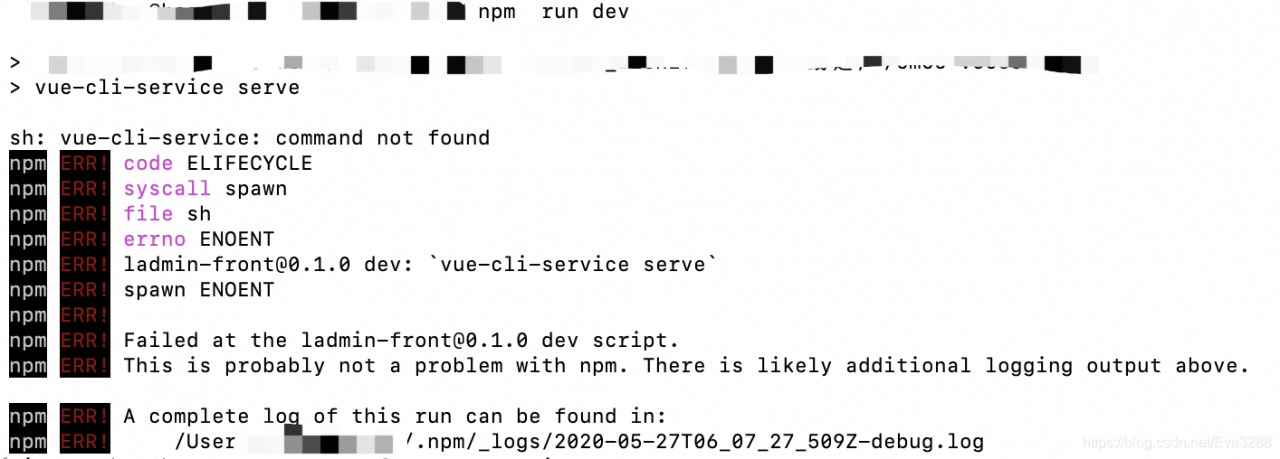
Mac error: SH: Vue cli service: command not found

An error below: sh: vue - cli - service: command not found

solution:
terminal execute the command

#clear cache
npm cache clean --force   
#reinstall
npm/cnpm  install

Another online article roughly said 3 solutions
1. Reinstall the
delete folder node_modules in carrying out NPM/CNPM install to install
2. Specify the path
./node_modules/.bin/vue-cli-service build
3. Global installation
npm install @vue/cli-service -g
NODE_ENV=production
Try a few times more, if other reasons can refer to https://stackoverflow.com/questions/51172064/command-not-found-with-vue-cli

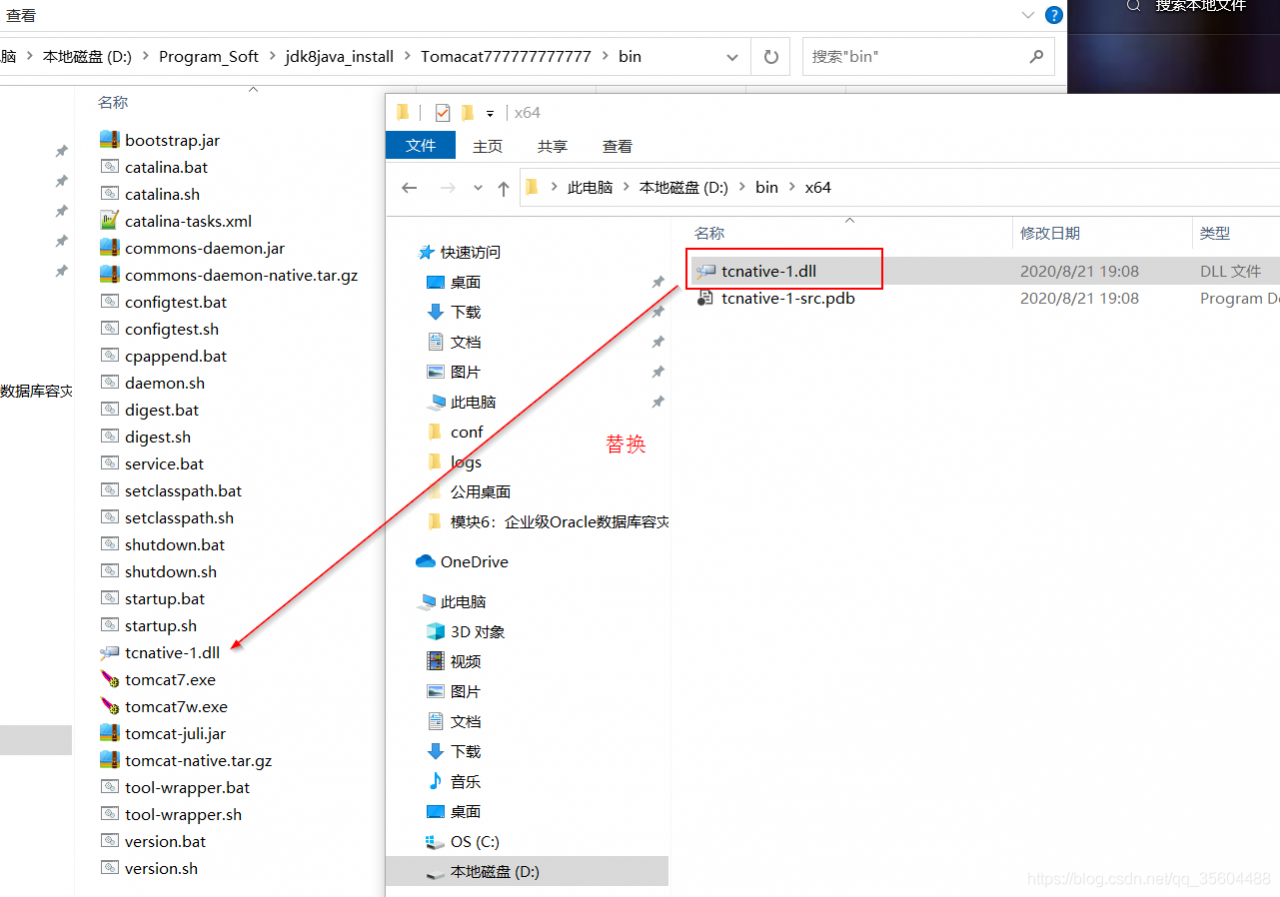
Solution to the error “tcnative-1.dll: can’t load amd 64 bit. DLL on IA 32 bit platform”

Operating system: Win8-64
Application server: apache-tomcat-7.0.59, 64-bit
Development tool: MyEclipse-8, 32-bit
The JDK: JDK – 6 u45 – Windows – x64
After integrating Tomcat into MyEclipse, launch the Times error:

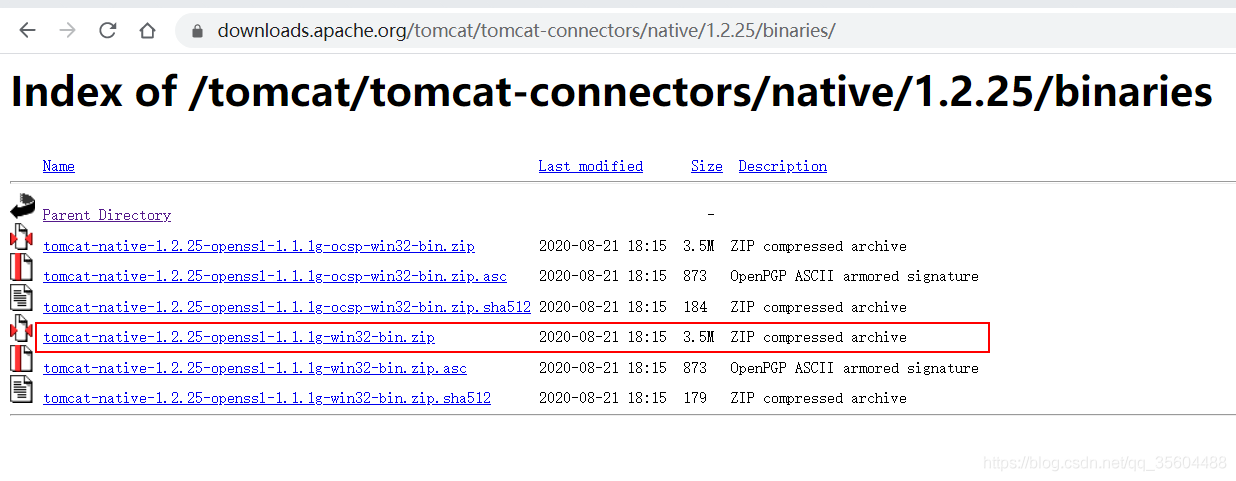
You can download a 32-bit tcnative 1.dll file and replace it with the same name file in the bin folder of the original Tomcat folder. You can restart Tomcat.

Loading DLL with Java in Windows

Java loads dynamically linked library files in classes.
Class file:
Static {
system.loadLibrary (” DLL file “);
}
The DLL file is under the package path of the project. For example: pro/bin/hell. DLL; (Pro project in the bin directory hello. DLL file)
Can’t find dependent libraries Can’t find dynamically linked libraries
 
Solution:
Winpcap can be installed to solve the problem. Download path: http://ftp-idc.pconline.com.cn/32017d10a844534eecd94d13ce732091/pub/download/201010/WinPcap_4_1_3.exe
 

Reproduced in: https://www.cnblogs.com/zhaofeng555/p/3433441.html

High precision addition function template

string P  (string & num,string add){
    int g=0;
    if(num.length()<add.length()){
        string t=num;
        num=add;
        add=t;
    }
    string t (num.length()-add.length(),'0');
    add= t+add;
    int len1=num.length(),len2=add.length();
    for(int i=len1-1;i>=0;i--){
        int t=((num[i]-'0') +(add[i]-'0') + g);
        num[i]=t%10+'0';
        g=t/10;
    }
    if(g!=0){
        num.insert(0,string(1,(char)g+'0'));
    }
    return num;
}