Author Archives: Robins

ZABBIX server startup error resolution

The following error is reported when starting ZABBIX server:

29171:20180714:084911.367 cannot start alert manager service: Cannot bind socket to "/var/run/zabbix/zabbix_server_alerter.sock": [13] Permission denied.
29142:20180714:084911.368 One child process died (PID:29171,exitcode/signal:1). Exiting ...
29225:20180714:084923.611 cannot start preprocessing service: Cannot bind socket to "/var/run/zabbix/zabbix_server_preprocessing.sock": [13] Permission denied.
 29213:20180714:084923.613 server #18 started [poller #2]
 29195:20180714:084923.614 One child process died (PID:29225,exitcode/signal:1). Exiting ...
 29195:20180714:084925.615 syncing history data...
 29195:20180714:084925.615 syncing history data done
 29195:20180714:084925.615 syncing trend data...
 29195:20180714:084925.615 syncing trend data done
 29195:20180714:084925.615 Zabbix Server stopped. Zabbix 3.4.10 (revision 81503).

The above is just a partial error log pasted.
The above reason is that SELinux starts
sestatus

SELinux status:                 enabled
SELinuxfs mount:                /sys/fs/selinux
SELinux root directory:         /etc/selinux
Loaded policy name:             targeted
Current mode:                   enforcing
Mode from config file:          disabled
Policy MLS status:              enabled
Policy deny_unknown status:     allowed
Max kernel policy version:      28

The solution is as follows:
VIM/etc/SELinux/config

# This file controls the state of SELinux on the system.
# SELINUX= can take one of these three values:
#     enforcing - SELinux security policy is enforced.
#     permissive - SELinux prints warnings instead of enforcing.
#     disabled - No SELinux policy is loaded.
SELINUX=disabled
# SELINUXTYPE= can take one of three two values:
#     targeted - Targeted processes are protected,
#     minimum - Modification of targeted policy. Only selected processes are protected. 
#     mls - Multi Level Security protection.
SELINUXTYPE=targeted 

Modify SELinux = disabled modify configuration file to close permanently.
setenforce 0 : temporarily shut down SELinux.
SELinux can also be set to allow ZABBIX access, which is not very troublesome, but SELinux can not be used basically. If you want to know, you can search for it by yourself. Here, I just want to make more statements.

Reproduced in: https://www.cnblogs.com/Cherry-Linux/p/9308490.html

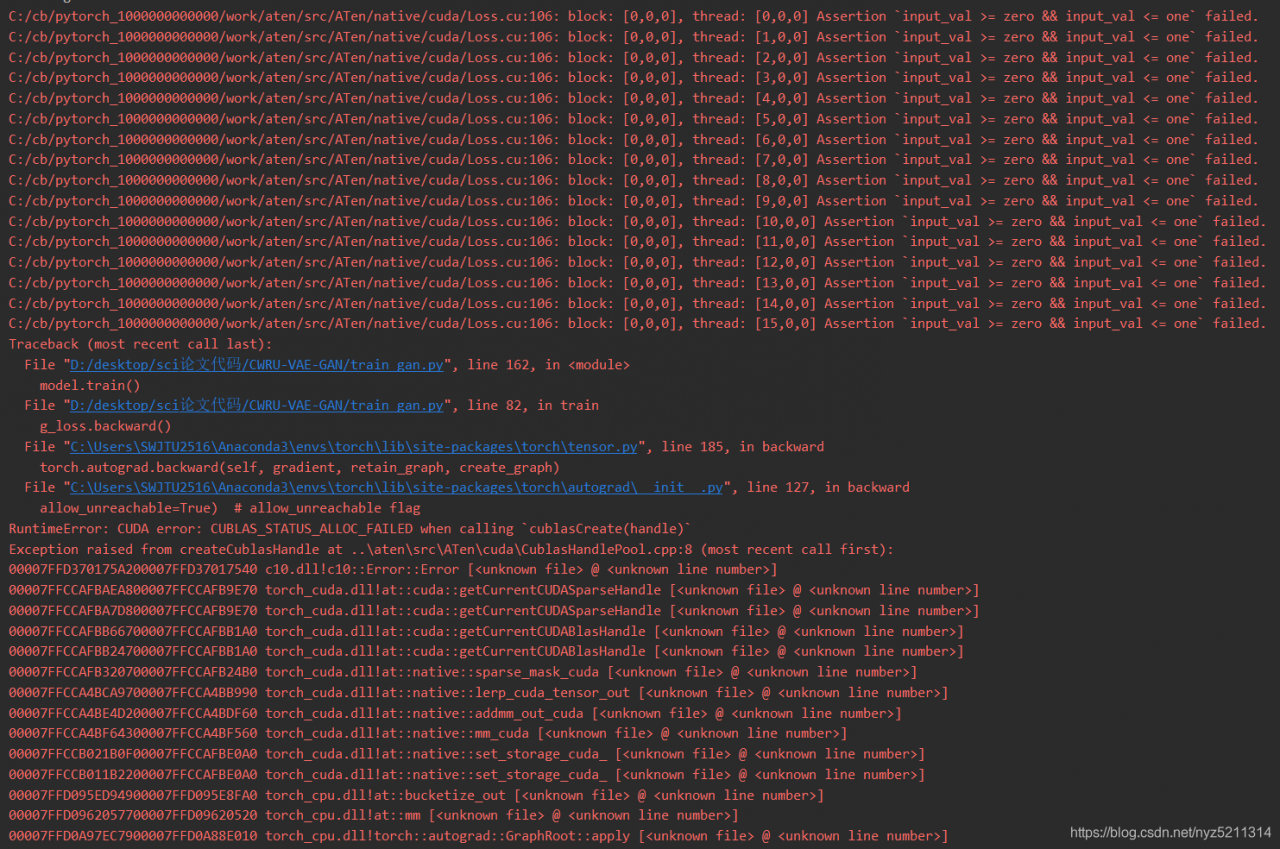
RuntimeError: CUDA error: CUBLAS_STATUS_ALLOC_FAILED when calling `cublasCreate(handle)`

RuntimeError: CUDA error: CUBLAS_ STATUS_ ALLOC_ FAILED when calling cublasCreate(handle)
Exception raised from createCublasHandle at … \aten\src\ATen\cuda\ CublasHandlePool.cpp : 8 (most recent call first):

record the bug of dcgan in Python training..
It took a long time to find out that the last line of the discriminator did not add sigmoid, which caused the tag to go beyond the range [0,1], so an error was reported.

Esp32 / 8266 uses arduinoota function to show no response from device

Similar problems appear:
sending invitation to 192.168.1.202
13:55:25 [error]: no response from device

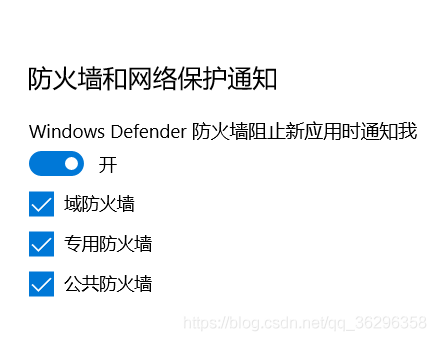
We need to turn off the firewall of win10.
If you don’t turn off the firewall, you need to set it instead of setting arduinoide
espota.exe
through the network,
in appdata, local, arduino15, packages, esp32, hardware, esp32, 1.0.4, tools\ espota.exe
This position.
If you don’t know which location, turn on the notification and there will be a notification when you intercept.

Visual slam Lesson 6: curve fitting with g2o, error: cmake error at CMakeList.txt (find_ package) By not providing“FindG2O.cmake“

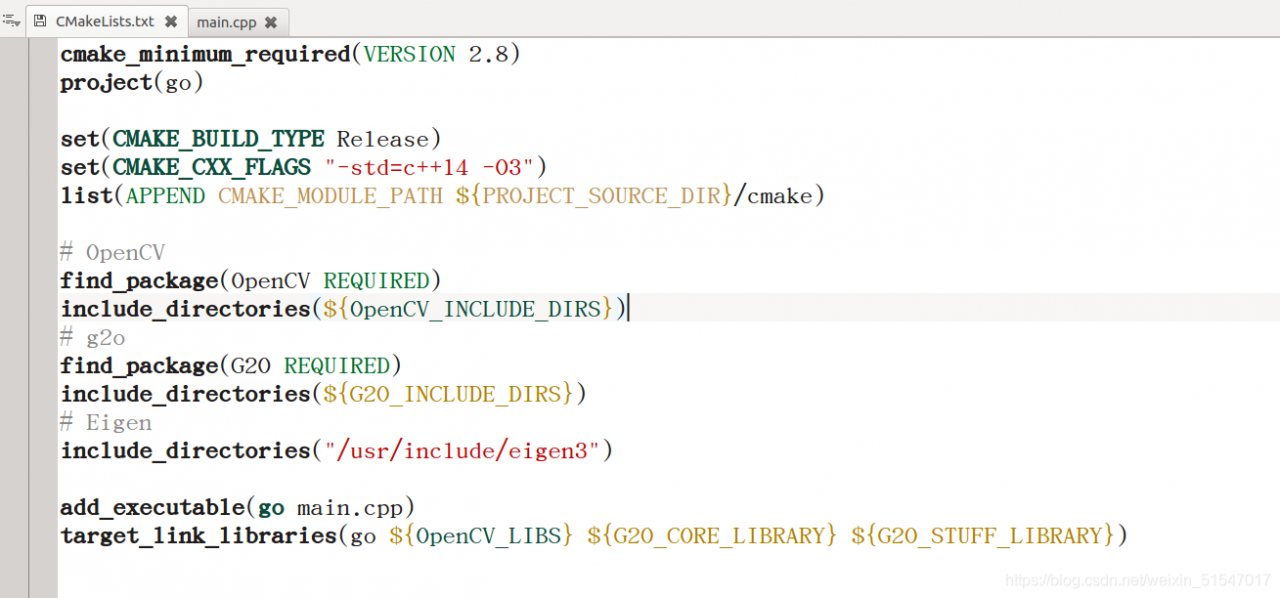
When compiling with KDevelop, my CMakeList.txt There’s an error in the file. It’s mine CMakeList.txt The code in the file is as follows:

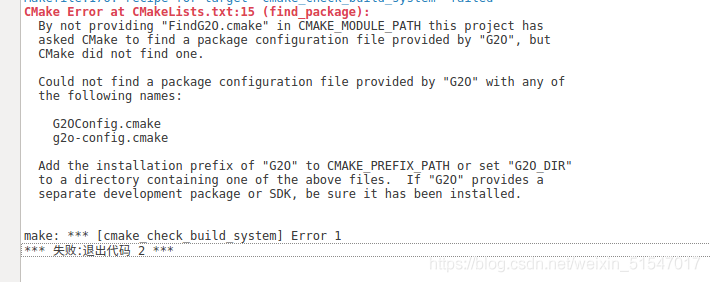
the errors are as follows:

The solution is as follows:
you need to CMakeList.txt Modify the following code in the file:
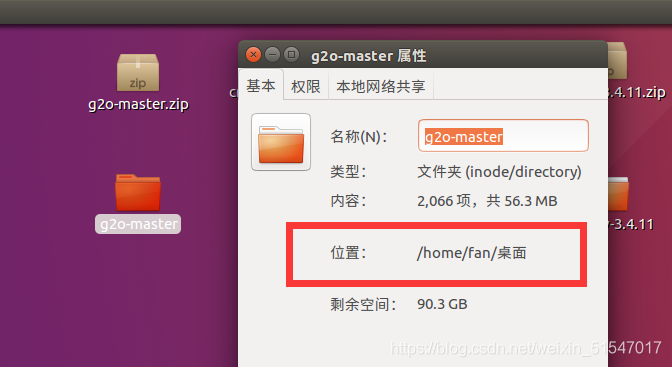
1. First of all, you need to find the location of your g2o installation: find the g2o folder – right click the properties to see

Add


list (APPEND CMAKE_ MODULE_ PATH ${PROJECT_ SOURCE_ DIR}/cmake)


Amend to read

list(APPEND CMAKE_ MODULE_ Path/home/fan/desktop/g2o master/cmake_ modules)

Among them,

/Home/fan/desktop/g2o master/cmake_ Modules// where to install your own g2o files

2. Add an extra set

set(G2O_ ROOT /usr/local/include/g2o)

After completing the above steps, there will be no problem with the build and it can be executed smoothly.
The code is as follows

cmake_ minimum_ required(VERSION 2.8)
project(go)
set(CMAKE_ BUILD_ TYPE Release)
set(CMAKE_ CXX_ FLAGS “-std=c++14 -O3”)
list(APPEND CMAKE_ MODULE_ Path/home/fan/desktop/g2o master/cmake_ modules)
set(G2O_ ROOT /usr/local/include/g2o)

find_ package(OpenCV REQUIRED)
include_ directories(${OpenCV_ INCLUDE_ DIRS})

find_ package(G2O REQUIRED)
include_ directories(${G2O_ INCLUDE_ DIRS})

include_ directories(“/usr/include/eigen3”)

add_ executable(go main.cpp )
target_ link_ libraries(go ${OpenCV_ LIBS} ${G2O_ CORE_ LIBRARY} ${G2O_ STUFF_ LIBRARY})

CV: How to extracts the part of the picture with the specified color

CV extracts the part of the picture with the specified color

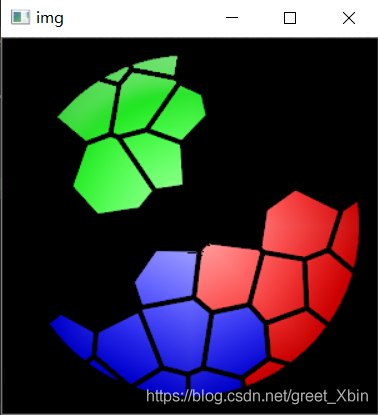
How to extract the red, blue and green colors of the image below?

1. Import the library first

import cv2
import numpy as np

2. Read picture

The conversion between BGR and HSV uses CV2. Color_ BGR2HSV

img = cv2.imread("3.png")
hsv=cv2.cvtColor(img,cv2.COLOR_BGR2HSV)#HSV空间

(in HSV space, h is color/chroma, value range [0179], s is saturation, value range [0255], V is brightness, value range [0255].)

3. The threshold values of three colors are set and extracted

cv2.inRange(src, lowerb, upperb[, dst]) → dst

SRC – first input array. Input matrix (image)
lowerb – inclusive lower boundary array or a scalar. Lower threshold
upperrb – inclusive upper boundary array or a scalar. Upper threshold
DST – output array of the same size as SRC and CV_ 8U type. Output the same matrix as Src

lower_blue=np.array([110,100,100])#blue
upper_blue=np.array([130,255,255])

lower_green=np.array([60,100,100])#green
upper_green=np.array([70,255,255])

lower_red=np.array([0,100,100])#red
upper_red=np.array([10,255,255])

red_mask=cv2.inRange(hsv,lower_red,upper_red)
blue_mask=cv2.inRange(hsv,lower_blue,upper_blue)
green_mask=cv2.inRange(hsv,lower_green,upper_green)

4. Process the original image

red=cv2.bitwise_and(img,img,mask=red_mask)
green=cv2.bitwise_and(img,img,mask=green_mask)
blue=cv2.bitwise_and(img,img,mask=blue_mask)

res=green+red+blue

cv2.bitwise_ And() function is used to “and” binary data, that is, to binary “and” each pixel value of image (gray image or color image), 1 & amp; 1 = 1, 1 & amp; 0 = 0, 0 & amp; 1 = 0, 0 & amp; 0 = 0.

5. Output display

cv2.imshow('img',res)
cv2.waitKey(0)
cv2.destroyAllWindows()

6. Results display

All code packed

import cv2
import numpy as np


img = cv2.imread("3.png")
hsv=cv2.cvtColor(img,cv2.COLOR_BGR2HSV)

lower_blue=np.array([110,100,100])#blue
upper_blue=np.array([130,255,255])

lower_green=np.array([60,100,100])#green
upper_green=np.array([70,255,255])

lower_red=np.array([0,100,100])#red
upper_red=np.array([10,255,255])

red_mask=cv2.inRange(hsv,lower_red,upper_red)
blue_mask=cv2.inRange(hsv,lower_blue,upper_blue)
green_mask=cv2.inRange(hsv,lower_green,upper_green)

red=cv2.bitwise_and(img,img,mask=red_mask)
green=cv2.bitwise_and(img,img,mask=green_mask)
blue=cv2.bitwise_and(img,img,mask=blue_mask)

res=green+red+blue

cv2.imshow('img',res)
cv2.waitKey(0)

cv2.destroyAllWindows()

How to Solve mybatis returns null when querying Oracle database with char type field

When my colleagues were learning mybatis, they encountered a problem that when they used char type fields as query criteria, they could not find the data all the time, while other types could.

The database used is Oracle, the query condition field type is char (50), and the Java code corresponds to string type.

Later, after investigation, it is because in Oracle, if the content length of char type field is not enough, it will automatically make up the length in the form of space. For example, if the value of the field name char (5) is SGL, Oracle will automatically make up the length with spaces, and the final value is SGL.

1.Solution:

Method 1: first use the trim() function to remove the spaces on both sides of the value, and then use it as a condition query

select * from data where data.name=#{name}

Change to:

select * from data where trim(data.name)=#{name}

Method 2: change the field type char() to varchar2(). In general, char () is only used when all values are of the same length, such as gender field. When 0 is used to represent male and 1 is used to represent female, char (1) can be used. If the length of the value is not fixed, it is better not to use char () type.

2.Learn more about mybatis returning null

Leave the mybatis framework aside and go back to the original JDBC query. When the char type of Oracle is used as the condition to query the data, the data can only be found when the value is exactly the same.

To create a test table:

create table t_user(

user_name char(5)

);

insert into t_user (user_name)values('sgl');

select '"'||user_name||'"' from  t_user;

–The query result is “SGL”, which shows that Oracle automatically fills in two spaces

Query data through Preparedstatement of JDBC

conn=getConnection();

ps=conn.prepareStatement("select * from t_user where user_name=?");

ps.setString(1,"sgl");

ResultSet rs = ps.executeQuery();

The data cannot be found through the above method, because the query condition value “SGL” and the database median value “SGL” are not equal.

If the value is “SGL”, the data can be found:

conn=getConnection();

ps=conn.prepareStatement("select * from t_user where user_name=?");

ps.setString(1,"sgl "); -- Add two spaces less than 5 digits in length

ResultSet rs = ps.executeQuery();

If you use the trim () method, you can also query the data, such as:

conn=getConnection();

ps=conn.prepareStatement("select * from t_user where trim(user_name)=?"); -- De-space the user_name in the database first, then compare

ps.setString(1,"sgl");

ResultSet rs = ps.executeQuery();

Now go back to mybatis and query the SQL in my colleague’s mapper file as follows:

select * from data where data.name=#{name}

The main method is as follows:

public static void main(String[] args) {
    ApplicationContext ctx = new ClassPathXmlApplicationContext("applicationContext.xml");
    DataService d = (DataService) ctx.getBean("dataServiceImpl");
    Data data = d.selectByName("sgl");
    System.out.println(data);
}

In fact, by looking at the source code or changing the log to the debug level, you can see that at the bottom of mybatis, the query statement will be precompiled with Preparedstatement, and then the parameters will be set in. For example, the following is the log printed by mybatis:

==> Preparing: select * from data where data.name=?

==> Parameters: sgl(String)

According to the previous JDBC query, we know the reason, so it’s easy to understand the problem in mybatis.

In addition, under mysql, when the value of char type field is insufficient, it doesn’t seem to automatically fill the value with spaces. However, when the value length is not fixed, char type is not recommended.
Spring cloud Netflix hystrix/acutor/hystrix.stream Error ut005023

Error phenomenon

UT005023: Exception handling request to /actuator/ hystrix.stream
Issues on GitHub

Solution

Looking at the GitHub code, we find that this problem has been fixed on the master branch, but it is not fixed in the latest jar package 1.5.18 of Maven central warehouse.
Solution 1: I created a jar package to cover the original jar package
I created a 1.5.19 jar package and uploaded it to the company’s private Maven warehouse

<dependency>
      <groupId>org.springframework.cloud</groupId>
      <artifactId>spring-cloud-starter-netflix-hystrix</artifactId>
</dependency>
<dependency>
      <groupId>com.netflix.hystrix</groupId>
      <artifactId>hystrix-metrics-event-stream</artifactId>
      <version>1.5.19</version>
</dependency>      

Solution 2:
use jetty container instead, because org.eclipse.jetty . server.ResponseWriter Synchronization lock is added in all methods. Note that I didn’t practice here. It’s better to speak based on facts

Analyze the reasons

Hystrix metrics event stream 1.5.18 source code HYS trixSampleSseServlet.java
The reason for the problem is: observeon( Schedulers.io ()) a sub thread is set up to print the monitoring data, and the main thread prints Ping in the while loop, Both threads do the same writer writer.print () and writer.checkError () operation. Different thread operations result in output buffer exception. The code solution on the master branch is to add a synchronized (responsewritelock) lock.

 sampleSubscription = sampleStream
                        .observeOn(Schedulers.io())
                        .subscribe(new Subscriber<String>() {
                            @Override
                            public void onCompleted() {
                                logger.error("HystrixSampleSseServlet: ({}) received unexpected OnCompleted from sample stream", getClass().getSimpleName());
                                moreDataWillBeSent.set(false);
                            }

                            @Override
                            public void onError(Throwable e) {
                                moreDataWillBeSent.set(false);
                            }

                            @Override
                            public void onNext(String sampleDataAsString) {
                             // Here is a sub-thread of RxJava constantly printing data
                                if (sampleDataAsString != null) {
                                    writer.print("data: " + sampleDataAsString + "\n\n");
                                    // explicitly check for client disconnect - PrintWriter does not throw exceptions
                                    if (writer.checkError()) {
                                        moreDataWillBeSent.set(false);
                                    }
                                    writer.flush();
                                }
                            }
                        });
                // Here is the main thread doing a while loop, constantly printing pings
                while (moreDataWillBeSent.get() && !isDestroyed) {
                    try {
                        Thread.sleep(pausePollerThreadDelayInMs);
                        //in case stream has not started emitting yet, catch any clients which connect/disconnect before emits start
                        writer.print("ping: \n\n");
                        // explicitly check for client disconnect - PrintWriter does not throw exceptions
                        if (writer.checkError()) {
                            moreDataWillBeSent.set(false);
                        }
                        writer.flush();
                    } catch (InterruptedException e) {
                        moreDataWillBeSent.set(false);
                    }
                }

Why won’t exceptions occur when using jetty containers

because org.eclipse.jetty . server.ResponseWriter All methods have synchronization locks on them.
the key codes are as follows:

package org.eclipse.jetty.server;

public class ResponseWriter extends PrintWriter {
    
    public boolean checkError() {
        synchronized(this.lock) {
            return this._ioException != null || super.checkError();
        }
    }

    public void flush() {
        try {
            synchronized(this.lock) {
                this.isOpen();
                this.out.flush();
            }
        } catch (Throwable var4) {
            this.setError(var4);
        }

    }

    public void write(int c) {
        try {
            synchronized(this.lock) {
                this.isOpen();
                this.out.write(c);
            }
        } catch (InterruptedIOException var5) {
            LOG.debug(var5);
            Thread.currentThread().interrupt();
        } catch (IOException var6) {
            this.setError(var6);
        }

    }

    public void write(char[] buf, int off, int len) {
        try {
            synchronized(this.lock) {
                this.isOpen();
                this.out.write(buf, off, len);
            }
        } catch (InterruptedIOException var7) {
            LOG.debug(var7);
            Thread.currentThread().interrupt();
        } catch (IOException var8) {
            this.setError(var8);
        }

    }

    public void write(String s, int off, int len) {
        try {
            synchronized(this.lock) {
                this.isOpen();
                this.out.write(s, off, len);
            }
        } catch (InterruptedIOException var7) {
            LOG.debug(var7);
            Thread.currentThread().interrupt();
        } catch (IOException var8) {
            this.setError(var8);
        }

    }
}

writer.flush() this line of code can theoretically be deleted in Tomcat and undertow containers

Because in writer.checkError The () method has already been called this.flush () method org.apache.catalina.connector.CoyoteWriter#checkError

package org.apache.catalina.connector;

public class CoyoteWriter extends PrintWriter {
  
    public boolean checkError() {
        this.flush();
        return this.error;
    }
}

io.undertow.servlet.spec.ServletPrintWriterDelegate#checkError

package io.undertow.servlet.spec;

public final class ServletPrintWriterDelegate extends PrintWriter {
   
    public boolean checkError() {
        return this.servletPrintWriter.checkError();
    }
}

public class ServletPrintWriter {
    
    public boolean checkError() {
        this.flush();
        return this.error;
    }
}

Compiling pit with hystrix source code

1. The project must be a git project. Packages downloaded directly from GitHub cannot be compiled. Git init is required to be the GIT directory initially. It is recommended to directly git clone [email protected] :Netflix/ Hystrix.git
2. I used gradle4.0
3 nebula.netflixoss ’Change the version to ‘4.1.0’
4. Use Alibaba’s Maven warehouse
the following is my build.gradle

buildscript {
    repositories {
         maven { url 'http://maven.aliyun.com/nexus/content/groups/public/' }
    }
    dependencies {
         classpath 'com.netflix.nebula:gradle-extra-configurations-plugin:3.0.3'
    }
}

plugins {
    id 'nebula.netflixoss' version '4.1.0'
    id 'me.champeau.gradle.jmh' version '0.3.1'
    id 'net.saliman.cobertura' version '2.2.8'
}

ext {
    githubProjectName = rootProject.name
    project.version='1.5.19'
}

allprojects {
    repositories {
         maven { url 'http://maven.aliyun.com/nexus/content/groups/public/' }
    }

    apply plugin: 'net.saliman.cobertura'
}

subprojects {
    apply plugin: 'nebula.netflixoss'
    apply plugin: 'java'
    apply plugin: 'nebula.provided-base'
	apply plugin: 'nebula.compile-api'
	
    sourceCompatibility = 1.8
    targetCompatibility = 1.8


    group = "com.netflix.${githubProjectName}"

    eclipse {
        classpath {
            // include 'provided' dependencies on the classpath
            plusConfigurations += [configurations.provided]
            downloadSources = true
            downloadJavadoc = true
        }
    }

    idea {
        module {
            // include 'provided' dependencies on the classpath
            scopes.COMPILE.plus += [configurations.provided]
        }
    }
}

mvn install和mvn deploy
mvn install:install-file
-Dfile=\data\hystrix\hystrix-contrib\hystrix-metrics-event-stream\build\libs\hystrix-metrics-event-stream-1.5.19.jar
-DgroupId=com.netflix.hystrix
-DartifactId=hystrix-metrics-event-stream
-Dversion=1.5.19
-Dpackaging=jar
mvn deploy:deploy-file
-Dfile=\data\hystrix\hystrix-contrib\hystrix-metrics-event-stream\build\libs\hystrix-metrics-event-stream-1.5.19.jar
-DgroupId=com.netflix.hystrix
-DartifactId=hystrix-metrics-event-stream
-Dversion=1.5.19
-Dpackaging=jar
-DrepositoryId=custom-releases
-Durl=http://host:port/nexus/content/repositories/custom_releases

M1 MacBook pod install Report an error chip incompatibility problem

1.Problem analysis

M1 MacBook has no problem in installing cocoapods, but there are many problems in pod install, such as LoadError – dlopen (/ library/RUBY/GEMS/2.6.0/GEMS/ffi-1.14.2/lib/FFI)_ c.bundle, 0x0009): missing compatible arch in /Library/Ruby/Gems/2.6.0/gems/ffi-1.14.2/lib/ffi_ c.bundle – /Library/Ruby/Gems/2.6.0/gems/ffi-1.14.2/lib/ffi_ c.bundle。 This is a compatibility issue

2.Solutions

According to this, the terminal enters the following command:

sudo arch -x86_64 gem install ffi
arch -x86_64 pod install

Solve the audio control and report domexception: the play() request was interrupted by a call to pause in the chrome console

When using the audio control, the play() request will be interrupted by pause

The specific solutions are as follows:

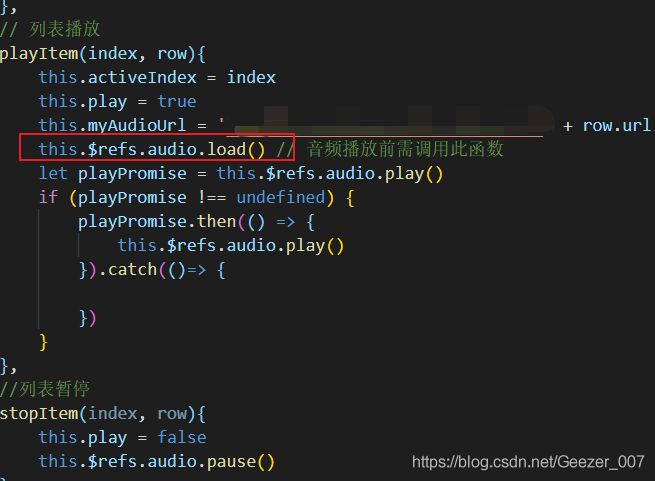
Before judging whether the audio is playing, the load () method should be called to load the audio data;

Then the audio is judged by if, and then the playback or pause is processed asynchronously

Play or pause after successful callback, depending on business requirements;