Author Archives: Robins

Regarding Pyhton regular error: sre_constants.error: nothing to repeat at position

Wrong regular expression

1. \b followed by the quantity

Wrongly written \d to \b, embarrassing!

1
>>> pattern = re.compile(r'123\b*hello')

Output:

Traceback (most recent call last):
  File "<input>", line 1, in <module>
  File "E:\Anacoda3\Lib\re.py", line 233, in compile
    return _compile(pattern, flags)
  File "E:\Anacoda3\Lib\re.py", line 301, in _compile
    p = sre_compile.compile(pattern, flags)
  File "E:\Anacoda3\Lib\sre_compile.py", line 562, in compile
    p = sre_parse.parse(p, flags)
  File "E:\Anacoda3\Lib\sre_parse.py", line 856, in parse
    p = _parse_sub(source, pattern, flags & SRE_FLAG_VERBOSE, False)
  File "E:\Anacoda3\Lib\sre_parse.py", line 415, in _parse_sub
    itemsappend(_parse(source, state, verbose))
  File "E:\Anacoda3\Lib\sre_parse.py", line 615, in _parse
    source.tell() - here + len(this))
sre_constants.error: nothing to repeat at position 2

Reason for error: Since \b is a word boundary, * means that it appears any number of times, that is, a word can only have one boundary, and it cannot appear any number of times, so this error will be reported

mybatis-plus calls its own selectById method and reports an error: org.apache.ibatis.binding.BindingException:

The version number of mybatis-plus is 2.0.1, there is no error when calling its own insert(T), but an error is reported when executing update, and an error is also reported when calling selectById and deleteById. That is, errors are reported when the primary key is required to be identified.

The statement is as follows: (interface and implementation are implemented by MP itself)

        User selectById = userMapper1.selectById("ceshi" );
        userMapper1.deleteById( "ceshi");


The error message is as follows:

org.apache.ibatis.binding.BindingException: Invalid bound statement (not found): cn.xm.jwxt.ceshi.mapper.UserMapper.deleteById
    at org.apache.ibatis.binding.MapperMethod$SqlCommand. <init>(MapperMethod.java:230 )
    at org.apache.ibatis.binding.MapperMethod. <init>(MapperMethod.java:48 )
    at org.apache.ibatis.binding.MapperProxy.cachedMapperMethod(MapperProxy.java: 65 )
    at org.apache.ibatis.binding.MapperProxy.invoke(MapperProxy.java: 58 )
    at com.sun.proxy.$Proxy18.deleteById(Unknown Source)
    at cn.xm.jwxt.ceshi.MpTest.test1(MpTest.java: 30 )
    at sun.reflect.NativeMethodAccessorImpl.invoke0(Native Method)
    at sun.reflect.NativeMethodAccessorImpl.invoke(NativeMethodAccessorImpl.java: 57 )
    at sun.reflect.DelegatingMethodAccessorImpl.invoke(DelegatingMethodAccessorImpl.java: 43 )
    at java.lang.reflect.Method.invoke(Method.java: 606 )
    at org.junit.runners.model.FrameworkMethod$ 1.runReflectiveCall(FrameworkMethod.java:44 )
    at org.junit.internal.runners.model.ReflectiveCallable.run(ReflectiveCallable.java: 15 )
    at org.junit.runners.model.FrameworkMethod.invokeExplosively(FrameworkMethod.java: 41 )
    at org.junit.internal.runners.statements.InvokeMethod.evaluate(InvokeMethod.java: 20 )
    at org.springframework.test.context.junit4.statements.RunBeforeTestMethodCallbacks.evaluate(RunBeforeTestMethodCallbacks.java: 75 )
    at org.springframework.test.context.junit4.statements.RunAfterTestMethodCallbacks.evaluate(RunAfterTestMethodCallbacks.java: 86 )
    at org.springframework.test.context.junit4.statements.SpringRepeat.evaluate(SpringRepeat.java: 84 )
    at org.junit.runners.ParentRunner.runLeaf(ParentRunner.java: 263 )
    at org.springframework.test.context.junit4.SpringJUnit4ClassRunner.runChild(SpringJUnit4ClassRunner.java: 254 )
    at org.springframework.test.context.junit4.SpringJUnit4ClassRunner.runChild(SpringJUnit4ClassRunner.java: 89 )
    at org.junit.runners.ParentRunner$ 3.run(ParentRunner.java:231 )
    at org.junit.runners.ParentRunner$ 1.schedule(ParentRunner.java:60 )
    at org.junit.runners.ParentRunner.runChildren(ParentRunner.java: 229 )
    at org.junit.runners.ParentRunner.access$ 000(ParentRunner.java:50 )
    at org.junit.runners.ParentRunner$ 2.evaluate(ParentRunner.java:222 )
    at org.springframework.test.context.junit4.statements.RunBeforeTestClassCallbacks.evaluate(RunBeforeTestClassCallbacks.java: 61 )
    at org.springframework.test.context.junit4.statements.RunAfterTestClassCallbacks.evaluate(RunAfterTestClassCallbacks.java: 70 )
    at org.junit.runners.ParentRunner.run(ParentRunner.java: 292 )
    at org.springframework.test.context.junit4.SpringJUnit4ClassRunner.run(SpringJUnit4ClassRunner.java: 193 )
    at org.eclipse.jdt.internal.junit4.runner.JUnit4TestReference.run(JUnit4TestReference.java: 86 )
    at org.eclipse.jdt.internal.junit.runner.TestExecution.run(TestExecution.java: 38 )
    at org.eclipse.jdt.internal.junit.runner.RemoteTestRunner.runTests(RemoteTestRunner.java: 459 )
    at org.eclipse.jdt.internal.junit.runner.RemoteTestRunner.runTests(RemoteTestRunner.java: 675 )
    at org.eclipse.jdt.internal.junit.runner.RemoteTestRunner.run(RemoteTestRunner.java: 382 )
    at org.eclipse.jdt.internal.junit.runner.RemoteTestRunner.main(RemoteTestRunner.java: 192)


Reason: If it is a handwritten interface by yourself, you can find out the reason if you didn’t write SQL or the XML namespace of SQL was wrong, but this was implemented by MP itself, and the interface was not used.

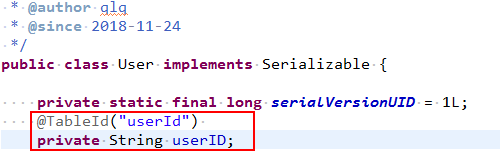
After checking, in the entity class, if the @TableId(“database field name”) annotation is not added to the primary key field, this error occurs when calling the own method involving id. It is estimated that mybatis-plus cannot recognize the primary key field.


 Solution: Declare the name of the primary key column of the database.


Therefore, it is recommended that if you use Mybatis-Plus, it is best to annotate the table name (@TableName) and the table primary key (@TableId) in detail in the entity class to avoid such errors that are difficult to find the cause.
Another: It is said that the new version of mybatis-plus has solved this problem

How to Solve Jquery 1.9 $.browser Error

When calling the jquery plug-in, a $.browser error occurred. It turned out that jQuery has removed attributes such as $.browser and $.browser.version since version 1.9.

Replaced by $.support.

Solution: add the following js

(function(jQuery){   
  
if (jQuery.browser) return ;   
  
jQuery.browser = {};   
jQuery.browser.mozilla = false ;   
jQuery.browser.webkit = false ;   
jQuery.browser.opera = false ;   
jQuery.browser.msie = false ;   
  
var nAgt = navigator.userAgent;   
jQuery.browser.name = navigator.appName;   
jQuery.browser.fullVersion = '' + parseFloat(navigator.appVersion);   
jQuery.browser.majorVersion = parseInt(navigator.appVersion, 10 );   
 var nameOffset,verOffset,ix;   
  
// In Opera, the true version is after "Opera" or after "Version"    
if ((verOffset=nAgt.indexOf( " Opera " ))!=- 1 ) {   
jQuery.browser.opera = true ;   
jQuery.browser.name = " Opera " ;   
jQuery.browser.fullVersion = nAgt.substring(verOffset+ 6 );   
 if ((verOffset=nAgt.indexOf( " Version " ))!=- 1 )   
jQuery.browser.fullVersion = nAgt.substring(verOffset+ 8 );   
}   
// In MSIE, the true version is after "MSIE" in userAgent    
else  if ((verOffset=nAgt.indexOf( " MSIE " ))!=- 1 ) {   
jQuery.browser.msie = true ;   
jQuery.browser.name = " Microsoft Internet Explorer " ;   
jQuery.browser.fullVersion = nAgt.substring(verOffset+ 5 );   
}   
// In Chrome, the true version is after "Chrome"    
else  if ((verOffset=nAgt.indexOf( " Chrome " ))!=- 1 ) {   
jQuery.browser.webkit = true ;   
jQuery.browser.name = " Chrome " ;   
jQuery.browser.fullVersion = nAgt.substring(verOffset+ 7 );   
}   
// In Safari, the true version is after "Safari" or after "Version"    
else  if ((verOffset=nAgt.indexOf( " Safari " ))!=- 1 ) {   
jQuery.browser.webkit = true ;   
jQuery.browser.name = " Safari " ;   
jQuery.browser.fullVersion = nAgt.substring(verOffset+ 7 );   
 if ((verOffset=nAgt.indexOf( " Version " ))!=- 1 )   
jQuery.browser.fullVersion = nAgt.substring(verOffset+ 8 );   
}   
// In Firefox, the true version is after "Firefox"    
else  if ((verOffset=nAgt.indexOf( " Firefox " ))!=- 1 ) {   
jQuery.browser.mozilla = true ;   
jQuery.browser.name = " Firefox " ;   
jQuery.browser.fullVersion = nAgt.substring(verOffset+ 8 );   
}   
// In most other browsers, "name/version" is at the end of userAgent    
else  if ((nameOffset=nAgt.lastIndexOf( '  ' )+ 1 ) <    
(verOffset =nAgt.lastIndexOf( ' / ' )))   
{   
jQuery.browser.name = nAgt.substring(nameOffset,verOffset);   
jQuery.browser.fullVersion = nAgt.substring(verOffset + 1 );   
 if (jQuery.browser.name.toLowerCase()== jQuery.browser.name.toUpperCase()) {   
jQuery.browser.name = navigator.appName;   
}   
}   
// trim the fullVersion string at semicolon/space if present    
if ((ix=jQuery.browser.fullVersion.indexOf( " ; " ))!=- 1 )   
jQuery.browser.fullVersion =jQuery.browser.fullVersion.substring( 0 ,ix);   
 if ((ix=jQuery.browser.fullVersion.indexOf( "  " ))!=- 1 )   
jQuery.browser.fullVersion =jQuery.browser.fullVersion.substring( 0 ,ix);   
  
jQuery.browser.majorVersion = parseInt( '' +jQuery.browser.fullVersion, 10 );   
 if (isNaN(jQuery.browser.majorVersion)) {   
jQuery.browser.fullVersion = '' + parseFloat(navigator.appVersion);   
jQuery.browser.majorVersion = parseInt(navigator.appVersion, 10 );   
}   
jQuery.browser.version = jQuery.browser.majorVersion;   
})(jQuery);   

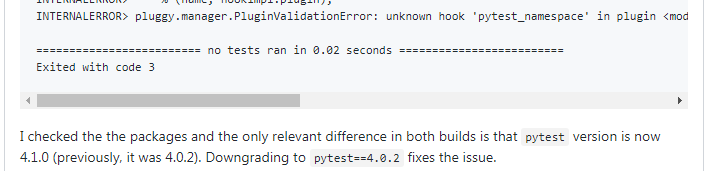
pytest pluggy.manager.PluginValidationError: unknown hook’pytest_namespace’ error handling method

1. Background description

The colleague who tested last week said that the pytest+allure environment is no problem running on other people’s computers, but when running in her environment, an error was reported and asked for help. In fact, pytest has only heard of allure and never heard of it directly, but it can’t directly say that it won’t, 

Look at the environment pytest can be installed directly in the form of a python library: pip install pytest pytest-allure-adaptor pytest-rerunfailures pytest-html

Allure installation is also simple to download and decompress and then add the bin directory to the environment variable. Download link: https://github.com/allure-framework/allure2/releases/tag/2.10.0


2. Problem solving

2.1 Error description

The main operating errors are as follows:

pluggy.manager.PluginValidationError: unknown hook'pytest_namespace' in plugin <module'allure.pytest_plugin' from'd:\\language\\miniconda3\\e
nvs\\pytest\\lib\\site-packages\\allure\\pytest_plugin.py'>

The complete error is as follows:

F:\PycharmProjects\pytest>pytest
================================================== ================== test session starts =================================================================================================================================================================================================================================================================================== =======================================
platform win32 - Python 3.6.6, pytest-4.3.0, py-1.7.0, pluggy-0.8.1
rootdir: F:\PycharmProjects\pytest, inifile: pytest.ini
plugins: rerunfailures-6.0, metadata-1.8.0, html-1.20.0, allure-adaptor-1.7.10
collecting 1 item I
NTERNALERROR> Traceback (most recent call last):
INTERNALERROR> File "d:\language\miniconda3\envs\pytest\lib\site-packages\_pytest\main.py", line 210, in wrap_session
INTERNALERROR> session.exitstatus = doit(config, session) or 0
INTERNALERROR> File "d:\language\miniconda3\envs\pytest\lib\site-packages\_pytest\main.py", line 249, in _main
INTERNALERROR> config.hook.pytest_collection(session=session)
INTERNALERROR> File "d:\language\miniconda3\envs\pytest\lib\site-packages\pluggy\hooks.py", line 284, in __call__
INTERNALERROR> return self._hookexec(self, self.get_hookimpls(), kwargs)
INTERNALERROR> File "d:\language\miniconda3\envs\pytest\lib\site-packages\pluggy\manager.py", line 68, in _hookexec
INTERNALERROR> return self._inner_hookexec(hook, methods, kwargs)
INTERNALERROR> File "d:\language\miniconda3\envs\pytest\lib\site-packages\pluggy\manager.py", line 62, in <lambda>
INTERNALERROR> firstresult=hook.spec.opts.get("firstresult") if hook.spec else False,
INTERNALERROR> File "d:\language\miniconda3\envs\pytest\lib\site-packages\pluggy\callers.py", line 208, in _multicall
INTERNALERROR> return outcome.get_result()
INTERNALERROR> File "d:\language\miniconda3\envs\pytest\lib\site-packages\pluggy\callers.py", line 80, in get_result
INTERNALERROR> raise ex[1].with_traceback(ex[2])
INTERNALERROR> File "d:\language\miniconda3\envs\pytest\lib\site-packages\pluggy\callers.py", line 187, in _multicall
INTERNALERROR> res = hook_impl.function(*args)
INTERNALERROR> File "d:\language\miniconda3\envs\pytest\lib\site-packages\_pytest\main.py", line 259, in pytest_collection
INTERNALERROR> return session.perform_collect()
INTERNALERROR> File "d:\language\miniconda3\envs\pytest\lib\site-packages\_pytest\main.py", line 487, in perform_collect
INTERNALERROR> self.config.pluginmanager.check_pending()
INTERNALERROR> File "d:\language\miniconda3\envs\pytest\lib\site-packages\pluggy\manager.py", line 251, in check_pending
INTERNALERROR>% (name, hookimpl.plugin),
INTERNALERROR> pluggy.manager.PluginValidationError: unknown hook'pytest_namespace' in plugin <module'allure.pytest_plugin' from'd:\\language\\miniconda3\\e
nvs\\pytest\\lib\\site-packages\\allure\\pytest_plugin.py'>


2.2 Error handling

Repeatedly re-created and configured the environment, and suddenly it ran successfully. I went back to rule out the Chinese path for the project, the Chinese path for the python environment, and the conda release. After I remembered that a page on Google said it was a version problem and I followed its recommendations. Old version installed:

Finally, it is confirmed that the new version of pytest (I am currently 4.3.0) reports an error, and it will not report an error if it is replaced with version 4.0.2:

# Uninstall the installed pytest
pip uninstall pytest
4. Installation # 0 .2 version pytest
pip install pytest== 4.0. 2

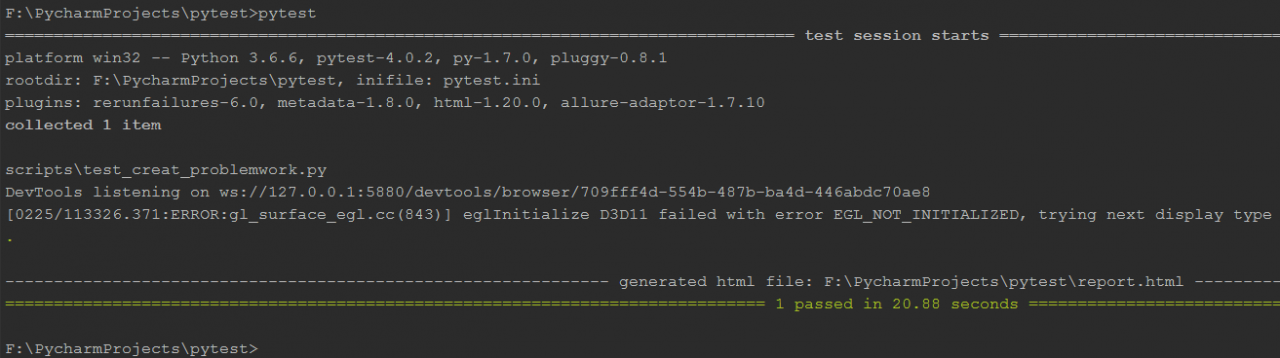
Successfully run as shown below:


When installing zookeeper, you can view the process start, but the status display error: Error contacting service. It is probably not running

When installing zookeeper-3.3.2, it started normally and no error was reported, but when checking the status with zkServer.sh status, an error occurred, as follows:

JMX enabled by default
Using config: /hadoop/zookeeper/bin/../conf/zoo.cfg
Error contacting service. It is probably not running.

jps looks at the process, but finds that the process has started

7313 QuorumPeerMain


There are three solutions for searching information online:

1, open zkServer.sh to find status)

STAT=`echo stat | nc localhost $(grep clientPort “$ZOOCFG” | sed -e’s/.*=//’) 2> /dev/null| grep Mode`Add
-q between nc and localhost 1 (It is the number 1 instead of the letter l)
If it already exists, remove the
note: Because the zookeeper I use is version 3.4.5, there is no line at all in my zkServer.sh script file, so it does not take effect

2. Call sh zkServer.sh status to encounter this problem. Baidu and Google found that someone modified a parameter of nc in the sh script to solve the problem, but the call of nc was not found in the sh file of 3.4.5. The log directory specified in the configuration file was not created and caused an error. Manually add the directory and restart, and the problem is solved.
Note: I think it’s not a log issue, so this method is not tried at all.

3. Create a data directory, that is, create a myid file in the directory specified by dataDir in your zoo.cfg configuration file, and specify the id, change the id to server.1=localhost:2888:3888 in your zoo.cfg file 1. Just write 1 in the myid header.
Note: When I installed the second time, the myid file was not created in the directory specified by dataDir, and the error was also reported. After creating the myid file in the directory specified by dataDir, no error was reported.

4 Because the firewall is not turned off. Turn off the firewall:

  #View firewall status

   service iptables status 

  #Turn off the firewall
   service iptables stop    #View the
  startup status of the firewall
chkconfig iptables –list #Turn
  off the firewall and start
   chkconfig iptables off

 Note: I did not turn off the firewall at the beginning, but when I turned off the firewall it did not solve the problem.

5 The mapping relationship between host and ip is not established.

  The command to establish the mapping relationship between hosts and ip is vim /etc/hosts. Add the mapping relationship between each host and ip address at the end of the file.

  Note: Only after the mapping relationship is established, can the machines on the same network segment use the host name for file transfer. problem solved!
Maven configuration error: JAVA_HOME not found in your environment

Recently, I was relatively empty and wanted to study spring mvc, so I compiled the development environment step by step according to the tutorial. After configuring maven, when running the command mvn -v, an error was reported. The error message is as follows:

Error: JAVA_HOME not found in your environment.
Please set the JAVA_HOME variable in your environment to match the
location of your Java installation.

I carefully checked the configuration of JAVA_HOME and found that there is no problem. Why does it prompt this error?

I searched the Internet,

Some say that JAVA_HOME should point to the root directory of jdk and cannot contain /bin;

Some say that there cannot be a semicolon after the JAVA_HOME path;

Some say that there should be no spaces in the path, such as “Program Files” such path.

I checked these items one by one, but it didn’t solve my problem.

In the end, I found the problem accidentally, and found that when I run cmd as an administrator, this error will not be reported.

SSH integration error: org.hibernate.hql.internal.ast.QuerySyntaxException: User is not mapped[……]

Very strange error, the information is as follows: 
org.hibernate.hql.internal.ast.QuerySyntaxException: User is not mapped [select count(*) from User u where u.userName=? and u.userPassword=?] 
Caused by: org .hibernate.hql.internal.ast.QuerySyntaxException: User is not mapped 
similar error message solution, I also studied for a long time before finally discovering the problem
There are two kinds of error conditions: 

1. The configuration file is not loaded into the hibernate entity list. 

2. The fields of the mapping file are inconsistent with the database fields, or the names are inconsistent, resulting 

in a special syntax for hql. Not sql. You set the hibernate dialect to the database you use.
The syntax of sql and hql are not the same thing. 
......QuerySyntaxException... means that the sql you want is not hql, and the syntax is wrong. .

1. See if you forget to add the hibernate mapping file to Hibernate.cfg.xml (when using Hibernate) or applicationContext.xml

2. Check whether the fields in the table correspond to the fields in the mapping file one-to-one

3. Check whether the field name uses keywords in the database

4. Is the HQL statement correct?

HQL: Hibernate query language Hibernate is equipped with a very powerful query language that looks a lot like SQL. But don’t be fooled by the similarities in grammatical structure, HQL is very consciously designed as a fully object-oriented query, it can understand concepts such as inheritance, polymorphism, and association.


So at this time you have to carefully check the hql statement you write, it must be an object query, especially [tableName] Do not write the table you want to query, but the object of the query

such as:

public long getTypeCount(Patent patent) {
String hqlString = “select count(*) from Patent as p where p.type ='”+patent.getType()+”‘”;
Query query = this.getSession().createQuery( hqlString);
long count =0;
count = ((Number)query.uniqueResult()).intValue();
return count;
}

Patent is an object

The database table name is patent if it is written as String hqlString = “select count(*) from p atent  as p where p.type ='”+patent.getType()+”‘”; 

There must be no results from the query, remember!

[Solved] yarn error ExitCodeException exitCode=127

I want to submit a task on yarn and report an error:

18/12/14 17:48:56 INFO mapreduce.Job: Job job_1544766080243_0018 failed with state FAILED due to: Application a18_000002 exited with  exitCode: 127
For more detailed output, check application tracking page:http://dev-hadoop6:8088/cluster/app/application_15447
Diagnostics: Exception from container-launch.
Container id: container_1544766080243_0018_02_000001
Exit code: 127
Stack trace: ExitCodeException exitCode=127:
        at org.apache.hadoop.util.Shell.runCommand(Shell.java:585)
        at org.apache.hadoop.util.Shell.run(Shell.java:482)
        at org.apache.hadoop.util.Shell$ShellCommandExecutor.execute(Shell.java:776)
        at org.apache.hadoop.yarn.server.nodemanager.DefaultContainerExecutor.launchContainer(DefaultContainerE
        at org.apache.hadoop.yarn.server.nodemanager.containermanager.launcher.ContainerLaunch.call(ContainerLa
        at org.apache.hadoop.yarn.server.nodemanager.containermanager.launcher.ContainerLaunch.call(ContainerLa
        at java.util.concurrent.FutureTask.run(FutureTask.java:266)
        at java.util.concurrent.ThreadPoolExecutor.runWorker(ThreadPoolExecutor.java:1149)
        at java.util.concurrent.ThreadPoolExecutor$Worker.run(ThreadPoolExecutor.java:624)
        at java.lang.Thread.run(Thread.java:748)


Container exited with a non-zero exit code 127
Failing this attempt. Failing the application.
18/12/14 17:48:56 INFO mapreduce.Job: Counters: 0
18/12/14 17:48:56 WARN mapreduce.HdfsMapReduce: Path /mapred-temp/job-user-analysis-statistic/01/top_in is not
java.io.IOException: Set input path failed !
        at com.tracker.offline.common.mapreduce.HdfsMapReduce.setInputPath(HdfsMapReduce.java:165)
        at com.tracker.offline.common.mapreduce.HdfsMapReduce.buildJob(HdfsMapReduce.java:122)
        at com.tracker.offline.common.mapreduce.HdfsMapReduce.waitForCompletion(HdfsMapReduce.java:65)
        at com.tracker.offline.business.job.user.JobAnalysisStatisticMR.main (JobAnalysisStatisticMR.java: 88 )
        at sun.reflect.NativeMethodAccessorImpl.invoke0(Native Method)
        at sun.reflect.NativeMethodAccessorImpl.invoke(NativeMethodAccessorImpl.java:62)
        at sun.reflect.DelegatingMethodAccessorImpl.invoke(DelegatingMethodAccessorImpl.java:43)
        at java.lang.reflect.Method.invoke(Method.java:498)
        at org.apache.hadoop.util.RunJar.run (RunJar.java: 221 )
        at org.apache.hadoop.util.RunJar.main (RunJar.java: 136 )
View error information: yarn logs- applicationId application_1544766080243_0018
18/12/14 17:59:57 INFO client.RMProxy: Connecting to ResourceManager at dev-hadoop6/10.100.3.176:8032


Container: container_1544766080243_0018_01_000001 on dev-hadoop5_43772
========================================================================
LogType:stderr
Log Upload Time: Friday December 14  17 : 48 : 56 + 0800  2018 
LogLength: 50
Log Contents:
/bin/bash: /bin/ java: No such file or directory
End of LogType:stderr

LogType:stdout
Log Upload Time: Friday December 14  17 : 48 : 56 + 0800  2018 
LogLength: 0
Log Contents:
End of LogType:stdout

This is not found in java, modify yarn-env.sh

export JAVA_HOME=/home/jdk8

Restart.

Yarn add package loading error: operation not permitted, unlink …

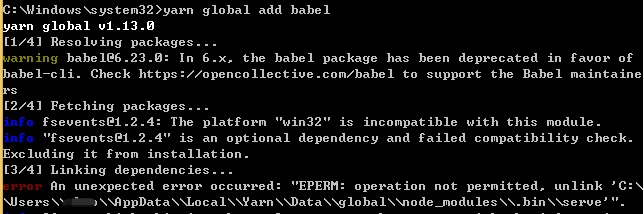
In yarn global add babelthe process of installing the package , the following error was reported:

error An unexpected error occurred: "EPERM: operation not permitted, unlink 'C:\\Users\\xxx\\AppData\\Local\\Yarn\\Data\\global\\node_modules\\.bin\\serve'".

solve

C:\\Users\\xxx\\AppData\\Local\\Yarn\\Data\\global\\node_modules\\.bin\\The content in the directory serveis occupied. After
thinking about it carefully, it is currently being used servein another project. After closing it, re-run it yarn global add babeland it will be fine.

The reason for this problem is that when the package is installed, the previous .binfile will be deleted and then regenerated. Because the file is occupied, the file cannot be deleted, so an error will be reported. You only need to close the corresponding occupied program.

When the package is installed, the previous .binfiles will be deleted and regenerated
. When the package is installed for the first time, babelthe creation time is as follows:

When the other package is installed for the second time, babelthe creation time is as follows: It

can be seen that the .binfolder is created when the package is installed for the second time. The following has babelbeen recreated.
In addition,
if you open the .binfolder while installing the package, you can see .binthat the folder will be deleted at the end of the package , and then regenerate

Flutter android studio runs gradle build error: Could not resolve all artifacts for configuration’:classpath’.

Flutter error report solution:

Find your flutter installation directory, for example mine is ~/Library/flutter

goto ~/Library/flutter/packages/flutter_tools/gradle

Modify flutter.gradle, add mavenCentral() under google() of repositories in buildscript, and then run it. As follows

buildscript {
    repositories {
        google()
        mavenCentral() // add this line
        jcenter()
    }
    dependencies {
        classpath 'com.android.tools.build:gradle:3.2.1'
    }
}

The error message is as follows:

* Error running Gradle:

ProcessException: Process "..\android\gradlew.bat" exited abnormally:

Starting a Gradle Daemon (subsequent builds will be faster)

FAILURE: Build failed with an exception.

* What went wrong:

A problem occurred configuring root project 'android'.

> Could not resolve all artifacts for configuration ':classpath'.

> Could not resolve com.google.auto.value:auto-value:1.5.2.

Required by:

project : > com.android.tools.build:gradle:3.2.1 > com.android.tools.build:bundletool:0.5.0

> Could not resolve com.google.auto.value:auto-value:1.5.2.

> Could not get resource 'https://jcenter.bintray.com/com/google/auto/value/auto-value/1.5.2/auto-value-1.5.2.pom'.

> Read timed out

> Could not resolve org.jdom:jdom2:2.0.6.

Required by:

project : > com.android.tools.build:gradle:3.2.1 > com.android.tools.build.jetifier:jetifier-processor:1.0.0-alpha10

> Skipped due to earlier error

> Could not resolve org.apache.commons:commons-compress:1.12.

Required by:

project : > com.android.tools.build:gradle:3.2.1 > com.android.tools.build:builder:3.2.1 > com.android.tools:sdklib:26.2.1

project : > com.android.tools.build:gradle:3.2.1 > com.android.tools.build:builder:3.2.1 > com.android.tools:sdklib:26.2.1 > com.android.tools:repository:26.2.1

> Skipped due to earlier error

> Could not resolve javax.inject:javax.inject:1.

Required by:

project : > com.android.tools.build:gradle:3.2.1 > com.android.tools.build:builder:3.2.1 > com.android.tools:sdk-common:26.2.1

> Skipped due to earlier error

> Could not resolve net.sf.kxml:kxml2:2.3.0.

Required by:

project : > com.android.tools.build:gradle:3.2.1 > com.android.tools.build:builder:3.2.1 > com.android.tools.build:manifest-merger:26.2.1

project : > com.android.tools.build:gradle:3.2.1 > com.android.tools.build:builder:3.2.1 > com.android.tools.ddms:ddmlib:26.2.1

project : > com.android.tools.build:gradle:3.2.1 > com.android.tools.build:builder:3.2.1 > com.android.tools:sdklib:26.2.1 > com.android.tools.layoutlib:layoutlib-api:26.2.1

> Skipped due to earlier error

> Could not resolve com.google.code.findbugs:jsr305:1.3.9.

Required by:

project : > com.android.tools.build:gradle:3.2.1 > com.android.tools.build:builder:3.2.1 > com.android.tools.build:apkzlib:3.2.1

project : > com.android.tools.build:gradle:3.2.1 > com.android.tools.analytics-library:shared:26.2.1 > com.google.guava:guava:23.0

> Skipped due to earlier error

> Could not resolve com.google.j2objc:j2objc-annotations:1.1.

Required by:

project : > com.android.tools.build:gradle:3.2.1 > com.android.tools.analytics-library:shared:26.2.1 > com.google.guava:guava:23.0

> Skipped due to earlier error

> Could not resolve org.codehaus.mojo:animal-sniffer-annotations:1.14.

Required by:

project : > com.android.tools.build:gradle:3.2.1 > com.android.tools.analytics-library:shared:26.2.1 > com.google.guava:guava:23.0

> Skipped due to earlier error

> Could not resolve commons-logging:commons-logging:1.2.

Required by:

project : > com.android.tools.build:gradle:3.2.1 > com.android.tools.analytics-library:crash:26.2.1 > org.apache.httpcomponents:httpclient:4.5.2

> Skipped due to earlier error

> Could not resolve commons-codec:commons-codec:1.9.

Required by:

project : > com.android.tools.build:gradle:3.2.1 > com.android.tools.analytics-library:crash:26.2.1 > org.apache.httpcomponents:httpclient:4.5.2

> Skipped due to earlier error

> Could not resolve org.jetbrains.kotlin:kotlin-stdlib-common:1.2.71.

Required by:

project : > com.android.tools.build:gradle:3.2.1 > org.jetbrains.kotlin:kotlin-stdlib-jdk8:1.2.71 > org.jetbrains.kotlin:kotlin-stdlib:1.2.71

> Skipped due to earlier error

> Could not resolve org.jetbrains:annotations:13.0.

Required by:

project : > com.android.tools.build:gradle:3.2.1 > org.jetbrains.kotlin:kotlin-stdlib-jdk8:1.2.71 > org.jetbrains.kotlin:kotlin-stdlib:1.2.71

project : > com.android.tools.build:gradle:3.2.1 > com.android.tools.build:builder:3.2.1 > com.android.tools:sdklib:26.2.1 > com.android.tools.layoutlib:layoutlib-api:26.2.1

> Skipped due to earlier error

> Could not resolve com.sun.activation:javax.activation:1.2.0.

Required by:

project : > com.android.tools.build:gradle:3.2.1 > com.android.tools.build:builder:3.2.1 > com.android.tools:sdklib:26.2.1 > com.android.tools:repository:26.2.1

> Skipped due to earlier error

> Could not resolve org.glassfish.jaxb:jaxb-runtime:2.2.11.

Required by:

project : > com.android.tools.build:gradle:3.2.1 > com.android.tools.build:builder:3.2.1 > com.android.tools:sdklib:26.2.1 > com.android.tools:repository:26.2.1

> Skipped due to earlier error

> Could not resolve com.google.jimfs:jimfs:1.1.

Required by:

project : > com.android.tools.build:gradle:3.2.1 > com.android.tools.build:builder:3.2.1 > com.android.tools:sdklib:26.2.1 > com.android.tools:repository:26.2.1

> Skipped due to earlier error

* Try:

Run with --stacktrace option to get the stack trace. Run with --info or --debug option to get more log output. Run with --scan to get full insights.

* Get more help at https://help.gradle.org

BUILD FAILED in 2m 12s

Command: C:\MyWorkCompany\Flutter\policies_manager\android\gradlew.bat app:properties

Finished with error: Please review your Gradle project setup in the android/ folder.

Vagrant up Error: Warning: Authentication failure. Retrying…[How to Solve]

Vagrant under windows reports an error, always prompting Warning: Authentication failure. Retrying…, and there is no shared folder after running, depressed…

Find information online, visit forums, and finally have a solution, at least it works, post it and share it.

No nonsense, here is the error code and solution:

Local environment win7, vagrant version 1.8.5, virtualbox version 5.0.4

vagrant box add centos71 vagrant-centos-7.1.box

vagrant init centos71


Error code:

 1 f:\box>vagrant up
 2 ==> default: Attempting graceful shutdown of VM...
 3     default: Guest communication could not be established! This is
 4 se
 5     default: SSH is not running, the authentication information was
 6     default: or some other networking issue. Vagrant will force hal
 7     default: capable.
 8 ==> default: Forcing shutdown of VM...
 9 ==> default: Clearing any previously set forwarded ports...
10 ==> default: Fixed port collision for 22 => 2222. Now on port 2200.
11 ==> default: Clearing any previously set network interfaces...
12 ==> default: Preparing network interfaces based on configuration...
13     default: Adapter 1: nat
14 ==> default: Forwarding ports...
15     default: 22 (guest) => 2200 (host) (adapter 1)
16 ==> default: Booting VM...
17 ==> default: Waiting for machine to boot. This may take a few minut
18     default: SSH address: 127.0.0.1:2200
19     default: SSH username: vagrant
20     default: SSH auth method: private key
21     default: Warning: Authentication failure. Retrying...
22     default: Warning: Authentication failure. Retrying...
23     default: Warning: Authentication failure. Retrying...
24     default: Warning: Authentication failure. Retrying...
25     default: Warning: Authentication failure. Retrying...
26     default: Warning: Authentication failure. Retrying...
27     default: Warning: Authentication failure. Retrying...
28     default: Warning: Authentication failure. Retrying...
29 The guest machine entered an invalid state while waiting for it
30 to boot. Valid states are 'starting, running'. The machine is in th
31 'paused' state. Please verify everything is configured
32 properly and try again.
33 
34 If the provider you're using has a GUI that comes with it,
35 it is often helpful to open that and watch the machine, since the
36 GUI often has more helpful error messages than Vagrant can retrieve
37 For example, if you're using VirtualBox, run `vagrant up` while the
38 VirtualBox GUI is open.
39 
40 The primary issue for this error is that the provider you're using
41 is not properly configured. This is very rarely a Vagrant issue.


Solution:

 1 # -*- mode: ruby -*-
 2 # vi: set ft=ruby :
 3 
 4 # All Vagrant configuration is done below. The "2" in Vagrant.configure
 5 # configures the configuration version (we support older styles for
 6 # backwards compatibility). Please don't change it unless you know what
 7 # you're doing.
 8 
 9 Vagrant.configure("2") do |config|
10   # The most common configuration options are documented and commented below.
11   # For a complete reference, please see the online documentation at
12   # https://docs.vagrantup.com.
13 
14   # Every Vagrant development environment requires a box. You can search for
15   # boxes at https://atlas.hashicorp.com/search.
16   config.vm.box = "centos71"
17   
18   config.vm.boot_timeout = 360
19   config.ssh.username = "vagrant"
20   config.ssh.password = "vagrant"
21 
22   # Disable automatic box update checking. If you disable this, then
23   # boxes will only be checked for updates when the user runs
24   # `vagrant box outdated`. This is not recommended.
25   # config.vm.box_check_update = false
26 
27   # Create a forwarded port mapping which allows access to a specific port
28   # within the machine from a port on the host machine. In the example below,
29   # accessing "localhost:8080" will access port 80 on the guest machine.
30   # config.vm.network "forwarded_port", guest: 80, host: 8080
31 
32   # Create a private network, which allows host-only access to the machine
33   # using a specific IP.
34   # config.vm.network "private_network", ip: "192.168.33.10"
35 
36   # Create a public network, which generally matched to bridged network.
37   # Bridged networks make the machine appear as another physical device on
38   # your network.
39   # config.vm.network "public_network"
40 
41   # Share an additional folder to the guest VM. The first argument is
42   # the path on the host to the actual folder. The second argument is
43   # the path on the guest to mount the folder. And the optional third
44   # argument is a set of non-required options.
45   # config.vm.synced_folder "../data", "/vagrant_data"
46 
47   # Provider-specific configuration so you can fine-tune various
48   # backing providers for Vagrant. These expose provider-specific options.
49   # Example for VirtualBox:
50   #
51   # config.vm.provider "virtualbox" do |vb|
52   #   # Display the VirtualBox GUI when booting the machine
53   #   vb.gui = true
54   #
55   #   # Customize the amount of memory on the VM:
56   #   vb.memory = "1024"
57   # end
58   #
59   # View the documentation for the provider you are using for more
60   # information on available options.
61 
62   # Define a Vagrant Push strategy for pushing to Atlas. Other push strategies
63   # such as FTP and Heroku are also available. See the documentation at
64   # https://docs.vagrantup.com/v2/push/atlas.html for more information.
65   # config.push.define "atlas" do |push|
66   #   push.app = "YOUR_ATLAS_USERNAME/YOUR_APPLICATION_NAME"
67   # end
68 
69   # Enable provisioning with a shell script. Additional provisioners such as
70   # Puppet, Chef, Ansible, Salt, and Docker are also available. Please see the
71   # documentation for more information about their specific syntax and use.
72   # config.vm.provision "shell", inline: <<-SHELL
73   #   apt-get update
74   #   apt-get install -y apache2
75   # SHELL
76 end


Two lines of code are added to the Vagrantfile configuration file, using clear text username and password

config.ssh.username = “vagrant”
config.ssh.password = “vagrant”

save

vagrant reload

done!

Well done and Good Luck!

Fetch Error: Failed to execute ‘fetch’ on ‘Window’: Request with GET/HEAD method cannot have body

Error code: src/api/index.js

import Fetch from'../fetch/index' 
import jk from './ jk ' 
export default {
  verifycodeApi: params => Fetch(jk.verifycode, {method:'get' ,body: params})
}

In the get method here, the body is used to accept the parameters, so an error is reported.


solution:

In the packaged fetch.js

const Fetch = (url, option = ()) => {
   // Format the data of the get request (the get request of fetch needs to splice the parameters behind the url) 
  if (option.method ==='get') {
    if (option.data) {
      url = url + formatUrl(option.data)
    }
  }

  // Process non-get request headers and request bodies 
  if (option.method ==='post' || option.method ==='put' || option.method ==='delete' ) {
    option.headers[ 'Content-Type'] = option.headers['Content-Type'] ||'application/json' 
    option.body = qs.stringify(option.body)
     // option.body = JSON.stringify( option.body) 
  }

  delete option.data 
}

The key point is the code marked in orange. This is to create a data attribute for the get method. After the url is spliced, delete the data attribute with delete.


So, in src/api/index.js

// The api file stores the interface folder 
import Fetch from'../fetch/index' 
import jk from './ jk ' 
export default {
  manageloginApi: params => Fetch(jk.managelogin, {method:'post' , body: params}),
  verifycodeApi: params => Fetch(jk.verifycode, {method:'get' , data: params})
}

You can use the data attribute to store the parameters passed by get, avoiding the error of body passing parameters