Author Archives: Robins

[Solved] Flutter Amap plug-in amap_location error: AmapLocationPlugin.java:287: error

1. Foreword

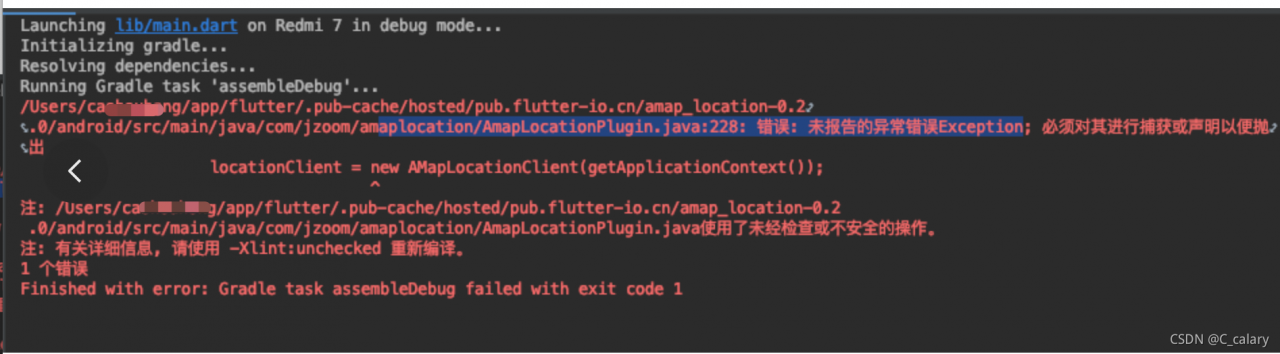
Plug in amap in use_ The location suddenly reported an error today. The project cannot run. The error prompt is as follows:

2. Error prompt

.../amaplocation/AmapLocationPlugin.java:287:Error: Unreported exception error Exception; it must be caught or declared in order to throw locationClient = new AMapLocationClient(getApplicationContext());
3. Cause investigation

After modifying the one-to-one communication without results and one-to-one search for information, I accidentally saw the discussion in the group and knew that it was caused by the problem of privacy policy. The temporary solution is not to use the latest Gaode com.amap.api: location. The latest privacy policy is available. The best solution should be to access the latest policy, which has not been implemented

4. Solution

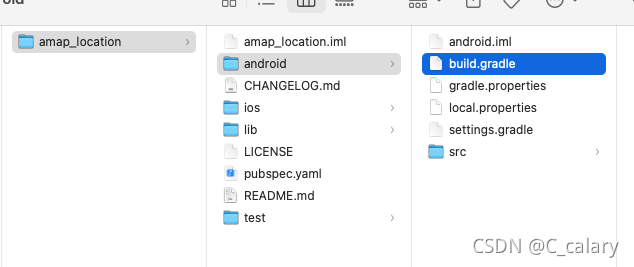
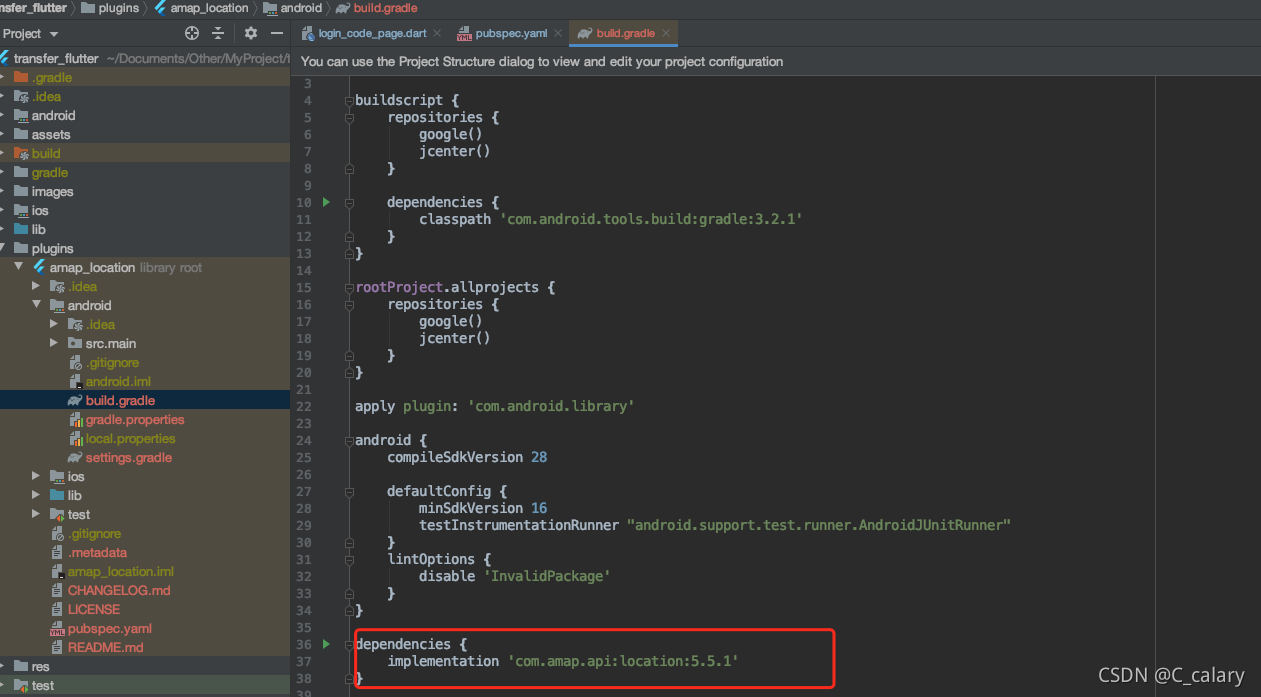
1. Find AutoNavi’s amap_location package according to the above path, in flutter/.pub-cache/hosted/…, and copy it after getting it, and change the latest dependency in android/build.gradle. At present, I Here is changed to 5.5.1
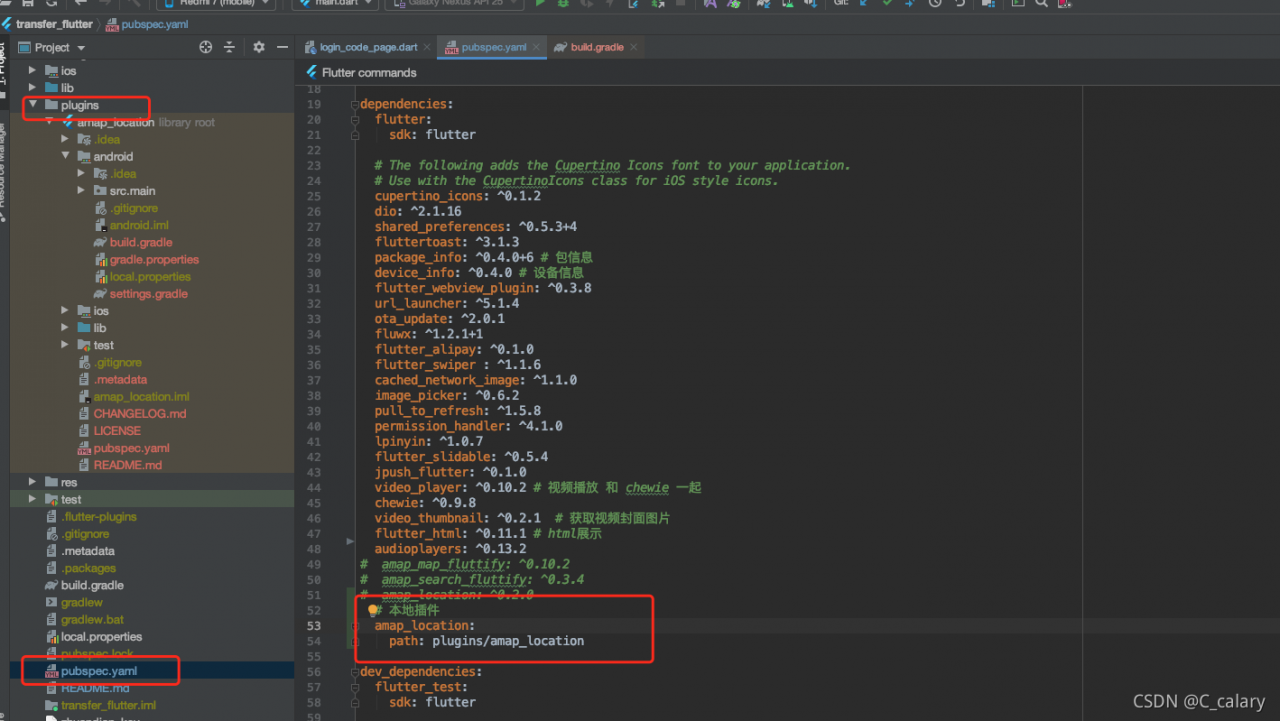
2. Delete the example in the package, create the local plug-in file plugins in the project, put the plug-in package into yaml, and import the local plug-in
Execute pub get, the error disappears, and the project can run
[Solved] Linux java -jar Start Project Error: Unsupported major.minor version 52.0

The error information is as follows:

Caused by inconsistent JDK environment

Exception in thread "main" java.lang.UnsupportedClassVersionError: org/springframework/boot/loader/JarLauncher : Unsupported major.minor version 52.0
        at java.lang.ClassLoader.defineClass1(Native Method)
        at java.lang.ClassLoader.defineClass(ClassLoader.java:800)
        at java.security.SecureClassLoader.defineClass(SecureClassLoader.java:142)
        at java.net.URLClassLoader.defineClass(URLClassLoader.java:449)
        at java.net.URLClassLoader.access$100(URLClassLoader.java:71)
        at java.net.URLClassLoader$1.run(URLClassLoader.java:361)
        at java.net.URLClassLoader$1.run(URLClassLoader.java:355)
        at java.security.AccessController.doPrivileged(Native Method)
        at java.net.URLClassLoader.findClass(URLClassLoader.java:354)
        at java.lang.ClassLoader.loadClass(ClassLoader.java:425)
        at sun.misc.Launcher$AppClassLoader.loadClass(Launcher.java:308)
        at java.lang.ClassLoader.loadClass(ClassLoader.java:358)
        at sun.launcher.LauncherHelper.checkAndLoadMain(LauncherHelper.java:482)

Solution:

First, download the appropriate JDK on the Linux server. I have re downloaded JDK1.8, and the original 1.7 has been installed

Start command:

To find the installation directory of JDK, start the project through the corresponding version of JDK

  nohup /usr/local/jdk8/bin/java -jar -Dspring.profiles.active=test read.jar &

NC -lk 7777 Error: nc: invalid option –k [How to Solve]

Recently, I am learning Flink to simulate real-time data through NC. However, when you enter NC -lk 7777 under windows, the following error is reported:

C:\Users\7371>nc -lk 7777
nc: invalid option -- k
nc -h for help

After some searching, it was finally solved
windows is different from Linux. You can enter NC - L - P 7777 directly after CMD

[Solved] Binding onclick event in JS: for loop: error uncaught typeerror: cannot set properties of undefined (setting ‘classname’)

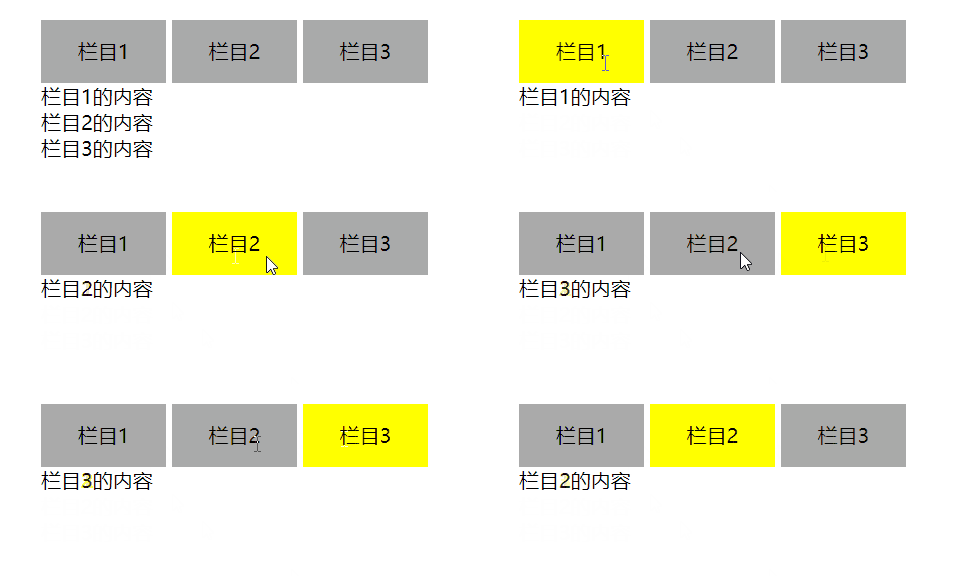
I want to achieve the following effects: click the column above to switch the content of the column below

Write the code as follows (mainly see the JS part)

<!DOCTYPE html>
<html lang="en">
<head>
    <meta charset="UTF-8">
    <meta http-equiv="X-UA-Compatible" content="IE=edge">
    <meta name="viewport" content="width=device-width, initial-scale=1.0">
    <title>Document</title>
    <style>
        .tab{
            display: inline-block;
            width: 100px;
            height: 50px;
            background-color: #aaa;
        }
        .current{
            background-color: yellow;
        }
        .content{
            display: none;
        }
    </style>
</head>
<body>
    <div class = "tab">
        <div class = "tab_list">
            <li>栏目1</li>
            <li>栏目2</li>
            <li>栏目3</li>
        </div>
        <div class = "tab_con" style="display: block;">栏目1的内容</div>
        <div class = "tab_con">栏目2的内容</div>
        <div class = "tab_con">栏目3的内容</div>
    </div>

    <script>
        var tab_list = document.querySelector(".tab_list").querySelectorAll("li");
        var tab_con = document.querySelectorAll(".tab_con");
        
        for(var i = 0;i<tab_list.length;i++){
            tab_list[i].onclick = function(){
                for(var j = 0;j<tab_list.length;j++){
                    tab_list[j].className = "tab";
                }
                tab_list[i].className = "tab red";

                for(var j = 0;j<tab_con.length;j++){
                    tab_con[j].style.display = "none";
                }
                tab_con[i].style.display = "block";

            }
        }


    </script>
</body>
</html>

The result shows an error: uncaught typeerror: cannot set properties of undefined (setting 'classname') at htmldivelement.Tab.<computed>.onclick

Baidu tested it and found the following code:

<script>
        var tab_list = document.querySelector(".tab_list").querySelectorAll("li");
        var tab_con = document.querySelectorAll(".tab_con");
        
        for(var i = 0;i<tab_list.length;i++){
            tab_list[i].onclick = function(){
                console.log("栏目" + i + "被点击了");
            }
        }


    </script>

In printing, I is 3 instead of 0, 1 and 2.

After consulting the data, we know that:

In the for loop, for each tab_List is bound to the onclick event to listen, but when the function is executed, I has ended the loop, so the printout is 3.

That is, the event listening function in the for loop needs to avoid using the loop variable I

So, if tab is involved_List [i], we can use this; If tab is involved_Con [i], that is, use I to get other elements, so we can give tab_List adds an attribute index, and then in the onclick function, we get this attribute, that is, we get the I we want

The code is as follows:

<!DOCTYPE html>
<html lang="en">
<head>
    <meta charset="UTF-8">
    <meta http-equiv="X-UA-Compatible" content="IE=edge">
    <meta name="viewport" content="width=device-width, initial-scale=1.0">
    <title>Document</title>
    <style>
        *{
            margin: 0;
            padding: 0;
        }
        .tab{
            width: 400px;
            margin: 100px auto;
        }
        .tab .tab_list li{
            display: inline-block;
            width: 100px;
            height: 50px;
            line-height: 50px;
            text-align: center;
            background-color: #aaa;
        }
        .tab .tab_list .current{
            background-color: yellow;
        }
        .content{
            display: none;
        }
    </style>
</head>
<body>
    <div class = "tab">
        <div class = "tab_list">
            <li>栏目1</li>
            <li>栏目2</li>
            <li>栏目3</li>
        </div>
        <div class = "tab_con" style="display: block;">栏目1的内容</div>
        <div class = "tab_con">栏目2的内容</div>
        <div class = "tab_con">栏目3的内容</div>
    </div>

    <script>
        var tab_list = document.querySelector(".tab_list").querySelectorAll("li");
        var tab_con = document.querySelectorAll(".tab_con");
        
        for(var i = 0;i<tab_list.length;i++){
            tab_list[i].setAttribute("index",i);
            tab_list[i].onclick = function(){
                var index = this.getAttribute("index");
                console.log("栏目" + index + "被点击了");
                for(var j = 0;j<tab_list.length;j++){
                    tab_list[j].className = "";
                }
                tab_list[index].className = "current";
                console.log(this.className);
                for(var j = 0;j<tab_con.length;j++){
                    tab_con[j].style.display = "none";
                }
                tab_con[index].style.display = "block";

            }
        }
    </script>
</body>
</html>

Eureka server startup error: cannot execute request on any known server

Article catalog

Error reporting screenshot reference: self inspection modification

Error reporting screenshot reference:

Self inspection

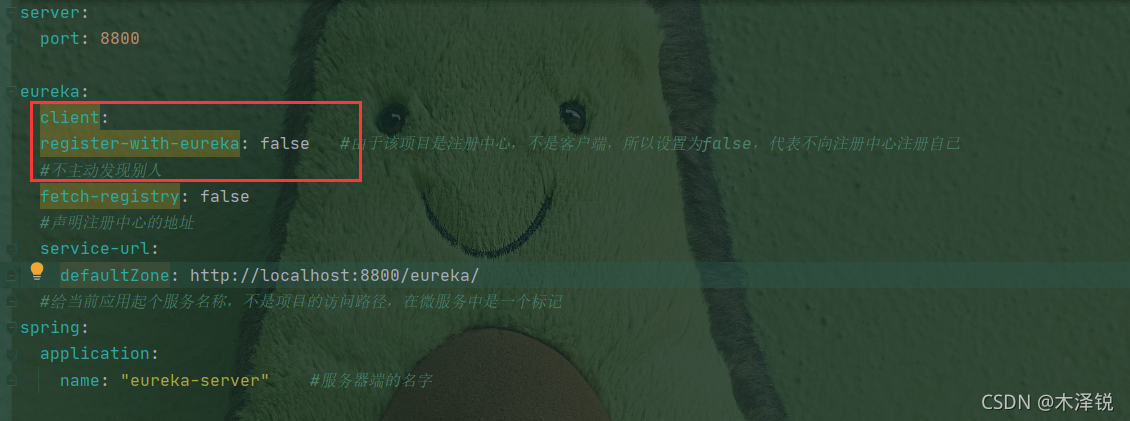
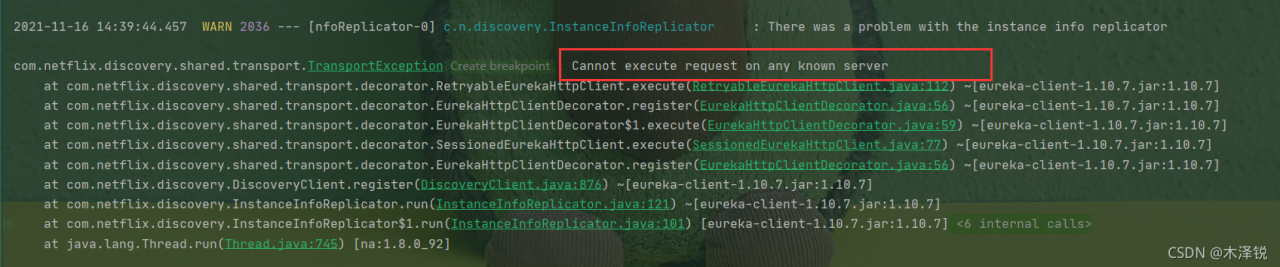
As soon as a new Eureka project was established, an error was reported. After checking the startup class and YML configuration file, it was found that the format of YML configuration file was wrong. The error is as follows:

Modification

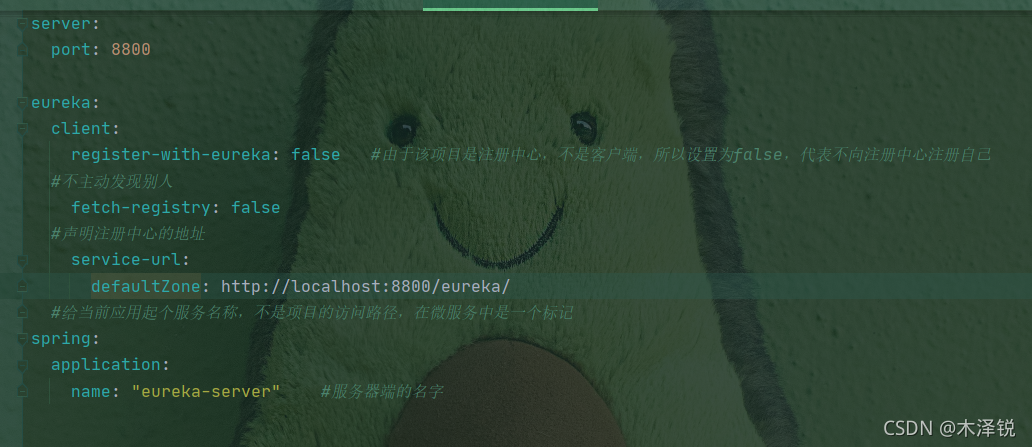
There is an obvious indentation error in the screenshot, which makes Eureka unable to start normally. After modifying the indentation, it is as follows:

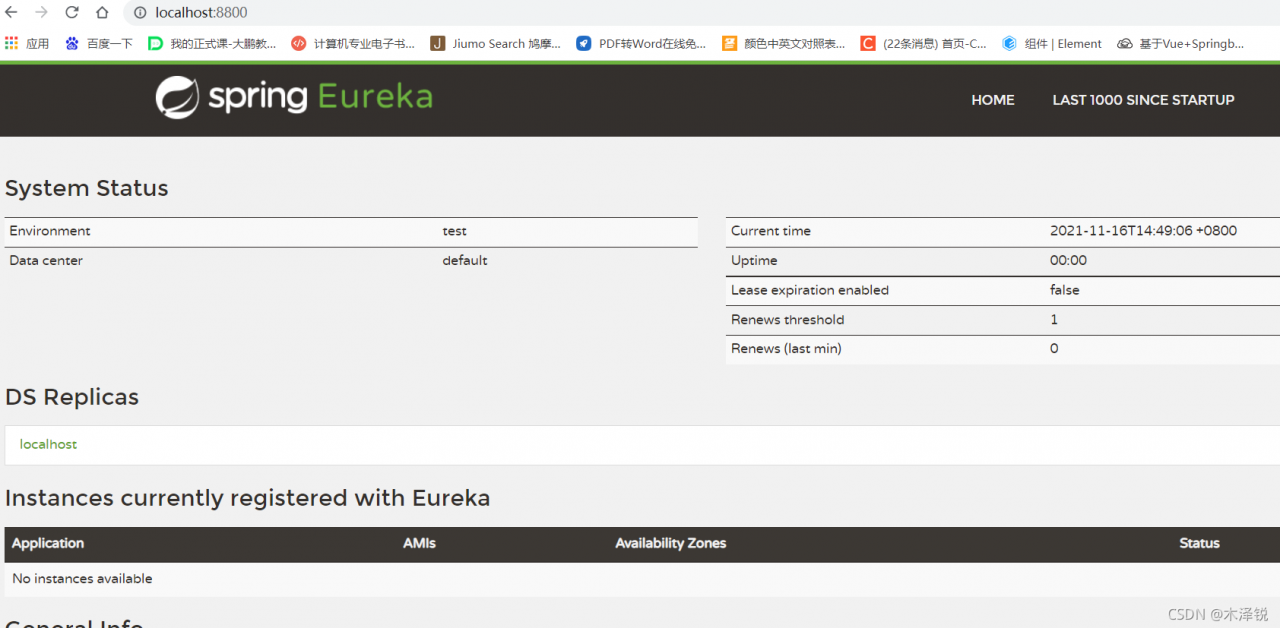
Screenshot of successful startup of Eureka server:

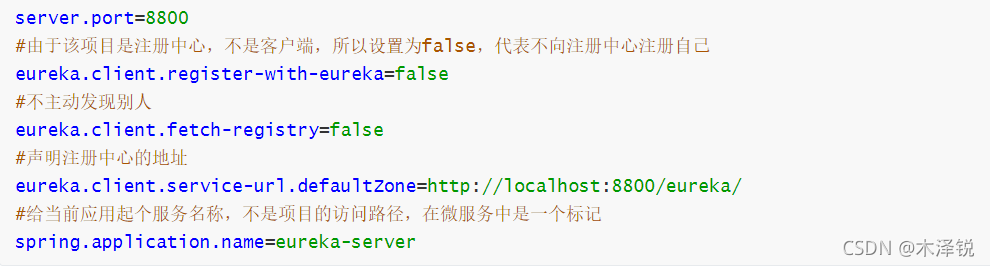
If the configuration file in YML format is prone to errors, we recommend that you use the configuration file in properties format; As follows:

Ie11 reports an error unhandled promise rejection typeerror: the object does not support

The problem of ie11 is the biggest problem. At this time, you should check the most likely place of the problem step by step
I make this error because I use the following code when making type judgment:
toString. Call (svalue)==‘ [object date] ‘
such a writing method is not recognized in ie, and an unhandled promise rejection typeerror will be reported: the object does not support it, so it is necessary to change the writing method

Object.prototype.toString.call(sValue) !== ‘ [object date] ‘
this way of writing is recognized by ie

[Solved] Angular basic create component error: Is it missing an @NgModule annotation

Error message

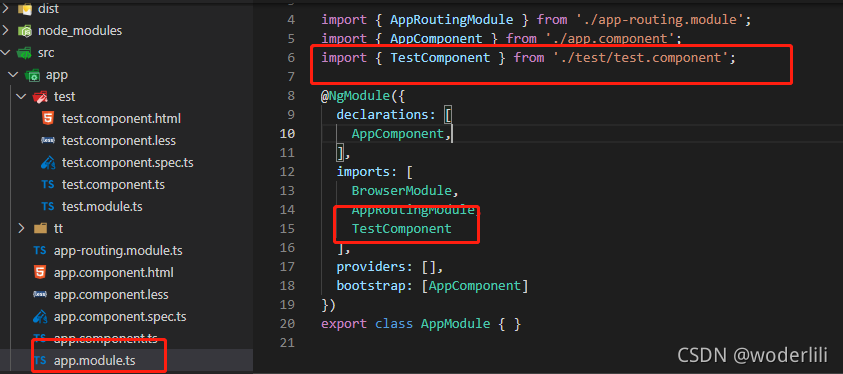
Error: src/app/test/test.component.ts:8:14 - error NG6002: Appears in the NgModule.imports of AppModule, but could not be resolved to an NgModule class.
Is it missing an @NgModule annotation?

Error code


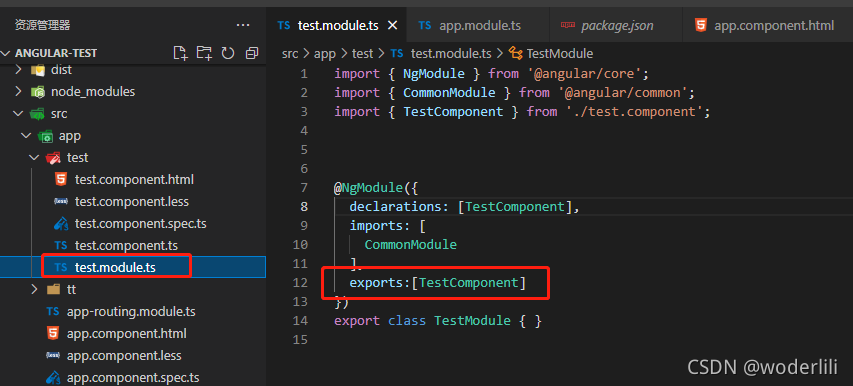
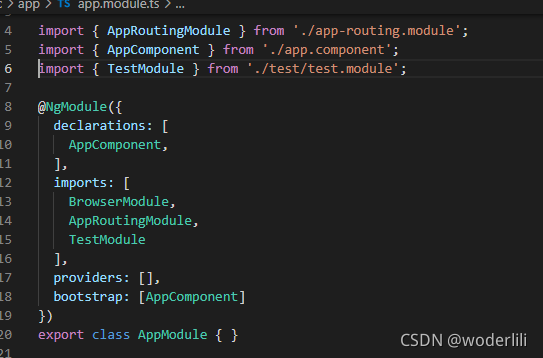
reason: TestComponent is imported incorrectly in app.module.ts file, so TestModule should be imported
correct import:

Note: a component can only belong to one module. After introducing testcomponent in test.module.ts, testcomponent cannot be imported in declarations in app.module.ts, Otherwise, an error will be reported in the browser!

Solution of epol warehouse error reporting during openeuler-21.09 DNF update

Problem phenomenon

$ sudo dnf update
EPOL
Errors during downloading metadata for repository 'EPOL':
    -Status code: 404 for htpp://repo.openeuler.org/openEuler-21.09/EPOL/repomd.xml (IP: 159.138.**.***)
Error: Failed to download metadata for repo 'EPOL': Cannot download repodata/repomd.xml: All mirrors were tried

solve

Method 1.
the official has pushed the update. The updated file is located in
/etc/yum.repos.d/openeuler.repo.rpmnew ,
it needs to be manually compared and updated to the original
/etc/yum.repos.d/openeuler.repo
for the differences between the two files, see baseurl Path Method 2 in method 2 below.
directly manually modify the baseurl address of epol
baseurl= http://repo.openeuler.org/openEuler-21.09/EPOL/ $basearch/
is modified to
baseurl= http://repo.openeuler.org/openEuler-21.09/EPOL/main/ $basearch/

[Solved] Android Project error: import android.support.v4 (V7). App.activitycompat

this is Chapter 18 of Android tutorial series. If you find it useful, you are welcome to follow the column

I: problem description

I got an Android project in 2018. The error message of a java file in the project is as follows

Error 1: Import android.support.v4.app.activitycompat

error 2: Import android.support.v7.app.appcompatactivity

The exception occurred when introducing Android support, because most Android projects now use Android x to replace the past Android support library, but it depends on the demand. Let’s talk about how to solve this problem on older Android projects.

II: solution

For error 1, copy the following line of code to replace the error reporting code

import android.support.v4.app.ActivityCompat;

For error 2, copy the following line of code instead of the error reporting code

import android.support.v7.app.AppCompatActivity;

Has your problem been solved? Welcome to leave a message in the comment area.


Conclusion

technology is accumulated bit by bit, and the great God can not be achieved in a day. Standing still is a step back, so make progress a little every day

finally, I attach a motto: “if you are eager to learn, if you are hungry, if you are humble, if you are stupid”. I hope we can encourage each other</ font>

Vs + QT reports an error “vs cannot open the source file qchartview”

Vs + QT reports an error “vs cannot open the source file qchartview”

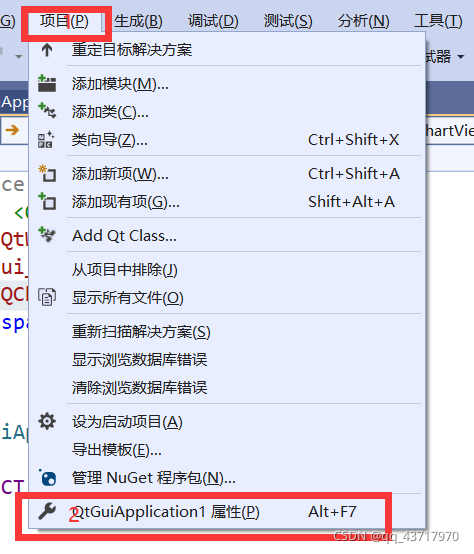
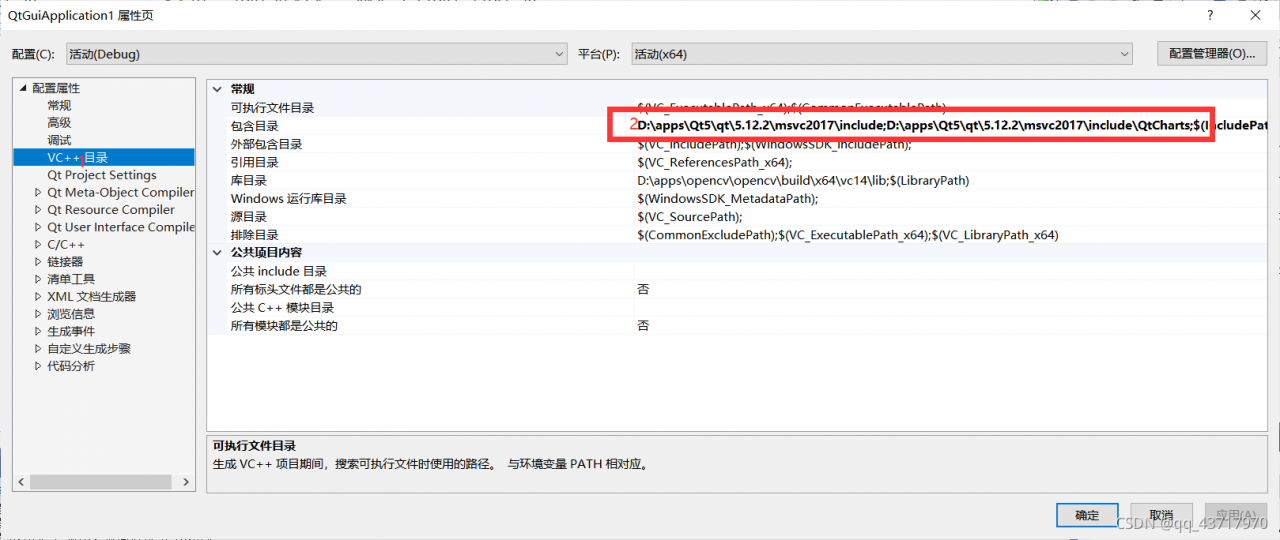
Just started to develop QT program with VS, not familiar with VS, #include & lt; QChartView> always reports an error and cannot open the source program. The solution is as follows:


add the two directories shown in the figure to the included directory. If qtcharts are not found, it indicates that qtcharts was not installed when QT was installed, and the qtcharts component needs to be reinstalled.

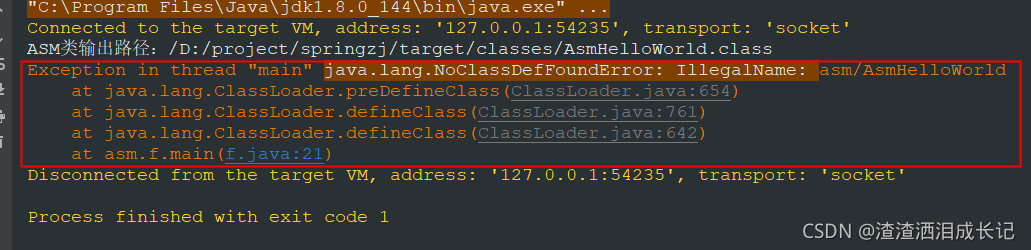
[Solved] defineClass Error: java.lang.NoClassDefFoundError: Illegal:

The defineclass() method actually converts byte bytes into class objects

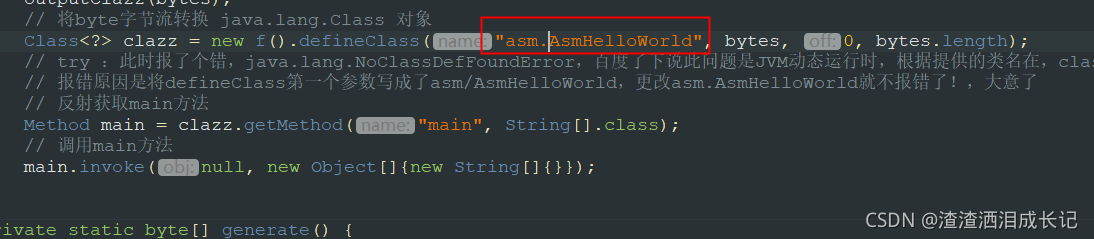
I always thought that the problem in the above picture was that the path could not be found, so I kept changing various paths. As a result, it was wrong to try. As a result, I looked at a blog and directly passed the empty parameters. I took a try attitude. I found that it was right and did not report an error. Suddenly, I found that alas, how can it be empty, Click the converted class to see the data, and then assign the value to the parameter according to that

Just change the ASM/asmhelloworld parameter to asm.asmhelloworld.

Done!

The Vue parent component uses ref to call the sub component method and reports an error

In the Vue project, the parent component uses $ref to call the method of the child component to report an error. At first, the console will report an error. When the pop-up window is closed and the page is not refreshed, the solution is simple and crude~

Both methods are OK, but the second is more intuitive optimization.

The first method uses a timer to solve the problem that the method is not loaded because the sub components are not mounted when the ref attribute is initially rendered. At this time, this method does not exist, so it cannot be accessed. Add a timer to delay execution. However, if the data is displayed one second later, you will directly see the loading problem of this page;

Therefore, the second method is more appropriate to solve the problem that DOM elements are not loaded. Let the method wait