Author Archives: Robins

GitHub push ErrorThe requested URL returned error: 403 Forbidden while accessing

When doing GTI operations over HTTPS, a problem arises when pushing the command:
The requested URL returned error: 403 Forbidden while accessing
Unable to push their own application. After some searching and testing, here is the simplest solution:
On the command line, change the address of the remote repository and add your user name to the front of the address:

git remote set-url origin https://[email protected]/user/repo.git

As my original origin address is: https://github.com/shincling/Initial_test_02.git
At this point becomes: https://[email protected]/shincling/Initial_test_02.git

And then if you Push, git, Push origin master, it will pop up and it will ask you for your password

You can actually just add the password to origin and just Push it

from:
http://stackoverflow.com/questions/7438313/pushing-to-git-returning-error-code-403-fatal-http-request-failed

Support annot run git xcrun: error: invalid active developer path

The Mac upgraded the system and found Git broke in idea…   
Complete error message
С annot Run Git
xcrun: error: invalid active developer path (/ Library/developer/CommandLineTools), missing xcrun at:/Library/developer/CommandLineTools/usr/bin/xcrun

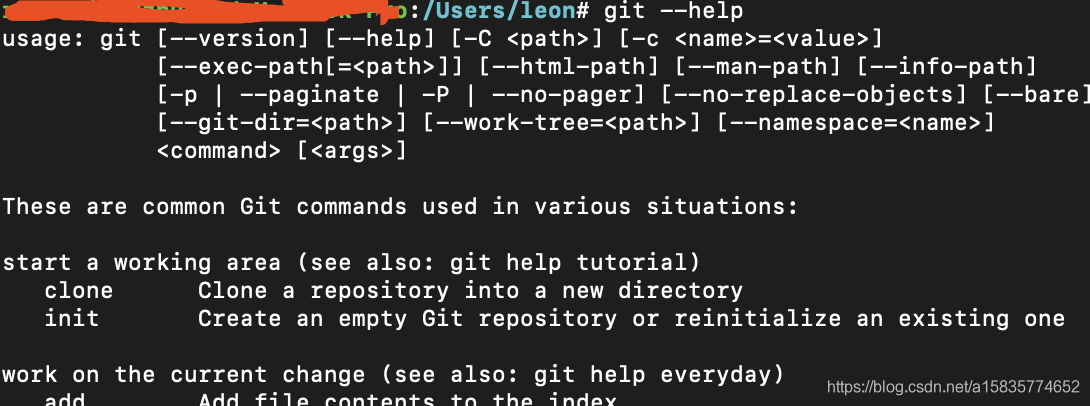
to see if Git can be used properly on the command line -help still registers the same error as above
In the search under git installation directory
Whereis the git
/usr/bin/git
The git installation location can be printed correctly
If there is a problem with the Git installation, brew Install Git is used again
Error: The following formula:
git
cannot be installed as a binary package and must be built from source.
Install The Command Line Tools:
xcode-select — Install
Error: Git must be installed and in your PATH!
Error: The following formula:
git
cannot be installed as a binary package and must be built from source.
Install The Command Line Tools:
xcode-select — Install
This error prompts xcode-select –install
Then use Xcode-select-install to solve the installation successfully

The console sees the successful output using the git –help command
Solution: use Xcode-select-install to complete the installation and restart idea
 

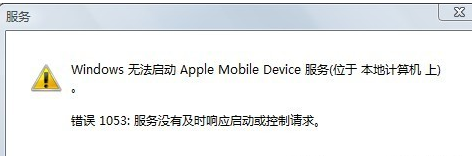
The apple mobile device service failed to start. Error 1053 is resolved

This article is reproduced from:
https://www.cnblogs.com/relax/p/3476741.html author: relax reprint please indicate the statement.

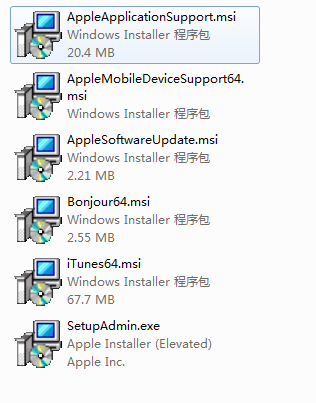
I didn’t want to install iTunes, so I downloaded the iTunes64 installation package and unzipped it to get six files

Installed AppleMobileDeviceSupport64. Msi found start up service, prompt error 1053, under the search on the net, found the mistake very much

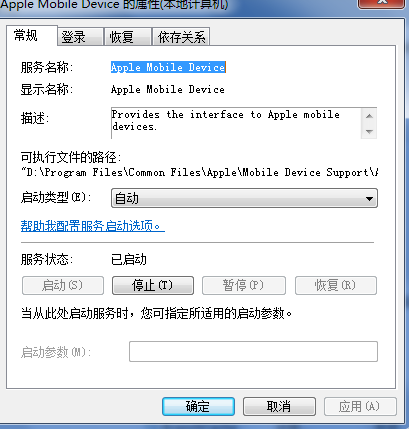
Then continue to install AppleApplicationSupport. Msi, installation is complete to start the Apple Mobile Device service

So Apple Mobile Device service start failure can try to reinstall AppleApplicationSupport. Msi to solve
I shall be very glad if this article is of any help to you


solve atibtmon.exe error

After the laptop installed Win7, toss and turn, with the driver wizard updated all the drivers, and installed a variety of software, then use QQ housekeeper optimization system.

Later, it was found that the system often reported errors at startup, atibtmon.exe, as follows:

Searched on the Internet, some said to reinstall the video card driver, some said to reinstall visual c++ 2008.

Reinstall again, report the error as before.

Finally, he tossed around AMD’s management software and tried it. It was a battery setup problem.

When the battery is selected to “maximize battery life”, atibtmon.exe will report an error when the laptop is switched from the wired power supply to the battery.

The following Settings, battery select “Maximize performance” when the problem is resolved.

Error c2064: term does not evaluate to a function in VC

I encountered this problem today: I found that an object was constructed twice. The first time an object is defined as a global variable using the no-argument default constructor FFT FftTrans; In the second chapter, when the function calls this object, the constructor with parameters is adopted. At this time, the compiler reports error C2064: term does not evaluate to a function.
Solution: In the function to call this object, at this time you want to have the constructor initialization parameters, but will report an error case, in the class to which the object belongs to define a method, function and parameters of the constructor initialization, and then use the object to call this method, achieve the same purpose!
Note: In solving this problem, it is found that the same error occurs when a variable is passed into the function, but the “()” symbol is added to the variable, which causes the same error.

Solutions to Excel 2007 “cannot shift object off sheet”

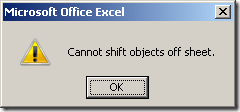
Yesterday when I was editing an Excel 2007 file, I tried to add a new line, but it failed every time. Excel said “Cannot shif objects off sheet”, as shown in the figure below.


The simplest solution is to press
Ctrl+6, you can’t add new lines again. The specific reasons can be found in the following links:

http://office.microsoft.com/en-us/excel/HA102412411033.aspx

Reproduced in: https://blog.51cto.com/jackiechen/281830

Ionic1 compiling IOS encountered * * archive failed * * cordovaerror: promise rejected with non error: ‘error code 65 f

** ARCHIVE FAILED **
CordovaError: Promise rejected with non-error: ‘Error code 65 for command: xcodebuild with args: -xcconfig,platforms/ios/cordova/build-debug.xcconfig,-workspace,AotaoWorld.xcworkspace,-scheme,AotaoWorld,-configuration,Debug,-destination,generic/platform=iOS,-archivePath,AotaoWorld.xcarchive,archi ve,CONFIGURATION_BUILD_DIR=/
 
Remove ionic plugin-console and it is said that ionic-plugin-console is not supported in higher editions

Error: pg_config executable not found.

PIP installation PsyCOPG2 installation and errors
Phenomenon:

Error: pg_config executable not found.

Please add the directory containing pg_config to the PATH
or specify the full executable path with the option:

python setup.py build_ext --pg-config /path/to/pg_config build ...

or with the pg_config option in 'setup.cfg'.
Complete output from command python setup.py egg_info:
running egg_info

creating pip-egg-info/psycopg2.egg-info

writing pip-egg-info/psycopg2.egg-info/PKG-INFO

writing top-level names to pip-egg-info/psycopg2.egg-info/top_level.txt

writing dependency_links to pip-egg-info/psycopg2.egg-info/dependency_links.txt

writing manifest file 'pip-egg-info/psycopg2.egg-info/SOURCES.txt'

warning: manifest_maker: standard file '-c' not found

The solution
1. Install libpq-dev

sudo apt-get install libpq-dev python-dev

2, PIP installation
··
PIP install psycopg2
··· ·
For more information, please pay attention to the public account

Java learning error information 3 — Java notes

Java common error messages and solutions

compile error

common compile error on Windows

‘javac’ is not recognized as an internal or external command, operable program or batch file.

this prompt indicates that the Windows system cannot find the compiler (compiler).

solution: (suppose the JDK installation location is C:\jdk1.7.0)

1. Include the JDK installation path on the command line;

& gt; C: \ jdk1.7.0 \ bin \ javac HelloWorldApp. Java

by default, the compiler (javac) is in the bin folder under the JDK installation path.

2. Include the JDK installation path in the Windows environment variable.

1) Start & gt; Control Panel > System > Advanced > Environment Variables;
(start > Control panel & GT; System & gt; Advanced system Setup & GT; Environment variables…) 2) add the bin PATH under the installed JDK to the PATH variable and remember to add the semicolon (;) .

PATH variable has a value of: < The end of the original PATH value & GT; ; C: \ jdk1.7.0 \ bin
After adding the PATH variable
, you can use the compiler (javac) directly from the command line without entering the PATH where the compiler is located.

Class names, “HelloWorldApp”, are only accepted if annotation processing is explicitly requested

found this prompt at compile time, indicating that the.java suffix was not added at compile time. The command to compile the Java file is Javac HelloWorldApp.java instead of Javac HelloWorldApp.

UNIX system common compile error

javac: Command not found

this prompt indicates that the compiler (javac) cannot be found for UNIX systems.

solution :(assume JDK installation location is /usr/local/jdk1.7.0)

1. Include the JDK installation path on the command line;

/usr/local/jdk1.7.0/javac HelloWorldApp. Java

is mainly where the compiler (javac) is added.
2. Modify the system PATH variable.

needs to be modified according to the Shell used, and different Shell modification methods are different.

Class name, ‘HelloWorldApp’, are only accepted if annotation processing is explicitly requested

this prompt is the same as in Windows, indicating that the filename on the command line was not added when compiling the file. Java suffix.

syntax Errors (all platforms) – Synatx Errors

the compiler displays a syntax error message when there is a typo in the program source file. The error message contains the file name of the error, line number, error type, error line code, and error code location.

as the following error message:

testing.java:14:’; ‘ expected.

System.out.println(“Input has ” + count + ” chars.”)

^

1 error

error file name: testing. Java

error line number: line 14

error message: semicolon (;) required

error line: system.out.println (“Input has “+ count +” chars.”)

error location: ^ indicates location, end of error code

error number: 1

multiple error messages are given if the compiler cannot accurately locate the error due to indenting, block scope, missing semicolon, etc.

any compilation error will indicate that the compilation was unsuccessful and the.class file will not be generated. You need to find and fix all compilation errors, and then recompile.

semantic error
In addition to checking the syntax, the
compiler also checks the underlying semantics, such as undefined variables, objects not instantiated being used directly, and so on.

runtime error

runtime error message on Windows/UNIX systems

Exception in thread “main” java.lang.NoClassDefFoundError: HellowWorldApp
An error above
indicates that the initiator program (Java) did not find a bytecode file (.class) that could be executed. By default, the Java launcher looks for the.class file that has been started in the current directory. You need to switch the current working directory to the directory containing the target.class file and execute Java HelloWorldApp again.

Could not find or load main class HelloWorldApp.class
The error message above
indicates that Java helloworldapp.class was executed. On the command line, the Java command should be followed by the required class name, not the.clAS file name. The correct execution is Java HelloWorldApp.

Exception in thread “main” java.lang.NoSuchMethodError:main
The error message above
indicates that the class being used does not contain a main function. The Java virtual machine requires that classes executed by Java commands contain a main function.

Ref: http://docs.oracle.com/javase/tutorial/getStarted/problems/index.html
compile error in hidden module: link

When Word 2016 for Mac is opened and quit, the popover always tells us “Compile error in Hidden Module: link”.
in the Finder press Shift + Command + G, enter the following address enter:
~/Library/Group Containers/UBF8T346G9 Office/User Content/Startup/Word/
then watch it. Is there a call linkCreation dotm file, so can be deleted. Don’t move the other files.
Refer to
https://zhidao.baidu.com/question/364609475164188372.html

E: sub process / usr / bin / dpkg returned an error code (2) solution under Ubuntu

preface
It has been roughly two or three years with ubuntu, and this is the first time I have encountered this problem, so I wrote down
. Thank you very much for letting me solve the code[2] error
error


This error occurred

dpkg: unrecoverable fatal error, aborting:
 files list file for package 'linux-libc-dev:amd64' is missing final newline
E: Sub-process /usr/bin/dpkg returned an error code (2)

Linux-libc-dev: AMD64 cannot be found, we need to fix this problem.
The solution


Find the damaged package and remove its status.

sudo gedit /var/lib/dpkg/status

If a Linux-LIBc-dev error is reported, delete the following:

Package: linux-libc-dev
Status: install ok installed
Priority: optional
Section: devel
Installed-Size: 5077
Maintainer: Ubuntu Kernel Team <[email protected]>
Architecture: amd64
Multi-Arch: same
Source: linux
Version: 4.15.0-46.49
Replaces: linux-kernel-headers
Provides: aufs-dev, linux-kernel-headers
Conflicts: linux-kernel-headers
Description: Linux Kernel Headers for development
 This package provides headers from the Linux kernel.  These headers
 are used by the installed headers for GNU glibc and other system
 libraries. They are NOT meant to be used to build third-party modules for
 your kernel. Use linux-headers-* packages for that.
    rename, backup the original info directory
sudo mv /var/lib/dpkg/info /var/lib/dpkg/info_old

Create an empty Info directory

sudo mkdir /var/lib/dpkg/info

Use apt – get updated

sudo apt-get update

Reinstall the package

sudo apt-get -f install

Code [1] Error resolution