Category Archives: JAVA

[Solved] Error:java: Compilation failed: internal java compiler error 解决办法

Problem: Error:java: Compilation failed: internal java compiler error Solution
Solution: Inconsistent settings in the JDK development tools.
1, check the project jdk (Ctrl+Alt+shift+S)
File ->Project Structure->Project Settings ->Project

2、View the jdk of the project (Ctrl+Alt+shift+S)
File ->Project Structure->Project Settings -> Modules -> (need to modify the name of the project) -> Sources ->

3、View Java configuration in idea
File ->Setting ->Build,Execution,Deployment -> Compiler -> Java Compiler

If the above three steps still fail
Clear IDEA cache Restart IDEA

File->Invalidate Caches/Restart

[Solved] Mybatis Error: attempting to get column ‘XX’ from result set

Summary of common causes
1. The field name in the encapsulation set is inconsistent with the database column name. Check whether it is consistent and whether there is this field
2. Using Lombok or other operations results in no parameter free structure or no get/set
3. Use Druid, because the version problem leads to exception handling for the time type localdatetime.class; This solution: do not use druid or use other database connection sources for replacement or Druid version upgrade.
Let’s talk about the source of this exception first:
getResult in basetypehandler.java

  public T getResult(ResultSet rs, String columnName) throws SQLException {
    try {
      // Map database fields and entity class attributes in the result set
      return getNullableResult(rs, columnName);
    } catch (Exception e) {
      throw new ResultMapException("Error attempting to get column '" + columnName + "' from result set.  Cause: " + e, e);
    }
  }

There will be exceptions before this exception, that is, the exception will be caused by many reasons, which means there will be many solutions for the exception. Here is the processing and positioning process of the third exception handling scheme.
problem scenario description
Query the qualified course record information by date. The time field in the entity class is starttime (Format: yyyy MM DD HH: mm: SS), and the field in the database is start_ Time, field type datetime.
Stack exception information (some stack information is deleted due to length reason):

org.mybatis.spring.MyBatisSystemException: nested exception is org.apache.ibatis.executor.result.ResultMapException: Error attempting to get column 'start_time' from result set.  Cause: org.apache.ibatis.executor.result.ResultMapException: Error attempting to get column 'start_time' from result set.  Cause: java.sql.SQLFeatureNotSupportedException
	at org.apache.ibatis.binding.MapperMethod.executeForMany(MapperMethod.java:147)
Caused by: org.apache.ibatis.executor.result.ResultMapException: Error attempting to get column 'start_time' from result set.  Cause: org.apache.ibatis.executor.result.ResultMapException: Error attempting to get column 'start_time' from result set.  Cause: java.sql.SQLFeatureNotSupportedException
	at org.apache.ibatis.type.BaseTypeHandler.getResult(BaseTypeHandler.java:87)
	... 73 more
Caused by: org.apache.ibatis.executor.result.ResultMapException: Error attempting to get column 'start_time' from result set.  Cause: java.sql.SQLFeatureNotSupportedException
	at org.apache.ibatis.type.BaseTypeHandler.getResult(BaseTypeHandler.java:85)
	... 99 more
Caused by: java.sql.SQLFeatureNotSupportedException
	at com.alibaba.druid.pool.DruidPooledResultSet.getObject(DruidPooledResultSet.java:1771)
	at sun.reflect.NativeMethodAccessorImpl.invoke0(Native Method)
	at sun.reflect.NativeMethodAccessorImpl.invoke(NativeMethodAccessorImpl.java:62)
	at sun.reflect.DelegatingMethodAccessorImpl.invoke(DelegatingMethodAccessorImpl.java:43)
	at java.lang.reflect.Method.invoke(Method.java:498)
	at org.apache.ibatis.logging.jdbc.ResultSetLogger.invoke(ResultSetLogger.java:69)
	at com.sun.proxy.$Proxy190.getObject(Unknown Source)
	at org.apache.ibatis.type.LocalDateTimeTypeHandler.getNullableResult(LocalDateTimeTypeHandler.java:38)
	at org.apache.ibatis.type.LocalDateTimeTypeHandler.getNullableResult(LocalDateTimeTypeHandler.java:28)
	at org.apache.ibatis.type.BaseTypeHandler.getResult(BaseTypeHandler.java:85)
	... 101 more

Look at the stack information from the beginning. Obviously, it is the exception thrown by getnullableresult in localdatetimetypehandler.java.The earliest exception information: java.sql.sqlfeaturenotsupportedexception.
first look at getnullableresult in localdatetimetypehandler.java

  public LocalDateTime getNullableResult(ResultSet rs, String columnName) throws SQLException {
    return rs.getObject(columnName, LocalDateTime.class);
  }

 rs.getobject has many implementation methods. Because the Druid database connection source is used (the original version is 1.0.28), you can directly locate GetObject in druidpooledresultset.java:

 public <T> T getObject(String columnLabel, Class<T> type) throws SQLException {
        throw new SQLFeatureNotSupportedException();
    }

Looking through the source code according to druid1.0.28, it is found that localdatetime.Class about date type processing instructions are not supported, and sqlfeaturenotsupportedexception is thrown directly. Modify the Druid version in pom.xml, upgrade to 1.2.1, and then take a look at the implementation of this version:

  public <T> T getObject(String columnLabel, Class<T> type) throws SQLException {
        try {
            return this.rs.getObject(columnLabel, type);
        } catch (Throwable var4) {
            throw this.checkException(var4);
        }
    }

Note: the higher version supports localdatetime.Class processing. It is normal after retesting!

[Solved] Error creating bean with name ‘accountService‘: Unsatisfied dependency expressed through field

Error creating bean with name ‘accountService’: Unsatisfied dependency expressed through field ‘accountDao’;

Spring integration mybatis error:

Warning: Exception encountered during context initialization - cancelling refresh attempt: org.springframework.beans.factory.UnsatisfiedDependencyException: Error creating bean with name 'accountService': Unsatisfied dependency expressed through field 'accountDao'; nested exception is org.springframework.beans.factory.BeanCreationException: Error creating bean with name 'accountDao' defined in file [D:\myJava\MyProject\springSSM_day06\target\classes\com\itheima\dao\AccountDao.class]: Cannot resolve reference to bean 'sqlSessionFactory' while setting bean property 'sqlSessionFactory'; nested exception is org.springframework.beans.factory.BeanCreationException: Error creating bean with name 'sqlSessionFactory' defined in class path resource [bean.xml]: Initialization of bean failed; nested exception is org.springframework.beans.ConversionNotSupportedException: Failed to convert property value of type 'java.lang.String' to required type 'javax.sql.DataSource' for property 'dataSource'; nested exception is java.lang.IllegalStateException: Cannot convert value of type 'java.lang.String' to required type 'javax.sql.DataSource' for property 'dataSource': no matching editors or conversion strategy found
Exception in thread "main" org.springframework.beans.factory.UnsatisfiedDependencyException: Error creating bean with name 'accountService': Unsatisfied dependency expressed through field 'accountDao'; nested exception is org.springframework.beans.factory.BeanCreationException: Error creating bean with name 'accountDao' defined in file [D:\myJava\MyProject\springSSM_day06\target\classes\com\itheima\dao\AccountDao.class]: Cannot resolve reference to bean 'sqlSessionFactory' while setting bean property 'sqlSessionFactory'; nested exception is org.springframework.beans.factory.BeanCreationException: Error creating bean with name 'sqlSessionFactory' defined in class path resource [bean.xml]: Initialization of bean failed; nested exception is org.springframework.beans.ConversionNotSupportedException: Failed to convert property value of type 'java.lang.String' to required type 'javax.sql.DataSource' for property 'dataSource'; nested exception is java.lang.IllegalStateException: Cannot convert value of type 'java.lang.String' to required type 'javax.sql.DataSource' for property 'dataSource': no matching editors or conversion strategy found
	at org.springframework.beans.factory.annotation.AutowiredAnnotationBeanPostProcessor$AutowiredFieldElement.inject(AutowiredAnnotationBeanPostProcessor.java:639)

Error code location: value = datasource

<bean id="dataSource" class="com.alibaba.druid.pool.DruidDataSource">
        <property name="driverClassName" value="${jdbc.driver}"></property>
        <property name="url" value="${jdbc.url}"></property>
        <property name="username" value="${jdbc.username}"></property>
        <property name="password" value="${jdbc.password}"></property>
    </bean>


<bean id="sqlSessionFactory" class="org.mybatis.spring.SqlSessionFactoryBean">
        <property name="dataSource" value="dataSource"></property>
        <property name="typeAliasesPackage" value="com.itheima.domain"></property>
    </bean>

Reason: because we use the factory to create Dao objects, we need to get connections from the data connection pool objects, so we can’t use value binding
value for binding strings
ref for binding objects

The correct is as follows: use ref to get the object

<bean id="sqlSessionFactory" class="org.mybatis.spring.SqlSessionFactoryBean">
        <property name="dataSource" ref="dataSource"></property>
        <property name="typeAliasesPackage" value="com.itheima.domain"></property>
    </bean>

[Solved] Minio Error: javax.xml.stream.XMLStreamException: ParseError

Invocation of init method failed; nested exception is javax.xml.stream.XMLStreamException: ParseError at [row,col]:[1,3]
Message: The tags preceding the root element in the document must be properly formatted.
Caused by: io.minio.errors.XmlParserException: null

Configuration file outgoing error
the 127.0.0.1:9001 port in the configuration is changed to 9000
the 9001 port is a command line operation, so this error is caused

Generate configDataContextRefres Error: Error creating bean with name ‘configDataContextRefresher‘

I have been tortured by this problem for a long time. My solution is as follows. I advise you to read the official documents that should be read, but don’t do it foolishly
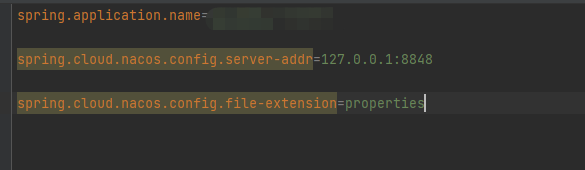
first write bootstrap.properties, and then write in the following:

these basic configurations

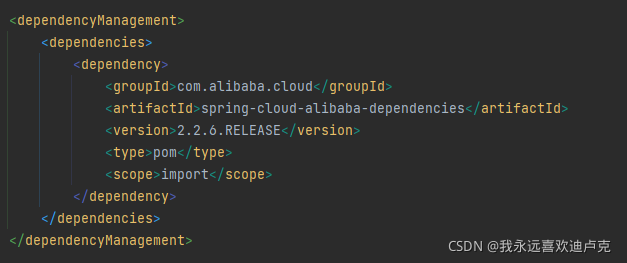
Then check whether you have introduced this dependency:

I read the error message. One of the error messages is springcloud context. After reading it for a long time, I think I should not have introduced it. However, I see a saying that it is useless to introduce context dependency in the version after 2020. It is necessary to quote the dependency in the above figure to read the configuration of Nacos from here.

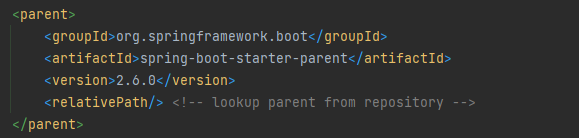
Finally, the versions of boot and cloud are posted, and the pro test can run:


org.springframework.beans.factory.BeanCreationException: Error creating bean with name ‘testApplicat

org.springframework.beans.factory.BeanCreationException: Error creating bean with name ‘testApplication’: Bean instantiation via constructor failed; nested exception is org.springframework.beans.BeanInstantiationException: Failed to instantiate [com.nos.test.TestApplication$$EnhancerBySpringCGLIB$$c1828724]: Constructor threw exception; nested exception is org.springframework.dao.InvalidDataAccessApiUsageException: Invalid numeric type, found: STRING; nested exception is org.bson.BsonInvalidOperationException: Invalid numeric type, found: STRING

Question request: List all the course names that appear in the STUDENT collection (distinct)


 public List<String> test6_01(){
        Query query = new Query();
        List<Integer> list_course = mongoTemplate.findDistinct(query,"CID","student_course",Integer.class);
        System.out.println(list_course);
        List<String> list = new ArrayList<>();
        for(Integer i:list_course){
            Query query1 = new Query(Criteria.where("CID").is(i));
            Course course = mongoTemplate.findOne(query1,Course.class,"course");
            list.add(course.getNAME());
        }
        return list;
    }

Org.bson.bsoninvalidoperationexception: invalid numeric type, found: String prompts me to find the wrong data type. Only when the CID found is of string type can I find the data imported in the data. The CID is automatically set to string type.

Then let’s look at the specific usage of finddistinct() in mongodb: you can re query, but you can’t sort.

The method receives 4 or 5 parameters, respectively:

1 query criteria
2 fields to be de duplicated filed
3 collection database table to be queried
4 POJO instance corresponding to collection to be queried
5 return result class (return list of filed fields to be de duplicated)

After modification:

  public List<String> test6_01(){
        Query query = new Query();
        List<String> list_course = mongoTemplate.findDistinct(query,"CID","student_course",String.class);
        System.out.println(list_course);
        List<String> list = new ArrayList<>();
        for(String i:list_course){
            Query query1 = new Query(Criteria.where("CID").is(i));
            Course course = mongoTemplate.findOne(query1,Course.class,"course");
            list.add(course.getNAME());
        }
        return list;
    }

Query results:

[Solved] Redis Error: Error condition on socket for SYNC: No route to host

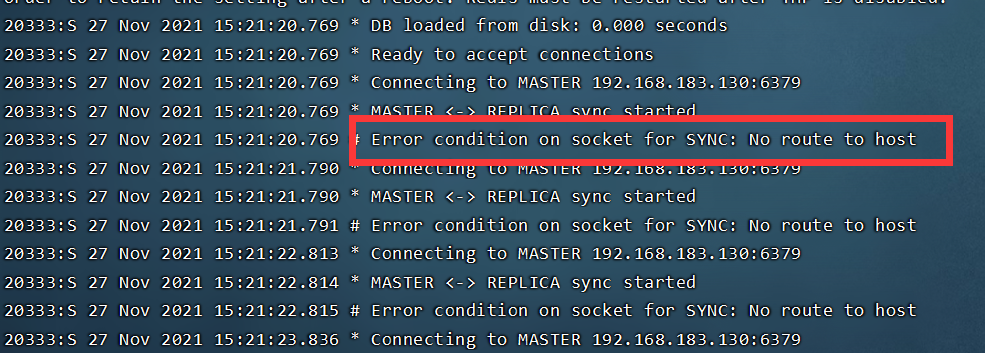
When we set up redis master-slave replication, we may encounter the following problems due to various problems:
error condition on socket for Sync: no route to host

Solution:

First, modify the related configurations in redis.conf:

#Original configuration
bind 127.0.0.1
#Modify to
bind 0.0.0.0
# Although it is said that commenting it out can also solve the above problem, it is not recommended to comment out this method. Because another problem will occur.
#or comment it out
#bind 127.0.0.1

Turn off the firewall of the host. Note: it is the firewall of the host, and then restart the service.

In CentOS 7, systemctl stop firewalld turns off the firewall. Other versions can turn off the firewall through service iptables stop.

Turn off the firewall:

 systemctl stop firewalld

Turn off redis service

ps -ef |grep -i redis # Find a process

kill -9 3667 #Shut down the process

Restart related services

[Solved] ERROR org.springframework.boot.SpringApplication – Application run failed org.yaml.snakeyaml.scanner

 ERROR org.springframework.boot.SpringApplication - Application run failed
org.yaml.snakeyaml.scanner.ScannerException: while scanning a tag
 in 'reader', line 7, column 15:
        password: !QAZ2wsx#EDC
                  ^
expected ' ', but found '#' (35)
 in 'reader', line 7, column 23:
        password: !QAZ2wsx#EDC
                          ^

	at org.yaml.snakeyaml.scanner.ScannerImpl.scanTag(ScannerImpl.java:1544)
	at org.yaml.snakeyaml.scanner.ScannerImpl.fetchTag(ScannerImpl.java:954)
	at org.yaml.snakeyaml.scanner.ScannerImpl.fetchMoreTokens(ScannerImpl.java:372)
	at org.yaml.snakeyaml.scanner.ScannerImpl.checkToken(ScannerImpl.java:227)
	at org.yaml.snakeyaml.parser.ParserImpl$ParseBlockMappingValue.produce(ParserImpl.java:586)
	at org.yaml.snakeyaml.parser.ParserImpl.peekEvent(ParserImpl.java:158)
	at org.yaml.snakeyaml.parser.ParserImpl.checkEvent(ParserImpl.java:148)
	at org.yaml.snakeyaml.composer.Composer.composeNode(Composer.java:136)
	at org.yaml.snakeyaml.composer.Composer.composeValueNode(Composer.java:257)
	at org.yaml.snakeyaml.composer.Composer.composeMappingChildren(Composer.java:248)
	at org.yaml.snakeyaml.composer.Composer.composeMappingNode(Composer.java:236)
	at org.yaml.snakeyaml.composer.Composer.composeNode(Composer.java:162)
	at org.yaml.snakeyaml.composer.Composer.composeValueNode(Composer.java:257)
	at org.yaml.snakeyaml.composer.Composer.composeMappingChildren(Composer.java:248)
	at org.yaml.snakeyaml.composer.Composer.composeMappingNode(Composer.java:236)
	at org.yaml.snakeyaml.composer.Composer.composeNode(Composer.java:162)
	at org.yaml.snakeyaml.composer.Composer.composeValueNode(Composer.java:257)
	at org.yaml.snakeyaml.composer.Composer.composeMappingChildren(Composer.java:248)
	at org.yaml.snakeyaml.composer.Composer.composeMappingNode(Composer.java:236)
	at org.yaml.snakeyaml.composer.Composer.composeNode(Composer.java:162)
	at org.yaml.snakeyaml.composer.Composer.getNode(Composer.java:95)
	at org.yaml.snakeyaml.constructor.BaseConstructor.getData(BaseConstructor.java:134)
	at org.springframework.boot.env.OriginTrackedYamlLoader$OriginTrackingConstructor.getData(OriginTrackedYamlLoader.java:99)
	at org.yaml.snakeyaml.Yaml$1.next(Yaml.java:512)
	at org.springframework.beans.factory.config.YamlProcessor.process(YamlProcessor.java:200)
	at org.springframework.beans.factory.config.YamlProcessor.process(YamlProcessor.java:164)
	at org.springframework.boot.env.OriginTrackedYamlLoader.load(OriginTrackedYamlLoader.java:84)
	at org.springframework.boot.env.YamlPropertySourceLoader.load(YamlPropertySourceLoader.java:50)
	at org.springframework.boot.context.config.StandardConfigDataLoader.load(StandardConfigDataLoader.java:48)
	at org.springframework.boot.context.config.StandardConfigDataLoader.load(StandardConfigDataLoader.java:34)
	at org.springframework.boot.context.config.ConfigDataLoaders.load(ConfigDataLoaders.java:102)
	at org.springframework.boot.context.config.ConfigDataImporter.load(ConfigDataImporter.java:118)
	at org.springframework.boot.context.config.ConfigDataImporter.resolveAndLoad(ConfigDataImporter.java:82)
	at org.springframework.boot.context.config.ConfigDataEnvironmentContributors.withProcessedImports(ConfigDataEnvironmentContributors

Check whether there are special characters in the YML configuration file
Username: root
password: “! Qaz2wsx#edc”
add double quotation marks to the password. Because the special characters caused by coding problems cannot be recognized, the database cannot be connected

[Modified] ANTLR4 line 1:14 token recognition error at ‘(‘

Explore the errors reported by antlr4 by yourself:
line 1:14 token recognition error at '('
means that: (the column number needs to be + 1) the symbol recognition error ‘(‘) in 1 row and 14 columns; it means that the symbol ‘(‘) not recognized by G4 rules does not affect the operation
line 1:0 token recognition error at: '7'
in 1 row and 1 column: ‘7’ symbols have no matching rules

[Solved] memcached Install Error: failed to ignore SIGHUP: no error

Memcached installs version 1.4.5
the administrator runs CMD with the following error:

Solution:
on the command line, enter schtasks/create/SC OnStart/TN memcached/TR "'c:\memcached\memcached. Exe '- M 512" , enter
note: C:\memcached\memcached.exe replace your installation address, Please refer to memcached installation for more installation details

See below:

cuda_error_launch_failed: unspecified launch failure [How to Solve]

Problem: error polling for event status: failed to query event: CUDA_error_launch_failed: unspecified launch failure

Troubleshooting: in the past, when my computer was in-depth learning, it automatically quit the program after training several epochs at a time. It can’t continue training. It can’t be a problem with the code, because the code can run directly on Ubuntu. Some people say that the video memory of the graphics card is insufficient, but sometimes it can train the whole network, query the GPU memory and find that the memory is not used during training.

Solution: through consulting the data, it is found that it may be the problem of the graphics card version. The driver version of my computer’s graphics card was 457 before, but there was no such problem after it was upgraded to 471.