Tag Archives: windows

Additional data: error value: 2147750687

Additional Data: Error Value: 2147750687.

work plan task, until now does not work, check the running record:

Additional Data: Error Value: 2147750687.

Google guessed it was due to the short intervals between scheduled tasks and the long execution time.

solution: re-create the scheduled task, repeat the execution interval for longer, and then set how long the execution time, whether or not the completion of the run, directly shut down, the time is best not to exceed the scheduled task interval.


reproduced UL:http://bbs.howtoadmin.com/thread-2005-1-1.html

Prompt 550 remove directory operation failed when FTP delete folder

recently used a remote FTP server and found that some folders can not be deleted no matter what. Look at the folder is empty, but you can’t delete it, nor can you rename it. After baidu was clear, the original is to hide the file made ghost. After opening the hidden files on the FTP client, you will find the hidden files in the directory. After deleting the hidden files, you can delete the folder.

FileZilla method for displaying hidden files:

1. After opening FileZilla, click [server (S)] → [forced display of hidden files (H)] → [ok].

2, disconnect and reconnect

Error occurred when Python installed the pocketsphinx module (package): Command‘ swig.exe “Failed: no such file or directory

command ‘swig.exe’ failed: No such file or directory when installing pocket sphinx today. I found a lot of content on the Internet, and finally I succeeded.
first of all, my computer is Windows10 system, the method is only available for Windows system, other systems do not know.
error is due to the fact that swig is missing from your computer, so you need to download and install it. I download from the website of the latest package swig 4.0.2, website address is: http://www.swig.org/download.html.
to unzip the downloaded files to C pan-gen directory. I want to emphasize the root directory here, because my previous attempts to put it in C:\Program Files (x86) still didn’t work (for unknown reasons). Finally, I just put it under C:\swigwin-4.0.2.
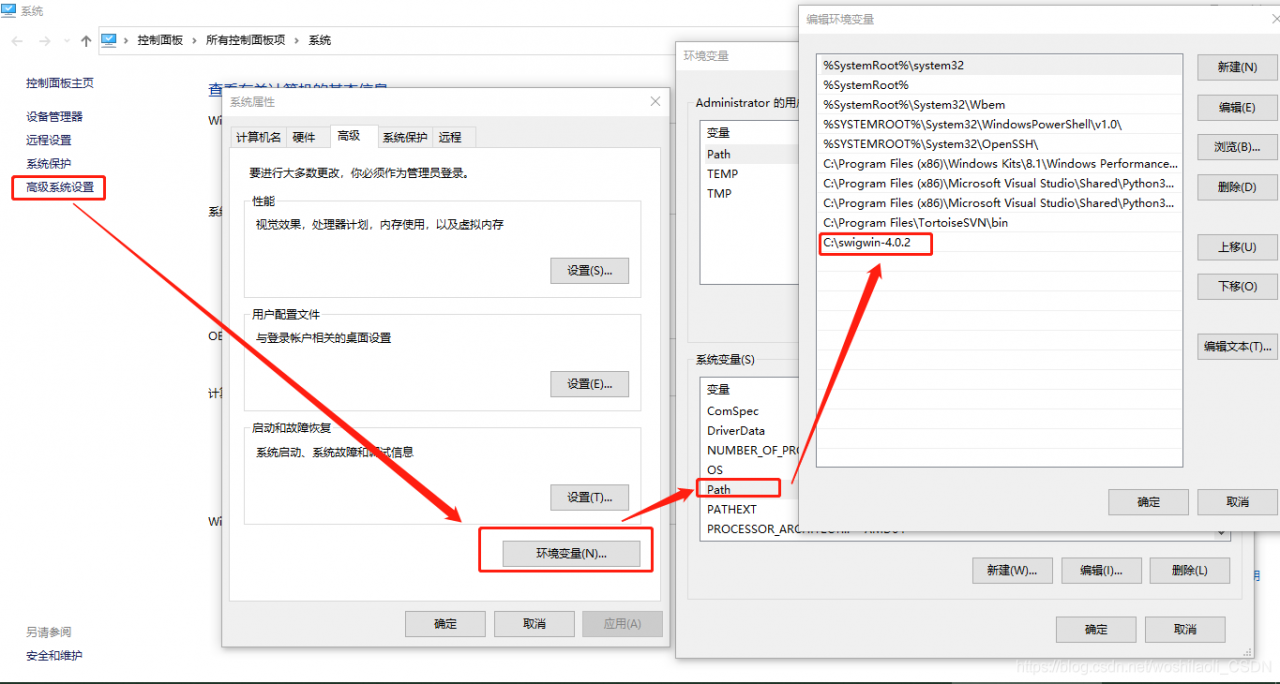
then add a new path path to the environment variable.

after the above steps are completed, then there is no problem with installing pocketsphinx.

About Java File.separator

in Windows path separator and Linux path separator is different, when the absolute path is used directly, cross-platform will be exposed “No such file or diretory” exception.

File
File file1 = new File (“C:\ TMP \test.txt”);
File file1 = new File (“C:\ TMP \test.txt”)

File file2 = new File (“/ TMP /test.txt”);

if cross-platform is considered, it is best to say:
File myFile = new File(“C:” + file.separator + “TMP” + file.separator, “test.txt”);

The

File class has several static fields that are similar to separator, which are system related and should be used as far as possible in programming.

separatorChar

public static final char separatorChar

is the default name separator associated with the system. This field is initialized to the first character that contains the system property file.separator value. On UNIX systems, the value of this field is ‘/’; On Microsoft Windows, it is ‘\’.

separator

public static final String separator

is the system-specific default name separator, which is represented as a string for convenience. This string contains only one character, separatorChar.

pathSeparatorChar

public static final char pathSeparatorChar

is the system-dependent path separator. This field is initialized as the first character that contains the system property path.separator value. This character is used to separate filenames in a given file sequence in the form of a path list. On UNIX systems, this field is ‘:’; On Microsoft Windows, it is ‘; ‘.

pathSeparator

public static final String pathSeparator

is the system-dependent path separator, which is represented as a string for convenience. This string contains only one character, pathSeparatorChar.

☞ warm prompt: to return to my blog index

WSL 2 needs to update its kernel components

welcome to my blog

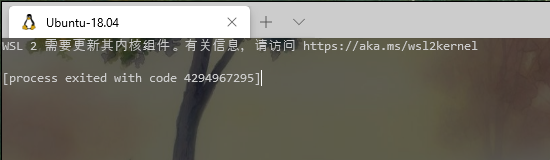
problem description: open win10 terminal display: WSL 2 needs to update its kernel components;

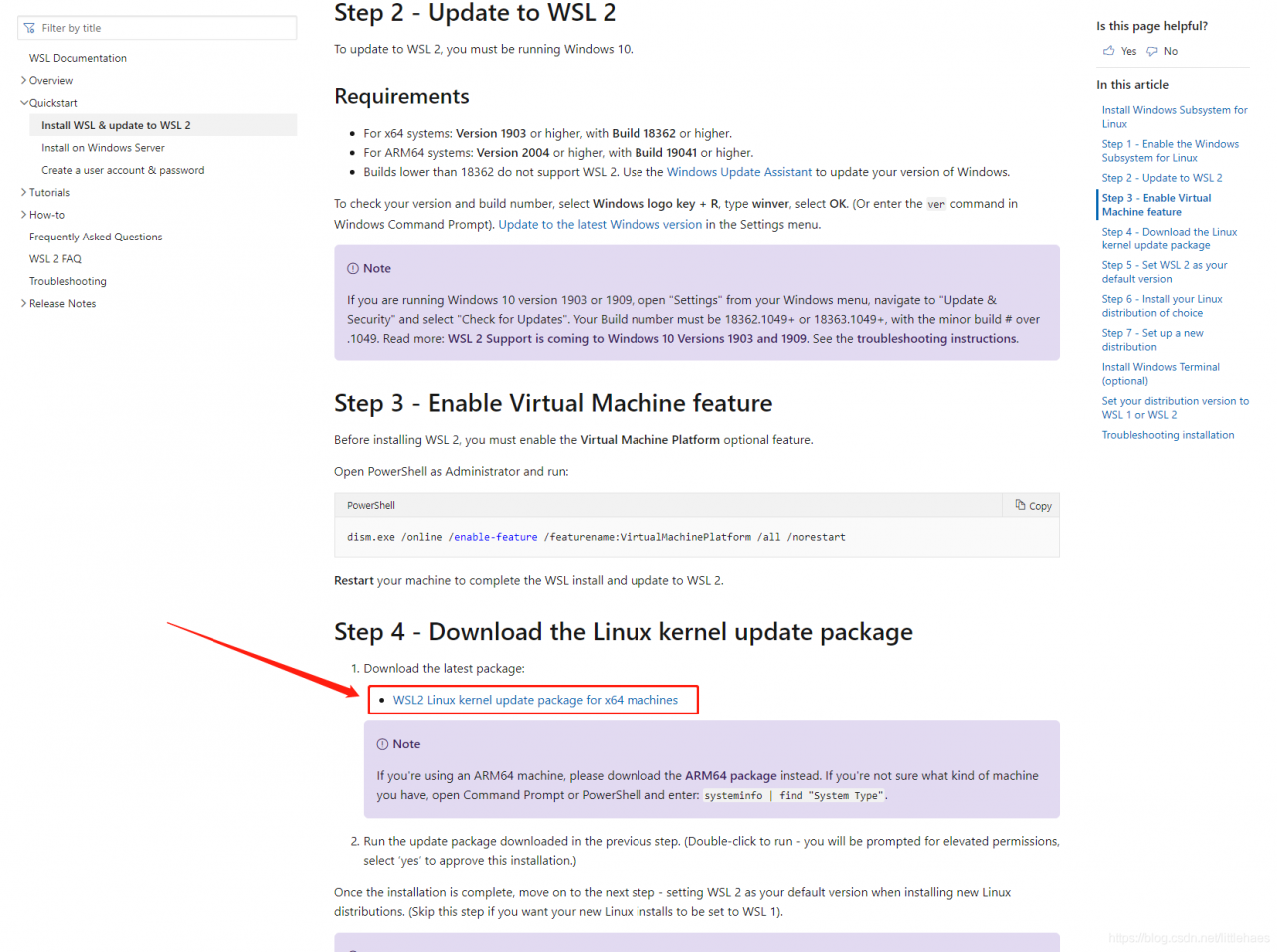
download the upgrade package of WSL2 Linux kernel from Microsoft, download the link, as shown in the figure below, click “this link” to download

install the update package, all the way next, without any additional options

Output the error log of CMD in windows to the txt file: use > > to log.txt

sometimes in Windows to run some CMD commands or command files: batch command files such as.bat,.cmd files,.exe files CMD window will flash back, there will be some error reasons, we would like to see, in order to targeted to solve the problem. At this time can think of is output error to the log file to preserve the view or record the screen software with high frame rate CMD window flash back inside displayed error information.

for now, I’m only going to talk about output to the log .

situation 1: run the command flash back directly in CMD.

solution: enter the command in the newly opened CMD window in the format: command > > log.txt

for example: ipconfig/all> > D:\test\log.txt is to output IP configuration information to the path D:\test\log.txt log file,

if the path is log.txt means output to the current directory,

like ipconfig/all> > Log.txt outputs logs to the C:\Windows\System32 directory, and the program that runs the ipconfig/all command ipconfig.exe is in the C:\Windows\System32 directory


Situation 2: run the.exe (.cmd,.bat, etc.) program

in CMD

solution: in the directory where exe program is located, hold Shift and right-click in the blank, enter the command in the open CMD window, the format is: exe program name > > log.txt

log output path as in scenario 1.

note: double-clicking the.exe,.cmd,.bat file will have the same effect as typing the program name on the CMD command line in scenario 2 to start the program.

USES scenario 2 to process and run visible exe,.cmd,.bat files. It has more advantages than double-clicking to run them. It is more controllable in the whole process, and more parameters can be added to the command line to assist running these files, such as making the run log TXT file.
Oracle login error: Oracle error 6 initializing SQL * plus (normal before)

computer suddenly power off and restart, then log in Oracle again suddenly reported an error

Error 6 initializing SQL*Plus 
Message file sp1<lang>.msb not found 
SP2-0750: You may need to set ORACLE_HOME to your Oracle software directory

has been good until now, suspect that it is caused by installing two versions (I installed versions 12 and 11)?
I simply changed the configuration of all Oracle environment variables to 11 (although both were configured before).
after the change can be seen in CMD:

remember to restart the computer for the configuration to take effect ~!

C:\Users\Administrator>set
CLASSPATH=.;C:\Program Files\Java\jdk1.8.0_181\lib\dt.jar;C:\Program Files\Java\jdk1.8.0_181\lib\tools.jar;C:\Program Files\Java\jedis-2.9.0.jar;
JAVA_HOME=C:\Program Files\Java\jdk1.8.0_181
ORACLE_HOME=D:\app\Administrator\product\11.2.0\dbhome_1
Path=C:\Program Files (x86)\Common Files\Oracle\Java\javapath;D:\app\Administrator\product\11.2.0\dbhome_1\BIN;Files\Java\jdk1.8.0_181\lib;D:\MongoDB\Server\4.0\bin;
TNS_ADMIN=F:\app\Administrator\virtual\product\12.2.0\dbhome_1\network\admin
#这里的12版本的没有改过来,但是不知道为啥还是可以运行的